
හැඳින්වීම
This manual provides instructions for setting up and operating your RCA 2-Device Universal Remote Control, model RCRH02BR. This remote is designed to control up to two different audio/video devices, such as a television and a cable box or DVD player, simplifying your home entertainment experience.
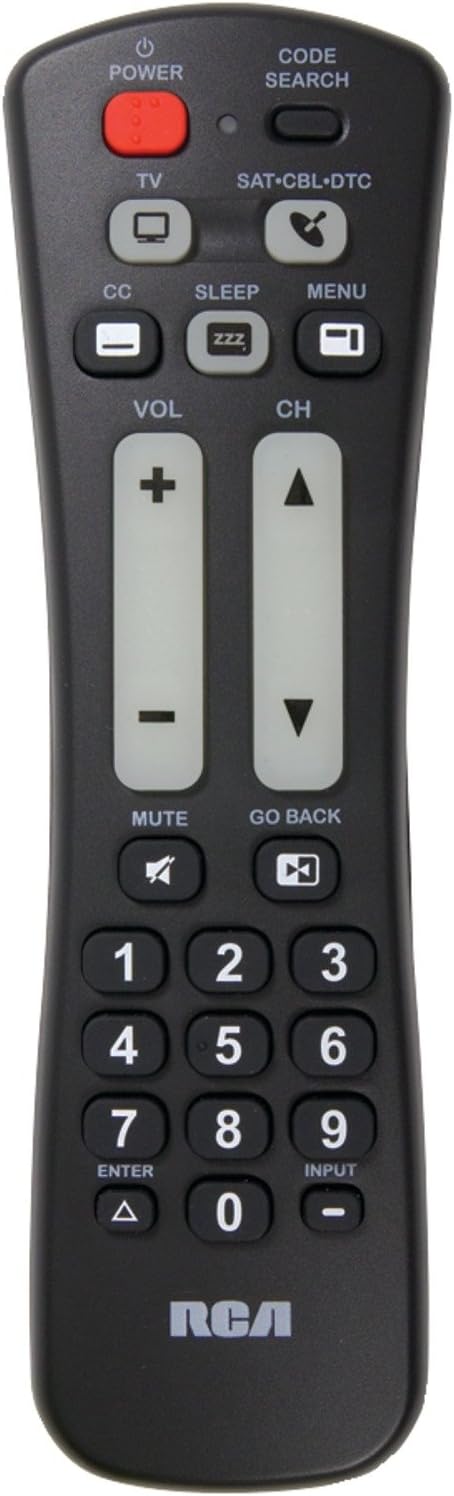
ඉදිරිපස view of the RCA 2-Device Universal Remote Control, showing its ergonomic design and large, clearly labeled buttons for power, volume, and channel.
පැකේජයේ අන්තර්ගතය
ඔබගේ පැකේජයේ සියලුම අයිතම ඇති බව තහවුරු කරගන්න:
- RCA 2-Device Universal Remote Control (RCRH02BR)
- පරිශීලක අත්පොත (මෙම ලේඛනය)
විශේෂාංග
The RCA RCRH02BR remote control offers the following key features:
- Controls up to 2 different audio/video devices.
- Oversized buttons for frequently used functions, enhancing ease of use.
- Volume and channel buttons feature a glow-in-the-dark design for visibility in low light conditions.
බැටරි ස්ථාපනය
දුරස්ථ පාලකයට AAA බැටරි දෙකක් අවශ්ය වේ (ඇතුළත් නොවේ).
- දුරස්ථ පාලකයේ පිටුපස බැටරි මැදිරිය සොයා ගන්න.
- Press down on the latch and slide the battery cover off.
- මැදිරිය තුළ ඇති සලකුණු සමඟ ධනාත්මක (+) සහ සෘණ (-) පර්යන්ත පෙළගැසී ඇති බව සහතික කරමින්, නව AAA බැටරි දෙකක් ඇතුළු කරන්න.
- එය ආරක්ෂිතව ක්ලික් කරන තෙක් බැටරි කවරය නැවත එම ස්ථානයට තල්ලු කරන්න.
සටහන: If the remote does not function after battery installation, ensure the batteries are correctly oriented and make firm contact with the terminals. Sometimes, gently pressing the batteries against the positive connector can resolve connection issues.
සැකසුම: දුරස්ථ පාලකය ක්රමලේඛනය කිරීම
To control your devices, the remote must be programmed with the correct codes. You can program the remote using either Manual Code Entry or Auto Code Search.
ක්රමය 1: අතින් කේත ඇතුළත් කිරීම
This method requires you to find the specific code for your device's brand from a code list (typically provided with the physical manual or available online).
- ඔබට පාලනය කිරීමට අවශ්ය උපාංගය (උදා: රූපවාහිනිය, DVD වාදකය) ක්රියාත්මක කරන්න.
- ඔබා අල්ලාගෙන සිටින්න කේත සෙවීම දර්ශක ආලෝකය ක්රියාත්මක වන තුරු බොත්තම.
- ඔබට ක්රමලේඛනය කිරීමට අවශ්ය උපාංග බොත්තම ඔබා මුදා හරින්න (උදා. TV, DVD). දර්ශක ආලෝකය එක් වරක් දැල්වී පසුව දැල්වෙමින් පවතිනු ඇත.
- Enter the 4-digit code for your device's brand using the number buttons. After entering the last digit, the indicator light should turn off.
- දුරස්ථ පාලකය ඔබගේ උපාංගය වෙත යොමු කර ඔබන්න බලය button. If the device turns off, the remote is successfully programmed.
- If the device does not turn off, repeat steps 2-5 with the next code listed for your brand.
ක්රමය 2: ස්වයංක්රීය කේත සෙවීම
This method automatically searches for the correct code for your device.
- ඔබට පාලනය කිරීමට අවශ්ය උපාංගය සක්රිය කරන්න.
- ඔබා අල්ලාගෙන සිටින්න කේත සෙවීම දර්ශක ආලෝකය ක්රියාත්මක වන තුරු බොත්තම.
- ඔබට ක්රමලේඛනය කිරීමට අවශ්ය උපාංග බොත්තම ඔබා මුදා හරින්න (උදා. TV, DVD). දර්ශක ආලෝකය එක් වරක් දැල්වී පසුව දැල්වෙමින් පවතිනු ඇත.
- දුරස්ථ පාලකය ඔබගේ උපාංගය වෙත යොමු කර නැවත නැවතත් ඔබන්න බලය button (approximately once per second) until your device turns off.
- උපාංගය ක්රියා විරහිත වූ පසු, වහාම ඔබන්න ඇතුල් කරන්න කේතය සුරැකීමට බොත්තම ඔබන්න. දර්ශක ආලෝකය නිවී යනු ඇත.
- Test other functions (e.g., volume, channel) to ensure the remote controls your device correctly. If not, repeat the auto code search process.
මෙහෙයුම් උපදෙස්
Once programmed, use the following buttons to control your devices:
- DEVICE BUTTONS (TV, DVD, etc.): Press the corresponding device button to select which device the remote will control. The indicator light will briefly illuminate.
- බලය: තෝරාගත් උපාංගය සක්රිය හෝ අක්රිය කරයි.
- VOL (+/-): Adjusts the volume of the selected device. These buttons glow in the dark.
- CH (+/-): Changes the channel on the selected device. These buttons glow in the dark.
- අංක බොත්තම් (0-9): Used to enter channel numbers or codes during programming.
- ආදානය: ඔබගේ රූපවාහිනියේ ආදාන මූලාශ්ර හරහා චක්රීය වේ.
- නිශ්ශබ්දතාව: Mutes the audio on the selected device.
දෝෂගවේෂණය
| ගැටලුව | හැකි විසඳුම |
|---|---|
| දුරස්ථය ඔබගේ උපාංගය ක්රියාත්මක නොකරයි. |
|
| Some functions (e.g., MENU) do not work. |
|
| දර්ශක ආලෝකය දැල්වෙන්නේ නැත. |
|
පිරිවිතර
- ආකෘතිය: RCRH02BR
- වෙළඳ නාමය: RCA
- Maximum Number of Supported Devices: 2
- ගැළපෙන උපාංග: Television, DVD Player, VCR, Cable Box, Satellite Receiver (depending on programming)
- සම්බන්ධතා තාක්ෂණය: අධෝරක්ත කිරණ (IR)
- පාලක වර්ගය: බොත්තම් පාලනය
- උපරිම පරාසය: ආසන්න වශයෙන් මීටර් 10 (අඩි 33)
- අවශ්ය බැටරි: 2 x AAA (ඇතුළත් කර නැත)
- අයිතමයේ බර: ආසන්න වශයෙන් අවුන්ස 4 (බැටරි නොමැතිව)
වගකීම් සහ සහාය
වගකීම් තොරතුරු
This RCA RCRH02BR Universal Remote Control is covered by a දින 90 වගකීමක් මිලදී ගත් දින සිට. මෙම වගකීම් සහතිකය සාමාන්ය භාවිතය යටතේ ද්රව්ය හා වැඩ කිරීමේ දෝෂ ආවරණය කරයි. වගකීම් හිමිකම් සඳහා කරුණාකර ඔබේ මිලදී ගැනීමේ සාක්ෂි තබා ගන්න.
පාරිභෝගික සහාය
For further assistance, troubleshooting, or to access the latest code lists, please visit the official RCA support website or contact their customer service. You can often find support resources by searching for "RCA RCRH02BR support" online.
For more information about RCA products, visit the RCA Store.