
හැඳින්වීම
The Jabra Music Street2 Bluetooth Stereo Headset is designed to provide high-quality audio and hands-free communication. This manual provides essential information for the proper use, maintenance, and troubleshooting of your device. Please read it carefully before use.
සැලසුම
1. හෙඩ්සෙට් එක ආරෝපණය කිරීම
Before first use, fully charge the headset. Connect the micro-USB charging cable to the charging port on the headset and the other end to a USB power source.
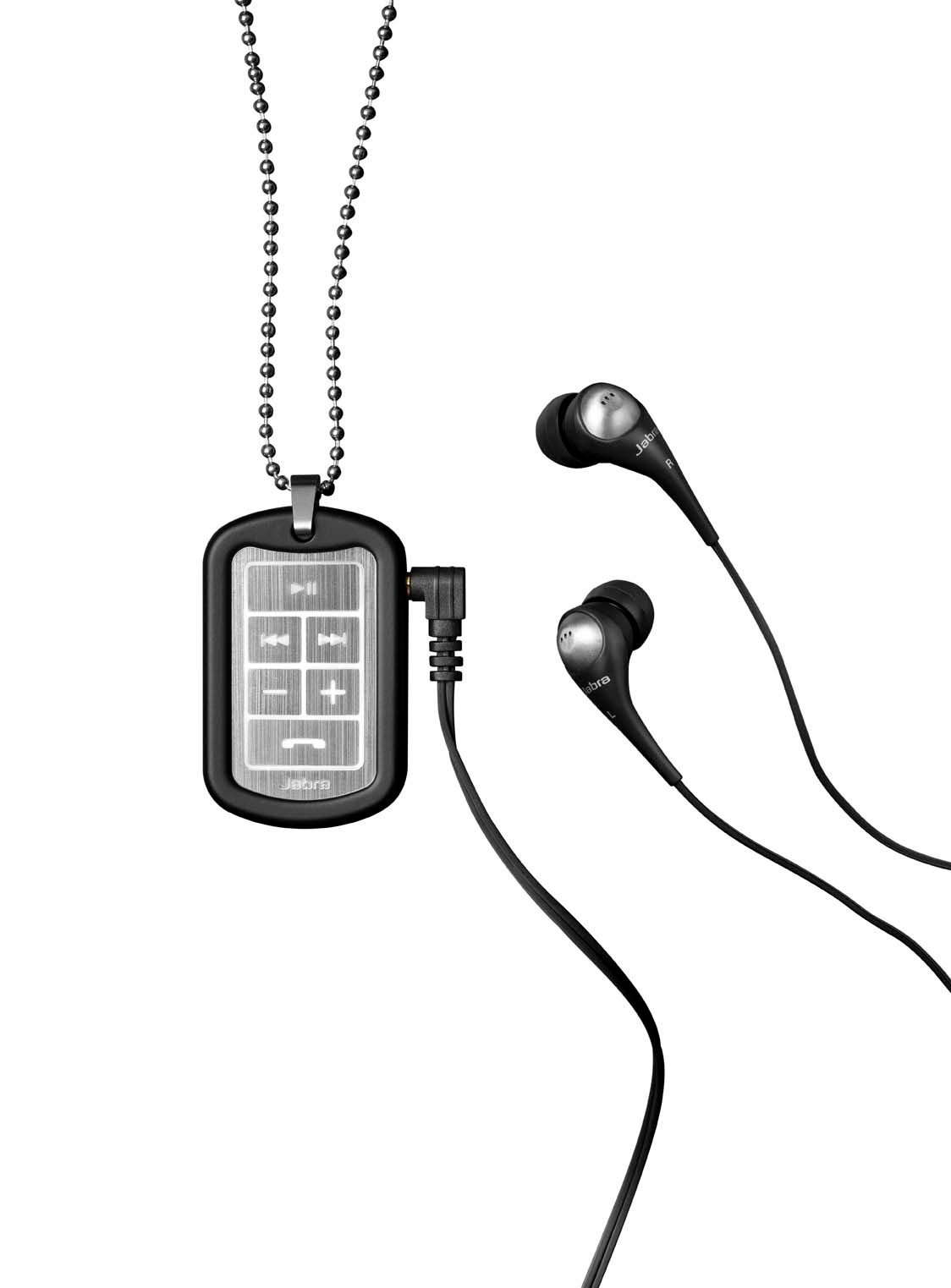
Image: The Jabra Music Street2 headset, highlighting the micro-USB charging port located on the side of the control unit.
- සම්පූර්ණ ආරෝපණයක් සාමාන්යයෙන් පැය 2ක් පමණ ගතවේ.
- LED දර්ශකය ආරෝපණ තත්ත්වය පෙන්වනු ඇත (උදා: ආරෝපණය කිරීම සඳහා රතු, සම්පූර්ණයෙන්ම ආරෝපණය කිරීම සඳහා නිල්).
2. බ්ලූටූත් උපාංගයක් සමඟ යුගල කිරීම
- හෙඩ්සෙට් එක ක්රියා විරහිත කර ඇති බවට සහතික වන්න.
- Press and hold the Multi-function button (usually the play/pause button) for approximately 5-7 seconds until the LED indicator flashes blue rapidly. This indicates pairing mode.
- ඔබගේ බ්ලූටූත් සක්රීය උපාංගයේ (ස්මාර්ට්ෆෝන්, ටැබ්ලටය, ආදිය), බ්ලූටූත් සැකසුම් වෙත ගොස් බ්ලූටූත් සක්රීය කරන්න.
- ඒ සඳහා සොයන්න available devices. "Jabra Street2" should appear in the list.
- Select "Jabra Street2" to connect. If prompted for a passcode, enter "0000" (four zeros).
- Once successfully paired, the LED indicator will flash blue slowly.
The headset can remember multiple paired devices but can only be connected to one at a time.
මෙහෙයුම් උපදෙස්
බලය සක්රිය / අක්රිය
- බල ගැන්වීම: Press and hold the Multi-function button until the LED flashes blue.
- විදුලිය විසන්ධි කිරීම: Press and hold the Multi-function button until the LED flashes red and then turns off.
සංගීත පාලනය
- වාදනය/විරාමය: බහු ක්රියාකාරී බොත්තම වරක් ඔබන්න.
- ඊළඟ ධාවන පථය: Press the "Next Track" button (usually marked with a forward arrow).
- පෙර ධාවන පථය: Press the "Previous Track" button (usually marked with a backward arrow).
- පරිමාව: "+" බොත්තම ඔබන්න.
- ශබ්දය පහළට: "-" බොත්තම ඔබන්න.
ඇමතුම් කළමනාකරණය
- පිළිතුරු ඇමතුම: බහු ක්රියාකාරී බොත්තම වරක් ඔබන්න.
- ඇමතුම අවසන් කරන්න: ඇමතුමක් අතරතුර බහුකාර්ය බොත්තම එක් වරක් ඔබන්න.
- ඇමතුම ප්රතික්ෂේප කරන්න: බහුකාර්ය බොත්තම තත්පර 2ක් ඔබාගෙන සිටින්න.
- අවසාන අංකය නැවත අමතන්න: Double-press the Multi-function button when not on a call.
- හ D ඇමතීම: Press the Multi-function button once when not on a call (if supported by your phone).
The headset automatically switches between music and calls.
නඩත්තු කිරීම
- Keep the headset dry. Moisture can damage the electronic circuits.
- Avoid extreme temperatures. High temperatures can shorten the life of electronic devices, damage batteries, and warp or melt certain plastics.
- Do not attempt to open the headset. Unauthorized modifications can damage the unit and void your warranty.
- Clean the headset with a soft, dry cloth. Do not use harsh chemicals or detergents.
- දිගු කාලයක් භාවිතයේ නොමැති විට හෙඩ්සෙට් එක සිසිල් වියළි ස්ථානයක ගබඩා කරන්න.
දෝෂගවේෂණය
බලය නැත
- හෙඩ්සෙට් එක සම්පූර්ණයෙන්ම ආරෝපණය වී ඇති බව සහතික කර ගන්න. එය බල ප්රභවයකට සම්බන්ධ කර ආරෝපණ දර්ශකය පරීක්ෂා කරන්න.
උපාංගය සමඟ යුගල කළ නොහැක
- Make sure the headset is in pairing mode (LED flashing blue rapidly).
- ඔබගේ උපාංගයේ බ්ලූටූත් සක්රීය කර ඇති බවත් එය පරාසය තුළ (සාමාන්යයෙන් මීටර් 10 ක් හෝ අඩි 33 ක්) ඇති බවත් සහතික කර ගන්න.
- Try turning off and on both the headset and your Bluetooth device.
- If previously paired, try deleting "Jabra Street2" from your device's Bluetooth list and re-pairing.
ශබ්දයක් හෝ දුර්වල ශබ්දයක් නැත
- හෙඩ්සෙට් එකේ සහ ඔබේ සම්බන්ධිත උපාංගයේ ශබ්ද මට්ටම් පරීක්ෂා කරන්න.
- හෙඩ්සෙට් එක ඔබගේ උපාංගයට නිසි ලෙස සම්බන්ධ වී ඇති බවට වග බලා ගන්න.
- බාධා වළක්වා ගැනීමට ඔබගේ උපාංගයට සමීප වන්න.
- Ensure the ear buds are correctly inserted and fit snugly to block external noise.
Calls Not Switching Automatically
- Verify that the headset is the active audio device for calls on your phone's Bluetooth settings.
- Some phone models may require manual selection of the audio output during a call.
පිරිවිතර
| මාදිලියේ නම | Jabra Music Street2 |
| බ්ලූටූත් අනුවාදය | 3.0 + EDR |
| රැහැන් රහිත පරාසය | මීටර් 10 (අඩි 33) දක්වා |
| කතා කාලය | පැය 8 දක්වා |
| පොරොත්තු කාලය | දින 9.5 දක්වා |
| ආරෝපණ කාලය | ආසන්න වශයෙන් පැය 2 කි |
| සම්බන්ධතාවය | Bluetooth, 3.5 mm Jack (for wired connection if applicable) |
| විශේෂාංග | Virtual surround sound, power bass, noise-blocking ear buds, automatic music/call switching |
වගකීම් සහ සහාය
Jabra products are covered by a limited warranty. For specific warranty terms and conditions, please refer to the warranty card included with your product or visit the official Jabra webඅඩවිය.
For technical support, frequently asked questions, or to download the latest software/firmware updates, please visit the official Jabra support page:
You may also contact Jabra customer service directly for assistance.