
XTAR MP1S
XTAR MP1S Intelligent USB Battery Charger User Manual
මාදිලිය: MP1S
1. හැඳින්වීම
The XTAR MP1S Intelligent USB Battery Charger is designed for charging various 3.7V Li-ion batteries, including 14650, 17670, 18650, 18700, and with the use of spacers, also 10440, 14500, 15270, 16340, and 18350 types. It features an advanced TC.CC.CV (Trickle Current, Constant Current, Constant Voltage) charging algorithm that continuously monitors battery status for safe and automatic charging. The charger is equipped with a protection circuit and intelligent temperature monitoring to ensure optimal performance and safety.
2. ආරක්ෂිත පූර්වාරක්ෂාවන්
Please read and understand all safety warnings before using the charger.
- ගෘහස්ථ භාවිතය පමණි: ඒකකය ජලයෙන් හා තෙතමනයෙන් ඈත් කරන්න.
- බැටරි අනුකූලතාව: Only charge 3.7V Li-ion batteries. Charging other battery types may cause damage or injury.
- විසුරුවා හැරීමක් නැත: Disassembly or modification of the charger is strictly prohibited.
- කෙටි පරිපථ වලින් වළකින්න: Short circuits are strictly prohibited and can cause severe damage to the charger and battery.
- මෙහෙයුම් උෂ්ණත්වය: Ensure the charger is used within the recommended operating temperature range of 0~40℃.
3. නිෂ්පාදන ලක්ෂණ
- Intelligent Charging Algorithm: Utilizes TC.CC.CV charging system for efficient and safe charging.
- Automatic Monitoring: Monitors battery status continuously throughout the charging process.
- Low Current Standby: Automatically enters a low current status (below 4uA) when the input voltage is removed, minimizing battery discharge.
- ගාස්තු නඩත්තුව: Continuously monitors the battery after charging is complete and restarts charging if the battery's voltage drops to 4.0V or below, maintaining a full charge.
- උෂ්ණත්ව පාලනය: The charging management chip monitors its own temperature. If the detected temperature is too high, the charge current will automatically lower to protect the charger.
- ආරක්ෂණ පරිපථය: Incorporates a robust protection circuit for enhanced safety.
4. ආරම්භ කිරීම (සැකසුම)
Follow these steps to set up your XTAR MP1S charger:
- සම්බන්ධක බලය: Connect the USB cable to the charger's USB input port and then to a 5V USB power source (e.g., computer USB port, USB wall adapter, or car charger).
- බැටරිය ඇතුළු කරන්න: Carefully insert the 3.7V Li-ion battery into the charging slot, ensuring the correct polarity (+ and - ends) aligns with the markings on the charger. The positive (+) end of the battery should align with the positive contact on the charger, and the negative (-) end with the negative spring contact.
- ආරෝපණ ඇඟවීම: The charger will automatically begin charging. Refer to the operating section for details on charging status.
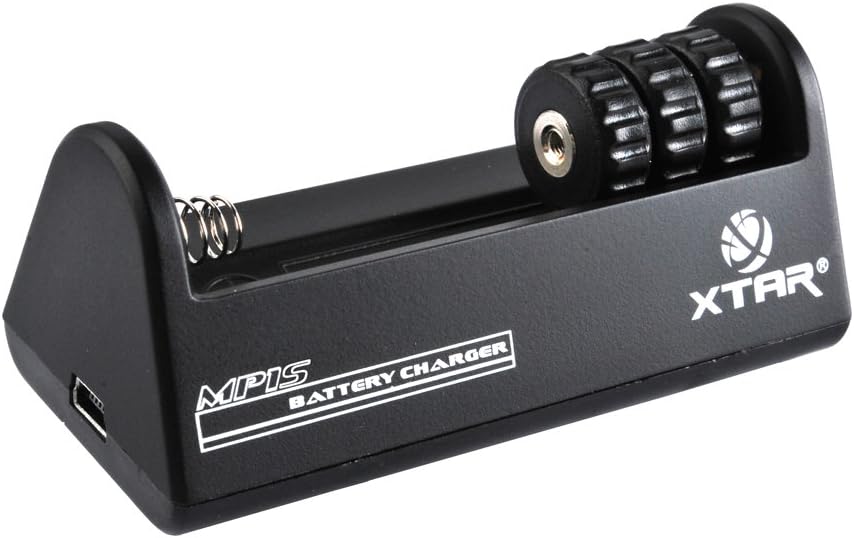
රූපය 1: ඉදිරිපස view of the XTAR MP1S Charger, showing the battery slot and USB input.
5. මෙහෙයුම
The XTAR MP1S charger operates automatically once a compatible battery is inserted and power is connected.
- ආරෝපණ ක්රියාවලිය: චාජරය බහු-චාලකයක් භාවිතා කරයිtage TC.CC.CV charging method. It starts with a trickle current, then moves to constant current, and finally constant voltage to safely and efficiently charge your battery.
- බැටරි අනුකූලතාව: This charger is designed for 3.7V Li-ion batteries. It supports 14650, 17670, 18650, 18700, and with the use of spacers, also 10440, 14500, 15270, 16340, 18350 battery sizes.
- ස්වයංක්රීය නැවත ආරෝපණය: To ensure your battery remains fully charged, the charger will automatically restart charging if the battery voltage drops below 4.0V after a full charge.

Figure 2: Bottom and side views of the XTAR MP1S Charger, showing ventilation and USB port.
6. නඩත්තු කිරීම
නිසි නඩත්තුව ඔබේ චාජරයේ ආයු කාලය සහ ප්රශස්ත ක්රියාකාරිත්වය සහතික කරයි:
- වියළිව තබා ගන්න: Always keep the charger in a dry environment. Avoid exposure to water or high humidity.
- පිරිසිදු සම්බන්ධතා: Periodically clean the charging contacts on the charger and your batteries with a dry, soft cloth to ensure good electrical connection.
- ගබඩා: භාවිතයේ නොමැති විට, චාජරය සෘජු හිරු එළියෙන් සහ අධික උෂ්ණත්වයන්ගෙන් ඈත්ව සිසිල් වියළි ස්ථානයක ගබඩා කරන්න.
- බලපෑමෙන් වළකින්න: Do not drop or subject the charger to heavy impact.
7. දෝශ නිරාකරණය
If you encounter issues with your XTAR MP1S charger, consider the following:
- චාජරය ක්රියාත්මක නොවේ:
- USB කේබලය චාජරයට සහ බල ප්රභවයට ආරක්ෂිතව සම්බන්ධ කර ඇති බවට වග බලා ගන්න.
- Verify that the USB power source (e.g., wall adapter, computer port) is functional and providing 5V output.
- බැටරිය ආරෝපණය නොවේ:
- Check that the battery is a 3.7V Li-ion type and is compatible with the charger (refer to compatible battery list).
- නිවැරදි ධ්රැවීයතාවකින් බැටරිය ඇතුළු කර ඇති බවට සහතික වන්න.
- බැටරි සහ චාජර් සම්බන්ධතා අපිරිසිදු හෝ හානි සඳහා පරීක්ෂා කරන්න. අවශ්ය නම් පිරිසිදු කරන්න.
- Check for any signs of short circuit on the battery or within the charger slot.
- Charging is Slow or Stops Prematurely:
- The charger's internal temperature control may reduce charging current if it detects overheating. Allow the charger to cool down in a well-ventilated area.
- Ensure the USB power source can provide sufficient current (500mA recommended).
8. පිරිවිතර
| පිරිවිතර | වටිනාකම |
|---|---|
| ආදර්ශ අංකය | MP1S |
| ආදාන වෙළුමtagඊ / ධාරාව | DC 5V / 500mA |
| ප්රතිදාන වෙළුමtagඊ / ධාරාව | DC 4.2V ±0.05% 500mA ±10% |
| මෙහෙයුම් උෂ්ණත්වය | 0~40℃ |
| නිෂ්පාදන මානයන් | අඟල් 7.09 x 9.84 x 1.97 |
| අයිතමයේ බර | අවුන්ස 2.82 (ග්රෑම් 80) |
| නිෂ්පාදකයා | XTAR |
| පළමු දිනය තිබේ | 3 ජූලි 2013 |
9. වගකීම් සහ සහාය
For warranty information and technical support, please contact XTAR customer service or visit the official XTAR webවෙබ් අඩවිය. මිලදී ගැනීම පිළිබඳ සාක්ෂියක් ලෙස ඔබේ මිලදී ගැනීමේ රිසිට්පත තබා ගන්න.
You can visit the official XTAR store on Amazon for more information: XTAR Official Store
Ask a question about this manual
Ask about setup, troubleshooting, compatibility, parts, safety, or missing instructions. Manuals+ will review the question and use this page’s manual context to help answer it.