
1. හැඳින්වීම
The Altronix Tempo2 Digital Timer is a versatile two-stage timer designed for various applications requiring precise timing control. It operates on either 12 or 24 volt AC or DC power and features a Single Pole Double Throw (SPDT) contact rated for 2 amps at 115VAC or 28VDC. Key functionalities include an adjustable timing range from 1 second to 60 seconds for timed door release, daily/weekly test modes, one-shot activation, and a door prop alarm. The unit incorporates EEProm memory for settings retention and an LCD display for clear status indication.
This manual provides detailed instructions for the proper installation, operation, and maintenance of your Tempo2 Digital Timer to ensure optimal performance and longevity.
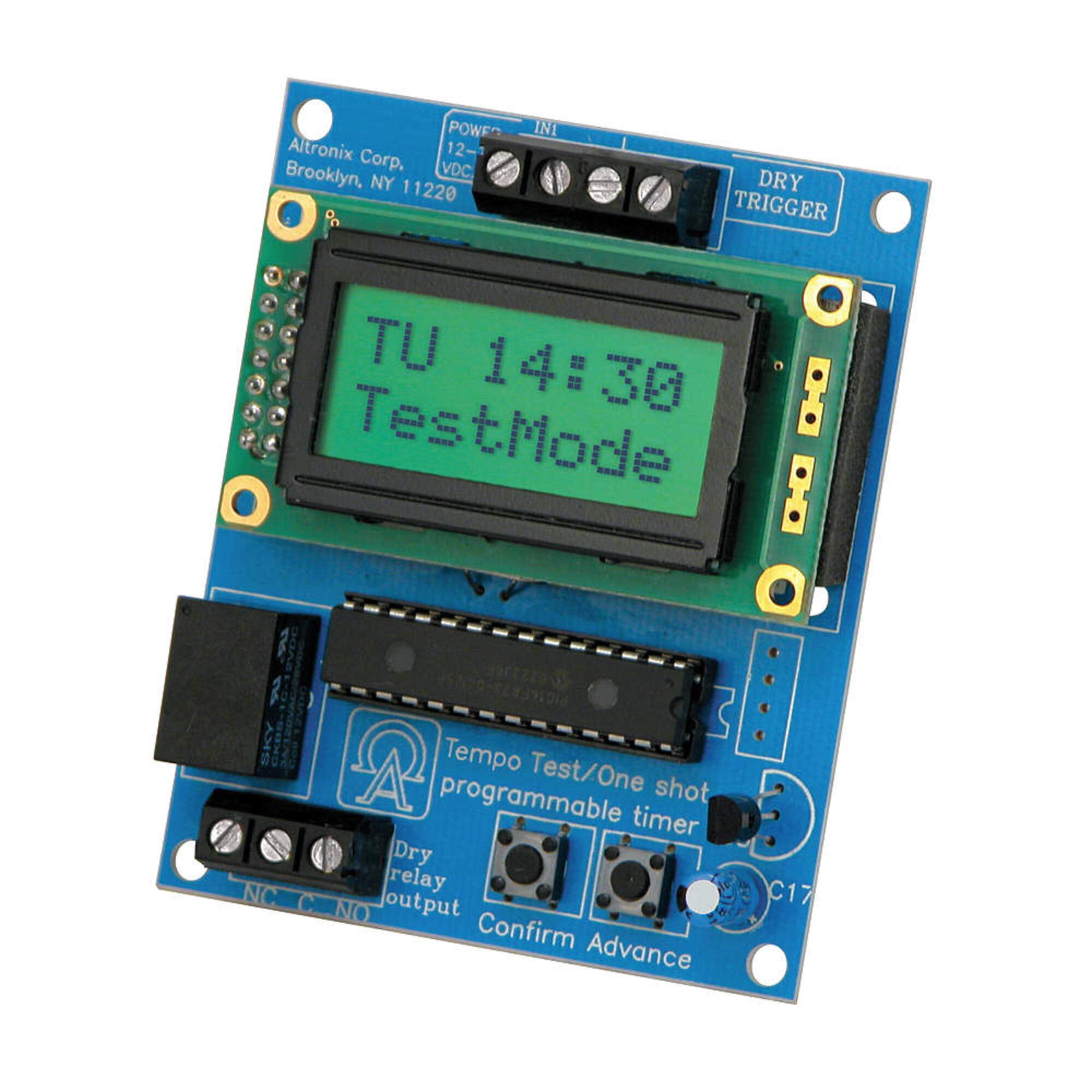
Image showing the Altronix Tempo2 Digital Timer unit, typically featuring its LCD display and control buttons.
2. විශේෂාංග
- Universal Two-Stage Timer: Provides flexible timing control for various applications.
- නම්යශීලී බල ආදානය: Operates on 12V or 24V AC or DC.
- SPDT Contact: 2 ලෙස ශ්රේණිගත කර ඇත Amp / 115VAC / 28VDC.
- Adjustable Timing Range: 1 second to 60 seconds for timed door release.
- මෙහෙයුම් ආකාර: Includes daily/weekly test mode and one-shot activation.
- Door Prop Alarm: Integrated alarm function for security applications.
- EEProm Memory: Retains programmed settings during power loss.
- LCD සංදර්ශකය: Provides clear visual feedback for programming and status.
3. පිහිටුවීම සහ ස්ථාපනය
Proper installation is crucial for the reliable operation of the Tempo2 Digital Timer. Ensure all power is disconnected before beginning installation.
3.1 සවි කිරීම
Mount the timer in a secure, dry location, away from direct heat sources or excessive moisture. Use appropriate fasteners for the mounting surface.
3.2 රැහැන් සම්බන්ධතා
Refer to the wiring diagram provided with your unit for specific connection points. General wiring guidelines are as follows:
- බල ආදානය: Connect 12V or 24V AC/DC power to the designated terminals. Observe correct polarity for DC connections.
- ප්රේරක ආදානය: Connect the trigger source (e.g., door contact, push button) to the trigger input terminals.
- රිලේ ප්රතිදානය: Connect the device to be controlled (e.g., door strike, alarm panel) to the SPDT relay output terminals (Common, Normally Open, Normally Closed). Ensure the load does not exceed the 2 Amp / 115VAC / 28VDC rating.
අවවාදයයි: Incorrect wiring can damage the unit or connected equipment. If you are unsure about any wiring procedures, consult a qualified electrician or technician.
4. මෙහෙයුම් උපදෙස්
The Tempo2 Digital Timer features an LCD display and control buttons for programming and operation.
4.1 Setting the Timer Duration
- Access the programming menu using the designated button (refer to the unit's specific button layout).
- Navigate to the 'Timing Duration' setting.
- Adjust the time from 1 second to 60 seconds using the up/down buttons.
- Save the setting and exit the programming menu.
4.2 Daily/Weekly Test Mode
This mode allows for scheduled testing of the timer's functionality without full activation. Consult the unit's programming guide for setting specific test schedules.
4.3 One-Shot Activation
The one-shot activation feature allows the timer to trigger once for the set duration upon receiving a signal. This is useful for single-event operations.
4.4 දොර මුක්කු එලාම්
When configured, the door prop alarm will activate if a connected door remains open beyond a pre-set time. This feature enhances security by alerting users to prolonged open door conditions.
5. නඩත්තු කිරීම
The Altronix Tempo2 Digital Timer is designed for reliable, long-term operation with minimal maintenance. Follow these guidelines to ensure continued performance:
- පිරිසිදු කිරීම: Periodically wipe the unit with a soft, dry cloth to remove dust and debris. Do not use abrasive cleaners or solvents.
- සම්බන්ධතා: Annually inspect all wiring connections to ensure they are secure and free from corrosion.
- පරිසරය: මෙහෙයුම් පරිසරය නිශ්චිත උෂ්ණත්ව හා ආර්ද්රතා පරාසයන් තුළ පවතින බවට සහතික වන්න.
ඒකකය තුළ පරිශීලක-සේවා කළ හැකි කොටස් නොමැත. සියලුම සේවා සුදුසුකම් ලත් පුද්ගලයින් වෙත යොමු කරන්න.
6. දෝශ නිරාකරණය
If you encounter issues with your Tempo2 Digital Timer, refer to the following common problems and solutions:
| ගැටලුව | විය හැකි හේතුව | විසඳුම |
|---|---|---|
| Timer not powering on / LCD blank | බලය නැත, වැරදි පරිමාවක්tage, or reversed DC polarity. | බල සැපයුම් සම්බන්ධතා සහ වෝල්ටීයතාවය පරීක්ෂා කරන්නtage. Ensure correct DC polarity. |
| Timer not activating output | Incorrect trigger input, faulty wiring, or incorrect programming. | Verify trigger input signal. Check output wiring. Review ක්රමලේඛන සැකසුම්. |
| Incorrect timing duration | Timer duration set incorrectly. | Re-enter the programming menu and adjust the timing duration as needed. |
| Door prop alarm not functioning | Door contact faulty, wiring issue, or alarm not enabled. | Check door contact and its wiring. Ensure door prop alarm is enabled in settings. |
If the problem persists after attempting these solutions, contact Altronix technical support for further assistance.
7. පිරිවිතර
- ආකෘතිය: TEMPO2
- වෙළඳ නාමය: ඇල්ට්රොනික්ස්
- බල ආදානය: 12V හෝ 24V AC/DC
- සම්බන්ධතා වර්ගය: SPDT (තනි කණු ද්විත්ව විසි කිරීම)
- සම්බන්ධතා ශ්රේණිගත කිරීම: 2 Amp @ 115VAC / 28VDC
- කාල පරාසය: 1 second to 60 seconds (adjustable)
- මතකය: EEProm (retains settings)
- සංදර්ශකය: LCD
- විශේෂාංග: දෙක-සtage operation, daily/weekly test mode, one-shot activation, door prop alarm
- අයිතමයේ බර: ආසන්න වශයෙන් රාත්තල් 0.2 (කිලෝග්රෑම් 0.09)
- UPC: 782239938292
- GTIN: 782239938292
8. වගකීම් සහ සහාය
Altronix products are backed by a manufacturer's warranty. For specific warranty terms and conditions, please refer to the warranty information included with your product packaging or visit the official Altronix webඅඩවිය.
For technical support, troubleshooting assistance, or to inquire about service, please contact Altronix customer support. Have your model number (TEMPO2) and any relevant purchase information ready when contacting support.
Altronix Contact Information:
Please refer to the official Altronix website for the most current contact details, including phone numbers and email addresses for technical support.