
1. හැඳින්වීම
This manual provides instructions for the proper use and care of your DeltaTrak 11047 Digital Lollipop Min/Max Probe Thermometer. This device is designed for accurate temperature measurement in various applications, featuring a digital display and Min/Max temperature recording capabilities.
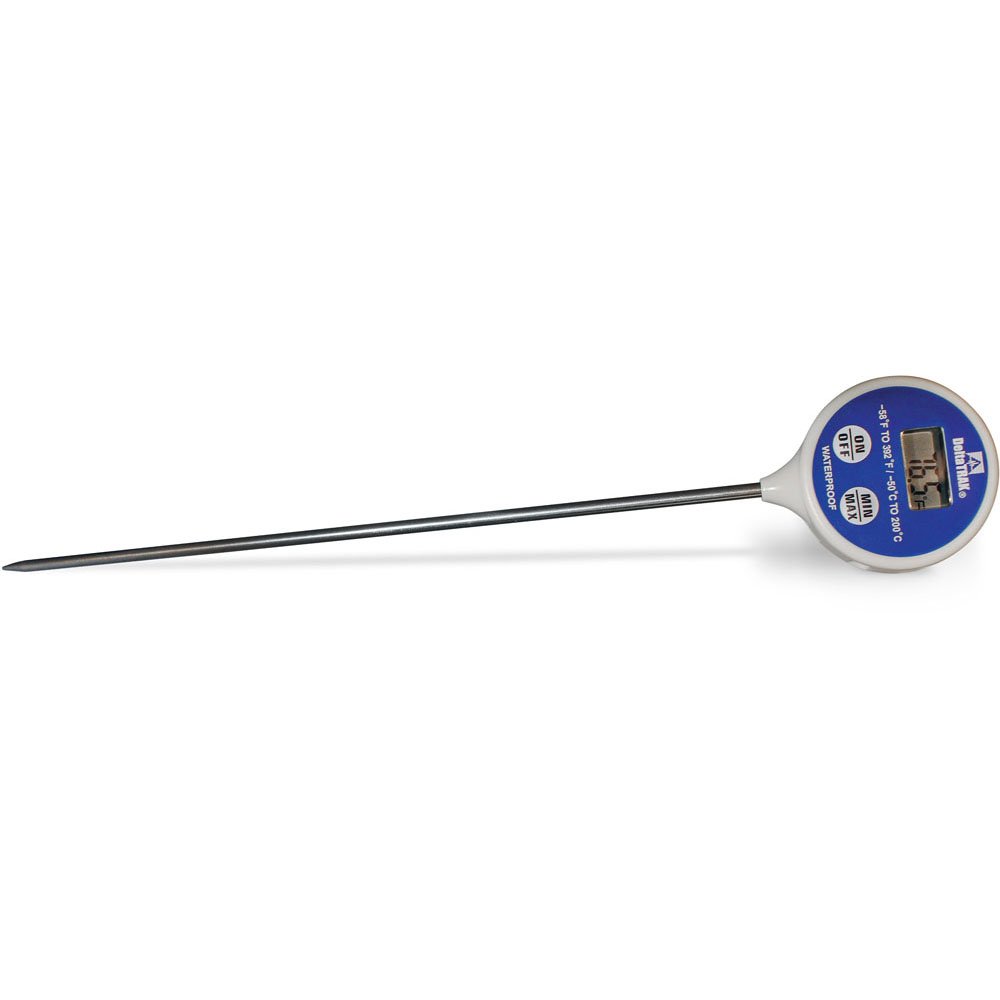
රූපය 1: DeltaTrak 11047 Digital Lollipop Min/Max Probe Thermometer. This image shows the thermometer with its digital display and probe.
2 ආරක්ෂිත තොරතුරු
Please read all safety instructions before using the thermometer to ensure safe operation and prevent damage to the device or injury to yourself.
- Do not expose the thermometer to extreme temperatures outside its specified operating range.
- Do not immerse the main body of the thermometer in water or other liquids. The probe is designed for immersion, but the display unit is not waterproof.
- දරුවන්ට ළඟා විය නොහැකි ලෙස තබා ගන්න.
- Do not attempt to disassemble or modify the thermometer. This will void the warranty and may cause damage.
- දේශීය රෙගුලාසිවලට අනුව බැටරි බැහැර කරන්න.
3. පිහිටුවීම
3.1. බැටරි ස්ථාපනය
The DeltaTrak 11047 thermometer requires batteries for operation (not included). Follow these steps to install them:
- උෂ්ණත්වමානයේ පිටුපස බැටරි මැදිරි කවරය සොයා ගන්න.
- Use a small screwdriver or coin to open the battery compartment.
- Insert the required batteries, ensuring correct polarity (+ and -). Refer to the markings inside the compartment.
- බැටරි මැදිරි කවරය ප්රතිස්ථාපනය කර එය තදින් සුරක්ෂිත කරන්න.
3.2. මූලික බලය ක්රියාත්මක කිරීම
බැටරි ස්ථාපනය කිරීමෙන් පසු, ඔබන්න සක්රිය / අක්රිය button to power on the device. The display will show the current temperature.
4. මෙහෙයුම් උපදෙස්
4.1. උෂ්ණත්ව කියවීමක් ලබා ගැනීම
- උෂ්ණත්වමානය ක්රියාත්මක කර ඇති බවට වග බලා ගන්න.
- Insert the stainless steel probe into the substance or environment you wish to measure. Ensure the probe tip is fully immersed or positioned correctly for accurate readings.
- Wait for the temperature reading on the digital display to stabilize. This usually takes a few seconds.
4.2. Min/Max Temperature Function
The thermometer can record the minimum and maximum temperatures measured during a session.
- ඔබන්න MIN / MAX button once to display the maximum temperature recorded since the last reset.
- ඔබන්න MIN / MAX button a second time to display the minimum temperature recorded.
- ඔබන්න MIN / MAX button a third time to return to the current temperature display.
- To reset the Min/Max values, press and hold the MIN / MAX button for approximately 3 seconds while in Min or Max display mode.
4.3. Unit Selection (°C/°F)
සෙල්සියස් (°C) සහ ෆැරන්හයිට් (°F) අතර මාරු වීමට:
- සොයා ගන්න ° C / ° F. button, usually found near the display or battery compartment.
- Press this button to toggle between the two temperature units.
5. නඩත්තු කිරීම
5.1 පිරිසිදු කිරීම
As per product care instructions, the thermometer should be cleaned by wiping it. Use a damp cloth with mild soap or a sanitizing wipe to clean the probe and the body of the thermometer. Do not use abrasive cleaners or immerse the main unit in water.
5.2. ගබඩා කිරීම
When not in use, store the thermometer in a clean, dry place at room temperature. Ensure the probe is clean and dry before storage. The thermometer often comes with a protective sheath for the probe; use this to prevent damage.
5.3. බැටරි ප්රතිස්ථාපනය
If the display becomes dim or the thermometer stops functioning, it may be time to replace the batteries. Follow the battery installation steps in Section 3.1.
6. දෝශ නිරාකරණය
| ගැටලුව | විය හැකි හේතුව | විසඳුම |
|---|---|---|
| සංදර්ශකයක් නැත හෝ අඳුරු සංදර්ශකයක් නැත | බැටරි ක්රියා විරහිත වීම හෝ අඩු වීම; වැරදි බැටරි ස්ථාපනය. | නිවැරදි ධ්රැවීයතාව සහතික කරමින් බැටරි ප්රතිස්ථාපනය කරන්න. |
| වැරදි කියවීම් | Probe not fully immersed; probe damaged; thermometer outside operating range. | Ensure probe is correctly positioned; check for visible damage; use within specified temperature range. |
| උෂ්ණත්වමානය ක්රියාත්මක නොවේ | Batteries not installed; power button malfunction. | Install or replace batteries; if problem persists, contact support. |
7. පිරිවිතර
- වෙළඳ නාමය: ඩෙල්ටාට්රැක්
- ආදර්ශ අංකය: 11047
- UPC: 700779110473
- බාහිර ද්රව්ය: Glass (Note: This likely refers to the display or a component, the probe is typically stainless steel)
- පිරිවිතර සපුරා ඇත: NIST
- අයිතමයේ බර: 36.3 ග්රෑම්
- පැකේජ මානයන්: 26.8 x 5.41 x 2.79 සෙ.මී
- ඇතුළත් සංරචක: උෂ්ණත්වමානය
- නිෂ්පාදන සත්කාර උපදෙස්: පිසදමන්න
- බැටරි: ඇතුළත් නොවේ
8. වගකීම් සහ සහාය
8.1. වගකීම් තොරතුරු
DeltaTrak products are manufactured to high-quality standards. For specific warranty details regarding your DeltaTrak 11047 thermometer, please refer to the warranty card included with your purchase or visit the official DeltaTrak webවෙබ් අඩවිය. වගකීම් හිමිකම් සඳහා මිලදී ගැනීමේ සාක්ෂියක් ලෙස ඔබේ මිලදී ගැනීමේ රිසිට්පත තබා ගන්න.
8.2. පාරිභෝගික සහාය
If you encounter any issues not covered in this manual or require further assistance, please contact DeltaTrak customer support. Contact information can typically be found on the product packaging or the official DeltaTrak webඅඩවිය.
වැඩි විස්තර සඳහා, පිවිසෙන්න: www.deltatrak.com වෙබ් අඩවිය