
Radioddity Raddy RF23 AM FM Portable Pocket Radio MP3 Player User Manual
ආකෘතිය: RF23
හැඳින්වීම
This manual provides detailed instructions for the Radioddity Raddy RF23, a compact and versatile portable radio and MP3 player. It features AM/FM radio reception, MP3 playback from Micro TF cards and USB disks, and an integrated flashlight. Please read this manual thoroughly before using the device to ensure proper operation and longevity.
පැකේජයේ අන්තර්ගතය
- 1 x Radioddity Raddy RF23 AM/FM Radio
- 1 x USB ආරෝපණ කේබලය
- 1 x Rechargeable Lithium-Ion Battery (BL-5C type)
- 1 x මැෂින් රඳවනය
නිෂ්පාදනය අවසන්view
Familiarize yourself with the various parts and controls of your Raddy RF23 radio.

රූපය 1: ඉදිරිපස View of Raddy RF23 - Displays the speaker grille, digital display, and numeric keypad with function buttons.

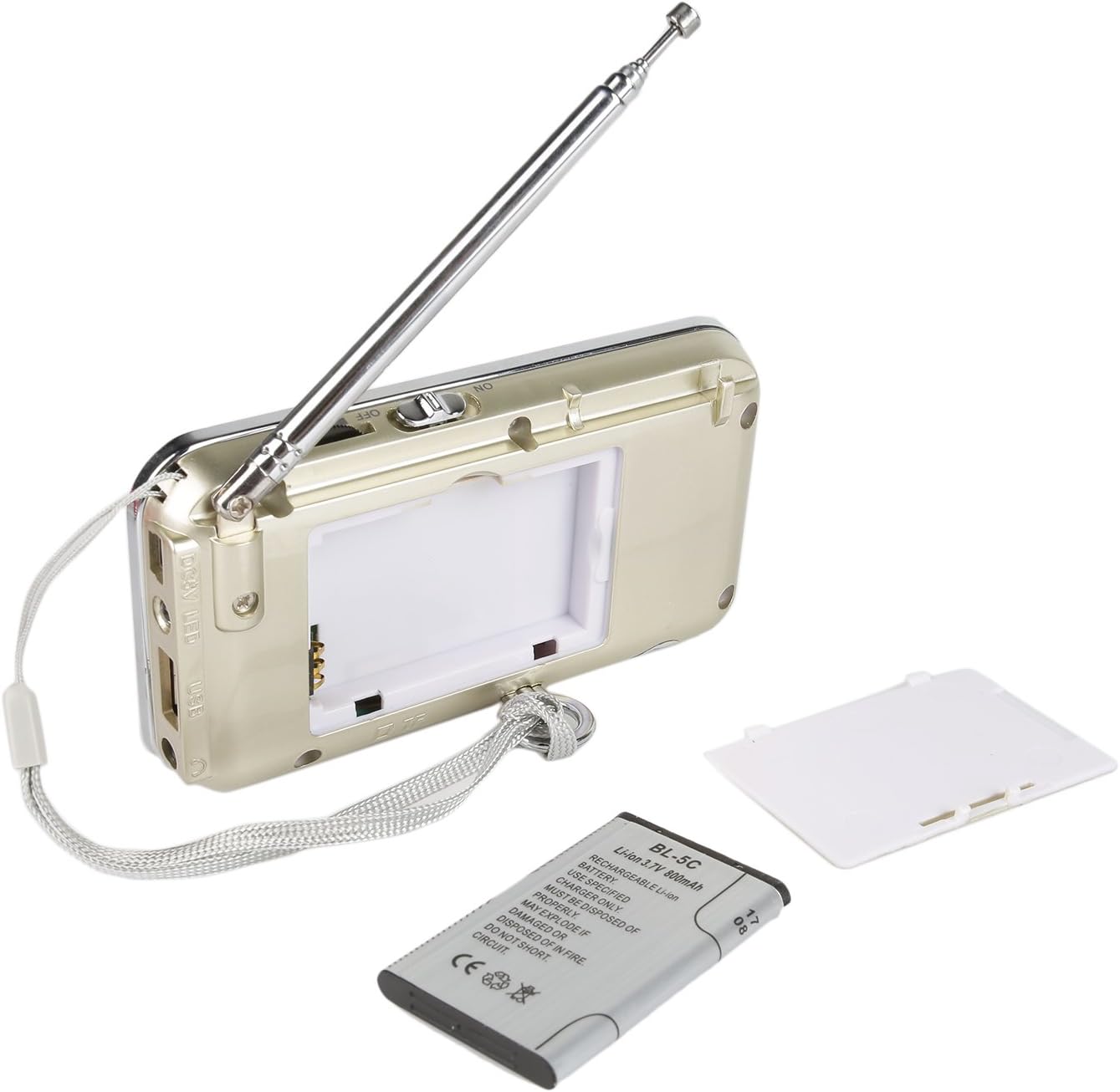
රූපය 2: ආපසු View of Raddy RF23 - Shows the battery cover, USB port, DC 5V charging port, and the wrist strap with its stand attachment.
පාලන සහ වරාය
- බල සැපයුම් සුවිචය: Slide switch on the side to turn the device ON or OFF.
- ඇන්ටනාව: වැඩිදියුණු කළ ගුවන්විදුලි පිළිගැනීම සඳහා දිගු කළ හැකි දුරේක්ෂ ඇන්ටෙනාව.
- සංඛ්යාංක දර්ශකය: Shows frequency, mode, and track information.
- කථානායක: ශ්රව්ය ප්රතිදානය සඳහා ඒකාබද්ධ ස්පීකරය.
- සංඛ්යාත්මක යතුරු පුවරුව (0-9): සෘජු සංඛ්යාත ආදානය හෝ ධාවන පථ තේරීම සඳහා භාවිතා වේ.
- මාදිලි බොත්තම: Switches between AM, FM, and MP3 playback modes.
- වාදනය/විරාම බොත්තම (▶⏸): Plays or pauses MP3 tracks.
- පෙර/ආපසු හැරවීමේ බොත්තම (◀◀): Skips to the previous track or rewinds during MP3 playback. In radio mode, short press for previous station, long press for auto-scan down.
- Next/Fast Forward Button (▶▶): Skips to the next track or fast forwards during MP3 playback. In radio mode, short press for next station, long press for auto-scan up.
- LED බොත්තම: Activates or deactivates the built-in flashlight.
- DC 5V ආදානය: උපාංගය ආරෝපණය කිරීම සඳහා මයික්රෝ USB පෝට් එකක්.
- USB Port: For connecting a USB flash drive for MP3 playback.
- TF කාඩ් පත: For inserting a Micro TF (Micro SD) card for MP3 playback.
- හෙඩ්ෆෝන් ජැක් (මි.මී. 3.5): For connecting headphones for private listening.
සැලසුම
1. බැටරි ස්ථාපනය
- රේඩියෝවේ පිටුපස බැටරි මැදිරි කවරය සොයා ගන්න.
- කවරය විවෘත කරන්න.
- Insert the provided BL-5C Lithium-Ion battery, ensuring the contacts align correctly.
- බැටරි මැදිරි කවරය ආරක්ෂිතව වසා දමන්න.

රූපය 3: බැටරි ස්ථාපනය - Open the battery compartment and insert the BL-5C battery.
2. බැටරිය ආරෝපණය කිරීම
- Connect the small end of the included USB charging cable to the DC 5V input port on the side of the radio.
- USB කේබලයේ විශාල කෙළවර USB බල ඇඩැප්ටරයකට (ඇතුළත් කර නැත) හෝ පරිගණකයේ USB පෝට් එකකට සම්බන්ධ කරන්න.
- The charging indicator light will illuminate. The light typically turns off or changes color when charging is complete.
- සම්පූර්ණ ආරෝපණය පැය 2-3 ක් පමණ ගත වේ.
රූපය 4: USB ආරෝපණය - Connect the radio to a USB power source using the provided cable.
3. Inserting a Micro TF Card or USB Disk (for MP3 Playback)
- රේඩියෝව ක්රියා විරහිත කර ඇති බවට වග බලා ගන්න.
- For a Micro TF card: Gently insert the card into the TF card slot until it clicks into place.
- For a USB disk: Insert the USB disk into the USB port.
- The radio will automatically detect the storage device when powered on and switched to MP3 mode.

Figure 5: TF Card Insertion - Insert a Micro TF card into the designated slot.
මෙහෙයුම් උපදෙස්
1. බලය සක්රිය / අක්රිය කරන්න
Slide the power switch located on the side of the radio to the "ON" position to power on. Slide it to "OFF" to power off.
2. මාදිලිය තෝරා ගැනීම
ඔබන්න මාදිලිය button repeatedly to cycle through the available modes: FM Radio, AM Radio, and MP3 Player (if a TF card or USB disk is inserted).
3. FM/AM Radio Operation
- රේඩියෝ මාදිලිය තෝරන්න: ඔබන්න මාදිලිය button until "FM" or "AM" appears on the display.
- ඇන්ටනාව දිගු කරන්න: ප්රශස්ත පිළිගැනීමක් සඳහා, දුරේක්ෂ ඇන්ටෙනාව සම්පූර්ණයෙන්ම දිගු කරන්න.
- ස්වයංක්රීය ස්ථාන පරිලෝකනය: දිගු ඔබන්න පෙර (◀◀) or ඊළඟ (▶▶) button to automatically scan for and stop at the next available station.
- අත්පොත සුසර කිරීම: Use the numeric keypad to directly enter a frequency (e.g., for 106.7 FM, press 1-0-6-7).
- ශබ්ද ගැලපුම: Adjust the volume using the dedicated volume controls, typically located on the side of the device or integrated with other function buttons.
4. MP3 Playback Operation
- MP3 මාදිලිය තෝරන්න: ඔබන්න මාදිලිය button until "MP3" or a track number appears on the display.
- වාදනය/විරාමය: ඔබන්න Play/Pause (▶⏸) නැවත ධාවනය ආරම්භ කිරීමට හෝ විරාම කිරීමට බොත්තම.
- ඊළඟ / පෙර ධාවන පථය: ඔබන්න ඊළඟ (▶▶) ඊළඟ ධාවන පථයට යාමට බොත්තම. ඔබන්න පෙර (◀◀) button to go to the beginning of the current track, or press it again to go to the previous track.
- ශබ්ද ගැලපුම: Adjust the volume using the dedicated volume controls, typically located on the side of the device or integrated with other function buttons.
- සෘජු ධාවන පථ තේරීම: Use the numeric keypad to enter the track number directly.
5. ෆ්ලෑෂ් ලයිට් ක්රියාකාරිත්වය
ඔබන්න LED button to turn the built-in flashlight ON. Press it again to turn the flashlight OFF.
නඩත්තු කිරීම
- පිරිසිදු කිරීම: Wipe the radio with a soft, dry cloth. Do not use liquid cleaners or solvents.
- ගබඩා: When not in use for extended periods, store the radio in a cool, dry place.
- බැටරි සත්කාර: If the radio will not be used for a long time, remove the battery to prevent leakage. Recharge the battery periodically to maintain its lifespan.
- ඇන්ටෙනා සත්කාර: නැමීම හෝ කැඩීම වළක්වා ගැනීම සඳහා දුරේක්ෂ ඇන්ටෙනාව මෘදු ලෙස හසුරුවන්න.
දෝෂගවේෂණය
| ගැටලුව | විය හැකි හේතුව | විසඳුම |
|---|---|---|
| රේඩියෝව ක්රියාත්මක නොවේ. | බැටරිය ක්රියා විරහිත වී හෝ නිවැරදිව ස්ථාපනය කර නොමැත. | Charge the battery or ensure it is inserted with correct polarity. |
| දුර්වල ගුවන්විදුලි පිළිගැනීම. | ඇන්ටනාව දිගු වී නැත, දුර්වල සංඥාවක් හෝ බාධාවක්. | Fully extend the antenna. Try repositioning the radio. Move away from electronic devices that may cause interference. |
| No sound from MP3 player. | Volume too low, incorrect mode, or no valid media. | Increase volume. Ensure MP3 mode is selected. Verify TF card/USB disk contains MP3 files සහ නිවැරදිව ඇතුළත් කර ඇත. |
| Flashlight does not work. | Battery low or flashlight not activated. | Charge the battery. Press the LED button to turn on the flashlight. |
| Device shuts off unexpectedly. | අඩු බැටරි. | බැටරිය සම්පූර්ණයෙන්ම ආරෝපණය කරන්න. |
පිරිවිතර
- වෙළඳ නාමය: විකිරණශීලතාවය
- ආකෘතිය: RF23
- නිෂ්පාදන මානයන්: අඟල් 4.61 x 0.79 x 2.5
- අයිතමයේ බර: අවුන්ස 6.7 කි
- බලශක්ති ප්රභවය: බැටරි බලයෙන් (ලිතියම් අයන බැටරි 1ක් අවශ්යයි)
- බැටරි වර්ගය: BL-5C (Rechargeable)
- සම්බන්ධතා තාක්ෂණය: USB
- සුසරක තාක්ෂණය: AM, FM
- රේඩියෝ සංගීත කණ්ඩායම් සහය දක්වයි: AM, FM
- සංඛ්යාත පරාසය: FM (87.5-108 MHz), AM (520-1710 KHz)
- විශේෂ ලක්ෂණය: Built-In Flashlight, Portable
- ගැළපෙන උපාංග: Earphone, Micro TF Card, USB Disk
- නිෂ්පාදකයා: විකිරණශීලතාවය
වගකීම් සහ සහාය
For warranty information or technical support, please refer to the documentation provided with your purchase or visit the official Radioddity webවෙබ් අඩවිය. වගකීම් හිමිකම් සඳහා මිලදී ගැනීමේ සාක්ෂියක් ලෙස ඔබේ මිලදී ගැනීමේ රිසිට්පත තබා ගන්න.
විකිරණශීලීතා නිල Webඅඩවිය: www.radioddity.com