
1. හැඳින්වීම
This manual provides instructions for the Superior Electronics Universal Replacement Remote Control, model SUPTRB015. This remote is designed to be a direct replacement for original remote controls of LG, Samsung, and Sony televisions, including Smart TV models. It is ready to use without any programming.
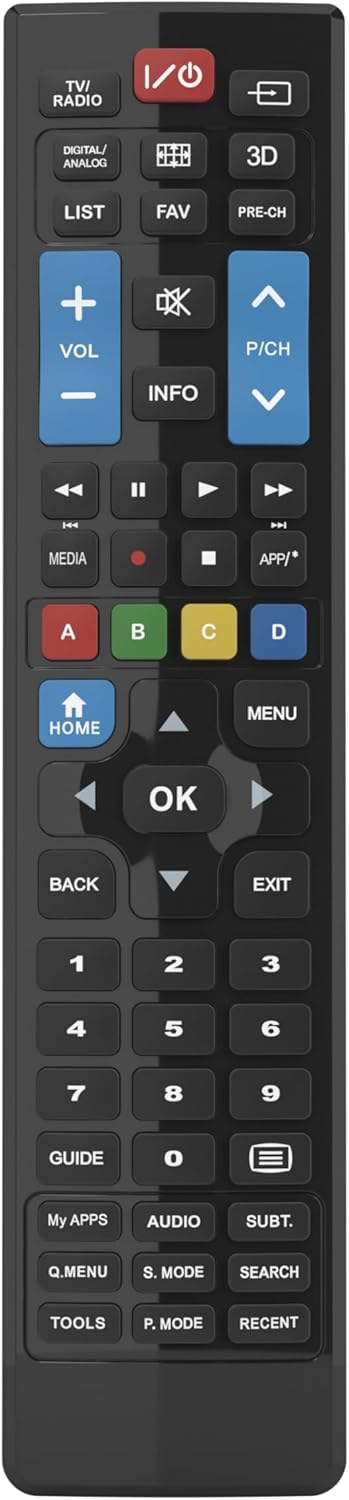
Figure 1: Superior Electronics Universal Remote Control (SUPTRB015)
2. පිහිටුවීම
2.1. බැටරි ස්ථාපනය
දුරස්ථ පාලකයට AAA බැටරි දෙකක් අවශ්ය වේ (ඇතුළත් නොවේ). ඒවා ස්ථාපනය කිරීමට මෙම පියවර අනුගමනය කරන්න:
- දුරස්ථ පාලකයේ පිටුපස බැටරි මැදිරිය සොයා ගන්න.
- Press down on the latch and slide the battery cover off.
- ධනාත්මක (+) සහ සෘණ (-) පර්යන්ත මැදිරිය තුළ ඇති රූපසටහන් වලට ගැලපෙන බව සහතික කර ගනිමින් AAA බැටරි දෙකක් ඇතුළු කරන්න.
- එය ආරක්ෂිතව ක්ලික් කරන තෙක් බැටරි කවරය නැවත එම ස්ථානයට තල්ලු කරන්න.

Figure 2: Battery Compartment on the back of the remote.
2.2. මූලික භාවිතය (ක්රමලේඛනය අවශ්ය නොවේ)
This universal remote control is designed for immediate use with LG, Samsung, and Sony televisions. Once batteries are installed, it is ready to operate your TV without any additional programming or code setup.
3. මෙහෙයුම් උපදෙස්
The remote control features an intuitive layout with dedicated buttons for common functions and Smart TV access. Refer to Figure 3 for a visual guide to the buttons.

රූපය 3: දුරස්ථ පාලක බොත්තම් පිරිසැලසුම.
3.1. මූලික රූපවාහිනී කාර්යයන්
- බල බොත්තම (ⓘ ⓘ សាន ស�): රූපවාහිනිය සක්රිය හෝ අක්රිය කරයි.
- ශබ්දය වැඩි කිරීම/පහළ කිරීම (වෙළුම +/-): ශබ්ද පරිමාව සීරුමාරු කරයි.
- Channel Up/Down (P/CH +/-): රූපවාහිනී නාලිකා වෙනස් කරයි.
- නිශ්ශබ්ද බොත්තම (🔇): රූපවාහිනී ශබ්දය නිශ්ශබ්ද කරයි හෝ නිශ්ශබ්ද කරයි.
- අංක බොත්තම් (0-9): Directly select TV channels.
- ආදාන/මූලාශ්ර බොත්තම (⎌): ආදාන මූලාශ්රය (HDMI, AV, ආදිය) තෝරයි.
3.2. Navigation and Menu Functions
- දිශානුගත පෑඩ් (ඉහළ, පහළ, වම්, දකුණු ඊතල): මෙනු සහ විකල්ප හරහා සංචාලනය කරයි.
- හරි බොත්තම: Confirms selections.
- මුල් පිටුව බොත්තම: Accesses the TV's main home screen or Smart Hub.
- මෙනු බොත්තම: රූපවාහිනියේ ප්රධාන මෙනුව විවෘත කරයි.
- ආපසු බොත්තම: පෙර තිරයට හෝ මෙනුවට ආපසු යයි.
- පිටවීමේ බොත්තම: වත්මන් මෙනුවෙන් හෝ යෙදුමෙන් ඉවත් වේ.
- තොරතුරු බොත්තම: වත්මන් වැඩසටහන හෝ ආදානය පිළිබඳ තොරතුරු පෙන්වයි.
3.3. Smart TV and Media Functions
- Dedicated Smart TV Buttons: Access popular streaming apps directly (e.g., Netflix, YouTube, Prime Video). These buttons are typically labeled or have recognizable logos.
- මාධ්ය පාලන බොත්තම් (වාදනය, විරාමය, නවත්වන්න, ආපසු හැරවීම, වේගයෙන් ඉදිරියට): මාධ්ය නැවත ධාවනය පාලනය කරයි.
- වර්ණ බොත්තම් (රතු, කොළ, කහ, නිල්): These buttons often have specific functions within Smart TV apps or teletext, as indicated on your TV screen.
4. නඩත්තු කිරීම
4.1 දුරස්ථ පාලකය පිරිසිදු කිරීම
දුරස්ථ පාලකයේ පෙනුම සහ ක්රියාකාරීත්වය පවත්වා ගැනීම සඳහා:
- මෘදු වියළි රෙද්දකින් මතුපිට පිස දමන්න.
- මුරණ්ඩු අපිරිසිදුකම සඳහා, තරමක් dampජලය හෝ මෘදු, උල්ෙල්ඛ නොවන පිරිසිදුකාරකයක් සහිත රෙදි.
- රළු රසායනික ද්රව්ය, ද්රාවක හෝ උල්ෙල්ඛ පිරිසිදු කිරීමේ පෑඩ් භාවිතා නොකරන්න, මන්ද මේවා දුරස්ථ පාලකයේ නිමාවට හෝ අභ්යන්තර සංරචක වලට හානි කළ හැකිය.
4.2. බැටරි ප්රතිස්ථාපනය
දුරස්ථ පාලකයේ ප්රතිචාරය මන්දගාමී වූ විට හෝ එය ක්රියා විරහිත වූ විට බැටරි ප්රතිස්ථාපනය කරන්න. සෑම විටම බැටරි දෙකම එකවර නව AAA බැටරි සමඟ ප්රතිස්ථාපනය කරන්න. පැරණි සහ නව බැටරි හෝ විවිධ වර්ගයේ බැටරි මිශ්ර නොකරන්න.
5. දෝශ නිරාකරණය
ඔබේ දුරස්ථ පාලකය සමඟ ගැටලු ඇති වුවහොත්, පහත විසඳුම් උත්සාහ කරන්න:
- දුරස්ථ පාලකය ප්රතිචාර නොදක්වයි:
- නිවැරදි ධ්රැවීයතාවයෙන් (+/-) බැටරි නිවැරදිව ඇතුළු කර ඇත්දැයි පරීක්ෂා කරන්න.
- බැටරි නැවුම් ඒවා සමඟ ප්රතිස්ථාපනය කරන්න.
- දුරස්ථ පාලකය සහ රූපවාහිනියේ අධෝරක්ත ග්රාහකය අතර කිසිදු බාධාවක් නොමැති බවට වග බලා ගන්න.
- Make sure you are within the effective operating range (up to 10 meters).
- Certain buttons not working:
- This remote is designed for LG, Samsung, and Sony TVs. Ensure your TV is one of these brands.
- Some advanced functions or very specific buttons might not be universally supported across all TV models, especially older ones.
- Clean the remote control, especially around the unresponsive buttons, to ensure no debris is preventing contact.
- Smart TV buttons not working:
- Ensure your TV is a Smart TV and is connected to the internet.
- The dedicated Smart TV buttons (e.g., Netflix, YouTube) are compatible with most LG, Samsung, and Sony Smart TV models. If they don't work, you may need to access these apps through your TV's main Smart Hub/Home menu using the navigation buttons.
6. පිරිවිතර
| වෙළඳ නාමය | සුපිරි ඉලෙක්ට්රොනික උපකරණ |
| මාදිලියේ නම | Superior Electronics Replacement LG/Samsung/Sony SUPTRB015 |
| විශේෂ ලක්ෂණය | විශ්වීය |
| වර්ණය | කළු |
| උපරිම සහය දක්වන උපාංග | 3 (LG, Samsung, Sony) |
| ගැළපෙන උපාංග | රූපවාහිනිය |
| සම්බන්ධතා තාක්ෂණය | අධෝරක්ත කිරණ |
| පාලක වර්ගය | බොත්තම් පාලනය |
| උපරිම පරාසය | මීටර් 10 |
| බැටරි ගණන | 2 AAA (Required) |

Figure 4: Remote Control Dimensions (approx. 20 cm length, 4.5 cm width).
7. වගකීම් සහ සහාය
Superior Electronics products are manufactured to high-quality standards. For information regarding warranty coverage, please refer to the documentation provided with your purchase or visit the official Superior Electronics website. For technical support or further assistance, please contact Superior Electronics customer service through their official channels.
අනාගත යොමුව සඳහා කරුණාකර මෙම අත්පොත තබා ගන්න.