
හැඳින්වීම
This manual provides essential information for the proper use and care of your GRADO RS2x Reference Series Open-Back Headphones. The RS2x headphones are designed for high-fidelity audio reproduction, featuring a blend of maple and hemp wood chambers and custom 44mm X Drivers. Each pair is hand-assembled to deliver a detailed and warm sound signature.
Please read these instructions thoroughly before using your headphones to ensure optimal performance and longevity.
නිෂ්පාදනය අවසන්view
The GRADO RS2x headphones are engineered for an immersive listening experience, combining traditional craftsmanship with advanced audio technology.
- Reference-Grade Audio Performance: Equipped with 44mm X Series drivers for balanced, transparent sound.
- Natural Maple & Hemp Wood Design: Hand-matched wood housing enhances warmth, clarity, and resonance.
- Hand-Assembled in Brooklyn, NY: Each pair is meticulously built, continuing a legacy of handcrafted audio gear.
- විවෘත-පසුපස නිර්මාණය: Provides a wide, three-dimensional soundstage, ideal for home listening.
- සුවපහසු සහ සැහැල්ලු: Features plush cushions, a braided cable, and a durable frame for extended listening.

රූපය 1: ඉදිරිපස view of the GRADO RS2x Reference Series Open-Back Headphones, showcasing the maple and hemp wood earcups, black foam cushions, and leather headband.
පැකේජයේ අන්තර්ගතය
සියලුම අයිතම පැකේජයේ ඇති බව තහවුරු කරගන්න:
- GRADO RS2x Reference Series Open-Back Headphones
- Attached Audio Cable (8-conductor braided)
- Adjustable Leather Headband
සැලසුම
ශ්රව්ය මූලාශ්රයකට සම්බන්ධ වෙමින්
- Locate the 3.5mm audio jack on your audio source (e.g., cellphone, laptop, desktop computer, ampජීවිත කාලය).
- හෙඩ්ෆෝන් කේබලයේ 3.5mm ප්ලග් එක ඔබගේ උපාංගයේ ශ්රව්ය ජැක් එකට තදින් ඇතුළු කරන්න.
- ශ්රව්ය බාධා වැළැක්වීම සඳහා සම්බන්ධතාවය ආරක්ෂිත බව සහතික කර ගන්න.
Identifying Left and Right Channels
The headphones are marked for proper channel orientation:
- The left earcup is marked with an 'L'.
- The right earcup is marked with an 'R'.
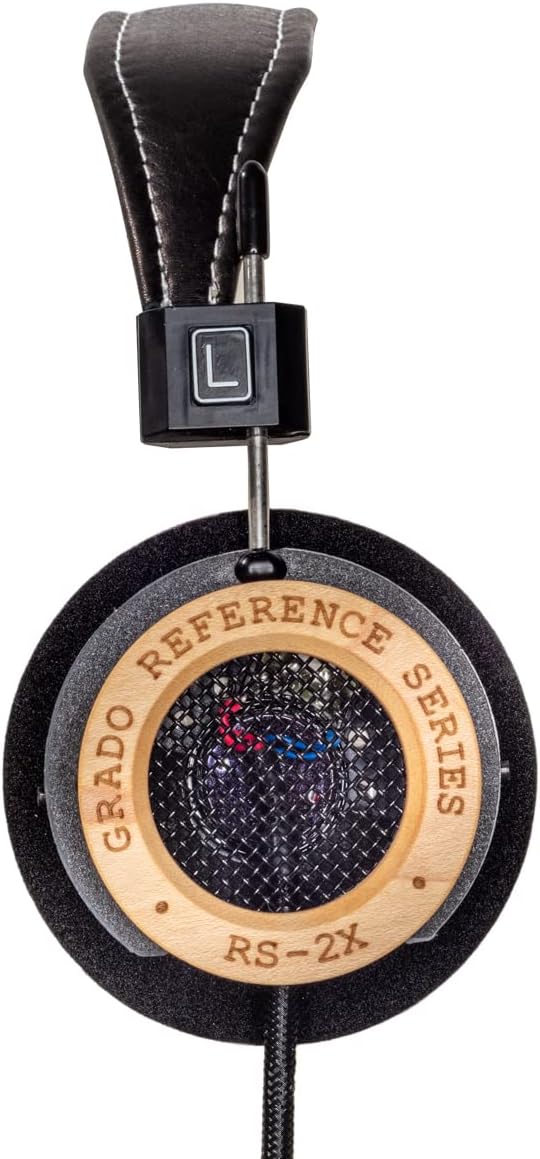
Figure 2: Close-up of the left earcup, showing the 'L' indicator on the headband adjustment.
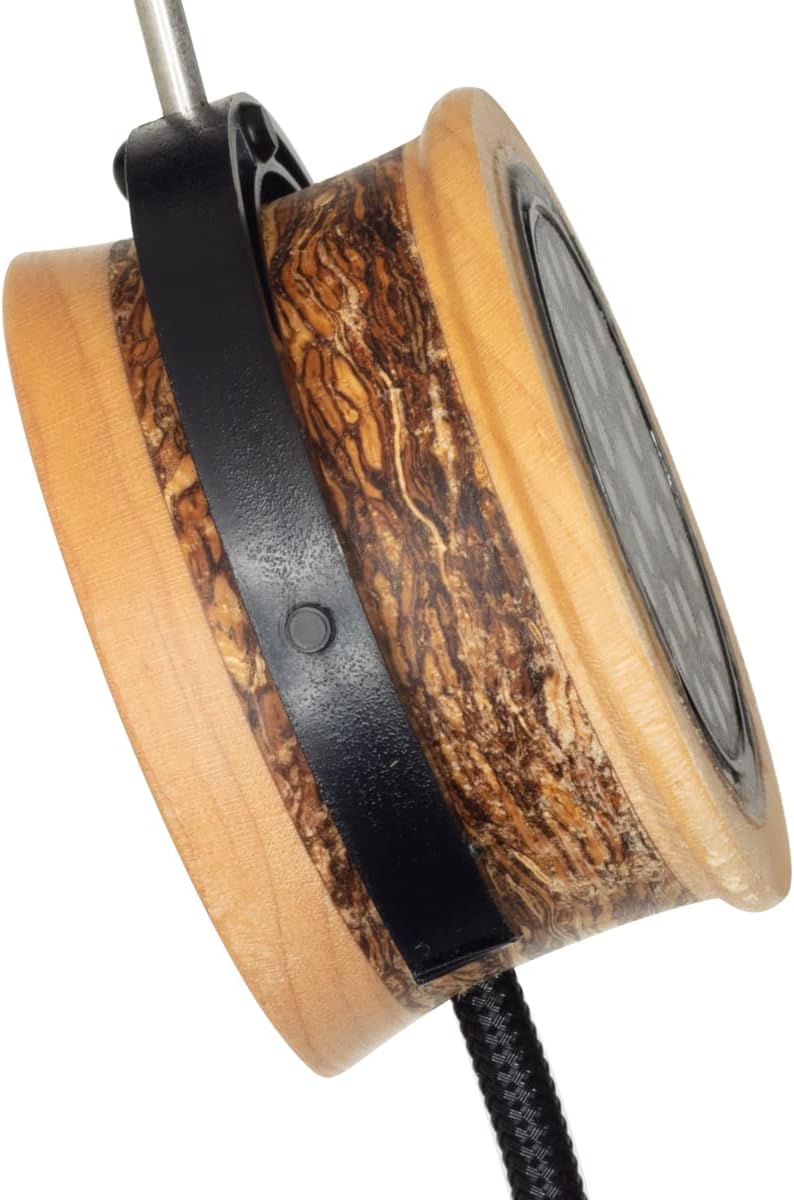
Figure 3: Close-up of the right earcup, showing the 'R' indicator on the headband adjustment.
හෙඩ්ෆෝන් පැළඳීම
- හෙඩ්බෑන්ඩ් එක සකසන්න: Gently slide the earcups up or down along the metal rods until the headband rests comfortably on the top of your head and the ear cushions sit evenly over your ears.
- Position the Earcups: Ensure the foam cushions fully cover your ears for optimal sound and comfort. The open-back design means some sound will naturally leak out, and external sounds may be audible.

රූපය 4: පැත්ත view of an earcup, illustrating the maple and hemp wood construction and the headband adjustment mechanism.
මෙහෙයුම් උපදෙස්
ශ්රව්ය නැවත ධාවනය
- Connect the headphones to your audio source as described in the Setup section.
- ඔබගේ සම්බන්ධිත උපාංගයේ ශ්රව්ය නැවත ධාවනය ආරම්භ කරන්න.
- Adjust the volume using the controls on your audio source. Begin with a low volume and gradually increase it to a comfortable listening level.
The GRADO RS2x headphones do not feature integrated media controls or a remote on the cable. All playback and volume adjustments are managed directly from your connected audio device.
රැකවරණය සහ නඩත්තුව
Proper care will help maintain the performance and appearance of your headphones.
- පිරිසිදු කිරීම: Use a soft, dry cloth to wipe the wood and leather surfaces. For the foam ear cushions, gently pat them with a slightly damp cloth if necessary, and allow them to air dry completely. Avoid using harsh chemicals or abrasive materials.
- කේබල් රැකවරණය: Avoid sharp bends or excessive pulling on the cable. Store the cable neatly when not in use.
- ගබඩා: Store your headphones in a clean, dry place away from direct sunlight and extreme temperatures.
- ජල ප්රතිරෝධය: මෙම හෙඩ්ෆෝන් වේ ජලයට ඔරොත්තු නොදේ.. Avoid exposure to moisture, rain, or liquids.
දෝෂගවේෂණය
If you encounter issues with your GRADO RS2x headphones, refer to the following common solutions:
- ශබ්දයක් නැත:
- Ensure the 3.5mm audio plug is fully inserted into the audio source.
- ඔබගේ ශ්රව්ය ප්රභවයේ ශබ්ද මට්ටම පරීක්ෂා කර එය නිහඬ කර නොමැති බවට වග බලා ගන්න.
- Test the headphones with a different audio source to rule out device issues.
- විකෘති හෝ දුර්වල ශබ්ද තත්ත්වය:
- Verify the audio cable connection is secure.
- Ensure the audio source's volume is not set too high, causing clipping or distortion.
- ශ්රව්ය උපකරණ තිබේදැයි පරීක්ෂා කරන්න file or streaming quality is sufficient.
- භාවිතය අතරතුර අපහසුතාව:
- Adjust the headband and earcup position to find a comfortable fit.
- දිගු සවන්දීමේ සැසිවලදී විවේක ගන්න.
If problems persist, contact GRADO customer support for further assistance.
තාක්ෂණික පිරිවිතර
| විශේෂාංගය | පිරිවිතර |
|---|---|
| මාදිලියේ නම | RS2x |
| සම්බන්ධතා තාක්ෂණය | රැහැන්ගත |
| හෙඩ්ෆෝන් ජැක් | 3.5 mm ජැක් |
| කන් ස්ථානගත කිරීම | කනට උඩින් |
| ආකෘති සාධකය | කනට උඩින් |
| ශ්රව්ය ධාවක වර්ගය | ගතික ධාවකය |
| ශ්රව්ය ධාවක ප්රමාණය | මිලිමීටර් 44 යි |
| සංඛ්යාත පරාසය | 14 - 28,000 හර්ට්ස් |
| සම්බාධනය | 38 ඕම් |
| ද්රව්ය | Wood (Maple & Hemp) |
| අයිතමයේ බර | අවුන්ස 14.4 කි |
| ජල ප්රතිරෝධක මට්ටම | ජලයට ඔරොත්තු නොදෙන |
වගකීම් සහ සහාය
GRADO products are known for their quality and craftsmanship. For specific warranty details, please refer to the documentation included with your purchase or visit the official GRADO webඅඩවිය.
If you require technical support, service, or have questions regarding your GRADO RS2x headphones, please contact GRADO customer service directly. Contact information can typically be found on the manufacturer's webඅඩවියේ හෝ ඔබේ නිෂ්පාදන ඇසුරුම්වල.