1. හැඳින්වීම
Thank you for choosing TREBLAB Z2 Hybrid Active Noise Cancelling Wireless Headphones. This manual provides essential information for setting up, operating, and maintaining your headphones to ensure optimal performance and longevity. Please read it carefully before use.
2. පෙට්ටියේ ඇති දේ
- TREBLAB Z2 Headphones
- TREBLAB Z2 Carrying Case
- 3.5mm ශ්රව්ය කේබලය (AUX)
- USB Type-C ආරෝපණ කේබලය
- User Manual; Quick Start Guide; Catalogue; Warranty card
3. නිෂ්පාදන අවසන්view
හෙඩ්ෆෝන් විශේෂාංග
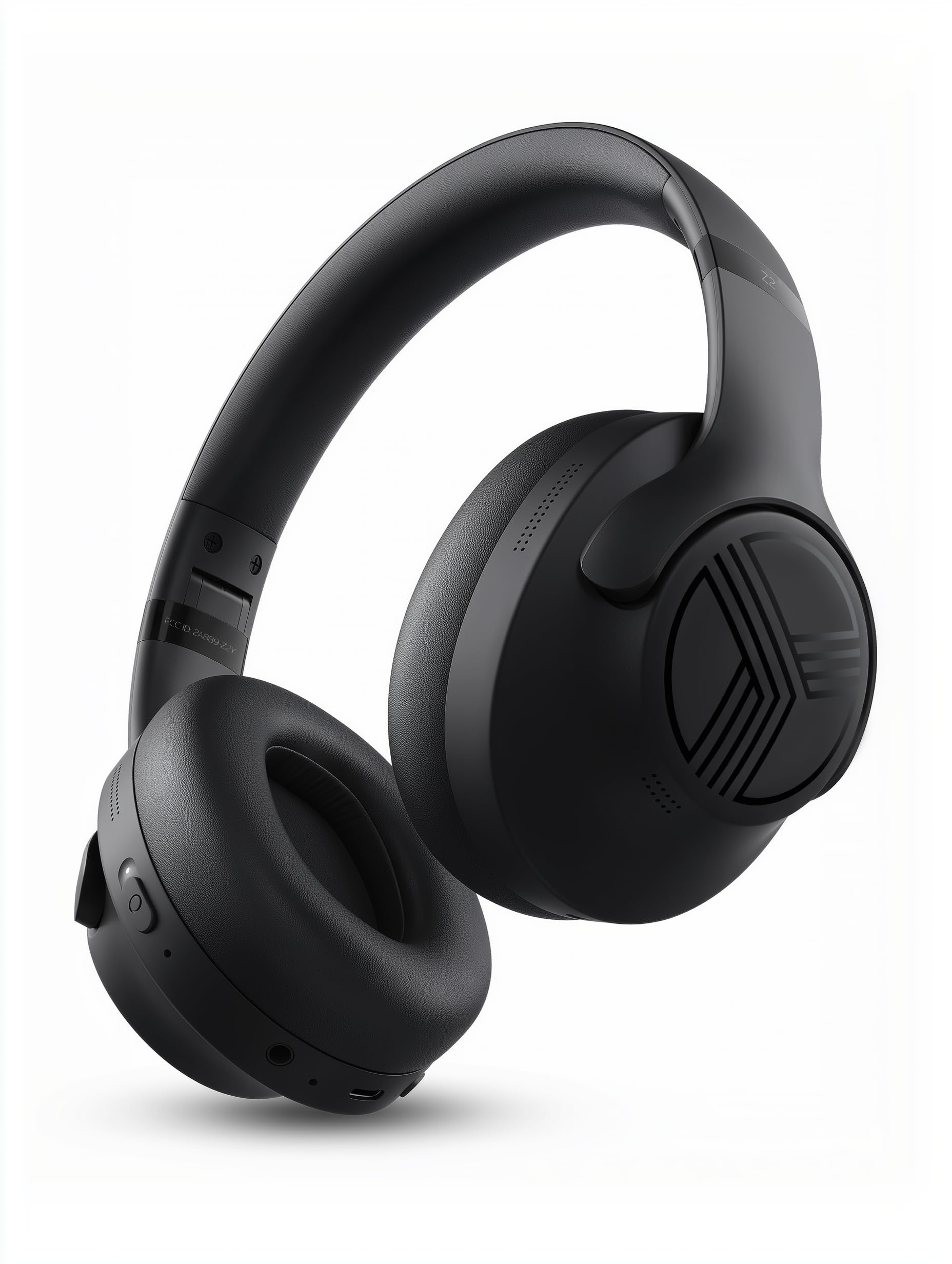
The TREBLAB Z2 headphones are designed for versatility and performance, featuring Hybrid Active Noise Cancelling (ANC) to minimize distractions, a long-lasting battery, and a comfortable, sweat-resistant design suitable for various activities.
- දෙමුහුන් ක්රියාකාරී ශබ්ද අවලංගු කිරීම: Blocks external noise for immersive audio.
- දිගු කළ ක්රීඩා කාලය: Up to 58 hours of battery life (without ANC, at 70% volume).
- ගැඹුරු බාස්: Powerful audio with balanced sound.
- IPX4 Water Resistant & Sweatproof: Durable for workouts and outdoor use.
- බ්ලූටූත් 5.3 සහ බහු ලක්ෂ්ය සම්බන්ධතාවය: Stable wireless connection to multiple devices.
- බිල්ට් මයික්රෆෝනය: Clear voice pickup for calls.
- නම්යශීලී නිර්මාණය: Lightweight and comfortable for extended wear and easy storage.
පාලන සහ වරාය
The headphones feature intuitive button controls for playback, volume, calls, and ANC activation. All controls and ports are conveniently located on the earcups.
- Power/Play/Pause/Phone Button: Central control for power, media playback, and call management.
- ශබ්දය වැඩි කිරීම/ඊළඟ ධාවන පථ බොත්තම: ශබ්දය සකසන්න හෝ ඊළඟ ගීතයට යන්න.
- ශබ්දය අඩු කිරීම/පෙර ධාවන පථ බොත්තම: ශබ්දය සකසන්න හෝ පෙර ගීතයට යන්න.
- ANC සක්රිය/අක්රිය ස්විචය: Activate or deactivate Active Noise Cancelling.
- Micro USB/USB Type-C Charging Port: හෙඩ්ෆෝන් ආරෝපණය කිරීම සඳහා.
- AUX Input (3.5mm Jack): රැහැන්ගත සම්බන්ධතාවය සඳහා.
- මයික්රෆෝනය: හෑන්ඩ්ස්-ෆ්රී ඇමතුම් සහ හඬ සහායක විධාන සඳහා.
- LED දර්ශකය: බලය, යුගල කිරීම සහ ආරෝපණ තත්ත්වය පෙන්වයි.
4. පිහිටුවීම
4.1 හෙඩ්ෆෝන් ආරෝපණය කිරීම
Before first use, fully charge your TREBLAB Z2 headphones. A full charge takes approximately 3 hours.
- Connect the USB Type-C charging cable to the charging port on the headphone.
- කේබලයේ අනෙක් කෙළවර අනුකූල USB බල ප්රභවයකට සම්බන්ධ කරන්න (උදා: බිත්ති ඇඩැප්ටරය, පරිගණක USB පෝට් එක).
- The LED indicator will show red during charging and turn off when fully charged.
4.2 බ්ලූටූත් යුගල කිරීම
බ්ලූටූත් හරහා ඔබගේ හෙඩ්ෆෝන් උපාංගයකට සම්බන්ධ කිරීමට:
- හෙඩ්ෆෝන් ආරෝපණය කර ක්රියා විරහිත කර ඇති බවට සහතික වන්න.
- Press and hold the Power/Play/Pause button for a few seconds until the LED indicator flashes blue and red, indicating pairing mode.
- ඔබගේ උපාංගයේ (ස්මාර්ට්ෆෝන්, ටැබ්ලටය, පරිගණකය), බ්ලූටූත් සක්රීය කර පවතින උපාංග සොයන්න.
- Select "TREBLAB Z2" from the list of found devices.
- සාර්ථකව යුගල කළ පසු, LED දර්ශකය නිල් පැහැයෙන් සෙමින් දැල්වෙනු ඇති අතර, ඔබට තහවුරු කිරීමේ ස්වරයක් ඇසෙනු ඇත.
For multipoint connection, pair the first device, then disable Bluetooth on the first device. Put the headphones back into pairing mode and connect to the second device. Once connected, re-enable Bluetooth on the first device, and the headphones should connect to both.
5. මෙහෙයුම් උපදෙස්
5.1 බලය සක්රිය / අක්රිය
- බල ගැන්වීම: Press and hold the Power/Play/Pause button for 3 seconds.
- විදුලිය විසන්ධි කිරීම: Press and hold the Power/Play/Pause button for 5 seconds.
5.2 සංගීත වාදනය
- වාදනය/විරාමය: Power/Play/Pause බොත්තම කෙටියෙන් ඔබන්න.
- ඊළඟ ධාවන පථය: Long press the Volume Up/Next Track button.
- පෙර ධාවන පථය: Long press the Volume Down/Previous Track button.
- පරිමාව: Short press the Volume Up/Next Track button.
- ශබ්දය පහළට: Short press the Volume Down/Previous Track button.
5.3 ඇමතුම් කළමනාකරණය
- පිළිතුරු ඇමතුම: Power/Play/Pause බොත්තම කෙටියෙන් ඔබන්න.
- ඇමතුම අවසන් කරන්න: ඇමතුමක් අතරතුර Power/Play/Pause බොත්තම කෙටියෙන් ඔබන්න.
- ඇමතුම ප්රතික්ෂේප කරන්න: Long press the Power/Play/Pause button for 2 seconds.
- නැවත අමතන්න: Double-press the Power/Play/Pause button.
5.4 ක්රියාකාරී ශබ්ද අවලංගු කිරීම (ANC)
To activate ANC, slide the ANC switch on the left earcup to the 'ON' position. The LED indicator will light up. Slide to 'OFF' to deactivate.
5.5 හ oice සහකාර
Activate your device's voice assistant (Siri, Google Assistant, Alexa) by pressing the Power/Play/Pause button for 1 second.
6. නඩත්තු කිරීම
- Clean headphones with a soft, damp රෙදි. දරුණු රසායනික ද්රව්ය භාවිතා නොකරන්න.
- Store headphones in the provided carrying case when not in use to protect them from dust and damage.
- Avoid exposing headphones to extreme temperatures, direct sunlight, or excessive moisture.
- හෙඩ්ෆෝන් විසුරුවා හැරීමට හෝ වෙනස් කිරීමට උත්සාහ නොකරන්න, මෙය වගකීම් සහතිකය අවලංගු කරයි.
7. දෝශ නිරාකරණය
| ගැටලුව | විසඳුම |
|---|---|
| හෙඩ්ෆෝන් ක්රියාත්මක නොවේ | හෙඩ්ෆෝන් සම්පූර්ණයෙන්ම ආරෝපණය වී ඇති බවට වග බලා ගන්න. |
| බ්ලූටූත් හරහා යුගල කළ නොහැක. | Ensure headphones are in pairing mode (flashing blue/red LED). Turn off and on Bluetooth on your device. Clear previous pairings on your device. |
| ශබ්දය හෝ අඩු පරිමාවක් නොමැත | Check volume levels on both headphones and connected device. Ensure headphones are properly paired. Try a wired connection with the AUX cable. |
| ANC ඵලදායී ලෙස ක්රියා නොකරයි | Ensure ANC switch is in the 'ON' position. Check for proper fit of earcups over ears. |
8. පිරිවිතර
| විශේෂාංගය | විස්තර |
|---|---|
| මාදිලියේ නම | Z2 |
| ශබ්ද පාලනය | දෙමුහුන් ක්රියාකාරී ශබ්ද අවලංගු කිරීම |
| බ්ලූටූත් අනුවාදය | 5.3 |
| බ්ලූටූත් පරාසය | අඩි 33 (මීටර් 10) |
| බැටරි ආයු කාලය (උපරිම) | Up to 58 hours (No ANC, 70% volume) |
| බැටරි ආයු කාලය (ANC ක්රියාත්මකයි) | Up to 51 hours (ANC + Wireless, 70% volume) |
| ආරෝපණ කාලය | පැය 3 යි |
| ශ්රව්ය ධාවක ප්රමාණය | මිලිමීටර් 40 යි |
| සංඛ්යාත ප්රතිචාරය | 20 හර්ට්ස් - 20 කිලෝහර්ට්ස් |
| සංවේදීතාව | 103 dB |
| සම්බාධනය | 32 ඕම් |
| ජල ප්රතිරෝධක මට්ටම | IPX4 (ජලයට ඔරොත්තු දෙන සහ දහඩිය ආරක්ෂිත) |
| අයිතමයේ බර | අවුන්ස 8.5 කි |
| මානයන් | අඟල් 6.4 x 3.2 x 8 |
9. වගකීම් සහ සහාය
Your TREBLAB Z2 headphones are covered by a 1-YEAR WARRANTY & 30-DAY RETURNS. For any questions, suggestions, or issues, please refer to the warranty card included in the box or contact TREBLAB customer support.
10. මාධ්ය ගැලරිය
නිෂ්පාදන රූප