
හැඳින්වීම
Thank you for choosing the Kaidi KD903 Wireless Bluetooth Earphones. This manual provides essential information for the safe and optimal use of your device. Please read it carefully before use and retain it for future reference.
කොටුවේ ඇති දේ:
- 1 x Kaidi KD903 Wireless Earphones
- 2 x Pairs of Comfortable Ear Tips (different sizes)
- 1 x USB ආරෝපණ කේබලය
- 1 x පරිශීලක අත්පොත

Image: Kaidi KD903 Wireless Earphones with included accessories, such as the charging cable and additional ear tips.
නිෂ්පාදනය අවසන්view
The Kaidi KD903 earphones are designed for active lifestyles, offering a secure fit and resistance to sweat. They feature Bluetooth 4.1 for stable connectivity and clear audio.
ප්රධාන ලක්ෂණ:
- බ්ලූටූත් 4.1: ස්ථාවර සහ කාර්යක්ෂම රැහැන් රහිත සම්බන්ධතාවයක් සහතික කරයි.
- දහඩිය ප්රතිරෝධය: Ideal for sports and workouts.
- CVC Intelligent Noise Reduction: Minimizes wind noise for clearer calls.
- බහු ලක්ෂ්ය සම්බන්ධතාවය: Connects to two devices simultaneously.
- හ oice මතක් කිරීම: Provides audio prompts for status updates.
- IOS Power Display: Shows battery level on iOS devices.
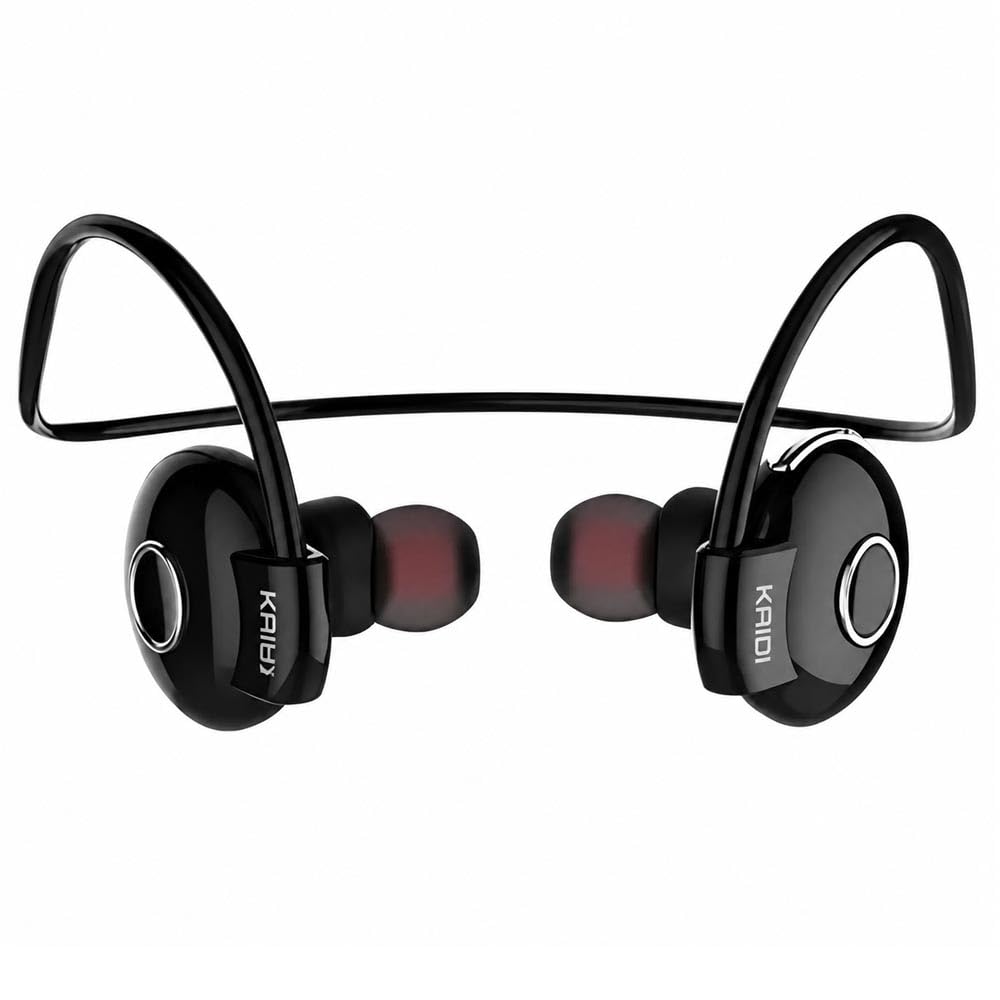
රූපය: පුපුරා ගිය එකක් view illustrating the internal components and design of the Kaidi KD903 earphone.
සැලසුම
1. ඉයර්ෆෝන් ආරෝපණය කිරීම
- Connect the USB charging cable to the charging port on the earphones.
- USB කේබලයේ අනෙක් කෙළවර අනුකූල USB බල ප්රභවයකට (උදා: පරිගණකය, බිත්ති ඇඩැප්ටරය) සම්බන්ධ කරන්න.
- The indicator light will illuminate to show charging status. A full charge typically takes approximately 2.5 hours.
- සම්පූර්ණයෙන්ම ආරෝපණය වූ පසු, දර්ශක ආලෝකය වෙනස් වේ හෝ නිවී යයි. ආරෝපණ කේබලය විසන්ධි කරන්න.
2. බ්ලූටූත් උපාංගයක් සමඟ යුගල කිරීම
- ඉයර්ෆෝන් ක්රියා විරහිත කර ඇති බවට වග බලා ගන්න.
- Press and hold the multi-function button (usually the main button on the earphone) for approximately 5-7 seconds until the indicator light flashes red and blue alternately. This indicates the earphones are in pairing mode.
- ඔබගේ ස්මාර්ට් ජංගම දුරකතනයේ හෝ වෙනත් බ්ලූටූත් සක්රීය උපාංගයක, බ්ලූටූත් සක්රීය කර පවතින උපාංග සොයන්න.
- Select 'KD903' from the list of found devices.
- Once connected, a voice prompt will confirm successful pairing, and the indicator light will typically flash blue slowly.

Image: A person wearing the Kaidi KD903 wireless earphones, highlighting their suitability for sports and active use.
මෙහෙයුම් උපදෙස්
බලය සක්රිය / අක්රිය
- බල ගැන්වීම: Press and hold the multi-function button for approximately 3 seconds until the blue indicator light flashes and a voice prompt says "Power On".
- විදුලිය විසන්ධි කිරීම: Press and hold the multi-function button for approximately 3 seconds until the red indicator light flashes and a voice prompt says "Power Off".
සංගීත වාදනය
- වාදනය/විරාමය: බහුකාර්ය බොත්තම එක් වරක් ඔබන්න.
- ඊළඟ ධාවන පථය: Volume + බොත්තම ඔබා අල්ලාගෙන සිටින්න.
- පෙර ධාවන පථය: වෙළුම් බොත්තම ඔබා අල්ලාගෙන සිටින්න.
- පරිමාව: Volume + බොත්තම කෙටියෙන් ඔබන්න.
- ශබ්දය පහළට: වෙළුම් බොත්තම කෙටියෙන් ඔබන්න.
ඇමතුම් කළමනාකරණය
- පිළිතුර/අවසන් ඇමතුම: බහුකාර්ය බොත්තම එක් වරක් ඔබන්න.
- ඇමතුම ප්රතික්ෂේප කරන්න: බහුකාර්ය බොත්තම ඔබාගෙන තත්පර 2ක් පමණ අල්ලාගෙන සිටින්න.
- අවසාන අංකය නැවත අමතන්න: බහුකාර්ය බොත්තම දෙවරක් ඔබන්න.
Multipoint Connection (Connecting to Two Devices)
- Pair the earphones with the first device as described in the "Pairing" section.
- After successful pairing, disable Bluetooth on the first device.
- Put the earphones back into pairing mode (red and blue flashing light).
- Pair the earphones with the second device.
- Once the second device is paired, re-enable Bluetooth on the first device. The earphones should now be connected to both devices simultaneously.
නඩත්තු කිරීම
Proper maintenance ensures the longevity and performance of your Kaidi KD903 earphones.
- පිරිසිදු කිරීම: Regularly clean the earphones with a soft, dry, lint-free cloth. Do not use abrasive cleaners, solvents, or harsh chemicals.
- දහඩිය ප්රතිරෝධය: While the earphones are sweat-resistant, avoid submerging them in water or exposing them to heavy rain. After intense workouts, wipe them dry.
- ගබඩා: භාවිතයේ නොමැති විට, ඉයර්ෆෝන් සෘජු හිරු එළියෙන් සහ අධික උෂ්ණත්වයන්ගෙන් ඈත්ව සිසිල් වියළි ස්ථානයක ගබඩා කරන්න.
- අයකිරීම: Charge the earphones using only the provided USB cable or a certified equivalent. Avoid overcharging.
දෝෂගවේෂණය
ඔබේ ඉයර්ෆෝන් සමඟ ගැටලු ඇති වුවහොත්, පහත පොදු ගැටලු සහ විසඳුම් වෙත යොමු වන්න:
- Earphones do not power on:
Ensure the earphones are fully charged. Connect them to a power source and allow them to charge for at least 30 minutes before attempting to power on again. - ශබ්දයක් නැත හෝ අඩු පරිමාවක්:
Check the volume levels on both the earphones and your connected device. Ensure the earphones are properly paired and connected to your device. Try re-pairing the earphones. - උපාංගයක් සමඟ යුගල කළ නොහැක:
Ensure the earphones are in pairing mode (red and blue indicator light flashing). Make sure Bluetooth is enabled on your device and it is within the 8-meter transmission range. Try restarting both the earphones and your device. - Connection is unstable or drops frequently:
Ensure there are no obstacles between the earphones and your device. Move closer to your device. Avoid environments with strong Wi-Fi or other wireless interference. - අයකිරීමේ ගැටලුව:
Verify that the charging cable is securely connected to both the earphones and the power source. Try using a different USB port or charging adapter.
පිරිවිතර
| විශේෂාංගය | පිරිවිතර |
|---|---|
| බ්ලූටූත් අනුවාදය | 4.1 |
| Profile සහාය | HSP/HFP/A2DP/AVRCP |
| පොරොත්තු කාලය | පැය 200 යි |
| කතා කාලය | පැය 10 යි |
| සංගීත ධාවන කාලය | පැය 6 යි |
| ආරෝපණ කාලය | පැය 2.5 යි |
| සංඛ්යාත පරාසය | RF 2.40 GHz (2.402 G – 2.480 G) |
| පරිසර උෂ්ණත්වය | -20 ° C සිට +60 ° C |
| සම්ප්රේෂණ දුර | මීටර් 8 දක්වා |
| බැටරි ධාරිතාව | 100mAh නැවත ආරෝපණය කළ හැකිය |
| මානයන් (L x W x H) | 12.2 x 10.3 x 4.4 සෙ.මී |
| සම්බන්ධක වර්ගය | USB Type-C |
| වර්ණය | කළු |
වගකීම් සහ සහාය
වගකීම් තොරතුරු
This Kaidi KD903 product comes with a දින 30 වගකීමක් from the date of purchase. This warranty covers manufacturing defects. Please retain your proof of purchase (receipt or invoice) as it is required for any warranty claims.
අනිසි භාවිතය, අනතුරු, අනවසර වෙනස් කිරීම් හෝ සාමාන්ය ඇඳීම් සහ ඉරීම් නිසා සිදුවන හානිය වගකීම් සහතිකය මගින් ආවරණය නොවේ.
පාරිභෝගික සහාය
For technical assistance, troubleshooting not covered in this manual, or warranty inquiries, please contact the retailer from whom you purchased the product. You may also visit the official Kaidi webඅමතර ආධාරක සම්පත් සඳහා අඩවිය.