

හැඳින්වීම
Thank you for choosing the XO B24 Foldable Bluetooth Headphones. This manual provides essential information for the safe and efficient use of your device. Please read it carefully before use and retain it for future reference.
The XO B24 headphones are designed for comfort and portability, featuring high-quality materials and a secure fit for an optimal audio experience.
නිෂ්පාදනය අවසන්view
The XO B24 headphones offer both wired and wireless connectivity, a built-in microphone for calls, and a foldable design for easy storage and transport.
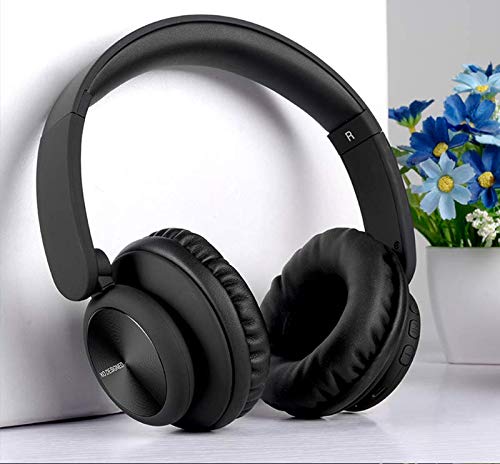
Image: XO B24 Foldable Bluetooth Headphones, showcasing their over-ear design and black color.
පිරිවිතර
| විශේෂාංගය | විස්තරය |
|---|---|
| වෙළඳ නාමය | XO |
| මාදිලියේ නම | B24 |
| ආදර්ශ අංකය | XO-B24 |
| වර්ණය | කළු |
| හෙඩ්ෆෝන් ආකෘති සාධකය | ඔන්-කන් |
| සම්බන්ධතා තාක්ෂණය | රැහැන්ගත, රැහැන් රහිත (බ්ලූටූත්) |
| හෙඩ්ෆෝන් ජැක් | 3.5 mm ජැක් |
| රැහැන් රහිත සන්නිවේදන තාක්ෂණය | බ්ලූටූත් |
| විශේෂ ලක්ෂණ | Includes Microphone, Foldable Design |
| මයික්රෆෝනය | ඔව් |
| ශබ්දය අවලංගු කිරීම | නැත |
| පාලන වර්ගය | Volume Control, Touch Control |
| ගැළපෙන උපාංග | බහු-උපාංගය |
| බැටරි අවශ්යයි | ඔව් |
සැලසුම
1. හෙඩ්ෆෝන් ආරෝපණය කිරීම
- සපයා ඇති USB ආරෝපණ කේබලය හෙඩ්ෆෝන්වල ආරෝපණ වරායට සම්බන්ධ කරන්න.
- USB කේබලයේ අනෙක් කෙළවර අනුකූල USB බල ප්රභවයකට (උදා: පරිගණකය, බිත්ති ඇඩැප්ටරය) සම්බන්ධ කරන්න.
- The LED indicator will illuminate during charging and turn off or change color once fully charged.
2. බ්ලූටූත් යුගලනය
- හෙඩ්ෆෝන් සම්පූර්ණයෙන්ම ආරෝපණය වී ඇති බවට වග බලා ගන්න.
- Press and hold the Power button on the headphones until the LED indicator flashes rapidly, indicating pairing mode.
- ඔබගේ උපාංගයේ (ස්මාර්ට්ෆෝන්, ටැබ්ලටය, පරිගණකය), බ්ලූටූත් සක්රීය කර පවතින උපාංග සොයන්න.
- Select "XO B24" from the list of found devices.
- Once paired, the LED indicator will stop flashing and may show a solid light or flash slowly.
3. රැහැන්ගත සම්බන්ධතාවය (විකල්ප)
- Insert one end of the 3.5mm audio cable into the headphone jack on the XO B24.
- Plug the other end of the 3.5mm audio cable into the audio output jack of your device.
- The headphones will operate in wired mode, conserving battery life.
මෙහෙයුම් උපදෙස්
බලය සක්රිය / අක්රිය
- බල ගැන්වීම: LED දර්ශකය දැල්වෙන තුරු බල බොත්තම තත්පර 3ක් පමණ ඔබාගෙන සිටින්න.
- විදුලිය විසන්ධි කිරීම: LED දර්ශකය ක්රියා විරහිත වන තෙක් බල බොත්තම තත්පර 3-5ක් පමණ ඔබාගෙන සිටින්න.
සංගීත වාදනය
- වාදනය/විරාමය: බහුකාර්ය බොත්තම (බොහෝ විට බල බොත්තම) එක් වරක් ඔබන්න.
- ඊළඟ ධාවන පථය: Press and hold the Volume Up button or a dedicated 'Next' button.
- පෙර ධාවන පථය: Press and hold the Volume Down button or a dedicated 'Previous' button.
පරිමාව පාලනය
- පරිමාව වැඩි කරන්න: ශබ්දය වැඩි කිරීමේ බොත්තම ඔබන්න.
- ශබ්දය අඩු කරන්න: ශබ්දය අඩු කිරීමේ බොත්තම ඔබන්න.
ඇමතුම් කළමනාකරණය
- පිළිතුර/අවසන් ඇමතුම: බහු ක්රියාකාරී බොත්තම වරක් ඔබන්න.
- ඇමතුම ප්රතික්ෂේප කරන්න: බහුකාර්ය බොත්තම ඔබාගෙන තත්පර 2ක් පමණ අල්ලාගෙන සිටින්න.
Folding Mechanism
- To fold the headphones for storage, gently rotate the earcups inwards towards the headband until they are compact.
- To unfold, reverse the process, ensuring the earcups click securely into place.
නඩත්තු කිරීම
- පිරිසිදු කිරීම: හෙඩ්ෆෝන් පිරිසිදු කිරීම සඳහා මෘදු වියළි රෙද්දක් භාවිතා කරන්න. උල්ෙල්ඛ පිරිසිදු කරන්නන් හෝ ද්රාවක භාවිතා නොකරන්න.
- ගබඩා: When not in use, store the headphones in a cool, dry place, away from direct sunlight and extreme temperatures. Utilize the foldable design for compact storage.
- බැටරි සත්කාර: බැටරි ආයු කාලය දීර්ඝ කිරීම සඳහා, හෙඩ්ෆෝන් නිතර නිතර සම්පූර්ණයෙන්ම විසර්ජනය කිරීමෙන් වළකින්න. නිරන්තරයෙන් භාවිතයේ නොමැති වුවද, ඒවා නිතිපතා ආරෝපණය කරන්න.
- තෙතමනය වළක්වා ගන්න: හෙඩ්ෆෝන් ජලයෙන් සහ අධික ආර්ද්රතාවයෙන් ඈත් කර තබන්න.
දෝෂගවේෂණය
| ගැටලුව | විසඳුම |
|---|---|
| හෙඩ්ෆෝන් ක්රියාත්මක නොවේ. | හෙඩ්ෆෝන් සම්පූර්ණයෙන්ම ආරෝපණය වී ඇති බව සහතික කර ගන්න. බල ප්රභවයකට සම්බන්ධ කර නැවත උත්සාහ කරන්න. |
| බ්ලූටූත් හරහා යුගල කළ නොහැක. | Make sure the headphones are in pairing mode (LED flashing rapidly). Disable and re-enable Bluetooth on your device. Move closer to the headphones. |
| ශබ්දයක් නැත හෝ අඩු පරිමාවක් නැත. | Check the volume levels on both the headphones and your connected device. Ensure the headphones are properly paired or the 3.5mm cable is securely connected. |
| ශබ්දයේ ගුණාත්මක භාවය දුර්වලයි. | Ensure there are no obstructions between the headphones and your device. Try moving closer to your device. Disconnect and reconnect the Bluetooth connection. |
| මයික්රෆෝනය ක්රියා නොකරයි. | Ensure the headphones are properly connected and selected as the audio input device on your system. Check if the microphone is muted on your device. |
වගකීම් සහ සහාය
The XO B24 Foldable Bluetooth Headphones come with a standard manufacturer's warranty. Please refer to the warranty card included in your product packaging for specific terms and conditions.
For technical support, troubleshooting assistance, or warranty claims, please contact your retailer or the official XO customer service. Contact information can typically be found on the product packaging or the manufacturer's webඅඩවිය.