
හැඳින්වීම
Thank you for choosing the SXFJF L350 Bluetooth Over-Ear Wireless Headphones. This manual provides essential information for the safe and efficient use of your headphones. Please read it carefully before use and retain it for future reference.
නිෂ්පාදනය අවසන්view
The SXFJF L350 headphones are designed for comfort and high-fidelity audio, featuring active noise cancellation, deep bass, and a built-in microphone for hands-free communication. Their foldable design enhances portability.
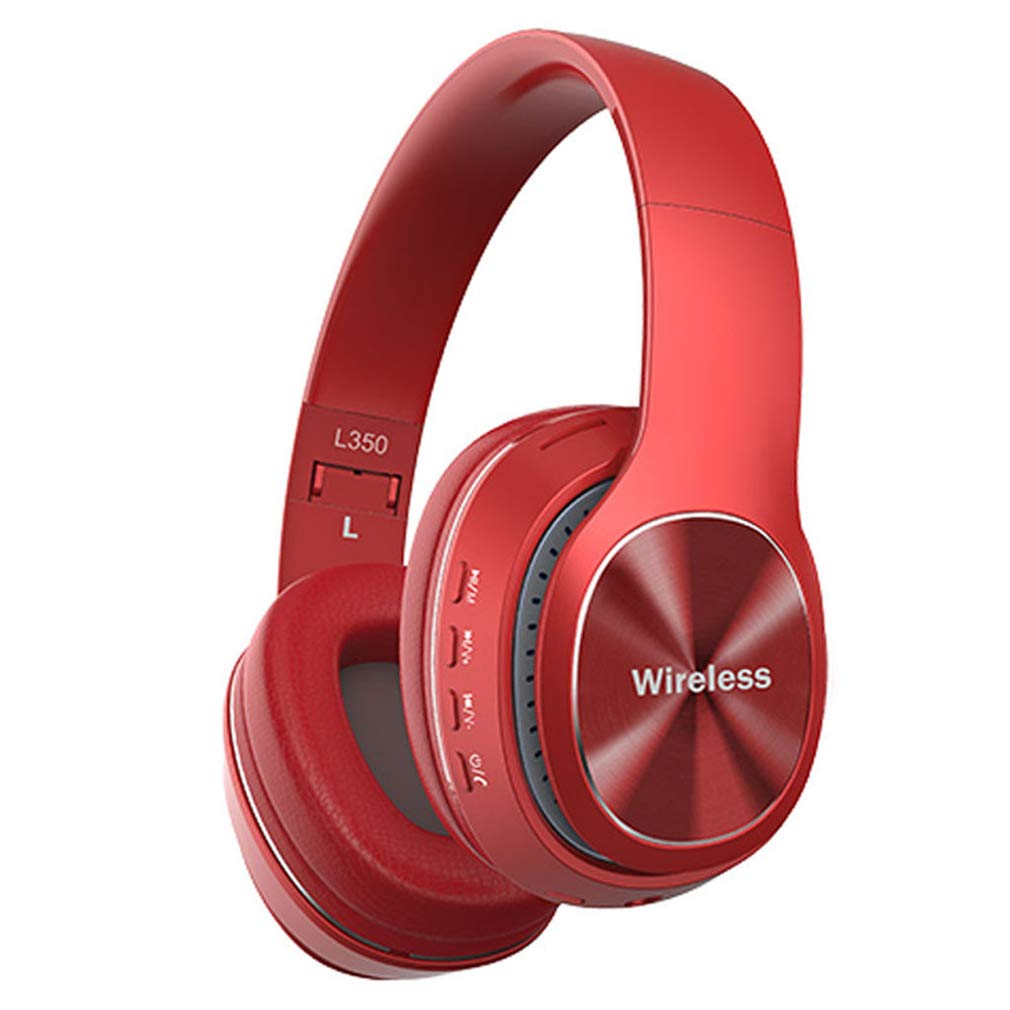
Image: SXFJF L350 Red Bluetooth Over-Ear Wireless Headphones. This image displays the red variant of the L350 headphones, highlighting the over-ear design, control buttons on the earcup, and the 'Wireless' branding.
ප්රධාන ලක්ෂණ:
- Active Noise Cancelling Function
- Premium Audio with Deep Bass
- 40mm Horn Drivers
- 105dB Sensitivity and 100dB Signal-to-Noise Ratio
- Foldable Structure for Portability
- Soft Memory-Protein Earmuffs for Comfort
- Ergonomic Fit
- Bluetooth 5.0 Connectivity with 15-meter working range
- 8-10 Hours Music Playback Time
- පැය 1300 පොරොත්තු කාලය
- Built-in Microphone for Hands-Free Calls
- 3.5mm Stereo Interface for Wired Connection
සැලසුම
1. හෙඩ්ෆෝන් ආරෝපණය කිරීම
Before first use, fully charge your headphones. Use the provided USB charging cable.
- Connect the Micro USB end of the charging cable to the charging port on the headphone earcup.
- Connect the USB-A end to a 5V USB power source (e.g., computer USB port, wall adapter).
- ආරෝපණය කිරීමේදී LED දර්ශකය දැල්වෙන අතර සම්පූර්ණයෙන්ම ආරෝපණය වූ විට වර්ණය වෙනස් වේ හෝ නිවා දමයි.
2. බ්ලූටූත් යුගලනය
ඔබගේ හෙඩ්ෆෝන් බ්ලූටූත් සක්රීය උපාංගයක් සමඟ යුගල කිරීමට මෙම පියවර අනුගමනය කරන්න:
- හෙඩ්ෆෝන් ක්රියා විරහිත කර ඇති බවට සහතික වන්න.
- Press and hold the Power button until the LED indicator flashes red and blue alternately, indicating pairing mode.
- ඔබගේ උපාංගයේ (ස්මාර්ට්ෆෝන්, ටැබ්ලටය, පරිගණකය), බ්ලූටූත් සක්රීය කර පවතින උපාංග සොයන්න.
- Select "L350" or "SXFJF Headphones" from the list of found devices.
- Once paired, the LED indicator will typically show a solid blue light or flash blue slowly.
- මුරපදයක් ඉල්ලා සිටියහොත්, "0000" ඇතුළත් කරන්න.
3. රැහැන්ගත සම්බන්ධතාවය (විකල්ප)
For devices without Bluetooth or when the battery is depleted, you can use the 3.5mm audio cable:
- 3.5mm ශ්රව්ය කේබලයේ එක් කෙළවරක් හෙඩ්ෆෝන්වල ඇති ශ්රව්ය ආදාන ජැක් එකට සම්බන්ධ කරන්න.
- Connect the other end to the 3.5mm audio output jack on your device.
- The headphones will function as wired headphones, and Bluetooth features will be disabled.
Video: SXFJF Bluetooth Over-Ear Wireless Headphones. This video provides a visual overview of the headphones, demonstrating their design, features, and various color options. It highlights the active noise cancellation, deep bass, and comfortable fit.
මෙහෙයුම් උපදෙස්
බලය සක්රිය / අක්රිය
- බල ගැන්වීම: LED දර්ශකය දැල්වෙන තුරු බල බොත්තම තත්පර 3ක් පමණ ඔබාගෙන සිටින්න.
- විදුලිය විසන්ධි කිරීම: LED දර්ශකය ක්රියා විරහිත වන තෙක් බල බොත්තම තත්පර 3ක් පමණ ඔබාගෙන සිටින්න.
සංගීත වාදනය
- වාදනය/විරාමය: Play/Pause බොත්තම වරක් ඔබන්න.
- ඊළඟ ධාවන පථය: Volume Up (+) බොත්තම ඔබා අල්ලාගෙන සිටින්න.
- පෙර ධාවන පථය: ශබ්දය අඩු කිරීමේ (-) බොත්තම ඔබා අල්ලාගෙන සිටින්න.
ඇමතුම් කළමනාකරණය
- පිළිතුර/අවසන් ඇමතුම: Play/Pause බොත්තම වරක් ඔබන්න.
- ඇමතුම ප්රතික්ෂේප කරන්න: තත්පර 2ක් සඳහා Play/Pause බොත්තම ඔබාගෙන සිටින්න.
- අවසාන අංකය නැවත අමතන්න: Play/Pause බොත්තම දෙවරක් ඔබන්න.
පරිමාව පාලනය
- පරිමාව වැඩි කරන්න: ශබ්දය වැඩි කිරීමේ (+) බොත්තම ඔබන්න.
- ශබ්දය අඩු කරන්න: ශබ්දය අඩු කිරීමේ (-) බොත්තම ඔබන්න.
නඩත්තු කිරීම
නිසි නඩත්තුව ඔබේ හෙඩ්ෆෝන් වල ආයු කාලය සහ ක්රියාකාරිත්වය සහතික කරයි:
- පිරිසිදු කිරීම: හෙඩ්ෆෝන් පිරිසිදු කිරීම සඳහා මෘදු වියළි රෙද්දක් භාවිතා කරන්න. උල්ෙල්ඛ පිරිසිදු කරන්නන් හෝ ද්රාවක භාවිතා නොකරන්න.
- ගබඩා: When not in use, store the headphones in a cool, dry place, away from direct sunlight and extreme temperatures. Utilize the foldable design for compact storage.
- ජලයෙන් වළකින්න: මෙම හෙඩ්ෆෝන් ජල ආරක්ෂිත නොවේ. ජලයට නිරාවරණය වීමෙන් හෝ අධික තෙතමනයෙන් වළකින්න.
- පරිස්සමින් හැසිරවීම: හෙඩ්ෆෝන් අතහරින්න, විසුරුවා හරින්න හෝ වෙනස් කරන්න එපා.
දෝෂගවේෂණය
ඔබේ හෙඩ්ෆෝන් සමඟ ගැටලු ඇති වුවහොත්, පහත පොදු ගැටලු සහ විසඳුම් වෙත යොමු වන්න:
| ගැටලුව | විසඳුම |
|---|---|
| හෙඩ්ෆෝන් ක්රියාත්මක නොවේ. | හෙඩ්ෆෝන් සම්පූර්ණයෙන්ම ආරෝපණය වී ඇති බව සහතික කර ගන්න. බල ප්රභවයකට සම්බන්ධ කර නැවත උත්සාහ කරන්න. |
| උපාංගය සමඟ යුගල කළ නොහැක. | Ensure headphones are in pairing mode (LED flashing red/blue). Turn off and on Bluetooth on your device. Move closer to the device. |
| ශබ්දයක් නැත හෝ අඩු පරිමාවක් නැත. | Check volume levels on both headphones and your device. Ensure headphones are properly paired or connected via audio cable. |
| දුර්වල ශබ්ද ගුණාත්මකභාවය. | Ensure there are no obstructions between the headphones and your device. Avoid interference from other wireless devices. Try a wired connection. |
| මයික්රෆෝනය ක්රියා නොකරයි. | Ensure the headphones are properly connected and selected as the input device on your phone/computer. |
පිරිවිතර
Technical specifications for the SXFJF L350 Bluetooth Over-Ear Wireless Headphones:
| විශේෂාංගය | විස්තර |
|---|---|
| බ්ලූටූත් අනුවාදය | බ්ලූටූත් 5.0 |
| වැඩ කරන පරාසය | මීටර් 15 දක්වා |
| සංගීත කාලය | පැය 8-10 |
| පොරොත්තු කාලය | පැය 1300 යි |
| බැටරි ධාරිතාව | 200 mAh |
| ආරෝපණ වෙළුමtage | 5V |
| ආරෝපණ ධාරාව | ඒ |
| ආරෝපණ අතුරුමුහුණත | මයික්රෝ USB |
| ප්ලග් වර්ගය | 3.5mm Stereo Interface |
| අං පිරිවිතර | 40 මි.මී |
| බලය පැටවීම | 50mW |
| සැපයුම් වෙළුමtage | 3.3-4.2V |
| SNR (සංඥා-ශබ්ද අනුපාතය) | 100dB |
| සංවේදීතාව | 105dB |
| වැඩ කරන ධාරාව | 30mA |
| සංඛ්යාත පරාසය | 24GHz-2480GHz |
වගකීම් සහ සහාය
For warranty information, product support, or any issues not covered in this manual, please refer to the product detail page on Amazon or contact SXFJF customer service directly. Contact details are typically available on the product packaging or the seller's Amazon storefront.