
හැඳින්වීම
Thank you for choosing the T'nB Feat True Wireless Bluetooth Earbuds. This manual provides essential information for the proper setup, operation, and maintenance of your device. Please read it carefully before use and retain it for future reference.
පැකේජයේ අන්තර්ගතය
සියලුම අයිතම පැකේජයේ ඇති බවට වග බලා ගන්න:
- T'nB Feat True Wireless Bluetooth Earbuds (Left and Right)
- අයකිරීමේ නඩුව
- Micro USB Charging Cable
- පරිශීලක අත්පොත (මෙම ලේඛනය)
නිෂ්පාදනය අවසන්view
The T'nB Feat earbuds are designed for comfortable, wire-free audio. The compact charging case protects your earbuds and recharges them on the go.
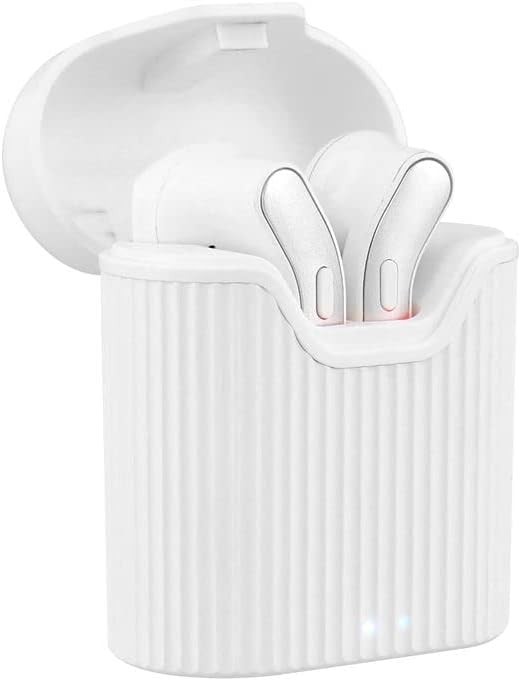
Image: T'nB Feat True Wireless Earbuds placed inside their open charging case, showing the earbuds and the interior of the case.

Image: The T'nB Feat True Wireless Earbuds charging case in a closed position, displaying its compact and portable design.
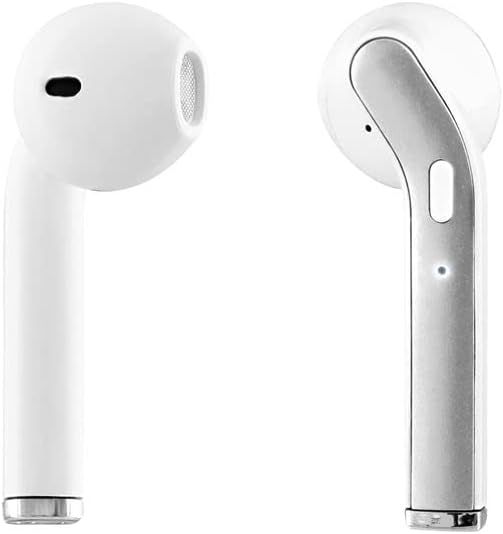
රූපය: සමීප ඡායාරූපයක් view of the individual T'nB Feat True Wireless Earbuds, highlighting their ergonomic in-ear design.
සැලසුම
1. ඉයර්බඩ් සහ කේස් ආරෝපණය කිරීම
පළමු භාවිතයට පෙර, ඉයර්බඩ් සහ ආරෝපණ පෙට්ටිය සම්පූර්ණයෙන්ම ආරෝපණය කරන්න.
- Place the earbuds into the charging case. Ensure they are correctly seated to make contact with the charging pins.
- Connect the Micro USB charging cable to the charging port on the case and the other end to a USB power source (e.g., computer USB port, wall adapter).
- The indicator lights on the case and/or earbuds will show the charging status. Refer to the indicator light section for details (if applicable, otherwise assume standard behavior).
- සම්පුර්ණයෙන්ම ආරෝපණය වූ පසු, ආරෝපණ කේබලය විසන්ධි කරන්න.
සටහන: A full charge provides approximately 5 hours of operating time for the earbuds.
2. බ්ලූටූත් උපාංගයක් සමඟ යුගල කිරීම
ස්ථාවර රැහැන් රහිත සම්බන්ධතාවයක් සඳහා ඉයර්බඩ් බ්ලූටූත් 5.0 භාවිතා කරයි.
- ඉයර්බඩ් ආරෝපණය කර ඇති බව සහතික කර ගන්න.
- Open the charging case and remove both earbuds. They will automatically power on and enter pairing mode. You may hear an audio prompt or see flashing indicator lights.
- On your Bluetooth-enabled device (smartphone, tablet, etc.), go to the Bluetooth settings and turn Bluetooth on.
- ඒ සඳහා සොයන්න available devices. You should see "T'nB FEAT" or a similar name appear in the list.
- Select "T'nB FEAT" to connect. Once connected, you will hear a confirmation tone or the indicator lights will change.
- The earbuds are now paired and ready for use. They will automatically reconnect to the last paired device when removed from the case, if Bluetooth is enabled on the device.
ඉයර්බඩ් ක්රියාත්මක කිරීම
බලය සක්රිය / අක්රිය
- බල ගැන්වීම: ආරෝපණ ආවරණයෙන් ඉයර්බඩ් ඉවත් කරන්න. ඒවා ස්වයංක්රීයව ක්රියාත්මක වනු ඇත.
- විදුලිය විසන්ධි කිරීම: ඉයර්බඩ් නැවත ආරෝපණ පෙට්ටියට දමන්න. ඒවා ස්වයංක්රීයව ක්රියා විරහිත වී ආරෝපණය වීමට පටන් ගනී.
සංගීත වාදනය
The earbuds feature intuitive controls for music management. (Specific control actions may vary slightly based on earbud design, typically involving taps or presses on the earbud surface.)
- වාදනය/විරාමය: ඉයර්බඩ් දෙකෙන් එක වරක් තට්ටු කරන්න.
- ඊළඟ ධාවන පථය: දකුණු ඉයර්බඩය දෙවරක් තට්ටු කරන්න.
- පෙර ධාවන පථය: වම් ඉයර්බඩය දෙවරක් තට්ටු කරන්න.
ඇමතුම් කළමනාකරණය
With the built-in microphone, you can manage calls directly from your earbuds.
- පිළිතුර/අවසන් ඇමතුම: Tap once on either earbud during an incoming call or an active call.
- ඇමතුම ප්රතික්ෂේප කරන්න: Press and hold either earbud for approximately 2 seconds during an incoming call.
නඩත්තු කිරීම
To ensure the longevity and optimal performance of your T'nB Feat earbuds, follow these maintenance guidelines:
- පිරිසිදු කිරීම: ඉයර්බඩ් සහ ආරෝපණ පෙට්ටිය පිරිසිදු කිරීමට මෘදු, වියලි, ලින්ට් රහිත රෙද්දක් භාවිතා කරන්න. උල්ෙල්ඛ පිරිසිදු කරන්නන්, මධ්යසාර හෝ රසායනික ද්රාවක භාවිතා නොකරන්න.
- ගබඩා: භාවිතයේ නොමැති විට, දූවිලි හා හානිවලින් ආරක්ෂා වීම සඳහා ඉයර්බඩ් ඒවායේ ආරෝපණ ආවරණයේ ගබඩා කරන්න. සිසිල්, වියළි ස්ථානයක ගබඩා කරන්න.
- ජලයෙන් වළකින්න: The earbuds are not waterproof. Avoid exposure to water, moisture, or extreme temperatures.
- අයකිරීම: බැටරි සෞඛ්යය පවත්වා ගැනීම සඳහා, නිතර භාවිතා නොකළත්, උපාංගය නිතිපතා ආරෝපණය කරන්න.
දෝෂගවේෂණය
ඔබේ ඉයර්බඩ් සමඟ ගැටළු ඇති වුවහොත්, පහත පොදු විසඳුම් වෙත යොමු වන්න:
| ගැටලුව | විසඳුම |
|---|---|
| ඉයර්බඩ් යුගලනය/සම්බන්ධ නොවේ |
|
| ඉයර්බඩ් වලින් ශබ්දයක් නැත |
|
| ඉයර්බඩ් නිතර විසන්ධි වේ |
|
| ආරෝපණ නඩුව ආරෝපණය නොවේ |
|
පිරිවිතර
- මාදිලියේ නම: EBFEATWH
- සම්බන්ධතාවය: සත්ය රැහැන් රහිත බ්ලූටූත් 5.0
- ආකෘති සාධකය: In-ear
- සම්බාධනය: 32 ඕම්
- සංවේදීතාව: 95 dB
- මෙහෙයුම් කාලය: ආසන්න වශයෙන් පැය 5 කි
- මයික්රෆෝනය: Built-in Universal Microphone
- ආරෝපණ වරාය: Micro USB (for case)
- විශේෂ ලක්ෂණ: Universal application, Cable-free design

Image: The retail packaging for the T'nB Feat True Wireless Earbuds, displaying key features and specifications.
වගකීම් සහ සහාය
T'nB products are covered by a manufacturer's warranty. For specific warranty terms and conditions, please refer to the documentation provided with your purchase or visit the official T'nB website. For technical support or further assistance, please contact T'nB customer service through their official channels.