
1. හැඳින්වීම
The T'nB Mood in-ear headphones (Model ESMOODBK) are designed for audio playback and hands-free communication. Featuring an integrated universal microphone and a flat, tangle-free cable, these earphones offer a convenient and reliable audio experience for various devices with a 3.5mm audio jack.

Image 1: T'nB Mood in-ear headphones showing the earbuds, inline microphone, and 3.5mm audio jack.
2. පැකේජ අන්තර්ගතය
කරුණාකර පහත අයිතම සඳහා පැකේජය පරීක්ෂා කරන්න:
- 1 x T'nB Mood In-Ear Headphones (Model ESMOODBK)
- 1 x පරිශීලක මාර්ගෝපදේශය
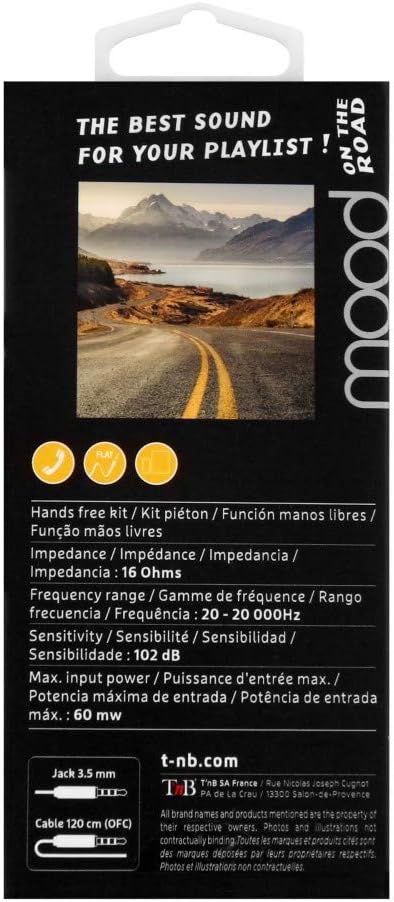
Image 2: Retail packaging for T'nB Mood headphones, highlighting key features and specifications.
3. නිෂ්පාදන ලක්ෂණ
- Integrated Universal Microphone: හෑන්ඩ්ස්-ෆ්රී ඇමතුම් සහ හඬ විධාන සඳහා.
- Flat OFC Cable: Designed to prevent tangles and enhance durability.
- 3.5mm Jack Connector: පුළුල් පරාසයක ශ්රව්ය උපකරණ සමඟ අනුකූල වේ.
- 10mm Driver Diameter: පැහැදිලි ශ්රව්ය ප්රතිදානයක් ලබා දෙයි.
- පුළුල් සංඛ්යාත පරාසය: 20 - 20,000 Hz for comprehensive sound reproduction.
- Optimal Impedance: 16 Ohms for efficient power usage.
- 120 cm Cable Length: සපයයි ample සුවපහසු භාවිතය සඳහා ළඟා වේ.
4. පිහිටුවීම
- හෙඩ්ෆෝන් ඉවත් කරන්න: Carefully remove the T'nB Mood headphones and user guide from the packaging.
- ශ්රව්ය උපාංගයට සම්බන්ධ වන්න: Insert the 3.5mm audio jack firmly into the headphone port of your smartphone, tablet, computer, or other compatible audio device.
- Position Earbuds: Place the earbuds comfortably into your ears. Ensure a snug fit for optimal sound quality and bass response.
- පරිමාව සකසන්න: Adjust the volume on your connected device to a comfortable listening level before playing audio.
5. මෙහෙයුම් උපදෙස්
5.1 ශ්රව්ය නැවත ධාවනය
- Once connected, play audio from your device. Sound will be routed through the headphones.
- ඔබගේ සම්බන්ධිත උපාංගයෙන් කෙලින්ම නැවත ධාවනය (වාදනය/විරාමය, ධාවන පථ මඟ හැරීම) සහ ශබ්දය පාලනය කරන්න.
5.2 Using the Universal Microphone
The T'nB Mood headphones feature an inline universal microphone for hands-free communication.
- ඇමතුම්වලට පිළිතුරු දීම / අවසන් කිරීම: When a call comes in, press the button on the inline microphone to answer. Press it again to end the call.
- හඬ විධාන: Depending on your device, you may be able to activate voice assistants (e.g., Siri, Google Assistant) by pressing and holding the microphone button. Refer to your device's manual for specific instructions.
- මයික්රෆෝනය ස්ථානගත කිරීම: Ensure the microphone is positioned close to your mouth for clear voice transmission during calls.
6. නඩත්තු කිරීම
නිසි සැලකිල්ල ඔබේ හෙඩ්ෆෝන් වල ආයු කාලය දීර්ඝ කරයි.
- ඉයර්බඩ් පිරිසිදු කිරීම: Gently wipe the earbuds with a soft, dry, lint-free cloth. Do not use harsh chemicals or abrasive materials.
- කේබල් රැකවරණය: Avoid excessive pulling, twisting, or bending of the cable. The flat design helps prevent tangles, but proper handling is still recommended.
- ගබඩා: භාවිතයේ නොමැති විට, හෙඩ්ෆෝන් අධික උෂ්ණත්වයන්ගෙන් සහ සෘජු හිරු එළියෙන් ඈත්ව පිරිසිදු, වියළි ස්ථානයක ගබඩා කරන්න. කේබලය ඕනෑවට වඩා තදින් ඔතා ගැනීමෙන් වළකින්න.
- තෙතමනය වළක්වා ගන්න: හෙඩ්ෆෝන් ජලයට හෝ අධික තෙතමනයට නිරාවරණය නොකරන්න.
7. දෝශ නිරාකරණය
If you encounter issues with your T'nB Mood headphones, please refer to the following common solutions:
- ශබ්දයක් හෝ අඩු හඬක් නැත:
- Ensure the 3.5mm jack is fully inserted into your device's audio port.
- Check the volume level on your connected device and ensure it is not muted.
- උපාංගයට විශේෂිත ගැටළුවක් බැහැර කිරීම සඳහා වෙනත් ශ්රව්ය උපාංගයක් සමඟ හෙඩ්ෆෝන් පරීක්ෂා කරන්න.
- Poor Sound Quality (Distortion, Static):
- ඉයර්බඩ් පිරිසිදුව හා සුන්බුන් වලින් තොර බවට වග බලා ගන්න.
- Verify the earbuds are properly seated in your ears for a good seal.
- වෙනත් ශ්රව්ය ප්රභවයක් උත්සාහ කරන්න හෝ file to check if the issue is with the content.
- මයික්රෆෝනය ක්රියා නොකරයි:
- Ensure the 3.5mm jack is fully inserted. A loose connection can affect microphone functionality.
- බාහිර මයික්රෆෝනය තෝරාගෙන ඇති බව සහතික කර ගැනීමට ඔබගේ උපාංගයේ ශ්රව්ය ආදාන සැකසුම් පරීක්ෂා කරන්න.
- වෙනත් යෙදුමක් හෝ උපාංගයක් සමඟ මයික්රෆෝනය පරීක්ෂා කරන්න.
8. පිරිවිතර
| වෙළඳ නාමය | T'nB |
| ආදර්ශ අංකය | ESMOODBK |
| වර්ණය | කළු |
| ආකෘති සාධකය | In-ear |
| සම්බන්ධතා තාක්ෂණය | රැහැන්ගත |
| හෙඩ්ෆෝන් ජැක් | 3.5 mm ජැක් |
| රියදුරු විෂ්කම්භය | 10 මි.මී |
| සංඛ්යාත පරාසය | 20 - 20,000 හර්ට්ස් |
| සම්බාධනය | 16 ඕම් |
| උපරිම ආදාන බලය | 60 mW |
| සංවේදීතාව | 102 dB |
| කේබල් දිග | 120 සෙ.මී |
| ද්රව්ය | ප්ලාස්ටික් |
| සංරචක ඇතුළත් | 1 x MOOD Earphones, 1 x User Guide |
9. වගකීම් සහ සහාය
Specific warranty details for the T'nB Mood headphones are not provided within this manual. For information regarding warranty coverage, terms, and conditions, please refer to the documentation included with your purchase or contact T'nB customer support directly.
For technical support or further assistance, please visit the official T'nB webවෙබ් අඩවිය හෝ ඔවුන්ගේ පාරිභෝගික සේවා දෙපාර්තමේන්තුව අමතන්න.