
නිෂ්පාදනය අවසන්view
The XIAOMI Redmi 9I is a feature-rich smartphone designed for everyday use. This manual provides essential information for setting up, operating, maintaining, and troubleshooting your device.
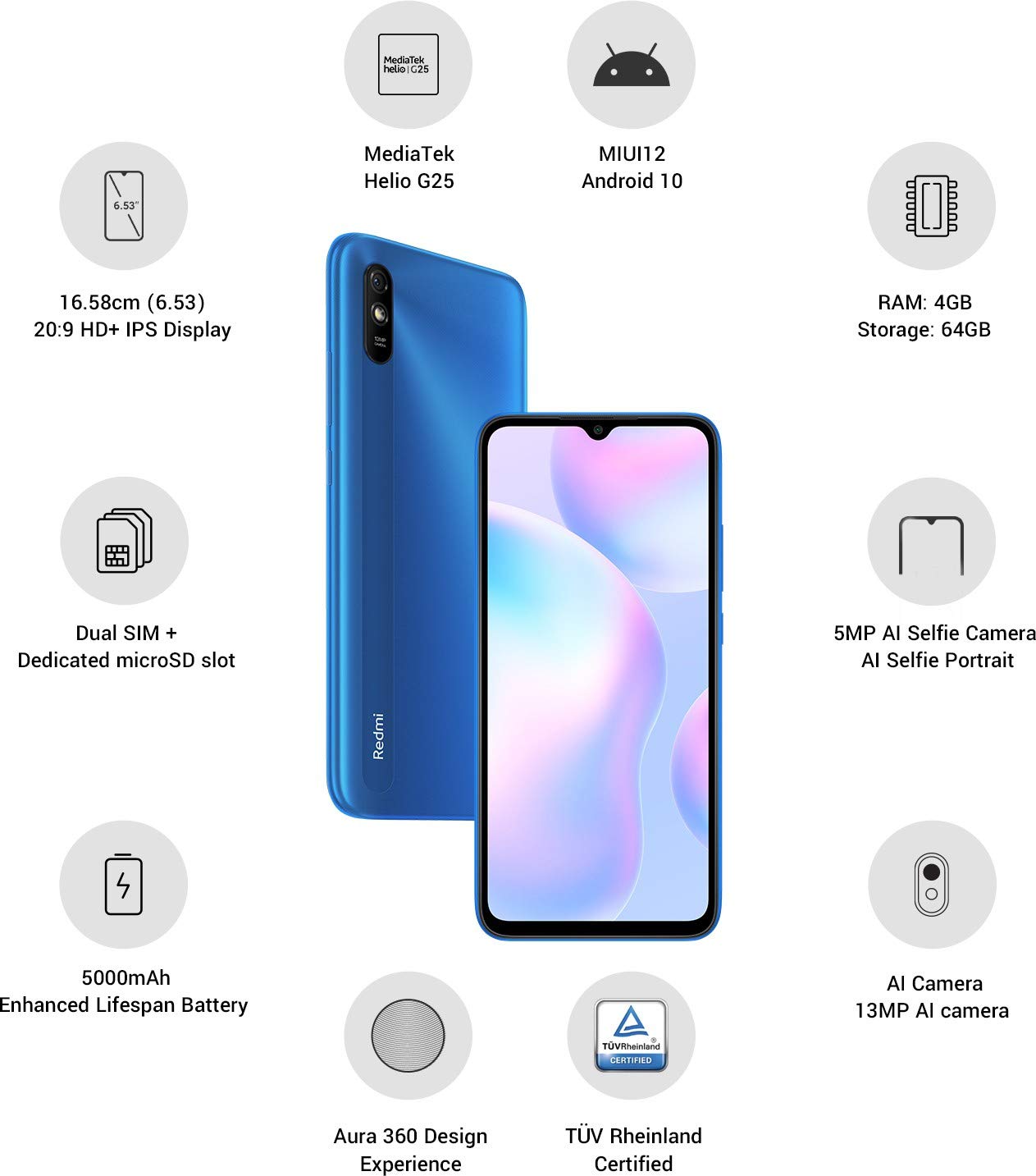
රූපය: අවසන්view of the Xiaomi Redmi 9I highlighting key features such as the 6.53-inch HD+ IPS Display, MediaTek Helio G25 processor, MIUI12 Android 10, 4GB RAM, 64GB Storage, Dual SIM + dedicated microSD slot, 5000mAh battery, 5MP AI Selfie Camera, 13MP AI Camera, Aura 360 Design Experience, and TÜV Rheinland Certification.
සැකසුම් මාර්ගෝපදේශය
1. Unboxing සහ මූලික පරීක්ෂාව
ඇසුරුම්කරණයෙන් සියලුම අයිතම ප්රවේශමෙන් ඉවත් කරන්න. පහත සඳහන් සංරචක ඇති බවට වග බලා ගන්න:
- XIAOMI Redmi 9I Smartphone
- බල ඇඩැප්ටරය
- USB Type-C කේබලය
- SIM Ejector මෙවලම
- ඉක්මන් ආරම්භක මාර්ගෝපදේශය (ඇතුළත් කර ඇත්නම්)
2. SIM කාඩ්පත් සහ MicroSD කාඩ්පත් ඇතුළත් කිරීම
Locate the SIM card tray on the side of your device. Use the provided SIM ejector tool to open the tray. Insert your Nano SIM card(s) and/or a microSD card into the designated slots. Ensure the cards are correctly oriented as shown in the diagram below. Gently push the tray back into the phone until it clicks into place.

රූපය: පැත්ත view of the Xiaomi Redmi 9I, illustrating the location of the SIM card tray. The tray is designed to hold dual Nano SIM cards and a dedicated microSD card.
3. උපාංගය ආරෝපණය කිරීම
Before first use, fully charge your Redmi 9I. Connect the USB Type-C cable to the phone's charging port (located at the bottom) and the other end to the power adapter. Plug the adapter into a wall outlet. The charging indicator will appear on the screen.

රූපය: පහළ view of the Xiaomi Redmi 9I, showing the USB Type-C charging port and speaker grille.
4. Powering On සහ Initial Configuration
Press and hold the Power button (located on the right side of the device) until the XIAOMI logo appears. Follow the on-screen instructions to complete the initial setup, including language selection, Wi-Fi connection, Google account setup, and security settings.

රූපය: පැත්ත view of the Xiaomi Redmi 9I, clearly showing the power button and volume rocker on the right edge of the device.
මෙහෙයුම් උපදෙස්
මූලික සංචාලනය
- ස්පර්ශ කරන්න: යෙදුම් විවෘත කිරීමට, අයිතම තේරීමට, හෝ ක්රියා තහවුරු කිරීමට අයිකන තට්ටු කරන්න.
- ස්වයිප්: Slide your finger across the screen to scroll, switch between home screens, or navigate within apps.
- පින්ච්: ඡායාරූප විශාලනය කිරීමට හෝ පිටතට ගැනීමට ඇඟිලි දෙකක් භාවිතා කරන්න සහ web පිටු.
- දිගු මුද්රණ යන්ත්රය: Press and hold an item for additional options or to move icons.
ඇමතුම් ලබා දීම සහ පණිවිඩ යැවීම
Tap the Phone icon to access the dialer. Enter a number or select a contact. Tap the Messages icon to compose and send text messages.
ජාල වෙත සම්බන්ධ වෙමින්
- Wifi: වෙත යන්න සැකසීම් > Wi-Fi, turn Wi-Fi on, and select your desired network. Enter the password if prompted.
- බ්ලූටූත්: වෙත යන්න සැකසීම් > බ්ලූටූත්, turn Bluetooth on, and pair with compatible devices.
- ජංගම දත්ත (4G): ඔබගේ SIM කාඩ්පත සක්රිය බවත් ජංගම දත්ත සක්රිය කර ඇති බවත් සහතික කර ගන්න. සැකසීම් > SIM කාඩ්පත් සහ ජංගම ජාල.
කැමරාව භාවිතා කිරීම
Tap the Camera icon to open the camera application. The Redmi 9I features a 13MP rear camera and a 5MP front camera. Switch between modes (Photo, Video, Portrait, etc.) by swiping across the screen. Tap the shutter button to capture photos or start/stop video recording.

රූපය: පසුපස view of the Xiaomi Redmi 9I, showcasing the 13MP AI camera module and the Redmi branding.
නඩත්තු කිරීම
ඔබේ උපාංගය පිරිසිදු කිරීම
Use a soft, lint-free cloth to clean the screen and body of your phone. Avoid using harsh chemicals or abrasive materials, which can damage the display or finish. For stubborn smudges, slightly dampen ජලය සහිත රෙදි හෝ ඉලෙක්ට්රොනික උපකරණ සඳහා නිර්මාණය කර ඇති තිර පිරිසිදු කරන්නා.
මෘදුකාංග යාවත්කාලීන
ප්රශස්ත ක්රියාකාරිත්වය, ආරක්ෂාව සහ නව විශේෂාංග වෙත ප්රවේශය සහතික කිරීම සඳහා මෘදුකාංග යාවත්කාලීන කිරීම් නිතිපතා පරීක්ෂා කර ස්ථාපනය කරන්න. වෙත යන්න සැකසීම් > දුරකථනය ගැන > MIUI අනුවාදය යාවත්කාලීන සඳහා පරීක්ෂා කිරීමට.
බැටරි සත්කාර
The Redmi 9I is equipped with a 5000 mAh Lithium-Polymer battery. To prolong battery life:
- අධික උෂ්ණත්වයෙන් වළකින්න.
- නිතර නැවත ආරෝපණය කිරීමට පෙර බැටරිය සම්පූර්ණයෙන්ම බැස යාමට ඉඩ නොදෙන්න.
- මුල් චාජරය සහ කේබලය භාවිතා කරන්න.
- Optimize battery usage in සැකසීම් > බැටරි සහ කාර්ය සාධනය.
ගබඩා කළමනාකරණය
Your device comes with 64GB of internal storage. To manage storage effectively:
- අනවශ්ය දේ නිතිපතා මකා දමන්න fileවීඩියෝ, ඡායාරූප සහ වීඩියෝ.
- භාවිතයට නොගත් යෙදුම් අස්ථාපනය කරන්න.
- වලාකුළු ගබඩා සේවා භාවිතා කරන්න.
- විශාල ලෙස ගෙනයන්න fileඇතුළත් කළ මයික්රෝ එස්ඩී කාඩ්පතකට s.
දෝෂගවේෂණය
This section addresses common issues you might encounter with your Redmi 9I.
උපාංගය ක්රියාත්මක නොවේ
- බැටරිය ආරෝපණය වී ඇති බවට වග බලා ගන්න. දුරකථනය අවම වශයෙන් විනාඩි 30ක් එහි චාජරයට සම්බන්ධ කරන්න.
- නැවත ආරම්භ කිරීමට බල කිරීම සඳහා බල බොත්තම තත්පර 10-15ක් ඔබාගෙන සිටින්න.
Poor Network Connectivity
- ඔබගේ SIM කාඩ්පත නිසි ලෙස ඇතුළත් කර ඇත්දැයි පරීක්ෂා කරන්න.
- Toggle Airplane Mode on and off (swipe down from the top for Quick Settings).
- ඔබගේ උපාංගය නැවත ආරම්භ කරන්න.
- Verify your mobile data plan is active and you are in an area with network coverage.
යෙදුම් බිඳ වැටීම හෝ කැටි කිරීම
- ගැටළු සහගත යෙදුම වසා දමා නැවත විවෘත කරන්න.
- යෙදුමේ හැඹිලිය සහ දත්ත හිස් කරන්න (Settings > Apps > Manage apps > [App Name] > Clear data).
- යෙදුම එහි නවතම අනුවාදයට යාවත්කාලීන කර ඇති බවට වග බලා ගන්න.
- ඔබගේ දුරකථනය නැවත ආරම්භ කරන්න.
තිරය ප්රතිචාර නොදක්වයි
- බල බොත්තම තද කරගෙන උපාංගය නැවත ආරම්භ කිරීමට බල කරන්න.
- If the issue persists, consider a factory reset (Warning: This will erase all data on your phone. Back up important data first. වෙත යන්න සැකසීම් > දුරකථනය ගැන > කර්මාන්තශාලා යළි පිහිටුවීම).
පිරිවිතර
| විශේෂාංගය | විස්තර |
|---|---|
| වෙළඳ නාමය | XIAOMI |
| ආකෘතිය | Redmi 9I |
| මෙහෙයුම් පද්ධතිය | Android 9.0 (MIUI12) |
| RAM | 4 GB |
| අභ්යන්තර ගබඩාව | 64 GB |
| ප්රොසෙසරය | ස්නැප්ඩ්රැගන් (2 GHz CPU වේගය) |
| සංදර්ශක වර්ගය | LCD |
| තිර ප්රමාණය | අඟල් 6.53 |
| පසුපස කැමරාව | 13 MP |
| ඉදිරිපස කැමරාව | 5 MP |
| බැටරි ධාරිතාව | 5000 මිලිamp Hours (Lithium-Polymer) |
| SIM කාඩ් පත | Dual SIM (Nano) |
| සම්බන්ධතාවය | 4G, Wi-Fi, Bluetooth, USB Type C |
| GPS | ග්ලෝනාස් |
| ද්රව්ය | ප්ලාස්ටික් |
| ජල ප්රතිරෝධක මට්ටම | වතුර කාන්දු නොවන |
වගකීම් තොරතුරු
The XIAOMI Redmi 9I comes with a වසර 1ක නිෂ්පාදකයාගේ වගකීමක් from the date of purchase. This warranty covers manufacturing defects under normal use. For detailed terms and conditions, please refer to the warranty card included in your product packaging or visit the official XIAOMI support webඅඩවිය.
පාරිභෝගික සහාය
If you encounter issues not covered in this manual or require further assistance, please contact XIAOMI customer support. You can typically find contact information (phone numbers, email, chat support) on the official XIAOMI webඅඩවියෙන් හෝ ඔබගේ උපාංගයේ සැකසුම් තුළ ඇති සහාය අංශය හරහා.
Before contacting support, please have your device's model number (Redmi 9I) and serial number ready. The serial number can usually be found in සැකසීම් > දුරකථනය ගැන > තත්ත්වය.


