
1. හැඳින්වීම
The Magewell Ultra Encode SDI (Model 53050) is a versatile live stream encoder designed for professional AV applications. It supports high-quality H.264, H.265 (HEVC), and NDI|HX encoding, along with multiple streaming protocols. This manual provides detailed instructions for setting up, operating, maintaining, and troubleshooting your Ultra Encode SDI device.
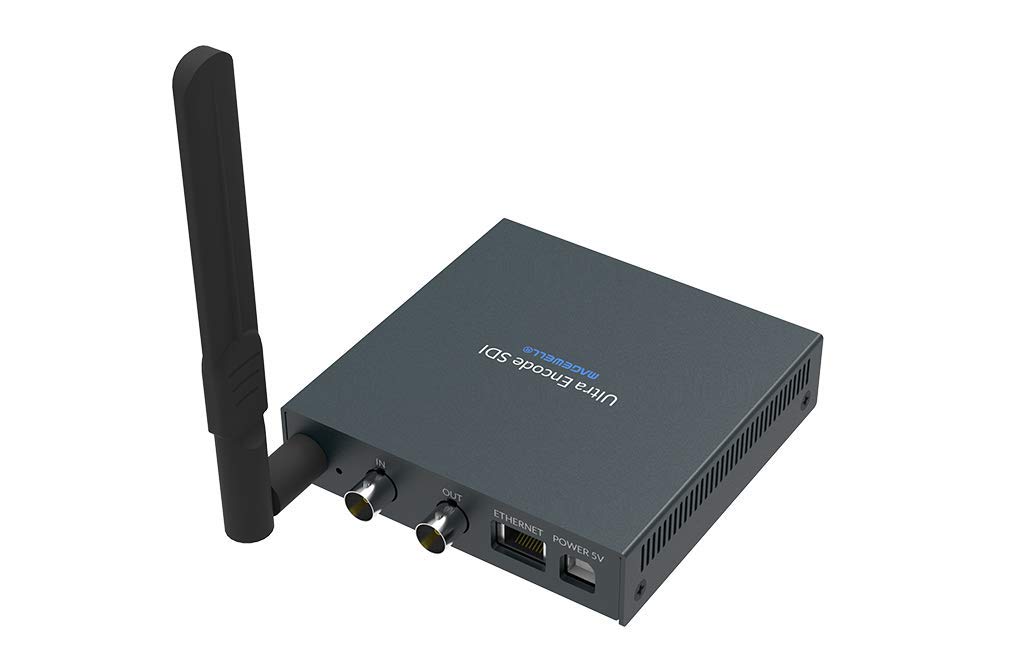
Figure 1.1: Magewell Ultra Encode SDI (Model 53050) device.
2. පැකේජ අන්තර්ගතය
Please verify that all items listed below are included in your package. If any items are missing or damaged, contact your vendor or Magewell support.
- Magewell Ultra Encode SDI (Model 53050) Unit
- Power Adapter (with regional plugs)
- USB 2.0 Type B cable
- Wi-Fi ඇන්ටෙනාව
- ටී-වරහන
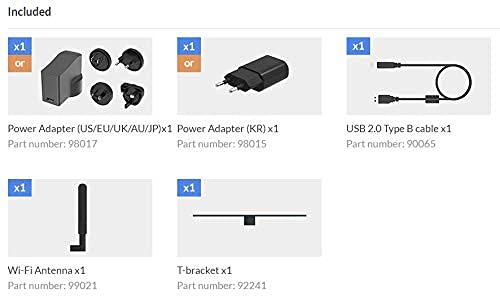
Figure 2.1: Included accessories with the Ultra Encode SDI.
3. නිෂ්පාදන අවසන්view
The Ultra Encode SDI features various ports and indicators for connectivity and status monitoring. Familiarize yourself with these components before setup.
3.1 Front/Side Panel

Figure 3.1: Front/Side panel with audio ports, status LEDs, and USB port.
- රේඛාව පිටත: 3.5mm ශ්රව්ය ප්රතිදානය.
- පේළියේ: 3.5mm ශ්රව්ය ආදානය.
- PWR LED: බල දර්ශකය.
- LED තුළ: Input signal status.
- සජීවී LED: Streaming status.
- ETH LED: Ethernet connection status.
- Wi-Fi LED: Wi-Fi සම්බන්ධතා තත්ත්වය.
- විකල්පය: USB port for optional accessories or configuration.
3.2 පසුපස පුවරුව

Figure 3.2: Rear panel with video, network, and power connections.
- IN (SDI): SDI/3G video input.
- OUT (SDI): SDI/3G loop-through output.
- ඊතර්නෙට්: රැහැන්ගත ජාල සම්බන්ධතාවය සඳහා RJ45 වරාය.
- POWER 5V: බල ආදාන වරාය.
3.3 වරාය රූප සටහන

Figure 3.3: Comprehensive port and indicator diagram.
4. පිහිටුවීම
Follow these steps to set up your Magewell Ultra Encode SDI device.
4.1 භෞතික සම්බන්ධතා
- සම්බන්ධක බලය: සපයා ඇති බල ඇඩැප්ටරය සම්බන්ධ කරන්න බලය 5V port on the rear panel and then into a power outlet. The පීඩබ්ලිව්ආර් LED on the front panel should illuminate.
- Connect Video Input: Connect your SDI/3G video source to the IN (SDI) port on the rear panel. If you need to loop the signal through, connect a cable from the OUT (SDI) port to your monitoring device.
- ශ්රව්ය සම්බන්ධ කරන්න (විකල්ප): If using analog audio, connect your audio source to the රේඛාව IN port and your audio monitoring device to the ලයින් අවුට් වරාය.
- සම්බන්ධක ජාලය:
- වයර්: Connect an Ethernet cable from your network router or switch to the ඊතර්නෙට් port on the rear panel. The ETH LED should illuminate.
- රැහැන් රහිත: Screw the provided Wi-Fi antenna onto the antenna socket. You will configure the Wi-Fi connection via the web අතුරුමුහුණත. එම Wifi LED will indicate connection status.
4.2 මූලික වින්යාසය (Web අතුරුමුහුණත)
The Ultra Encode SDI is configured via a web-පාදක අතුරුමුහුණත. එයට ප්රවේශ වීමට:
- Ensure your computer is on the same network as the Ultra Encode SDI.
- Use a network scanning tool or check your router's connected devices list to find the IP address of the Ultra Encode SDI. Alternatively, some devices may have a default IP or a discovery tool.
- a විවෘත කරන්න web browser and enter the device's IP address in the address bar.
- Log in using the default credentials (refer to the device's quick start guide or Magewell documentation for default username and password).
- වෙතින් web interface, you can configure network settings (including Wi-Fi), video/audio input parameters, encoding settings, and streaming destinations.
5. මෙහෙයුම් උපදෙස්
The Ultra Encode SDI offers flexible encoding and streaming capabilities.
5.1 කේතන සැකසුම්
- The device supports H.264 and H.265 (HEVC) video encoding. Select the desired codec and adjust parameters such as bitrate (up to 16Mbps), resolution, and frame rate via the web අතුරු මුහුණත.
- Audio encoding options are also available for optimal quality and compatibility.
5.2 Streaming Protocols
The Ultra Encode SDI supports various streaming protocols:
- RTMP/RTMPS: Commonly used for live streaming to platforms like YouTube, Facebook, and Twitch. Configure the server URL and stream key in the web අතුරු මුහුණත.
- HLS: HTTP Live Streaming for adaptive bitrate delivery.
- SRT: Secure Reliable Transport protocol for low-latency, high-quality video transport over unreliable networks.
- NDI|HX: NewTek's NDI|HX encoding for IP production workflows. Enable and configure NDI|HX output in the web අතුරු මුහුණත.
5.3 Configurable Presets
The device includes configurable presets for easy streaming to popular platforms:
- Access the presets section in the web අතුරු මුහුණත.
- Select a platform (e.g., Facebook, Twitch, YouTube) and enter your stream key or login details as prompted.
- Activate the preset to begin streaming.
6. නඩත්තු කිරීම
Proper maintenance ensures the longevity and optimal performance of your Ultra Encode SDI.
- පිරිසිදු කිරීම: උපාංගයේ බාහිර පෙනුම පිරිසිදු කිරීම සඳහා මෘදු වියළි රෙද්දක් භාවිතා කරන්න. දියර පිරිසිදු කරන්නන් හෝ උල්ෙල්ඛ ද්රව්ය භාවිතා කිරීමෙන් වළකින්න.
- වාතාශ්රය: අධික උනුසුම් වීම වැළැක්වීම සඳහා උපාංගය හොඳින් වාතාශ්රය ඇති ප්රදේශයක තබා ඇති බවට වග බලා ගන්න. වාතාශ්රය විවරයන් අවහිර නොකරන්න.
- ස්ථිරාංග යාවත්කාලීන කිරීම්: Periodically check the Magewell official website for firmware updates. Updating the firmware can provide new features, performance improvements, and bug fixes. Follow the instructions provided by Magewell for safe firmware updates.
- ගබඩා: දිගු කාලයක් භාවිතයේ නොමැති විට, උපාංගය සෘජු හිරු එළියෙන් සහ අධික උෂ්ණත්වයන්ගෙන් ඈත්ව සිසිල් වියළි ස්ථානයක ගබඩා කරන්න.
7. දෝශ නිරාකරණය
මෙම කොටසින් ඔබට මුහුණ දීමට සිදුවිය හැකි පොදු ගැටළු සාකච්ඡා කෙරේ.
- බලය නැත:
- බල ඇඩැප්ටරය උපාංගයට සහ ක්රියාකාරී බල අලෙවිසැලකට ආරක්ෂිතව සම්බන්ධ කර ඇති බවට වග බලා ගන්න.
- Verify the power adapter is the correct one supplied with the device.
- වීඩියෝ ආදානයක් නැත:
- Check the SDI cable connection between the source and the device's IN (SDI) වරාය.
- Confirm the video source is active and outputting a compatible SDI signal.
- පරීක්ෂා කරන්න IN LED තත්ත්වය.
- ජාල සම්බන්ධතාවයක් නැත:
- For wired connection, ensure the Ethernet cable is properly connected and the ETH LED is active.
- For Wi-Fi, ensure the antenna is attached, and Wi-Fi settings are correctly configured in the web interface. Check the Wifi LED.
- Verify your network router is functioning correctly.
- ප්රවේශ විය නොහැක Web අතුරු මුහුණත:
- Ensure your computer is on the same network as the encoder.
- Verify the IP address of the encoder.
- ඔබගේ බ්රවුසරයේ හැඹිලිය හිස් කිරීමට හෝ වෙනත් බ්රවුසරයක් භාවිතා කිරීමට උත්සාහ කරන්න.
- Streaming Issues (Buffering, Disconnections):
- ඔබගේ අන්තර්ජාල සම්බන්ධතා වේගය සහ ස්ථාවරත්වය පරීක්ෂා කරන්න.
- Reduce the encoding bitrate in the web interface if your network bandwidth is limited.
- Verify streaming server URL and stream key are correct.
- පරීක්ෂා කරන්න සජීවී LED තත්ත්වය.
For further assistance, refer to the Magewell support webවෙබ් අඩවිය හෝ ඔවුන්ගේ තාක්ෂණික සහාය කණ්ඩායම අමතන්න.
8. පිරිවිතර
| විශේෂාංගය | පිරිවිතර |
|---|---|
| වෙළඳ නාමය | මැග්වෙල් |
| ආකෘතිය | 53050 |
| නිෂ්පාදන මානයන් | 10.5 x 10.6 x 2.5 සෙ.මී |
| අයිතමයේ බර | ග්රෑම් 596 (කිලෝග්රෑම් 0.6) |
| වීඩියෝ ආදානය | SDI/3G Input |
| වීඩියෝ ප්රතිදානය | SDI/3G Loop |
| ශ්රව්ය ආදානය | Line-In (3.5mm) |
| ශ්රව්ය ප්රතිදානය | Line-Out (3.5mm) |
| කේතන ආකෘති | H.264, H.265 (HEVC), NDI|HX |
| උපරිම බිට්රේට් | 16Mbps දක්වා |
| Streaming Protocols | RTMP, RTMPS, HLS, SRT |
| ජාල සම්බන්ධතාවය | Ethernet (RJ45), Wi-Fi (802.11ac) |
| බල සැපයුම | 12 Volts (DC) |
| ගැළපෙන උපාංග | ලැප්ටොප් (වින්යාසය සඳහා) |
| විශේෂ ලක්ෂණ | Wireless connectivity, Configurable presets for streaming platforms |
9. වගකීම් සහ සහාය
For information regarding product warranty, technical support, and service, please refer to the official Magewell website or contact your authorized Magewell dealer. Keep your purchase receipt as proof of purchase for warranty claims.
Magewell Official Webඅඩවිය: www.magewell.com