
හැඳින්වීම
This manual provides detailed instructions for the proper use, setup, and maintenance of your SXFJF TWS Dual Dynamic Driver Earbuds. Please read this manual thoroughly before using the product to ensure optimal performance and longevity.
පැකේජයේ අන්තර්ගතය
ඔබගේ පැකේජයේ සියලුම අයිතම ඇති බව තහවුරු කරගන්න:
- 2 x රැහැන් රහිත ඉයර්බඩ්
- 1 x Type-C Charging Cable
- 1 x ආරෝපණ නඩුව
- 3 x Ear Cap Sets (S/M/L)
- 1 x පරිශීලක අත්පොත
සැලසුම
1. ඉයර්බඩ් සහ කේස් ආරෝපණය කිරීම
Before first use, fully charge the earbuds and the charging case. Place the earbuds into the charging case. Connect the Type-C charging cable to the charging case and a power source. The indicator lights on the case will show the charging status.

Image: The charging case with earbuds inserted, displaying battery level indicators. The case serves for both storage and charging.
2. මූලික යුගලනය
- ඉයර්බඩ් ආරෝපණය කර ඇති බව සහතික කර ගන්න.
- ආරෝපණ නඩුවේ පියන විවෘත කරන්න. ඉයර්බඩ් ස්වයංක්රීයව ක්රියාත්මක වන අතර යුගල කිරීමේ ප්රකාරයට ඇතුල් වේ.
- ඔබගේ උපාංගයේ (ස්මාර්ට්ෆෝන්, ටැබ්ලටය, ආදිය), බ්ලූටූත් සක්රීය කරන්න.
- ඒ සඳහා සොයන්න Bluetooth devices and select "AWEI T12P" (or similar name) from the list to connect.
- සම්බන්ධ වූ පසු, සාර්ථක යුගලනය තහවුරු කිරීමට හඬ විමසුමක් මඟින් හැකි වේ.

Image: Diagram illustrating stereo and mono pairing modes. For stereo, take out both earbuds to connect. For mono, take out one earbud to connect.
3. ස්වයංක්රීය සම්බන්ධතාවය
After the initial pairing, the earbuds will automatically connect to the last paired device when taken out of the charging case, provided Bluetooth is enabled on the device.
4. උපාංග අනුකූලතාව
These earbuds are universally compatible with devices supporting Bluetooth 5.1, including mobile phones, tablets, laptops, and other operating systems like Android and iOS.

Image: A smartphone screen displaying Bluetooth device options, indicating wide compatibility with various operating systems.
මෙහෙයුම් උපදෙස්
1. බලය සක්රිය / අක්රිය කරන්න
- බල ගැන්වීම: Open the charging case lid, or press and hold the touch control area on both earbuds for 3 seconds.
- විදුලිය විසන්ධි කිරීම: ඉයර්බඩ් නැවත ආරෝපණ පෙට්ටියට දමා පියන වසා දමන්න, නැතහොත් ඉයර්බඩ් දෙකෙහිම ස්පර්ශ පාලන ප්රදේශය තත්පර 5ක් ඔබාගෙන සිටින්න.
2. ස්පර්ශ පාලන
ඉයර්බඩ් වල විවිධ කාර්යයන් සඳහා ස්පර්ශ සංවේදී පාලනයන් ඇත:
- වාදනය/විරාමය: ඉයර්බඩ් දෙකෙන් එකක් මත එක තට්ටු කරන්න.
- ඊළඟ ධාවන පථය: දකුණු ඉයර්බඩය දෙවරක් තට්ටු කරන්න.
- පෙර ධාවන පථය: වම් ඉයර්බඩය දෙවරක් තට්ටු කරන්න.
- පිළිතුර/අවසන් ඇමතුම: ලැබෙන ඇමතුමක් අතරතුර ඉයර්බඩ් දෙකෙන් එකක් මත එක් වරක් තට්ටු කරන්න.
- ඇමතුම ප්රතික්ෂේප කරන්න: ලැබෙන ඇමතුමක් අතරතුර ඉයර්බඩ් දෙකෙන් එකක් තත්පර 2ක් ඔබාගෙන සිටින්න.
- හ oice සහකාර සක්රිය කරන්න: ඉයර්බඩ් දෙකෙන් එකක් තුන් වරක් තට්ටු කරන්න.
3. ශබ්දය අවලංගු කිරීම
These earbuds incorporate CVC 8.0 noise cancelling technology to reduce ambient noise during calls and enhance audio clarity.
4. බැටරි ආයු කාලය
The earbuds provide approximately 3.5-4 hours of playtime on a single charge. The charging case extends the total playtime to about 30 hours. Standby time is up to 300 hours.

Image: Earbuds and charging case displayed with a background of media content, highlighting extended battery life for music, games, and movies.
නඩත්තු කිරීම
1 පිරිසිදු කිරීම
- මෘදු, වියලි, ලින්ට් රහිත රෙද්දකින් ඉයර්බඩ් සහ ආරෝපණ පෙට්ටිය නිතිපතා පිරිසිදු කරන්න.
- උල්ෙල්ඛ පිරිසිදු කරන්නන්, මධ්යසාර හෝ රසායනික ද්රාවක භාවිතා නොකරන්න.
- නිසි ආරෝපණය සහතික කිරීම සඳහා ඉයර්බඩ් සහ කේස් දෙකෙහිම ආරෝපණ සම්බන්ධතා පිරිසිදු කරන්න.
2. ගබඩා කිරීම
- ඉයර්බඩ් ආරක්ෂා කිරීමට සහ ඒවා ආරෝපණය කර තබා ගැනීමට භාවිත නොකරන විට ඒවායේ ආරෝපණ පෙට්ටියේ ගබඩා කරන්න.
- Avoid storing in extreme temperatures (hot or cold) or high humidity.
3. බැටරි රැකවරණය
- බැටරි සෞඛ්යය පවත්වා ගැනීම සඳහා, නිතර භාවිතා නොකළත්, ඉයර්බඩ් නිතිපතා ආරෝපණය කරන්න.
- දිගු කාලයක් බැටරිය සම්පූර්ණයෙන්ම බැස යාමෙන් වළකින්න.
දෝෂගවේෂණය
ඔබේ ඉයර්බඩ් සමඟ ගැටළු ඇති වුවහොත්, පහත පොදු විසඳුම් වෙත යොමු වන්න:
- ඉයර්බඩ් යුගල නොවේ: Ensure both earbuds are charged. Place them back in the case, close the lid, then open it again to re-enter pairing mode. Delete previous Bluetooth connections on your device and try pairing again.
- එක් ඉයර්බඩ් එකක් පමණක් ක්රියා කරයි: Ensure both earbuds are charged. Try resetting the earbuds by placing them in the case, closing the lid, and then opening it. If the issue persists, try re-pairing.
- ශබ්දයක් නැත: Check the volume level on your connected device. Ensure the earbuds are properly connected via Bluetooth.
- ආරෝපණ ගැටළු: Ensure the charging cable is securely connected to both the case and the power source. Clean the charging contacts on the earbuds and inside the case.
- දුර්වල ශබ්ද ගුණාත්මකභාවය: Ensure the earbuds are properly seated in your ears. Try different ear cap sizes for a better seal. Ensure there are no obstructions between the earbuds and your device.
පිරිවිතර
Detailed technical specifications for the SXFJF TWS Dual Dynamic Driver Earbuds:
| විශේෂාංගය | පිරිවිතර |
|---|---|
| බ්ලූටූත් අනුවාදය | 5.1 |
| ආධාරක ප්රොටෝකෝල | HSP, HFP, A2DP, AVRCP |
| කතා කාලය | පැය 4 යි |
| සෙල්ලම් කාලය | පැය 3.5-4 |
| පොරොත්තු කාලය | පැය 300 යි |
| ආරෝපණ කාලය | පැය 1.5 යි |
| Earbud බැටරි ධාරිතාව | 45mAh (තනි ඉයර්බඩ්) |
| ආරෝපණ කේස් බැටරි ධාරිතාව | 390mAh |
| Input Charging Standard | DC5V |
| උපරිම සම්ප්රේෂණ දුර | මීටර් 10 කි |
| සම්බාධනය | 16Ω±15% |
| සංවේදීතාව | 93dB |
| සංඛ්යාත ප්රතිචාර පරාසය | 20Hz-20000Hz |
| ශ්රව්ය ධාවක වර්ගය | Dual Dynamic Driver (Φ6mm/16ΩWT0606*2) |
| ශබ්ද පාලනය | ක්රියාකාරී ශබ්ද අවලංගු කිරීම (CVC 8.0) |
| පාලන වර්ගය | ස්පර්ශ පාලනය |
| ජල ප්රතිරෝධක මට්ටම | දිය කාන්දු නොවන |
| ද්රව්ය | ප්ලාස්ටික් |

රූපය: එක්ස් කිරණක් view of an earbud highlighting the internal dual dynamic drivers, which contribute to superior acoustic fidelity.
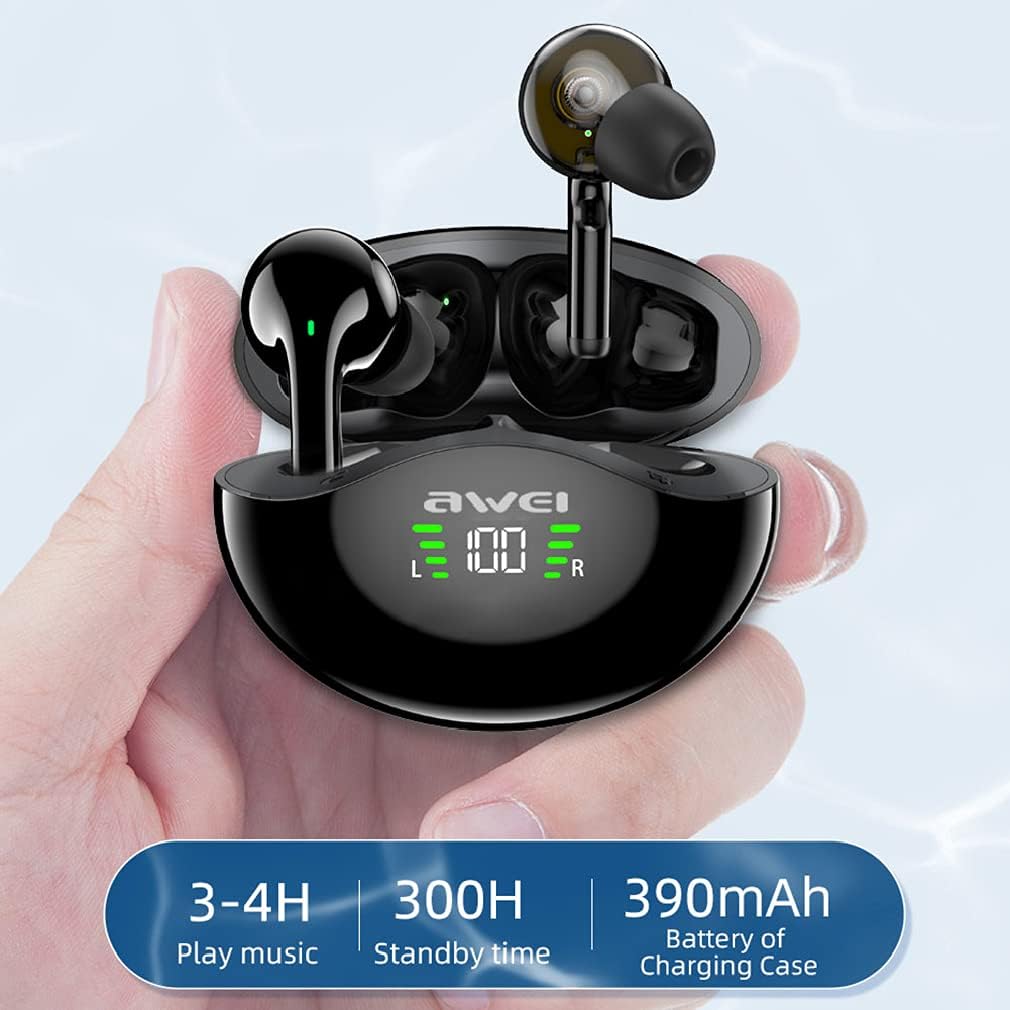
Image: Visual representation of battery life: 3-4 hours play music, 300 hours standby time, and 390mAh battery capacity for the charging case.
වගකීම් සහ සහාය
Your SXFJF TWS Dual Dynamic Driver Earbuds come with a standard manufacturer's warranty. For specific warranty terms and conditions, please refer to the documentation included with your purchase or contact the seller directly.
For technical support, troubleshooting assistance, or any product-related inquiries, please contact the manufacturer or your point of purchase. Please have your model number (B09BCNMBWB) and purchase details ready when seeking support.