
1. හැඳින්වීම
Thank you for choosing the A4tech FG1112 Fstyler Wireless Keyboard and Mouse Set. This compact and efficient combo provides a reliable 2.4GHz wireless connection, offering convenience and comfort for your daily computing needs. The keyboard features a Q Turkish layout with FN multimedia keys, while the mouse offers precise 1200 DPI optical tracking. This manual will guide you through the setup, operation, and maintenance of your new device.
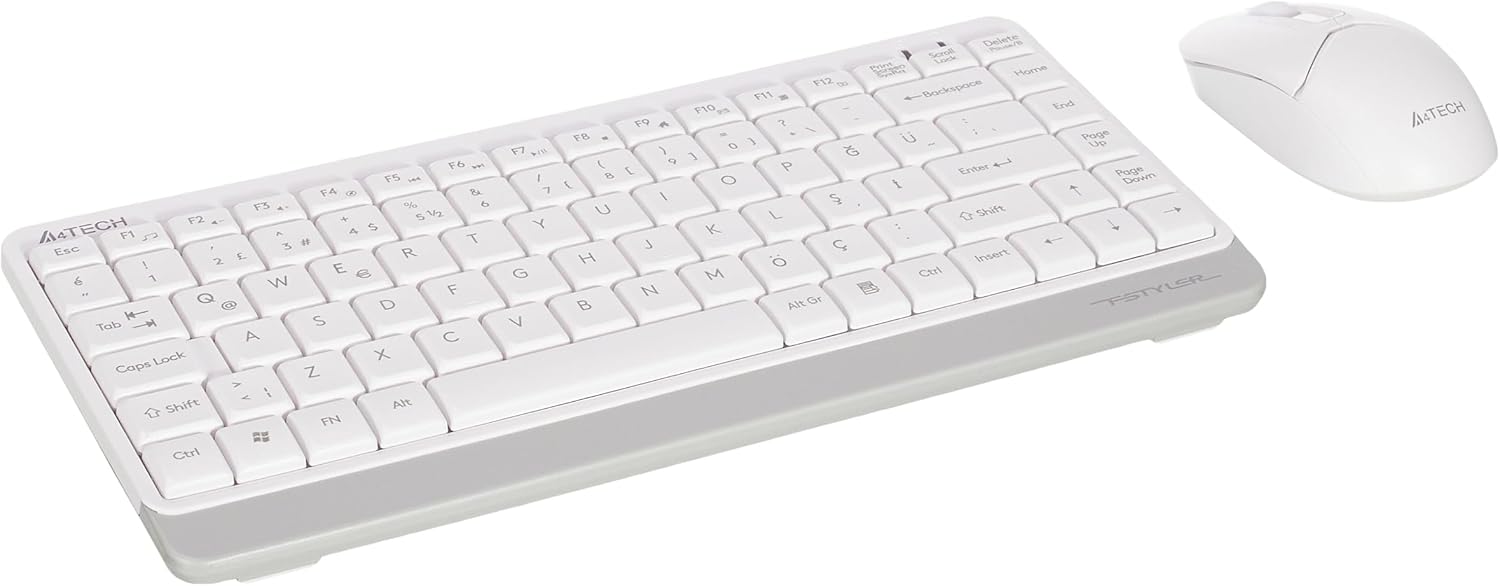
Image 1.1: A4tech FG1112 Fstyler Wireless Keyboard and Mouse Set (White)
2. පැකේජ අන්තර්ගතය
සියලුම අයිතම පවතින බව සහතික කර ගැනීමට කරුණාකර පැකේජයේ අන්තර්ගතය පරීක්ෂා කරන්න:
- 1 x A4tech FG1112 Wireless Keyboard
- 1 x A4tech Fstyler Wireless Mouse
- 1 x USB නැනෝ ග්රාහකයා
- 2 x AAA බැටරි (යතුරු පුවරුව සඳහා)
- 1 x AA Battery (for mouse, typically included)
- 1 x පරිශීලක අත්පොත (මෙම ලේඛනය)
3. සැකසුම් උපදෙස්
- බැටරි ඇතුළු කරන්න:
- For the keyboard: Open the battery compartment cover on the underside of the keyboard. Insert two AAA batteries, ensuring correct polarity (+/-). Close the cover.
- For the mouse: Open the battery compartment cover on the underside of the mouse. Insert one AA battery, ensuring correct polarity (+/-). Close the cover.

Image 3.1: Mouse bottom view showing battery compartment and power switch.
- Connect USB Nano Receiver: Locate the USB Nano Receiver, typically stored inside the mouse's battery compartment or packaged separately. Plug the receiver into an available USB port on your computer.
- බල ගැන්වීම:
- For the keyboard: Ensure the keyboard is powered on. There might be a power switch on the top right or underside.
- මූසිකය සඳහා: මූසිකයේ යටි පැත්තේ ඇති බල ස්විචය "ON" ස්ථානයට ලිස්සා යවන්න.
- ස්වයංක්රීය සම්බන්ධතාවය: Your computer should automatically detect and install the necessary drivers for the keyboard and mouse. This process may take a few moments. Once complete, your devices are ready for use.
Video 3.1: A short demonstration of the A4tech Fstyler Wireless Keyboard and Mouse Set, showing its compact design and wireless connectivity. This video illustrates the product's features and ease of use.
4. මෙහෙයුම් උපදෙස්
4.1 යතුරුපුවරු භාවිතය
The A4tech FG1112 keyboard features a compact design with a Q Turkish layout. It is designed for comfortable and quiet typing.

රූපය 4.1: ඉහළට view of the A4tech FG1112 Wireless Keyboard, highlighting its Q Turkish layout.
බහුමාධ්ය සහ ක්රියාකාරී යතුරු:
The keyboard includes 12 multimedia and internet function keys integrated into the F1-F12 keys. To activate these functions, press the FN අපේක්ෂිත F-යතුර සමඟ එකවර යතුර.
- FN + F1: මාධ්ය වාදකය
- FN + F2: Volume Down
- FN + F3: පරිමාව වැඩි කරන්න
- FN + F4: නිශ්ශබ්ද කරන්න
- FN + F5: පෙර ධාවන පථය
- FN + F6: ඊළඟ ධාවන පථය
- FN + F7: Play/Pause
- FN + F8: නවත්වන්න
- FN + F9: Home Page
- FN + F10: විද්යුත් තැපෑල
- FN + F11: මගේ පරිගණකය
- FN + F12: කැල්කියුලේටරය

Image 4.2: Illustration of FN key functionality for multimedia controls.
4.2 මූසික භාවිතය
The A4tech Fstyler mouse provides precise 1200 DPI optical tracking for smooth and accurate cursor movement.

රූපය 4.3: ඉහළට view of the A4tech Fstyler Wireless Mouse.
මූලික කාර්යයන්:
- වම් ක්ලික් කරන්න: Primary function, used for selecting items, opening files, ආදිය.
- දකුණු ක්ලික් කරන්න: Secondary function, typically opens context menus.
- අනුචලන රෝදය: Used for scrolling documents and web pages vertically. Can also function as a middle click button.
5. නඩත්තු කිරීම
- පිරිසිදු කිරීම: Use a soft, dry cloth to clean the keyboard and mouse. For stubborn dirt, a slightly damp cloth can be used, but ensure no liquid enters the devices.
- බැටරි ආදේශනය: When the keyboard or mouse becomes unresponsive or exhibits delayed input, it's time to replace the batteries. Follow the "Insert Batteries" steps in the Setup section.
- ගබඩා: When not in use for extended periods, turn off the mouse to conserve battery life. Store the devices in a cool, dry place.
6. දෝශ නිරාකරණය
| ගැටලුව | හැකි විසඳුම |
|---|---|
| යතුරුපුවරුව/මූසිකය ප්රතිචාර නොදක්වයි |
|
| Delayed or intermittent response |
|
| බහුමාධ්ය යතුරු ක්රියා නොකරයි |
|
7. පිරිවිතර
| විශේෂාංගය | විස්තර |
|---|---|
| වෙළඳ නාමය | A4tech විසින් තවත් |
| ආකෘතිය | FG1112 |
| සම්බන්ධතා තාක්ෂණය | 2.4GHz රැහැන් රහිත |
| යතුරුපුවරු පිරිසැලසුම | Q Turkish |
| යතුරුපුවරු වර්ගය | Multimedia Membrane |
| Mouse DPI | 1200 DPI Optical |
| යතුරුපුවරු බල ප්රභවය | 2 x AAA බැටරි |
| මූසික බල ප්රභවය | 1 x AA Battery (typical) |
| විශේෂ ලක්ෂණ | Wireless, Mini, Multimedia Keys, Optical Mouse, Laser Printed Keys, Water-resistant design (with drainage channels) |
| නිෂ්පාදන බර | 0.62 Kilograms (Set) |
| මානයන් (යතුරු පුවරුව) | Approx. 315mm (Width) x 146mm (Depth) x 25mm (Height) |
| මානයන් (මූසිකය) | Approx. 64mm (Width) x 108mm (Depth) x 35mm (Height) |

Image 7.1: Dimensions of the A4tech FG1112 Keyboard and Mouse.
8. වගකීම් සහ සහාය
This A4tech FG1112 Fstyler Wireless Keyboard and Mouse Set comes with a වසර 2ක වගකීමක් මිලදී ගත් දින සිට. වගකීම් හිමිකම් සඳහා කරුණාකර ඔබේ මිලදී ගැනීමේ සාක්ෂි තබා ගන්න.
For technical support, troubleshooting assistance, or warranty inquiries, please contact A4tech customer service through their official webඅඩවිය හෝ ඔබේ දේශීය බෙදාහරින්නා.
ඔබට වැඩිදුර තොරතුරු සහ සහාය සම්පත් සොයා ගත හැක A4tech Store on Amazon.