
1. හැඳින්වීම
The XTAR VC4 Plus is an advanced four-bay universal battery charger designed for a wide range of rechargeable batteries. It features a smart LCD display, QC3.0 fast charging input, and multiple operating modes including charging, grading, and storing. This manual provides detailed instructions for safe and efficient use of your VC4 Plus charger.

Image 1.1: The XTAR VC4 Plus charger, including the main unit, USB-C cable, and power adapter.
2 ආරක්ෂිත තොරතුරු
චාජරය භාවිතා කිරීමට පෙර කරුණාකර සියලු ආරක්ෂක උපදෙස් කියවා තේරුම් ගන්න. මෙම උපදෙස් අනුගමනය කිරීමට අපොහොසත් වීමෙන් විදුලි කම්පනය, ගින්නක් හෝ බරපතල තුවාල සිදුවිය හැකිය.
- Use the charger only for rechargeable batteries specified in this manual.
- නැවත ආරෝපණය කළ නොහැකි බැටරි ආරෝපණය නොකරන්න.
- Do not disassemble, modify, or short-circuit the charger.
- චාජරය ජලය, තෙතමනය සහ අධික උෂ්ණත්වයන්ගෙන් ඈත් කර තබන්න.
- ආරෝපණය කිරීමේදී නිසි වාතාශ්රය සහතික කරන්න.
- Supervise charging and remove batteries once fully charged.
- දරුවන්ට ළඟා විය නොහැකි ලෙස තබා ගන්න.
- The charger is equipped with multiple protection features including over-current, over-voltage, over-charge, short-circuit, and over-heat protection.

Image 2.1: The XTAR VC4 Plus incorporates multiple safety protection mechanisms.
3. පැකේජ අන්තර්ගතය
සියලුම අයිතම පැකේජයේ ඇති බව තහවුරු කරගන්න:
- XTAR VC4 Plus Battery Charger
- USB Type-C කේබලය
- QC3.0 බල ඇඩැප්ටරය
- පරිශීලක අත්පොත
- ගබඩා මල්ල

Image 3.1: Contents of the XTAR VC4 Plus package.
4. නිෂ්පාදන අවසන්view
Familiarize yourself with the components of the XTAR VC4 Plus charger:
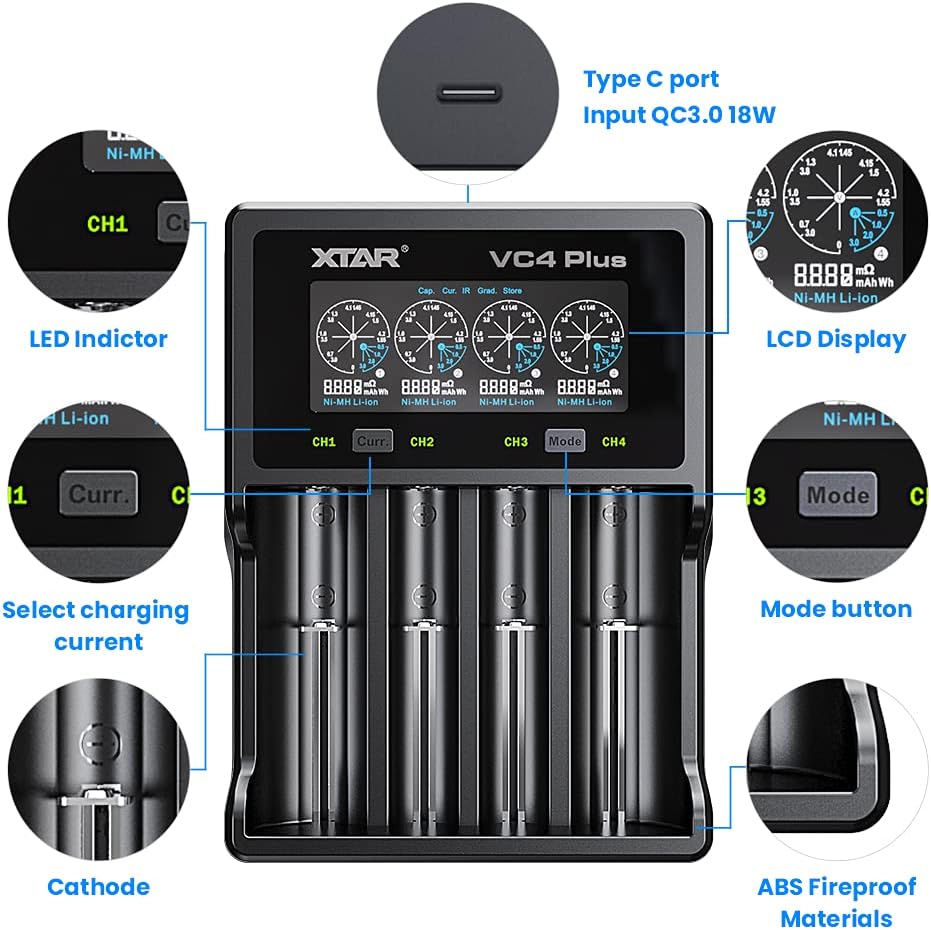
Image 4.1: Key components and features of the XTAR VC4 Plus charger.
- Charging Bays (CH1-CH4): Four independent slots for batteries.
- LCD සංදර්ශකය: Shows real-time charging status, battery information, and selected mode.
- 'Curr' Button: Selects the charging current for the active channel.
- 'Mode' Button: Cycles through different operating modes (Charging, Grading, Storing).
- Type-C ආදාන වරාය: For connecting the power adapter. Supports QC3.0 for faster input.
- LED දර්ශක: Provide quick visual status for each channel.
5. පිහිටුවීම
- සම්බන්ධක බලය: Insert the USB Type-C cable into the charger's Type-C input port and connect the other end to the QC3.0 power adapter. Plug the power adapter into a suitable wall outlet. The LCD display will illuminate.
- මූලික සංදර්ශකය: Upon power-on, the charger will perform a self-test, and the LCD will show initial information.
6. මෙහෙයුම් උපදෙස්
6.1 Compatible Battery Types
The XTAR VC4 Plus supports a wide range of 3.6V/3.7V Li-ion/IMR/INR/ICR batteries and 1.2V Ni-MH/Ni-CD batteries. It can charge different types simultaneously.
- Li-ion/IMR/INR/ICR (3.6V/3.7V): 10440, 14500, 14650, 16340, 17335, 17500, 17670, 18350, 18490, 18500, 18650, 18700, 20700, 21700, 22650, 25500, 26650.
- Ni-MH/Ni-CD (1.2V): AAAA, AAA, AA, A, SC, C, D.
- සටහන: The charger can accommodate 4 protected 20700/21700 batteries simultaneously.

Image 6.1.1: The charger's compatibility with various Lithium-ion and Ni-MH/Ni-CD battery sizes.
6.2 බැටරි ඇතුල් කිරීම
Carefully insert one or more rechargeable batteries into the charging bays, ensuring the correct polarity (+ and - ends match the markings in the bay). The charger will automatically detect the battery type and begin charging in the default mode.
6.3 LCD සංදර්ශකය තේරුම් ගැනීම
The LCD provides detailed information for each channel:

Image 6.3.1: Explanation of the XTAR VC4 Plus LCD display elements.
- බැටරි වර්ගය: Displays 'Li-ion' or 'Ni-MH'.
- Internal Resistance (mΩ): Indicates the battery's internal resistance.
- Charged Capacity (mAh/Wh): Shows the amount of charge delivered to the battery.
- වෙළුමtagඊ (වී): වත්මන් වෙළුමtagබැටරියේ ඊ.
- වත්මන් (A): වත්මන් ආරෝපණය ampකෝපය.
6.4 Selecting Charging Current
The charger automatically selects an appropriate charging current. To manually adjust the current for a specific channel:
- බැටරිය ඇතුල් කරන්න.
- Press the 'Curr' button (CH1/CH2 or CH3/CH4) corresponding to the desired channel.
- Repeatedly press the 'Curr' button to cycle through available current options (e.g., 0.5A, 1.0A, 2.0A, 3.0A). The selection will apply to the active channel.

Image 6.4.1: Press the 'Curr' button to adjust the charging current.
6.5 Operating Modes (Charging, Grading, Storing)
The VC4 Plus offers three main operating modes. To switch between modes:
- බැටරිය ඇතුල් කරන්න.
- Press the 'Mode' button (CH3/CH4) to cycle through the modes for the active channel.
- For some modes, a long press of the 'Mode' button may be required to confirm selection or initiate a process.

රූපය 6.5.1: ඉවරයිview of the three operating modes: Charging, Grading, and Storing.
6.5.1 ආරෝපණ ප්රකාරය
This is the default mode for recharging batteries. The charger will automatically detect the battery type and apply an appropriate charging current. The LCD will display real-time charging progress.

Image 6.5.1.1: The charger display indicating Charging Mode.
6.5.2 Grading Mode
Grading mode is used to determine the actual capacity of a battery. The charger will fully charge the battery, then discharge it to a safe level while measuring the discharged capacity, and finally recharge it. This process provides an accurate capacity reading.

Image 6.5.2.1: The charger display indicating Grading Mode.
6.5.3 Storing Mode
Storing mode is designed to prepare batteries for long-term storage by charging or discharging them to an optimal voltage level (typically around 3.7V for Li-ion). This helps to prolong battery lifespan and maintain performance.

Image 6.5.3.1: The charger display indicating Storing Mode.
7. පිරිවිතර
| විශේෂාංගය | පිරිවිතර |
|---|---|
| ආදර්ශ අංකය | VC4 PLUS |
| ආදාන වෙළුමtage | 240 Volts (AC adapter) |
| ආදාන ධාරාව | QC3.0 max 3A |
| Charging Bays | 4 independent bays |
| Compatible Li-ion Batteries | 3.6V/3.7V IMR/INR/ICR: 10440, 14500, 14650, 16340, 17335, 17500, 17670, 18350, 18490, 18500, 18650, 18700, 20700, 21700, 22650, 25500, 26650 |
| Compatible Ni-MH/Ni-CD Batteries | 1.2V: AAAA, AAA, AA, A, SC, C, D |
| ප්රදර්ශනය කරන්න | ස්මාර්ට් LCD |
| පැකේජ මානයන් | අඟල් 8.58 x 5 x 1.61 |
| අයිතමයේ බර | අවුන්ස 14.9 කි |
| නිෂ්පාදකයා | XTAR |
8. නඩත්තු කිරීම
- පිරිසිදු කිරීම: Disconnect the charger from power before cleaning. Use a soft, dry cloth to wipe the surface of the charger. Do not use abrasive cleaners or solvents.
- ගබඩා: භාවිතයේ නොමැති විට, චාජරය සෘජු හිරු එළියෙන් සහ අධික උෂ්ණත්වයන්ගෙන් ඈත්ව සිසිල් වියළි ස්ථානයක ගබඩා කරන්න.
- බැටරි සම්බන්ධතා: Periodically check the battery contacts for any debris or corrosion. Clean gently if necessary.
9. දෝශ නිරාකරණය
- චාජරය ක්රියාත්මක නොවේ:
- Ensure the USB Type-C cable is securely connected to both the charger and the power adapter.
- Verify that the power adapter is properly plugged into a working wall outlet.
- Try using a different USB Type-C cable or power adapter if available.
- බැටරි ආරෝපණය නොවේ:
- බැටරිය නිවැරදි ධ්රැවීයතාවයකින් ඇතුළු කර ඇත්දැයි පරීක්ෂා කරන්න.
- Ensure the battery is a compatible rechargeable type.
- Clean the battery contacts and charger contacts if they appear dirty.
- The battery might be over-discharged or damaged. Try a different battery.
- LCD display error:
- බැටරිය ඉවත් කර එය නැවත ඇතුල් කරන්න.
- Disconnect and reconnect the power to reset the charger.
- මන්දගාමී ආරෝපණය:
- Ensure you are using the provided QC3.0 power adapter for optimal charging speed.
- Check the selected charging current for the channel and adjust if necessary (refer to Section 6.4).
10. වගකීම් සහ සහාය
XTAR products are manufactured to high-quality standards. For warranty information or technical support, please refer to the warranty card included in your package or visit the official XTAR webවෙබ් අඩවිය. වගකීම් හිමිකම් සඳහා කරුණාකර ඔබේ මිලදී ගැනීමේ සාක්ෂි තබා ගන්න.


