1. හැඳින්වීම
This manual provides detailed instructions for the setup, operation, maintenance, and troubleshooting of your NUCOUN VC-7G Mixed Denomination Money Counter Machine. Please read this manual thoroughly before operating the device to ensure proper function and longevity.

රූපය: ඉදිරිපස view of the NUCOUN VC-7G Mixed Denomination Money Counter Machine, showcasing එහි සංයුක්ත නිර්මාණය සහ පරිශීලක අතුරුමුහුණත.
2. පිහිටුවීම
2.1 ඇසිරීම සහ ස්ථානගත කිරීම
- Carefully remove the money counter from its packaging.
- Place the machine on a stable, flat surface, ensuring adequate ventilation.
- Keep the machine away from direct sunlight, high temperatures, and excessive humidity.
2.2 බල සම්බන්ධතාවය
- යන්ත්රයේ බල ආදානයට විදුලි රැහැන සම්බන්ධ කරන්න.
- විදුලි රැහැනේ අනෙක් කෙළවර සුදුසු විදුලි අලෙවිසැලකට සම්බන්ධ කරන්න.
- Turn on the power switch located at the rear of the machine.
3. මෙහෙයුම් උපදෙස්
3.1 පරිශීලක අතුරුමුහුණත අවසන්view
The NUCOUN VC-7G features a user-friendly TFT touch screen and minimal key buttons for intuitive operation.
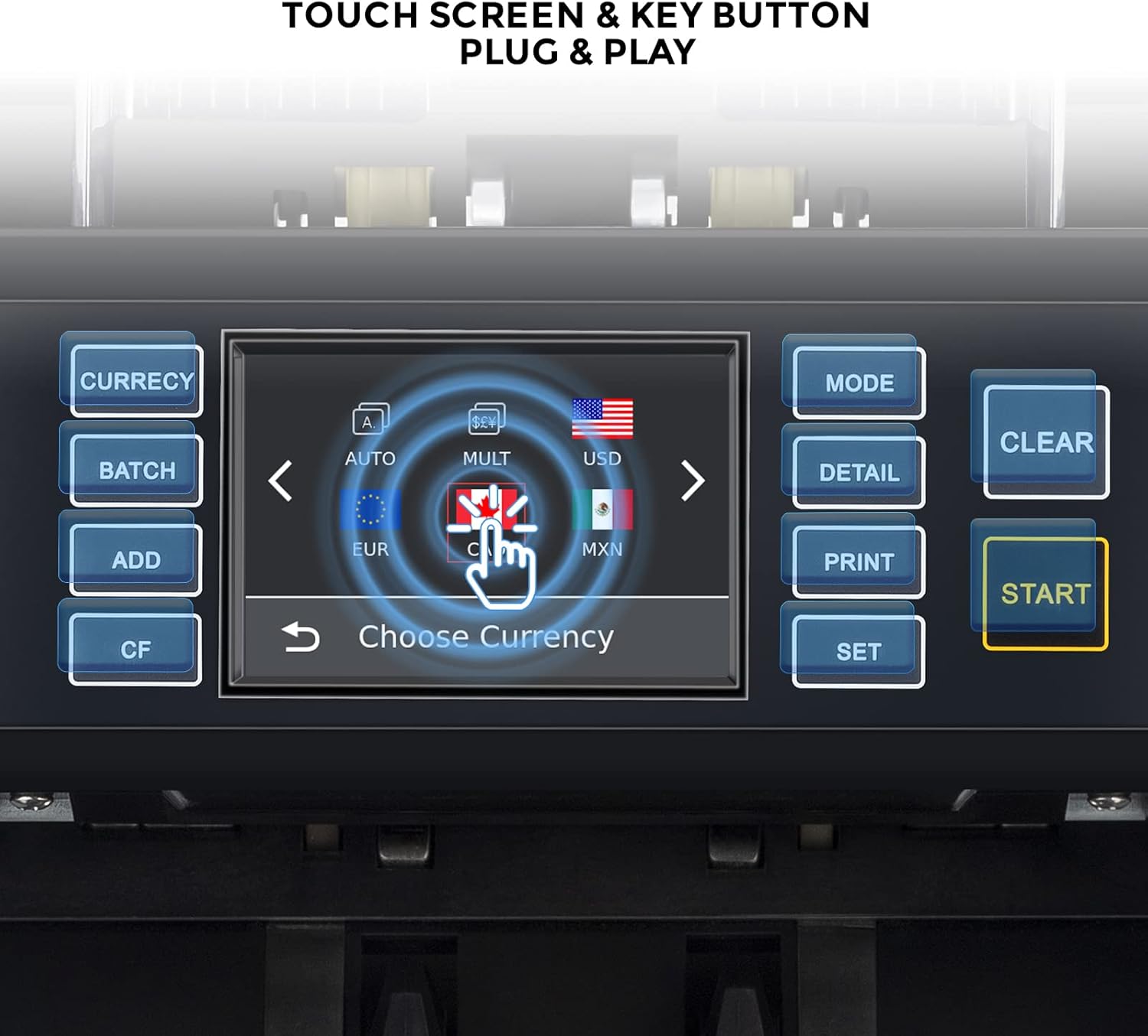
Image: Close-up of the NUCOUN VC-7G's touch screen and key buttons, highlighting the intuitive interface.
3.2 Basic Counting Operations
- මිශ්ර නිකාය ගණන් කිරීම: Place a stack of mixed denomination bills into the hopper. The machine will automatically count and calculate the total value.
- Single Denomination Counting: Select the desired denomination. The machine will count bills of that specific denomination.
- Auto Currency Recognition: The machine can automatically detect and process various currencies.
- Multi-Currency Counting: The device supports counting multiple currencies simultaneously, providing a detailed breakdown.
- කෑලි ගණන් කිරීම: Counts the number of bills without regard to their denomination.
- Serial Number Record: Activate this function to record and display the serial numbers of counted bills.

Image: Visual representation of the various working modes of the NUCOUN VC-7G, including mixed denomination, sorting, auto recognition, multi-currency, serial number record, and piece counting.
The NUCOUN VC-7G is designed to handle both polymer and cotton notes, including new and worn bills, ensuring accurate counting in various conditions.

Image: Illustration showing the NUCOUN VC-7G handling various types of banknotes, including old, polymer, paper, and new notes, highlighting its versatility.
4. ව්යාජ හඳුනා ගැනීම
The VC-7G is equipped with advanced counterfeit detection technologies to ensure the authenticity of bills.
- 2CIS (Contact Image Sensor): Scans both sides of the bill for detailed image analysis.
- UV (පාරජම්බුල): අව්යාජ මුදල් නෝට්ටු වල ඇති UV ලක්ෂණ හඳුනා ගනී.
- MG (චුම්භක): Verifies magnetic ink patterns.
- IR (අධෝරක්ත): අධෝරක්ත ආරක්ෂක විශේෂාංග සඳහා පරීක්ෂා කරයි.
- MT (Magnetic Thread): Detects magnetic security threads.
- SN (Serial Number) Recognition: Records and verifies serial numbers.
- Size Detection: Identifies bills with incorrect dimensions.

Image: Diagram illustrating the various counterfeit detection methods employed by the NUCOUN VC-7G, including SN recognition, UV, MG, IR, 2CIS, and size detection.
5. නඩත්තු කිරීම
5.1 යන්ත්රය පිරිසිදු කිරීම
Regular cleaning ensures optimal performance and extends the lifespan of your money counter. Use the provided brush to gently remove dust and debris from the bill path and sensors.
Video: This video demonstrates how to clean the NUCOUN VC-7G money counter machine using a brush, focusing on the bill feeding area and internal components. (Relevant segment starts at 02:21)
5.2 Cleaning the CIS Sensors
The CIS sensors are crucial for accurate denomination and counterfeit detection. Open the rear cover of the machine and gently wipe the CIS sensors with a soft, lint-free cloth or a specialized cleaning card.
Video: This video illustrates the process of cleaning the CIS sensors within the NUCOUN VC-7G, emphasizing careful handling and the use of appropriate cleaning materials. (Relevant segment starts at 02:51)
6. මෘදුකාංග යාවත්කාලීන කිරීම
To ensure your machine is up-to-date with the latest currency features and security enhancements, software updates can be performed via USB.
- Obtain the latest software update file from the official NUCOUN website or support.
- යාවත්කාලීනය පිටපත් කරන්න file USB ෆ්ලෑෂ් ධාවකය වෙත.
- Insert the USB flash drive into the USB port on the rear of the machine.
- Follow the on-screen instructions to initiate the upgrade process.
- Once the upgrade is complete, unplug the USB and restart the machine.
Video: This video guides you on how to update the software of the NUCOUN VC-7G using a USB drive, showing the connection and on-screen prompts. (Relevant segment starts at 03:31)
7. Data Export and Printing
7.1 Connecting to a Printer
The NUCOUN VC-7G can connect to an 80mm or 58mm receipt printer to print counting lists and serial numbers.
- Use a compatible serial cable to connect the machine to the printer.
- Connect the printer to its power source and turn it on.
- After counting in MULTI or MIX mode, press the "PRINT" button on the machine to print the counting list.
- The machine also supports printing serial numbers of bills.
Video: This video provides instructions on connecting the NUCOUN VC-7G to an 80mm or 58mm receipt printer and printing counting results, including serial numbers. (Relevant segment starts at 00:33)
7.2 Exporting Data to PC
Counting data, including denomination details and serial numbers, can be exported to a PC for record-keeping and analysis.
- Connect the machine to your PC using a USB to 232 serial cable.
- Install the necessary drivers on your PC (if not already installed).
- Access the machine's settings to select "PC" as the device choice and ensure the baud rate is set to 115200.
- Use the provided PC software to upload and save counting data in formats like Excel or PDF.
Video: This video offers detailed steps on connecting the NUCOUN VC-7G to a PC to export counting data, including driver installation and software usage. (Relevant segment starts at 04:28)
8. පිරිවිතර
| විශේෂාංගය | විස්තර |
|---|---|
| වෙළඳ නාමය | NUCOUN |
| ආකෘතිය | VC-7G |
| ද්රව්ය | පොලිකාබනේට් |
| නිෂ්පාදකයා | AICASH |
| ව්යාජ හඳුනාගැනීම | 2CIS, UV, MG, IR, MT, SN Recognition, Size Detection |
| ගණන් කිරීමේ මාතයන් | Mixed Denomination, Single Denomination, Multi-Currency, Piece Counting, Sorting |
| සහාය දක්වන මුදල් වර්ග | 32 currencies (covering 90% American countries) |
| ගණන් කිරීමේ වේගය | මිනිත්තුවකට බිල්පත් 1500ක් දක්වා |
| ප්රදර්ශනය කරන්න | ටීඑෆ්ටී ස්පර්ශ තිරය |
| සම්බන්ධතාවය | USB, Serial Port (for printer/PC) |
| පළමු ලබා ගත හැකි දිනය | 14 පෙබරවාරි 2022 |
9. දෝශ නිරාකරණය
- Error Message "Suspected Note": This indicates a potential counterfeit bill or a bill that does not match the selected denomination. Remove the bill and inspect it. If genuine, try counting it again.
- Bills Jamming: Ensure bills are neatly stacked and not folded or torn. Clean the bill path and sensors regularly.
- Inaccurate Counts: Perform regular cleaning of sensors. Ensure bills are properly aligned in the hopper.
- යන්ත්රය ක්රියාත්මක නොවේ: Check the power cord connection and the power switch. Ensure the power outlet is functional.
- මුද්රණ යන්ත්රය ප්රතිචාර නොදක්වයි: Verify the cable connection between the machine and the printer. Ensure the printer is powered on and has paper. Check baud rate settings in the machine's menu.
- මෘදුකාංග යාවත්කාලීන කිරීමේ අසාර්ථකත්වය: Ensure the USB drive contains the correct update file and is properly inserted. Restart the machine and try again.
10. වගකීම් සහ සහාය
NUCOUN offers a three-year quality protection warranty for the VC-7G money counter. This includes lifetime software upgrade and maintenance support.
For technical assistance, software updates, or any inquiries, please contact our dedicated support team. Our US-based support team aims to answer your questions within 12 hours.
- විද්යුත් තැපෑල: service@nucoun.com
- දුරකථනය: +1-206-406-7653

Image: Graphic indicating 24/7 support and a dedicated US-based support team for NUCOUN products.