
1. නිෂ්පාදන අවසන්view
The Elgato Stream Deck MK.2 is a studio controller designed to streamline your workflow for content creation, streaming, and general productivity. It features 15 customizable LCD keys that allow for instant control over applications, tools, and platforms.
ප්රධාන ලක්ෂණ:
- 15 Customizable LCD Keys: Instantly control your apps, tools and platforms.
- එක්-ස්පර්ශ මෙහෙයුම: Trigger single or multiple actions, launch social posts, adjust audio, mute mic, turn on lights, and much more.
- බලවත් Plugins: Integrates with Elgato 4KCU, OBS, Streamlabs, Twitch, YouTube, Twitter, Spotify, Philips Hue, and many other applications.
- Hotkey Actions: Streamline film editing, music production, and photography workflows.

Image: The Elgato Stream Deck MK.2 White, showcasing its 15 programmable LCD keys.
2. පිහිටුවීම
2.1 කොටුවේ ඇති දේ:
- Elgato Stream Deck MK.2 White
- වෙන් කළ හැකි ස්ථාවරය
- USB-C සිට USB-A කේබලය
- ඉක්මන් ආරම්භක මාර්ගෝපදේශය
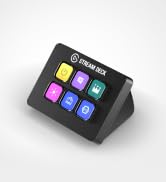
Image: Contents of the Elgato Stream Deck MK.2 packaging, including the device, stand, and USB cable.
2.2 Physical Connection:
- Attach the detachable stand to the back of your Stream Deck MK.2. The stand allows for adjustable viewing කෝණ.
- Connect the USB-C end of the provided cable to the port on the back of the Stream Deck.
- Connect the USB-A end of the cable to an available USB 2.0 port on your computer (Mac or PC).
Video: Demonstrates unboxing and connecting the Elgato Stream Deck MK.2 White to a computer.
2.3 මෘදුකාංග ස්ථාපනය:
- Visit the official Elgato website (elgato.com/s/downloads) to download the Stream Deck software for your operating system (macOS 10.13 or newer / Windows 10 (64-bit)).
- තිරයේ ඇති උපදෙස් අනුගමනය කිරීමෙන් මෘදුකාංගය ස්ථාපනය කරන්න.
- Launch the Stream Deck application. The software will automatically detect your connected Stream Deck device.

Image: The Stream Deck software interface, illustrating how to customize buttons and actions.
3. Operating the Stream Deck
3.1 Customizing Keys:
- In the Stream Deck software, drag and drop actions from the right-hand panel onto any of the 15 LCD keys.
- Each key can be assigned a single action, a multi-action (a sequence of actions), or a folder to organize more actions.
- Customize the icon and title for each key to easily identify its function.
Video: A quick look at the Elgato Stream Deck MK.2 in action, demonstrating key customization and functionality.
3.2 Profiles and Pages:
- බහු වෘත්තිකයන් සාදන්නfiles for different applications or workflows. The Stream Deck can automatically switch profiles when you open a specific application.
- එක් එක් ප්රෝ තුළfile, you can create multiple pages of actions, allowing for an extensive number of commands. Navigate between pages using dedicated navigation actions.

Image: The Stream Deck software displaying various application profiles and their associated customizable actions.
4. නඩත්තු කිරීම
- Keep the device clean by gently wiping it with a soft, dry cloth.
- Avoid using harsh chemicals or abrasive materials, as these may damage the LCD keys or the device's finish.
- Ensure the USB cable is securely connected and free from kinks or damage.
5. දෝශ නිරාකරණය
5.1 Device Not Detected:
- Ensure the USB cable is firmly connected to both the Stream Deck and your computer.
- Try connecting the Stream Deck to a different USB port on your computer.
- Restart the Stream Deck software and/or your computer.
5.2 Keys Not Responding:
- Verify that the Stream Deck software is running and the correct profile ක්රියාකාරී වේ.
- Check for any software updates for the Stream Deck application.
- Ensure the application you are trying to control is open and in focus.
6. පිරිවිතර
| විශේෂාංගය | විස්තර |
|---|---|
| වෙළඳ නාමය | එල්ගාටෝ |
| මාදිලියේ නම | එම්කේ.2 |
| ආදර්ශ අංකය | 10GBA9911 |
| වර්ණය | සුදු |
| යතුරු ගණන | 15 |
| අතුරු මුහුණත | USB 2.0 |
| මානයන් (නැවතුම් නොමැතිව) | 118 x 84 x 25 mm / 4.6 x 3.3 x 1.0 in |
| බර (නැවතුම් නොමැතිව) | 145 ග්රෑම් |
| පද්ධති අවශ්යතා | macOS 10.13 or newer / Windows 10 (64-bit) |
7. වගකීම් සහ සහාය
7.1 වගකීම් තොරතුරු:
The Elgato Stream Deck MK.2 comes with a වසර 2ක නිෂ්පාදක වගකීමවගකීම් හිමිකම් සඳහා කරුණාකර ඔබේ මිලදී ගැනීමේ සාක්ෂි තබා ගන්න.
7.2 පාරිභෝගික සහාය:
For technical assistance, software updates, or additional resources, please visit the official Elgato support website or refer to the Quick Start Guide included in your product packaging.
මාර්ගගත සම්පත් වලට ඇතුළත් වන්නේ:
- Elgato Support Portal: https://help.elgato.com/
- Stream Deck Software Downloads: https://www.elgato.com/s/downloads