
NACON 10946680
NACON Asymmetric Wireless Controller for PlayStation 4
මාදිලිය: 10946680
හැඳින්වීම
Thank you for choosing the NACON Asymmetric Wireless Controller for PlayStation 4. This controller is officially licensed for PlayStation 4 and designed to provide an immersive gaming experience with its unique asymmetric stick layout and wireless connectivity. This manual will guide you through the setup, operation, maintenance, and troubleshooting of your new controller.
පෙට්ටියේ ඇති දේ
සියලුම අයිතම පවතින බව සහතික කර ගැනීමට කරුණාකර ඔබේ පැකේජයේ අන්තර්ගතය පරීක්ෂා කරන්න:
- NACON Asymmetric Wireless Controller
- USB ලබන්නා
- USB ආරෝපණ කේබලය
- ඉක්මන් ආරම්භක මාර්ගෝපදේශය (මෙම ඩිජිටල් අත්පොතෙහි ඇතුළත් නොවේ)
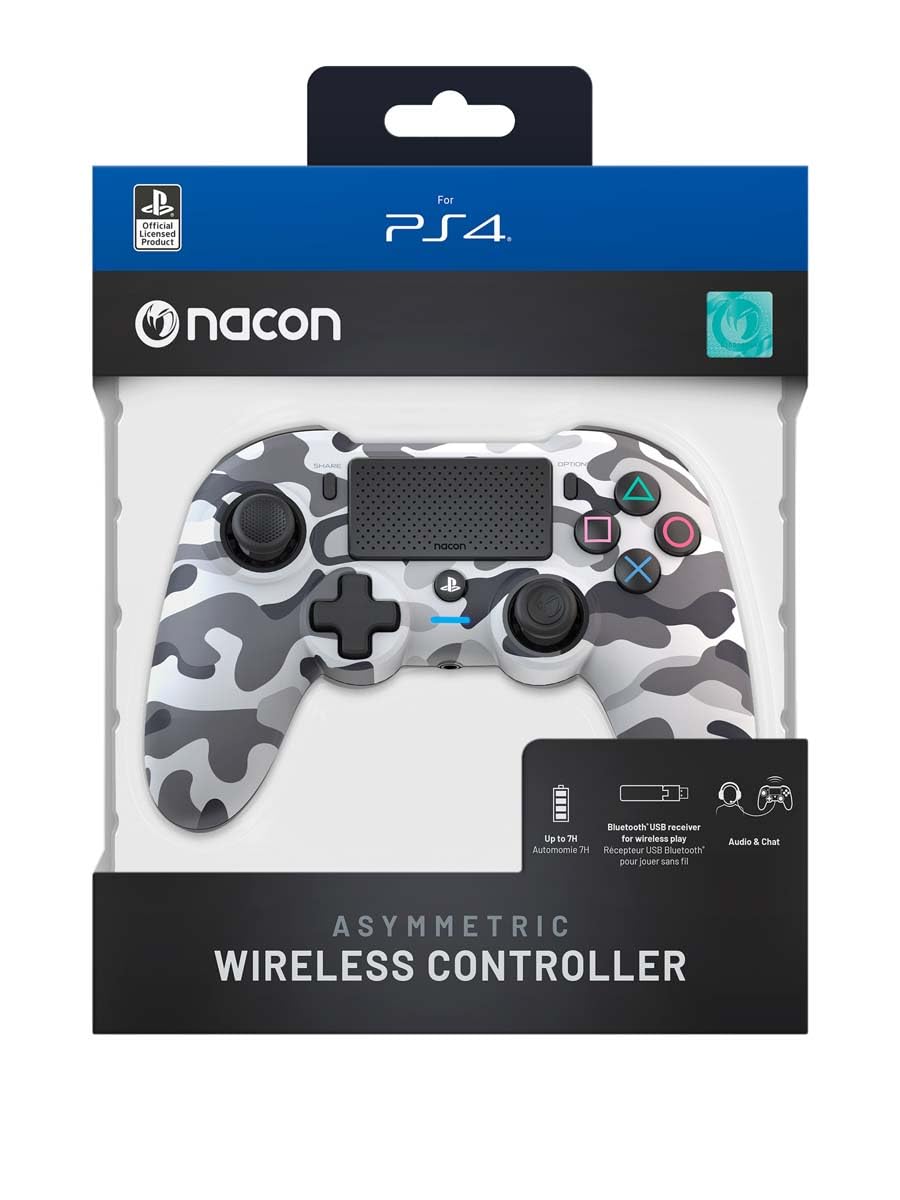
Image: The NACON Asymmetric Wireless Controller shown in its retail packaging, highlighting the product and its key features.
සැලසුම
1. පාලකය ආරෝපණය කිරීම
Before first use, fully charge the controller. Connect the small end of the USB charging cable to the controller's charging port and the larger end to a USB port on your PlayStation 4 console or a compatible USB wall adapter. The LED indicator on the controller will show charging status and turn off when fully charged.
2. Connecting to PlayStation 4 (Wireless)
- Insert the USB Receiver into an available USB port on your PlayStation 4 console.
- Press the PlayStation button on the controller. The controller will automatically attempt to pair with the USB Receiver.
- Once successfully paired, the LED indicator on the controller will illuminate steadily, indicating a stable connection.
3. Connecting to PC (Wireless)
The controller can also be used with a PC. Insert the USB Receiver into an available USB port on your PC. The controller should be recognized automatically by Windows as a standard gamepad. Drivers may be installed automatically.

රූපය: ඉදිරිපස view of the NACON Asymmetric Wireless Controller, showcasing its button layout and asymmetric stick design.
පාලකය ක්රියාත්මක කිරීම
බොත්තම් පිරිසැලසුම සහ කාර්යයන්
The NACON Asymmetric Wireless Controller features a familiar PlayStation button layout with an ergonomic asymmetric stick configuration for enhanced comfort and precision.
- වම් ඇනලොග් සැරයටිය: චලනය සහ සංචලනය සඳහා භාවිතා වේ.
- දකුණු ඇනලොග් සැරයටිය: Used for camera control and aiming.
- දිශානුගත පෑඩ් (ඩී-පෑඩ්): නිවැරදි දිශානුගත ආදානය සඳහා.
- ක්රියා බොත්තම් (ත්රිකෝණය, වෘත්තය, කුරුසය, හතරැස්): Standard PlayStation action buttons.
- L1/R1 බොත්තම්: උරහිස් බොත්තම්.
- L2/R2 ප්රේරක: Analog triggers for precise input.
- බෙදාගන්න බොත්තම: Access sharing features on PS4.
- විකල්ප බොත්තම: Access in-game menus and options.
- PlayStation Button: Power on/off the controller, access PS4 Home Menu.
- ස්පර්ශ පෑඩ්: Interactive surface for specific game functions.
බැටරි දර්ශකය
The controller includes an LED indicator that provides information on battery status. Refer to the Quick Start Guide for specific LED patterns and their meanings (e.g., low battery, charging, fully charged).
නඩත්තු කිරීම
පිරිසිදු කිරීම
ඔබේ පාලකය පිරිසිදු කිරීමට මෘදු වියළි රෙද්දක් භාවිතා කරන්න. මුරණ්ඩු අපිරිසිදුකම සඳහා, තරමක් dampen the cloth with water. Do not use harsh chemicals, abrasive cleaners, or solvents, as these can damage the controller's finish and internal components.
ගබඩා කිරීම
When not in use, store the controller in a cool, dry place away from direct sunlight and extreme temperatures. Avoid placing heavy objects on the controller.
බැටරි සත්කාර
බැටරි ආයු කාලය දීර්ඝ කිරීම සඳහා, පාලකය නිතර නිතර සම්පූර්ණයෙන්ම විසර්ජනය කිරීමෙන් වළකින්න. දිගු කාලයක් ගබඩා කරන්නේ නම්, ගබඩා කිරීමට පෙර බැටරිය ආසන්න වශයෙන් 50% දක්වා ආරෝපණය කර සෑම මාස කිහිපයකට වරක් නැවත ආරෝපණය කරන්න.
දෝෂගවේෂණය
| ගැටලුව | හැකි විසඳුම |
|---|---|
| පාලකය සම්බන්ධ නොවේ. |
|
| Controller does not charge. |
|
| බොත්තම් හෝ කූරු ප්රතිචාර නොදක්වයි. |
|
පාලකය නැවත සැකසීම
If the controller is unresponsive or behaving erratically, a soft reset may resolve the issue. Locate the small reset button (often a pinhole) on the back or underside of the controller. Use a thin, pointed object (like a paperclip) to press and hold the button for a few seconds. Then, re-pair the controller with your console.
පිරිවිතර
- ආදර්ශ අංකය:
- 10946680
- සම්බන්ධතාවය:
- Wireless (via USB Receiver)
- ගැළපුම:
- ප්ලේස්ටේෂන් 4, පීසී
- Dimensions (Controller):
- ආසන්න වශයෙන් 6.89 x 2.76 x 8.27 අඟල් (17.5 x 7 x 21 cm)
- Weight (Controller):
- ආසන්න වශයෙන් අවුන්ස 14.1 (ග්රෑම් 400)
- නිෂ්පාදකයා:
- නැකන්
- මුලින්ම ලබා ගත හැකි දිනය:
- 6 ජූලි 2022
වගකීම් සහ සහාය
For warranty information, technical support, or further assistance with your NACON Asymmetric Wireless Controller, please visit the official NACON webවෙබ් අඩවියට හෝ ඔවුන්ගේ පාරිභෝගික සහාය සෘජුවම අමතන්න. වගකීම් හිමිකම් සඳහා ඔබේ මිලදී ගැනීමේ සාක්ෂි තබා ගන්න.
නිල NACON Webඅඩවිය: www.nacongaming.com
Ask a question about this manual
Ask about setup, troubleshooting, compatibility, parts, safety, or missing instructions. Manuals+ will review the question and use this page’s manual context to help answer it.