
1. හැඳින්වීම
Thank you for choosing the Kaidi TWS Smart Touch Wireless Earbuds KD-771. These earbuds feature Bluetooth V5.1 for stable connectivity, Smart Touch controls for easy operation, and an IPX4 splash-resistant design, making them suitable for various activities. This manual provides detailed instructions to help you get the most out of your new earbuds.
පැකේජයේ අන්තර්ගතය:
- 1 Pair of Kaidi KD-771 Wireless Earbuds
- අයකිරීමේ නඩුව
- 1 USB Charging Cable (Type-C, typically)
- 1 පරිශීලක අත්පොත
2. පිහිටුවීම
2.1 ඉයර්බඩ් ආරෝපණය කිරීම සහ නඩුව ආරෝපණය කිරීම
Before first use, fully charge the earbuds and the charging case. The charging case acts as a portable power bank for your earbuds.
- ඉයර්බඩ් ආරෝපණය කිරීම: Place the earbuds into their respective slots in the charging case. Ensure the charging contacts align. The indicator lights on the earbuds will show their charging status.
- නඩුව අයකිරීම: Connect the USB charging cable to the charging port on the case and the other end to a USB power adapter (not included) or a computer USB port. The charging case indicator will illuminate to show charging status. A full charge for the case and earbuds typically takes approximately 4 hours.
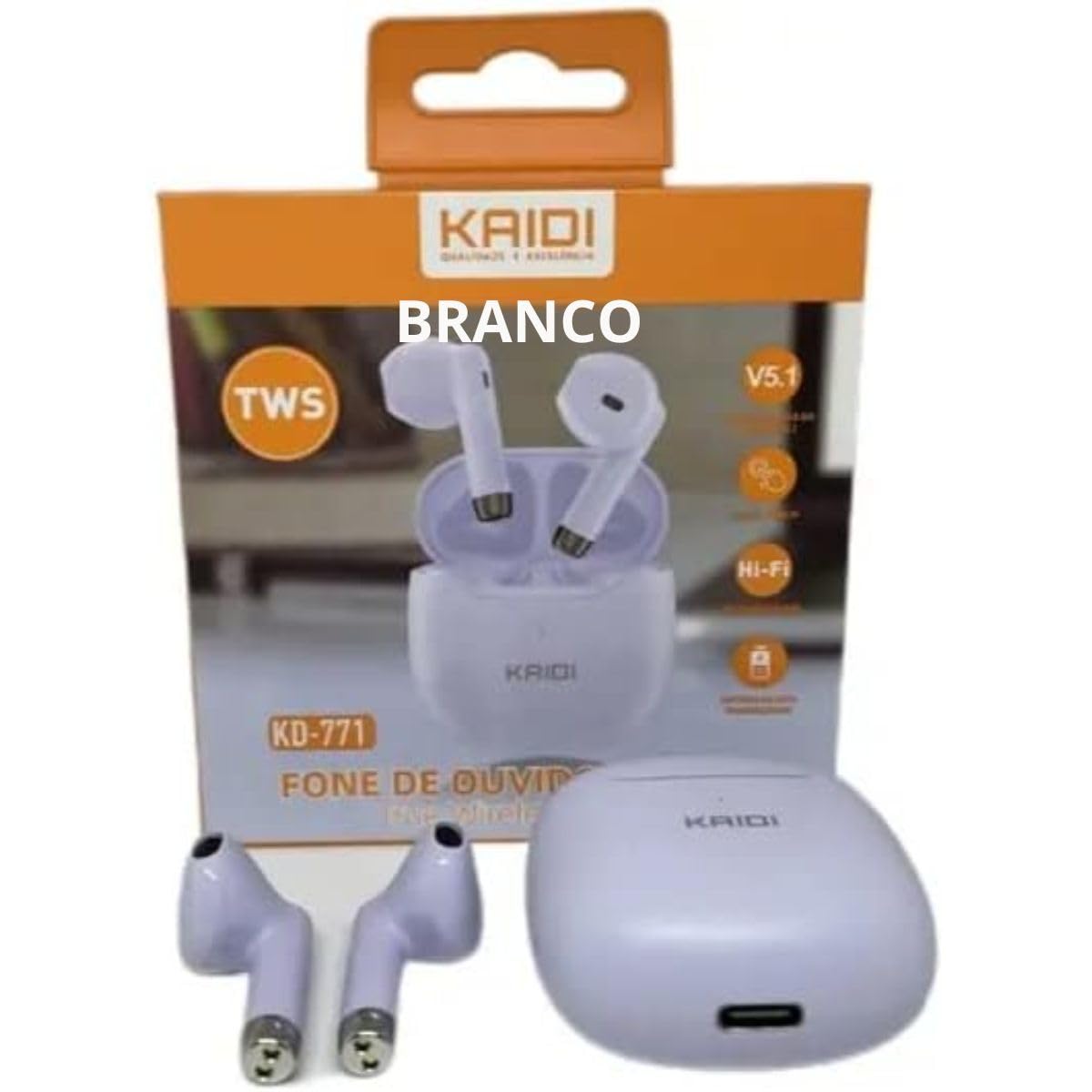
Image: Kaidi KD-771 Earbuds in their charging case. The earbuds are white and sit securely in the case, which is also white. This image illustrates the product's appearance and how the earbuds are stored.
2.2 ඔබගේ උපාංගය සමඟ යුගල කිරීම
Follow these steps to pair your Kaidi KD-771 earbuds with your smartphone or other Bluetooth-enabled device:
- බල ගැන්වීම: Open the charging case. The earbuds will automatically power on and enter pairing mode. You will hear an audible prompt, and the indicator lights on the earbuds will flash (typically blue and red alternately).
- බ්ලූටූත් සක්රිය කරන්න: On your device, go to the Bluetooth settings and ensure Bluetooth is turned on.
- ඉයර්බඩ් තෝරන්න: In the list of available Bluetooth devices, look for "KD-771" or a similar name and select it to connect.
- තහවුරු කිරීම: Once connected, you will hear a confirmation sound from the earbuds, and the indicator lights will stop flashing or flash slowly.
සටහන: උපාංගයේ බ්ලූටූත් සක්රීය කර ඇත්නම්, ඉයර්බඩ් නඩුවෙන් පිටතට ගත් විට අවසන් වරට යුගල කළ උපාංගයට ස්වයංක්රීයව නැවත සම්බන්ධ වේ.
3. මෙහෙයුම් උපදෙස්
The Kaidi KD-771 earbuds feature Smart Touch controls for convenient operation.
3.1 බලය සක්රිය / අක්රිය
- බල ගැන්වීම: Open the charging case, or long-press the touch area on both earbuds for approximately 3 seconds.
- විදුලිය විසන්ධි කිරීම: Place the earbuds back into the charging case and close the lid, or long-press the touch area on both earbuds for approximately 5 seconds.
3.2 සංගීත වාදනය
- වාදනය/විරාමය: Tap the touch area on either the left or right earbud once.
- ඊළඟ ධාවන පථය: දකුණු ඉයර්බඩයේ ස්පර්ශ ප්රදේශය දෙවරක් තට්ටු කරන්න.
- පෙර ධාවන පථය: වම් ඉයර්බඩයේ ස්පර්ශ ප්රදේශය දෙවරක් තට්ටු කරන්න.
3.3 ඇමතුම් කළමනාකරණය
- පිළිතුර/අවසන් ඇමතුම: Tap the touch area on either earbud once during an incoming call or during an active call.
- ඇමතුම ප්රතික්ෂේප කරන්න: Long-press the touch area on either earbud for approximately 2 seconds during an incoming call.
3.4 හ oice සහකාර
- හ oice සහකාර සක්රිය කරන්න: ඉයර්බඩ් දෙකෙන් එකක ස්පර්ශ ප්රදේශය තුන් වරක් තට්ටු කරන්න.
3.5 වෙළුම් පාලනය
- පරිමාව වැඩි කරන්න: Long-press the touch area on the right earbud.
- ශබ්දය අඩු කරන්න: Long-press the touch area on the left earbud.
4. නඩත්තු කිරීම
4.1 පිරිසිදු කිරීම
- ඉයර්බඩ් සහ ආරෝපණ පෙට්ටිය පිරිසිදු කිරීමට මෘදු, වියලි, ලින්ට් රහිත රෙද්දක් භාවිතා කරන්න.
- උල්ෙල්ඛ පිරිසිදු කරන්නන්, ද්රාවක හෝ එයරොසෝල් ඉසින භාවිතා නොකරන්න.
- නිසි ආරෝපණය සහතික කිරීම සඳහා ඉයර්බඩ් සහ කේස් දෙකෙහිම ආරෝපණ සම්බන්ධතා වියළි කපු පුළුන් කැබැල්ලකින් මෘදු ලෙස පිරිසිදු කරන්න.
4.2 ගබඩා කිරීම
- භාවිතයේ නොමැති විට, ඉයර්බඩ් ආරක්ෂා කර ගැනීමට සහ ආරෝපණය කර තබා ගැනීමට ඒවායේ ආරෝපණ පෙට්ටියේ ගබඩා කරන්න.
- උපාංගය අධික උෂ්ණත්වයන්ගෙන් සහ සෘජු හිරු එළියෙන් ඈත්ව සිසිල් වියළි ස්ථානයක ගබඩා කරන්න.
4.3 ජල ප්රතිරෝධය (IPX4)
The Kaidi KD-771 earbuds are rated IPX4, meaning they are splash-resistant. This protects them from splashing water from any direction. They are suitable for light rain or sweaty workouts.
- ඉයර්බඩ් වතුරේ ගිල්වන්න එපා.
- Avoid exposing them to high-pressure water jets.
- ආරෝපණ සම්බන්ධතා වලට හානි වීම වැළැක්වීම සඳහා ඉයර්බඩ් නැවත ආරෝපණ පෙට්ටියට දැමීමට පෙර ඒවා වියළී ඇති බවට වග බලා ගන්න.
5. දෝශ නිරාකරණය
5.1 ඉයර්බඩ් යුගල නොවේ
- ඉයර්බඩ් දෙකම ආරෝපණය කර ඇති බව සහතික කර ගන්න.
- ඔබගේ උපාංගයේ බ්ලූටූත් අක්රිය කර නැවත ක්රියාත්මක කරන්න.
- Delete "KD-771" from your device's Bluetooth list and try pairing again.
- If only one earbud connects, try resetting the earbuds (refer to the full reset instructions if available in a separate guide, or try placing them back in the case and taking them out again).
5.2 ශබ්දයක් නැත හෝ අඩු ශබ්දයක්
- ඔබගේ උපාංගයේ සහ ඉයර්බඩ් දෙකෙහිම ශබ්ද මට්ටම පරීක්ෂා කරන්න.
- ඉයර්බඩ් ඔබේ උපාංගයට නිසි ලෙස සම්බන්ධ වී ඇති බවට වග බලා ගන්න.
- ඉයර්බඩ් ස්පීකර් දැලෙන් ඕනෑම සුන්බුන් පිරිසිදු කරන්න.
5.3 අයකිරීමේ ගැටළු
- ආරෝපණ කේබලය නඩුවට සහ බල ප්රභවයට ආරක්ෂිතව සම්බන්ධ කර ඇති බවට වග බලා ගන්න.
- Verify that the power source is working.
- ඉයර්බඩ්වල සහ කේස් එක ඇතුළත ආරෝපණ සම්බන්ධතා පිරිසිදු කරන්න.
6. පිරිවිතර
| විශේෂාංගය | පිරිවිතර |
|---|---|
| ආදර්ශ අංකය | KD-771 |
| බ්ලූටූත් අනුවාදය | V5.1 |
| බැටරි ආයු කාලය (ඉයර්බඩ්) | Approx. 4 hours (talk time/music playback) |
| ආරෝපණ කාලය | Approx. 4 hours (for full charge of case and earbuds) |
| ජල ප්රතිරෝධය | IPX4 (ඉසින-ප්රතිරෝධී) |
| සම්බාධනය | 32 ඕම් |
| සංඛ්යාත පරාසය | 2.400 - 2.485 ගිගාහර්ට්ස් |
| ශ්රව්ය ධාවක වර්ගය | සමබර ආයුධ ධාවක |
| පාලන ක්රමය | ස්පර්ශ කරන්න |
| සංරචක ඇතුළත් | Earbuds, Charging Case |
| ඇනටෙල් සහතික කිරීම | 18583-21-14467 |
7. වගකීම් සහ සහාය
7.1 වගකීම් තොරතුරු
This Kaidi KD-771 product is covered by a මාස 3ක වගකීමක් from the date of purchase against manufacturing defects. Please retain your proof of purchase for warranty claims.
වගකීම් සහතිකය මගින් සිදුවන හානිය ආවරණය නොවේ:
- නුසුදුසු භාවිතය හෝ හැසිරවීම.
- අනවසර අලුත්වැඩියාවන් හෝ වෙනස් කිරීම්.
- Accidental damage, drops, or extreme temperatures.
- Water damage beyond the IPX4 rating (e.g., submersion).
7.2 සහාය
For further assistance, troubleshooting, or warranty inquiries, please contact the retailer or the manufacturer (KAIDI) directly. Refer to your purchase documentation for specific contact details.