
නිෂ්පාදනය අවසන්view
This document provides instructions for the ZdalaMit 0212-62622-00R replacement remote control. This remote is designed to function with various Polaroid TV/DVD Combo models, offering a direct replacement without requiring complex programming. Simply install batteries, and the remote is ready for use.

ඉදිරිපස view of the ZdalaMit 0212-62622-00R replacement remote control, showing all buttons and layout.
සැලසුම
1. බැටරි ස්ථාපනය කිරීම
The remote control requires two (2) 1.5V AAA Alkaline batteries (not included). Ensure correct polarity when inserting the batteries.
- දුරස්ථ පාලකයේ පිටුපස බැටරි මැදිරිය සොයා ගන්න.
- එය විවෘත කිරීම සඳහා බැටරි මැදිරි කවරය පහළට හෝ ඊතලයකින් දක්වා ඇති දිශාවට තල්ලු කරන්න.
- මැදිරිය තුළ පෙන්වා ඇති පරිදි ධන (+) සහ සෘණ (-) පර්යන්තවලට ගැලපෙන AAA බැටරි දෙකක් ඇතුළු කරන්න.
- බැටරි මැදිරි කවරය ප්රතිස්ථාපනය කරන්න, එය ආරක්ෂිතව ස්ථානයට ක්ලික් කරන බව සහතික කරන්න.
සටහන: No programming is required for this replacement remote. Once batteries are installed, it is ready for use with compatible Polaroid TV/DVD Combo models.
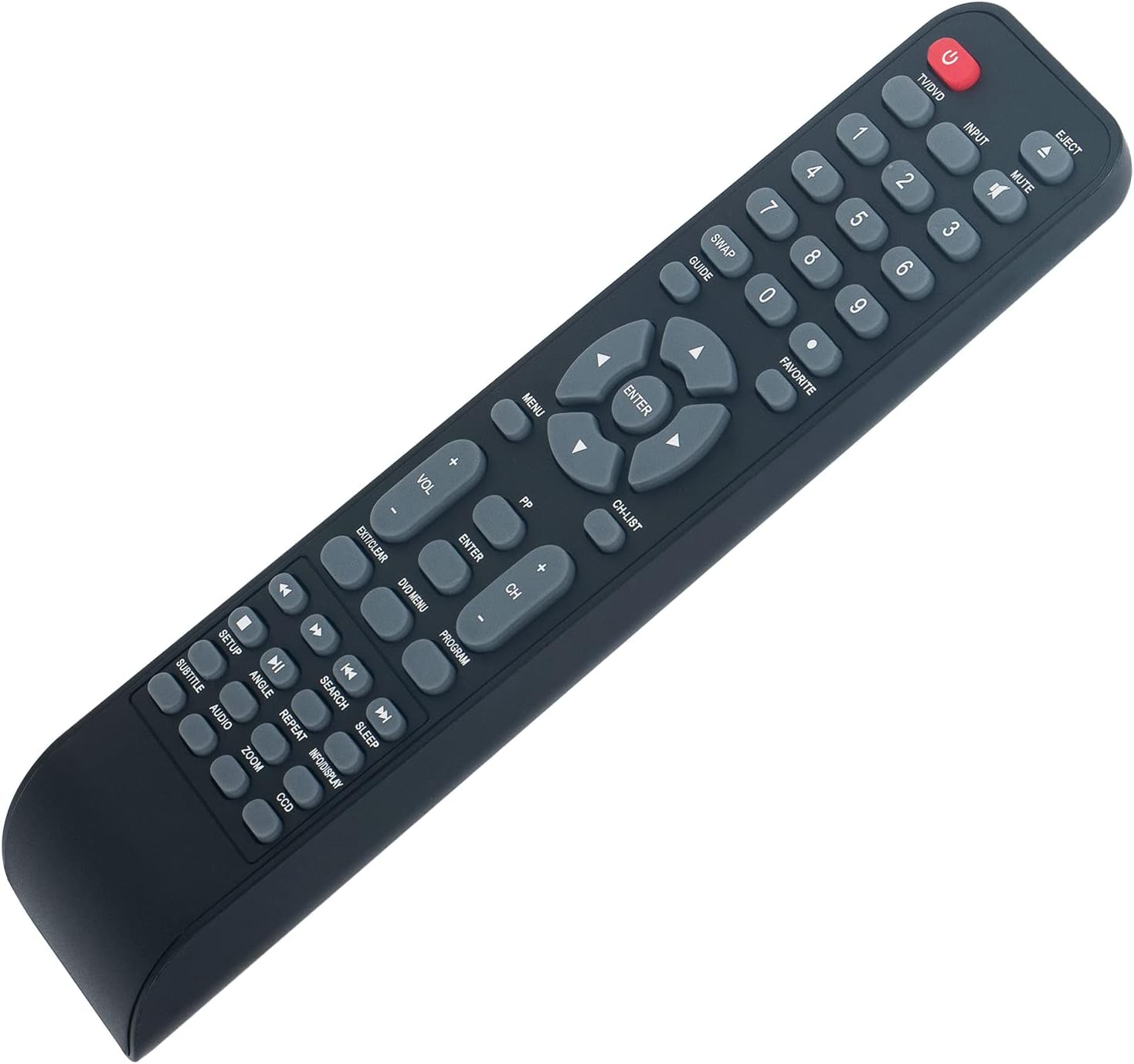
කෝණික view of the remote control, illustrating its ergonomic design and button layout for easy handling during battery installation.
මෙහෙයුම් උපදෙස්
Point the remote control directly at the infrared sensor on your Polaroid TV/DVD Combo unit for optimal performance. Ensure there are no obstructions between the remote and the unit.
මූලික කාර්යයන්
- TV/DVD (Power): Press to turn the TV/DVD Combo unit on or off.
- ආදානය: Selects the input source (e.g., TV, DVD, HDMI if applicable).
- නිශ්ශබ්දතාව: ශ්රව්ය නිශ්ශබ්ද කරයි හෝ නිශ්ශබ්ද කරයි.
- අංක බොත්තම් (0-9): Used for direct channel selection or entering numerical values.
- VOL +/-: ශබ්ද මට්ටම සීරුමාරු කරයි.
- CH +/-: රූපවාහිනී නාලිකාව ඉහළට හෝ පහළට වෙනස් කරයි.
- මෙනු: Accesses the main menu of the TV or DVD player.
- ඊතල බොත්තම් (ඉහළ, පහළ, වම, දකුණ): මෙනු විකල්ප හරහා සංචාලනය කරයි.
- ඇතුල් කරන්න: Confirms a selection in the menu.
- EXIT/CLEAR: Exits a menu or clears an entry.
DVD/Media Playback Functions
- විෂය: Ejects the DVD from the player.
- DVD මෙනුව: Accesses the DVD disc menu.
- ක්රීඩා කරන්න/විරාම කරන්න (►/❚❚): නැවත ධාවනය ආරම්භ කිරීම හෝ විරාමය ලබා දීම.
- නවත්වන්න (■): නැවත ධාවනය නතර කරයි.
- ආපසු හරවන්න (◀◀): නැවත ධාවනය ආපසු හරවයි.
- වේගයෙන් ඉදිරියට (►►): වේගවත් ඉදිරි ධාවනය.
- PREVIOUS (◀❚): Skips to the beginning of the current track/chapter or the previous one.
- NEXT (❚►): ඊළඟ ධාවන පථයට/පරිච්ඡේදයට යයි.
- නැවත කරන්න: Repeats a track, chapter, or entire disc.
- සොයන්න: Initiates a search function within media.
- උපසිරැසි: Toggles subtitle display.
- ශ්රව්ය උපකරණ: Changes audio tracks or languages.
- ඇන්ජල්: Changes camera angle on compatible DVDs.
- විශාලනය: Zooms in or out on the picture.
- INFO/DISPLAY: වත්මන් වැඩසටහන හෝ මාධ්ය පිළිබඳ තොරතුරු පෙන්වයි.
නඩත්තු කිරීම
- පිරිසිදු කිරීම: To clean the remote control, wipe it with a soft, dry cloth. Do not use liquid cleaners or abrasive materials, as these can damage the surface or internal components.
- බැටරි ආදේශනය: Replace batteries when the remote's response becomes sluggish or stops working. Always replace both batteries at the same time with new AAA Alkaline batteries. Do not mix old and new batteries, or different types of batteries.
- ගබඩා: If the remote control will not be used for an extended period, remove the batteries to prevent leakage, which can cause damage to the remote. Store the remote in a cool, dry place away from direct sunlight and extreme temperatures.
දෝෂගවේෂණය
| ගැටලුව | විය හැකි හේතුව | විසඳුම |
|---|---|---|
| දුරස්ථව ප්රතිචාර නොදක්වයි | Dead or incorrectly installed batteries. Obstruction between remote and TV/DVD Combo. Remote is too far from the unit. | Replace batteries with new AAA Alkaline batteries, ensuring correct polarity. Remove any objects blocking the line of sight to the TV/DVD Combo's IR sensor. Move closer to the unit (within 33 feet). |
| සමහර කාර්යයන් ක්රියා නොකරයි | The specific function may not be supported by your particular Polaroid TV/DVD Combo model. | This remote is a replacement designed for a range of Polaroid TV/DVD Combo models. While it offers broad compatibility, some advanced or model-specific functions may not be fully supported on all units. Refer to your original TV/DVD Combo manual for specific feature compatibility. |
| බොත්තම් ඇලෙන සුළු හෝ ප්රතිචාර නොදක්වයි | බොත්තම් යටතේ අපිරිසිදු හෝ සුන්බුන්. | Gently clean the remote control surface with a soft, dry cloth. Avoid pressing buttons excessively hard. |
පිරිවිතර
- ආකෘතිය: 0212-62622-00 ආර්
- වෙළඳ නාමය: ZdalaMit
- ගැළපුම: Polaroid TV/DVD Combo models (TDAC-01933, TDAC-02212, TLAC-03212, 4641-TLXB, TDAC-03212B, TDAC-03212W, TLAC-02255, TDAC01933, TDAC02212, TLAC02255, TDAC03212B, TDAC03212W, TLAC03212, 4641TLXB)
- බල සැපයුම: 2 x 1.5V AAA Alkaline Batteries (not included)
- සම්බන්ධතා තාක්ෂණය: අධෝරක්ත කිරණ (IR)
- උපරිම පරාසය: ආසන්න වශයෙන් අඩි 33 (මීටර් 10)
- Button Quantity: 18
- වර්ණය: කළු
- මානයන් (L x W x H): 8.34" x 1.99" x 0.55" (21.18 සෙ.මී. x 5.05 සෙ.මී. x 1.4 සෙ.මී.)
- අයිතමයේ බර: ග්රෑම් 40 (බැටරි නොමැතිව)
වගකීම් සහ සහාය
This ZdalaMit remote control comes with a වසර 1ක වගකීමක් මිලදී ගත් දින සිට. මෙම වගකීම් සහතිකය සාමාන්ය භාවිතය යටතේ නිෂ්පාදන දෝෂ ආවරණය කරයි. අනිසි භාවිතය, අනතුරු, අනවසර වෙනස් කිරීම් හෝ බැටරි කාන්දු වීම නිසා සිදුවන හානිය එය ආවරණය නොකරයි.
For technical support, warranty claims, or any questions regarding your remote control, please contact the seller directly through the platform where the purchase was made. Please have your order number ready when contacting support.