
Formovie M146FCN
Formovie V10 4K ප්රොජෙක්ටර් පරිශීලක අත්පොත
Model: M146FCN
හැඳින්වීම
Thank you for choosing the Formovie V10 4K Projector. This smart mini home theater projector delivers stunning 4K UHD visuals and immersive audio, designed to enhance your entertainment experience. This manual provides essential information for setting up, operating, maintaining, and troubleshooting your projector to ensure optimal performance and longevity.
පෙට්ටියේ ඇති දේ
සියලුම අයිතම පවතින බව සහතික කර ගැනීමට කරුණාකර ඔබේ පැකේජයේ අන්තර්ගතය පරීක්ෂා කරන්න:
- Formovie V10 4K Projector
- දුරස්ථ පාලකය
- විදුලි රැහැන්
- බල ඇඩැප්ටරය
- පරිශීලක අත්පොත
- වගකීම් කාඩ්පත

Image: The retail box of the Formovie V10 4K Projector, showing the product packaging.
නිෂ්පාදනය අවසන්view
Familiarize yourself with the main components of your Formovie V10 projector.

රූපය: ඉදිරිපස view of the Formovie V10 4K Projector, highlighting the lens and 4K UHD branding.
- ප්රක්ෂේපණ කාච: රූපය තිරය මතට විමෝචනය කරයි.
- සංවේදක: For auto-focus, keystone correction, and human detection.
- ස්පීකර් ග්රිල්: Integrated 2x7.5W full-range speakers and 15W independent subwoofer for immersive audio.
- ආදාන/ප්රතිදාන වරාය: (Located on the rear/side, refer to specific diagrams in the physical manual for exact placement)
- HDMI (for connecting external devices like gaming consoles, laptops)
- USB 3.0 (for connecting USB drives)
- 3.5mm Audio Out (for external audio systems)
- Ethernet (for wired network connection)
- බල ආදානය
සැලසුම
- ස්ථානගත කිරීම: Place the projector on a stable, flat surface or mount it according to your preference. Ensure there are no obstructions in front of the lens. For optimal viewing, ප්රක්ෂේපණ මතුපිටට ලම්බකව ප්රක්ෂේපකය ස්ථානගත කරන්න.
- බල සම්බන්ධතාවය: Connect the power adaptor to the projector's power input port, then plug the power cord into a wall outlet.
- මූලික බලය සක්රිය කිරීම: උපාංගය ක්රියාත්මක කිරීමට ප්රොජෙක්ටරයේ බල බොත්තම හෝ දුරස්ථ පාලකය ඔබන්න.
- අවධානය සහ යතුරු ගල් නිවැරදි කිරීම: The projector features automatic focus and keystone correction. Allow a few moments for the system to adjust the image clarity and shape. Manual adjustments can typically be made via the settings menu if needed.
- ජාල සම්බන්ධතාවය:
- Wifi: Navigate to the network settings, select your Wi-Fi network, and enter the password.
- ඊතර්නෙට්: Connect an Ethernet cable from your router to the projector's Ethernet port.
මෙහෙයුම් උපදෙස්
උපාංග සම්බන්ධ කිරීම
- HDMI උපාංග: Connect your laptop, gaming console, or Blu-ray player to the HDMI port using an HDMI cable. The projector will automatically detect the input or you can select it from the input source menu.
- USB උපාංග: Insert a USB drive into the USB 3.0 port to access media fileසෘජුවම.
- බ්ලූටූත්: Pair Bluetooth devices like speakers or headphones via the Bluetooth settings menu. The projector supports Bluetooth 5.
- තිරයේ ප්රතිබිම්බය: The projector supports various screen mirroring protocols.

Image: Display showing support for Huawei Cast+, Miracast, and Mac Airplay for screen mirroring.
මූලික සංචාලනය
Use the provided remote control to navigate the Android interface. The remote typically includes directional buttons, an OK/Enter button, Back, Home, and Volume controls.
ප්රධාන ලක්ෂණ
- ඇදහිය නොහැකි දීප්තිය: Enjoy excellent image performance in any lighting condition with 2500 ANSI Lumens of brightness.
- Stunning 4K Clarity: Experience breathtaking visuals with 4K resolution (3840 x 2160 pixels) and 8.3 million individual pixels for exceptional clarity.

Image: A graphic emphasizing "TRUE 4K Resolution" for the projector's display capabilities.
- Advanced Color Performance: Features 10-bit color depth, 118% DCI P3 color gamut, and 1024 bits color scale for vibrant and accurate colors.

Image: A graphic detailing the projector's color performance with "10 Bit Color Depth", "118% DCI P3", and "1024 bits Color Scale".
- Built for Gaming: Elevate your gaming with a 240Hz refresh rate and low 12ms latency, ensuring smooth and responsive gameplay.
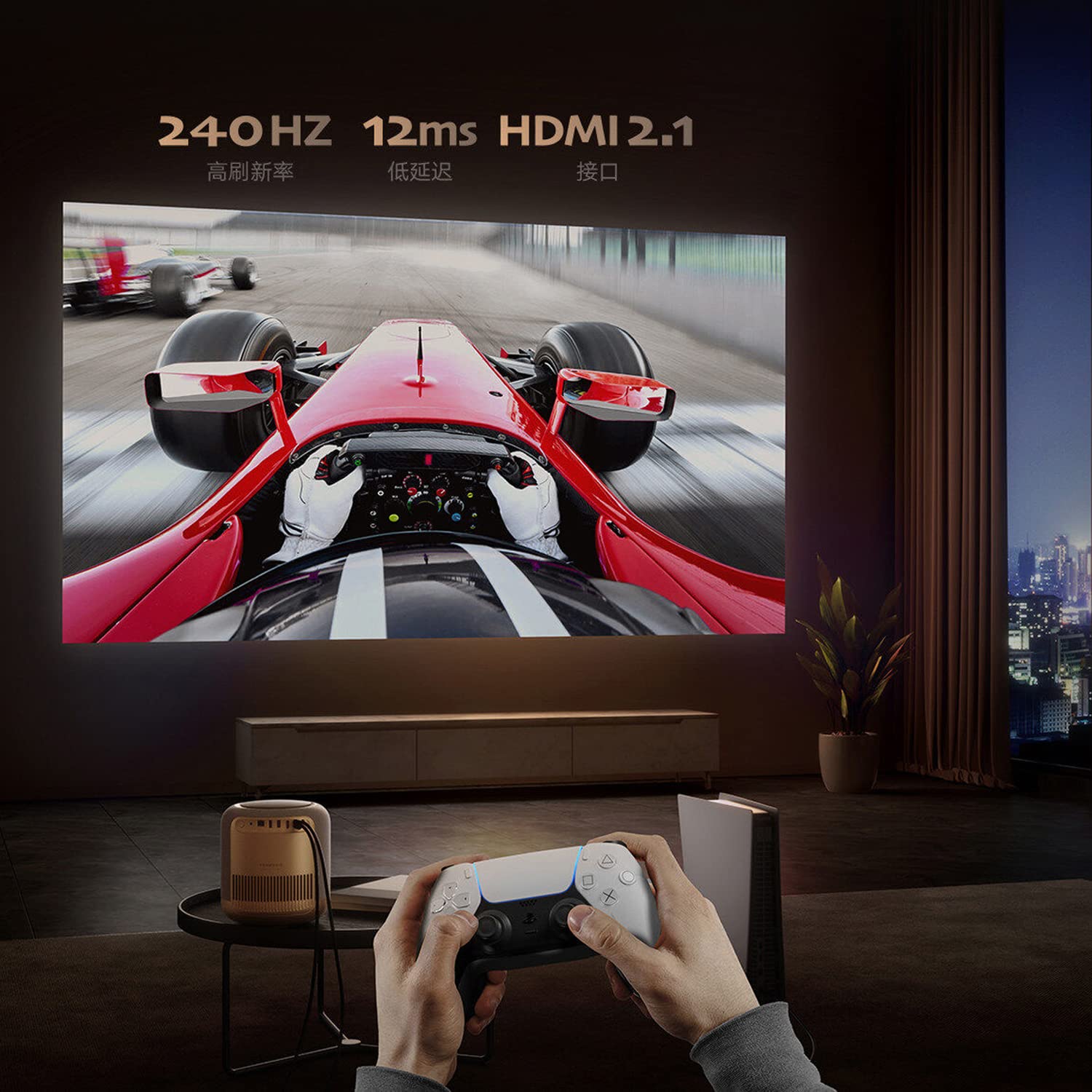
Image: A person playing a racing game projected by the Formovie V10, with text highlighting "240Hz", "12ms", and "HDMI 2.1".
- ගිල්වන ශ්රව්ය අත්දැකීම: Enhance your experience with 2x7.5W full-range speakers and a powerful 15W independent subwoofer for rich, dynamic sound.
- අක්ෂි ආරක්ෂාව: Features ToF human detection to automatically adjust brightness and prevent eye injury when someone approaches the light source.

Image: A screen prompt in Chinese warning not to look directly at the light source, demonstrating the ToF human detection feature.
- බහුකාර්ය භාවිතය: Perfect for movies, gaming, and streaming, this projector offers a comprehensive entertainment solution for any setting.
පිරිවිතර
| විශේෂාංගය | විස්තර |
|---|---|
| වෙළඳ නාමය | ෆෝමෝවි |
| මාදිලියේ නම | FORMOVIE V10 |
| ආදර්ශ අංකය | M146FCN |
| සංදර්ශක තාක්ෂණය | 4K UHD |
| විභේදනය | 3840 x 2160 පික්සල |
| රූපයේ දීප්තිය | 2500 ANSI ලුමෙන්ස් |
| රූප පරස්පර අනුපාතය | 10000:1 |
| දර්ශන අනුපාතය | 16:9 |
| Refresh Rate | 240 Hz |
| ශබ්ද මට්ටම | 28 dB |
| ශ්රව්ය උපකරණ | 2x7.5W full-range speakers, 15W independent subwoofer |
| සම්බන්ධතා තාක්ෂණය | Bluetooth 5, Wi-Fi, USB 3.0, Ethernet, HDMI |
| දෘඩාංග අතුරුමුහුණත | HDMI, LANC, 3.5mm Audio, USB 3.0, Bluetooth 5 |
| ගැළපෙන උපාංග | Laptop, Gaming Console, Tablet, Smartphone, Speaker |
| නිෂ්පාදන මානයන් | 20 x 20 x 21 සෙ.මී |
| අයිතමයේ බර | කිලෝ ග්රෑම් 3.8 කි |
| සවිකිරීමේ වර්ගය | tabletop Mount |
| මුල් රට | චීනය |
නඩත්තු කිරීම
- කාච පිරිසිදු කිරීම: දෘශ්ය කාච සඳහා විශේෂයෙන් නිර්මාණය කර ඇති මෘදු, ලින්ට් රහිත රෙද්දක් භාවිතා කරන්න. කාචය සීරීමට හේතු විය හැකි උල්ෙල්ඛ පිරිසිදු කරන්නන් හෝ රෙදි භාවිතා නොකරන්න.
- ප්රොජෙක්ටර් ශරීරය පිරිසිදු කිරීම: Wipe the exterior with a soft, dry cloth. For stubborn marks, a slightly damp රෙදි භාවිතා කළ හැකි අතර පසුව වියළි රෙද්දක් භාවිතා කළ හැකිය. ශක්තිමත් ඩිටර්ජන්ට් හෝ ද්රාවක භාවිතා කිරීමෙන් වළකින්න.
- වාතාශ්රය: Ensure the projector's ventilation openings are not blocked to prevent overheating. Do not place the projector on soft surfaces like carpets or blankets that could obstruct airflow.
- ගබඩා: දිගු කාලයක් භාවිතයේ නොමැති විට, ප්රොජෙක්ටරය සෘජු හිරු එළියෙන් සහ අධික උෂ්ණත්වයන්ගෙන් ඈත්ව සිසිල්, වියළි ස්ථානයක ගබඩා කරන්න.
දෝෂගවේෂණය
| ගැටලුව | විය හැකි හේතුව / විසඳුම |
|---|---|
| බලය නැත |
|
| රූපයක් නැත / හිස් තිරය |
|
| බොඳ රූපය |
|
| ශබ්දයක් නැත |
|
| දුරස්ථ පාලකය ක්රියා නොකරයි |
|
වගකීම් සහ සහාය
The Formovie V10 4K Projector comes with a වසර 1ක වගකීමක් provided by the manufacturer from the date of purchase. Please retain your proof of purchase for warranty claims.
For technical support, service, or warranty inquiries, please contact the authorized distributor or the manufacturer directly. The importer for this product is Aytexcel Private Limited.
Importer Contact Information:
අයිටෙක්සෙල් පුද්ගලික සමාගම
12 Highland, Pali Hill, Bandra, Mumbai 400050
විද්යුත් තැපෑල: hello@aytexel.com
සම්බන්ධතා: +91.9820022205
For more information, you may also visit the official Formovie store on Amazon: Formovie India Direct Store.
Ask a question about this manual
Ask about setup, troubleshooting, compatibility, parts, safety, or missing instructions. Manuals+ will review the question and use this page’s manual context to help answer it.