1. හැඳින්වීම
Thank you for choosing the Generic M29 Pro Wireless Earbuds. This manual provides detailed instructions on how to set up, operate, maintain, and troubleshoot your new earbuds. Please read this manual carefully before use to ensure optimal performance and longevity of your device.
2. පැකේජ අන්තර්ගතය
පහත ලැයිස්තුගත කර ඇති සියලුම අයිතම ඔබේ පැකේජයේ ඇති බවට වග බලා ගන්න:
- M29 Pro Wireless Earbuds (Left and Right)
- අයකිරීමේ නඩුව
- USB Type-C ආරෝපණ කේබලය
- පරිශීලක අත්පොත

Image: Contents of the M29 Pro Wireless Earbuds package, showing the earbuds, charging case, USB-C data cable, and instruction manual.
3. නිෂ්පාදන අවසන්view
The M29 Pro Wireless Earbuds feature an ergonomic in-ear design, touch controls, and an LED display on the charging case for battery status. The earbuds are designed for comfortable, all-day wear.
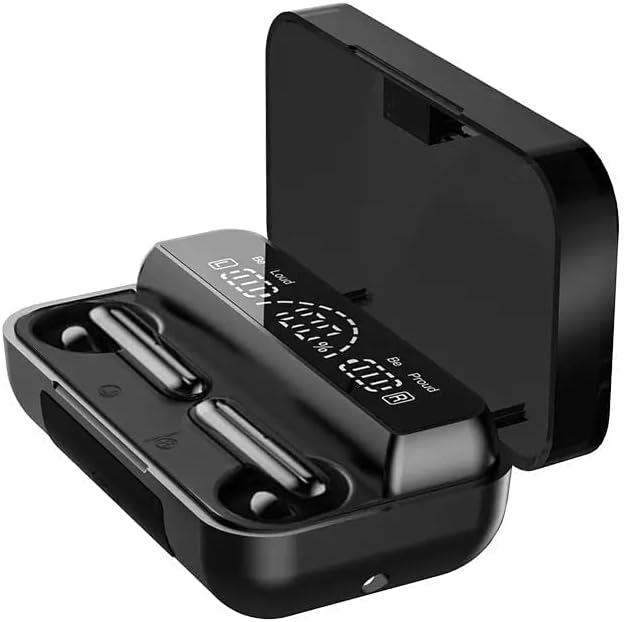
Image: The M29 Pro Wireless Earbuds resting in their open charging case, highlighting their compact design.
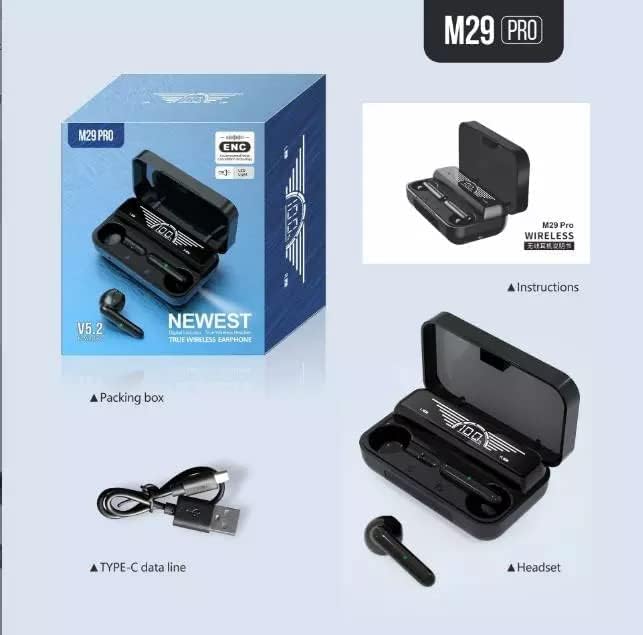
Image: The M29 Pro Wireless Earbuds inside the charging case, with the LED display clearly showing the battery percentage for both the case and individual earbuds.
4. ආරෝපණය කිරීම
4.1 මූලික ගාස්තුව
Before first use, fully charge the earbuds and the charging case. Place the earbuds into the charging case and connect the USB Type-C cable to the charging port on the case and a power source. The LED display on the case will indicate the charging status.
4.2 ඉයර්බඩ් ආරෝපණය කිරීම
Place the earbuds into the charging case. They will automatically begin charging. The LED display on the case will show the individual earbud battery levels.
4.3 නඩුව අය කිරීම
Connect the charging case to a power source using the provided USB Type-C cable. The LED display will show the case's battery percentage. A full charge for both the case and earbuds takes approximately 2 hours.
4.4 බලශක්ති බැංකු ක්රියාකාරිත්වය
The charging case can also function as a power bank to charge other devices. Connect your device to the USB output port on the charging case using an appropriate cable (not included).
5. බලය සක්රිය / අක්රිය කරන්න
5.1 බලය ක්රියාත්මකයි
- ස්වයංක්රීය: ආරෝපණ පෙට්ටිය විවෘත කරන්න, එවිට ඉයර්බඩ් ස්වයංක්රීයව ක්රියාත්මක වේ.
- අත්පොත: Press and hold the touch control area on both earbuds for approximately 3 seconds until you hear a power-on prompt.
5.2 බලය අක්රියයි
- ස්වයංක්රීය: Place the earbuds back into the charging case and close the lid. They will power off automatically and begin charging.
- අත්පොත: Press and hold the touch control area on both earbuds for approximately 5 seconds until you hear a power-off prompt.
6. බ්ලූටූත් යුගලනය
6.1 පළමු වරට යුගල කිරීම
- ඉයර්බඩ් සම්පූර්ණයෙන්ම ආරෝපණය වී ඇති බව සහතික කර ගන්න.
- ආරෝපණ පෙට්ටිය විවෘත කරන්න. ඉයර්බඩ් ස්වයංක්රීයව යුගල කිරීමේ ප්රකාරයට ඇතුළු වනු ඇත, එය ඉයර්බඩ් මත දැල්වෙන LED ආලෝකයක් මඟින් දැක්වේ.
- ඔබගේ ස්මාර්ට් ජංගම දුරකථනයේ හෝ වෙනත් උපාංගයක බ්ලූටූත් සක්රීය කරන්න.
- ඒ සඳහා සොයන්න "M29 Pro" in the list of available Bluetooth devices.
- Select "M29 Pro" to connect. Once connected, you will hear a confirmation sound, and the earbud LED lights will turn off.
The M29 Pro uses Bluetooth V5.1 technology for a stable connection up to 10 meters.
6.2 Re-connection
After initial pairing, the earbuds will automatically connect to the last paired device when taken out of the charging case, provided Bluetooth is enabled on the device and it is within range.
7. ස්පර්ශ පාලන
The M29 Pro earbuds feature intuitive touch controls for various functions:
| ක්රියාව | කාර්යය |
|---|---|
| තනි තට්ටු කිරීම (වම/දකුණ) | සංගීතය වාදනය කරන්න/විරාම කරන්න, පිළිතුරු දෙන්න/ඇමතුම අවසන් කරන්න |
| දෙවරක් තට්ටු කරන්න (වම් ඉයර්බඩ්) | පෙර ධාවන පථය |
| දෙවරක් තට්ටු කරන්න (දකුණු ඉයර්බඩ්) | ඊළඟ ධාවන පථය |
| තුන් වරක් තට්ටු කිරීම (වම/දකුණ) | හඬ සහායක සක්රිය කරන්න |
| Press and hold (Left/Right) | එන ඇමතුම ප්රතික්ෂේප කරන්න |
| Long press (Left/Right) | Toggle Active Noise Cancellation (ANC) |
8. ශ්රව්ය විශේෂාංග
The M29 Pro earbuds are engineered to deliver a high-fidelity audio experience with deep bass and clear sound, enhanced by CVC 8.0 noise cancellation technology to minimize external distractions.

Image: An internal diagram of an earbud, highlighting the moving coil unit design for surging bass and HiFi sound effects, ensuring good audio resolution and minimal distortion for an immersive listening experience.
9. නඩත්තු කිරීම
- පිරිසිදු කිරීම: Regularly clean the earbuds and charging case with a soft, dry cloth. Avoid using liquids or abrasive cleaners.
- ගබඩා: ඉයර්බඩ් ආරක්ෂා කිරීමට සහ ඒවා ආරෝපණය කර තබා ගැනීමට භාවිත නොකරන විට ඒවායේ ආරෝපණ පෙට්ටියේ ගබඩා කරන්න.
- ආන්තික තත්වයන් වළක්වා ගන්න: ඉයර්බඩ් අධික උෂ්ණත්වයන්ට, ආර්ද්රතාවයට හෝ සෘජු හිරු එළියට නිරාවරණය නොකරන්න.
- ජල ප්රතිරෝධය: The earbuds are sweat-resistant, making them suitable for sports. However, they are not waterproof; avoid submerging them in water.
10. දෝශ නිරාකරණය
| ගැටලුව | විසඳුම |
|---|---|
| ඉයර්බඩ් යුගල නොවේ | Ensure earbuds are charged. Turn off and on Bluetooth on your device. Forget "M29 Pro" from your device's Bluetooth list and try pairing again. |
| එක් ඉයර්බඩ් එකක් පමණක් ක්රියා කරයි | Place both earbuds back into the charging case, close the lid, then open it again. Ensure both earbuds are charged. |
| ශබ්දයක් නැත | Check device volume. Ensure earbuds are connected. Try re-pairing. |
| ආරෝපණ නඩුව ආරෝපණය නොවේ | Ensure the USB-C cable is properly connected to both the case and the power source. Try a different cable or power adapter. |
11. පිරිවිතර
| විශේෂාංගය | විස්තර |
|---|---|
| මාදිලියේ නම | M29 Pro |
| වෙළඳ නාමය | සාමාන්ය |
| සම්බන්ධතා තාක්ෂණය | රැහැන් රහිත (බ්ලූටූත් V5.1) |
| Headphones Form Factor | In-ear |
| ශබ්ද පාලනය | ක්රියාකාරී ශබ්ද අවලංගු කිරීම (CVC 8.0) |
| පාලන ක්රමය | ස්පර්ශ පාලනය |
| ආරෝපණ කේස් බැටරිය | 2000mAh (පොලිමර් ලිතියම්) |
| Earbud Playtime | Approximately 6 hours (per charge) |
| මුළු ක්රීඩා කාලය (අවස්ථාව සමඟ) | පැය 48 දක්වා |
| පොරොත්තු කාලය | පැය 280 යි |
| සම්පූර්ණ ආරෝපණ කාලය | Approximately 2 hours (case and earbuds) |
| ද්රව්ය | ABS ප්ලාස්ටික් |
| වර්ණය | කළු |
| පැකේජ මානයන් | 13.8 x 11.8 x 7.1 සෙ.මී |
| බර | ග්රෑම් 140 කි |
12 ආරක්ෂිත තොරතුරු
- නිෂ්පාදිතය විසුරුවා හැරීම හෝ වෙනස් කිරීම නොකරන්න.
- දරුවන් සහ සුරතල් සතුන්ගෙන් ඈත් වන්න.
- ශ්රවණ හානිය වළක්වා ගැනීම සඳහා දිගු වේලාවක් ඉහළ ශබ්දයකින් සවන් දීමෙන් වළකින්න.
- දේශීය රෙගුලාසිවලට අනුව වගකීමෙන් යුතුව භාණ්ඩය බැහැර කරන්න.
13. වගකීම් සහ සහාය
For warranty information or technical support, please refer to the retailer or contact the manufacturer directly. Keep your purchase receipt as proof of purchase.