හැඳින්වීම
This manual provides essential instructions for the setup, operation, and maintenance of your Generic Replacement Remote Control. This remote is designed to function as a replacement for various TD Systems LCD HDTV TV models. Please read this manual carefully to ensure proper use and to maximize the lifespan of your remote control.
සැලසුම
1. බැටරි ස්ථාපනය
The remote control requires two (2) AAA batteries (not included) for operation. Follow these steps to install the batteries:
- දුරස්ථ පාලකයේ පිටුපස බැටරි මැදිරි කවරය සොයා ගන්න.
- කවරය පහළට තල්ලු කරන්න හෝ අගුල ඔබා මැදිරිය විවෘත කරන්න.
- ධනාත්මක (+) සහ සෘණ (-) පර්යන්ත මැදිරිය තුළ ඇති සලකුණු සමඟ නිවැරදිව පෙළගස්වා ඇති බව සහතික කරමින් AAA බැටරි දෙකක් ඇතුළු කරන්න.
- බැටරි මැදිරි කවරය ආරක්ෂිතව ක්ලික් කරන තෙක් එය නැවත එම ස්ථානයට ලිස්සා යාමෙන් ප්රතිස්ථාපනය කරන්න.

Image: Back of the remote control with the battery compartment open, illustrating the correct orientation for AAA battery insertion.
2. මූලික භාවිතය
Once batteries are installed, the remote control is ready for use. No programming is typically required for this replacement remote. Point the remote directly at your TD Systems TV and press the Power button to test functionality.
වැදගත් සටහන: This replacement remote may not support all advanced functions or specific smart TV features found on your original remote. Basic TV functions such as power, volume, channel, and menu navigation are generally supported.
මෙහෙයුම් උපදෙස්
Familiarize yourself with the button layout and their primary functions:
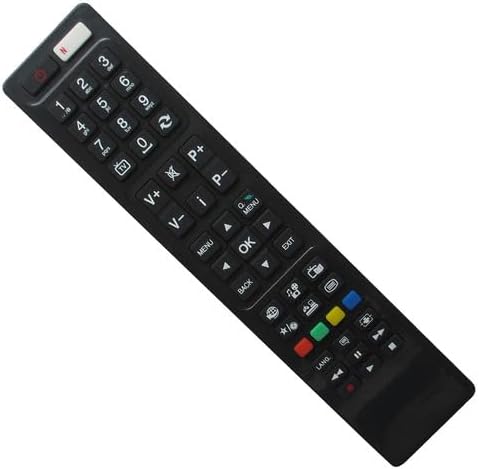
රූපය: ඉදිරිපස view of the remote control, displaying the layout of all operational buttons.
- බල බොත්තම (⏻ ⏻ ශ්රේණිය): රූපවාහිනිය ක්රියාත්මක හෝ අක්රිය කරයි.
- අංක බොත්තම් (0-9): නාලිකා කෙලින්ම තෝරන්න.
- Volume Up/Down (V+/V-): රූපවාහිනියේ ශබ්ද මට්ටම සීරුමාරු කරයි.
- නාලිකාව ඉහළට/පහළට (P+/P-): Changes the TV channel sequentially.
- නිහte කරන්න (🔇): රූපවාහිනී ශ්රව්ය නිශ්ශබ්ද කිරීම හෝ නිශ්ශබ්ද කිරීම.
- මෙනුව: සැකසුම් සහ විකල්ප සඳහා රූපවාහිනියේ ප්රධාන මෙනුවට ප්රවේශ වේ.
- සංචාලන බොත්තම් (ඉහළ, පහළ, වම, දකුණ): මෙනු සහ විකල්ප හරහා සංචාලනය කරන්න.
- හරි බොත්තම: මෙනු තුළ තේරීම් තහවුරු කරයි.
- ආපසු: පෙර මෙනුවට හෝ තිරයට නැවත පැමිණේ.
- පිටවීම: වත්මන් මෙනුවෙන් හෝ යෙදුමෙන් ඉවත් වේ.
- Source/Input (📺): ආදාන මූලාශ්රය (HDMI, AV, ආදිය) තෝරයි.
- වර්ණ බොත්තම් (රතු, කොළ, කහ, නිල්): Used for specific functions within certain TV menus or applications, if supported by your TV model.
- මාධ්ය පාලන බොත්තම් (වාදනය, විරාමය, නැවැත්වීම, ආපසු හැරවීම, වේගයෙන් ඉදිරියට): Controls media playback if your TV supports it.
නඩත්තු කිරීම
බැටරි ප්රතිස්ථාපනය
දුරස්ථ පාලකයේ ප්රතිචාරය මන්දගාමී වූ විට හෝ ක්රියා විරහිත වූ විට බැටරි ප්රතිස්ථාපනය කරන්න. සෑම විටම බැටරි දෙකම එකවර නව AAA බැටරි සමඟ ප්රතිස්ථාපනය කරන්න. පැරණි සහ නව බැටරි හෝ විවිධ වර්ගයේ බැටරි මිශ්ර නොකරන්න.
පිරිසිදු කිරීම
දුරස්ථ පාලකය පිරිසිදු කිරීම සඳහා, මෘදු වියළි රෙද්දකින් එහි මතුපිට මෘදු ලෙස පිස දමන්න. මුරණ්ඩු අපිරිසිදුකම සඳහා, තරමක් dampරෙදි කැබැල්ල වතුරෙන් සෝදන්න. රළු රසායනික ද්රව්ය, උල්ෙල්ඛ පිරිසිදු කරන්නන් හෝ අධික තෙතමනය භාවිතා කිරීමෙන් වළකින්න, මන්ද මේවා දුරස්ථ පාලකයට හානි කළ හැකිය.
ගබඩා කිරීම
දුරස්ථ පාලකය සෘජු හිරු එළියෙන් සහ අධික උෂ්ණත්වයන්ගෙන් ඈත්ව සිසිල් වියළි ස්ථානයක ගබඩා කරන්න. දුරස්ථ පාලකය දිගු කාලයක් භාවිතා නොකරන්නේ නම්, කාන්දු වීම වැළැක්වීම සඳහා බැටරි ඉවත් කිරීම රෙකමදාරු කරනු ලැබේ.
දෝෂගවේෂණය
- දුරස්ථ පාලකය ප්රතිචාර නොදක්වයි:
- නිවැරදි ධ්රැවීයතාවයෙන් (+/-) බැටරි නිවැරදිව ඇතුළු කර ඇති බවට වග බලා ගන්න.
- පැරණි බැටරි නව AAA බැටරි සමඟ ප්රතිස්ථාපනය කරන්න.
- Make sure there are no obstructions between the remote control and the TV's infrared sensor.
- ඔබ ඵලදායී පරාසය තුළ සිටින බවත් දුරස්ථ පාලකය කෙලින්ම රූපවාහිනිය දෙසට යොමු කරන බවත් සහතික කර ගන්න.
- සමහර කාර්යයන් ක්රියා නොකරයි:
- As a replacement remote, it may not support all specific or advanced functions of your original TV remote. This is normal for universal or replacement remotes.
- Verify that your TV model is listed as compatible. If your model is not listed, full functionality cannot be guaranteed.
පිරිවිතර
| වෙළඳ නාමය | සාමාන්ය |
| ගැළපෙන උපාංග | Television (TD Systems F40D101, XF40D101, K40DLV3F, RC4846, RC4860, 48FHD1, 40DLV1FSM) |
| බලශක්ති ප්රභවය | 2 x AAA බැටරි (ඇතුළත් කර නැත) |
| උපරිම සහාය දක්වන උපාංග ගණන | 1 |
| වර්ණය | Random (typically Black) |
| නිෂ්පාදකයා | SZHKHXD |
| ASIN | B0BP9GVFXH |
සහාය සහ වගකීම්
As a generic replacement product, specific warranty information may vary. For any issues, questions, or support regarding this remote control, please contact the seller directly through your purchase platform. Ensure you provide your order details for efficient assistance.


