
හැඳින්වීම
This manual provides instructions for the safe and efficient operation of your WUIPET Elevated Automatic Smart Pet Feeder. Please read this manual thoroughly before use and retain it for future reference.
ආරක්ෂිත තොරතුරු
- ගෘහස්ථ භාවිතය සඳහා පමණි.
- ප්රධාන ඒකකය ජලයේ ගිල්වන්න එපා.
- Use only dry pet food.
- Keep out of reach of children and pets when not in use or during assembly.
- බල ඇඩැප්ටරය ආරක්ෂිතව සම්බන්ධ කර ඇති බවට සහතික වන්න.
- Do not use damaged power cords or adapters.
- දේශීය රෙගුලාසිවලට අනුව බැටරි නිසි ලෙස බැහැර කරන්න.
- Clean the feeder regularly as per maintenance instructions.
පැකේජයේ අන්තර්ගතය
- WUIPET Automatic Pet Feeder Main Unit
- Food Storage Container Lid
- මල නොබැඳෙන වානේ ආහාර බඳුන
- ආහාර බඳුන් රඳවනය
- Feeder Raisers (1-inch and 2-inch)
- USB-C Power Adapter and Cable
- පරිශීලක අත්පොත (මෙම ලේඛනය)
නිෂ්පාදනය අවසන්view
The WUIPET Elevated Automatic Smart Pet Feeder is designed to provide scheduled meals for your cats and dogs, offering convenience and promoting healthy eating habits. It features WiFi connectivity for app control, adjustable height, voice recording, and dual power options.
ප්රධාන ලක්ෂණ
- APP පාලනය: Manage feeding schedules and portions remotely via the "Smart Life" app (2.4GHz WiFi required).
- සකස් කළ හැකි උස: Includes raisers to elevate the food bowl, reducing neck strain and aiding digestion.
- නම්යශීලී කාලසටහන්ගත කිරීම: Program up to 10 meals per day with up to 12 portions per meal (1/12 cup per portion).
- හඬ පටිගත කරන්නා: ආහාර වේලෙහි ඔබේ සුරතලාට කතා කිරීමට තත්පර 10ක පණිවිඩයක් පටිගත කරන්න.
- ද්විත්ව බල සැපයුම: Operates with USB-C adapter or 3 D-cell batteries (not included) for uninterrupted feeding.
- විශාල ධාරිතාව: 4-liter (17-cup) food storage suitable for extended periods.
සැලසුම
1. ඇසිරීම සහ එකලස් කිරීම
- ඇසුරුම්කරණයෙන් සියලුම සංරචක ඉවත් කරන්න.
- ප්රධාන පෝෂක ඒකකය පැතලි, ස්ථාවර මතුපිටක් මත තබන්න.
- Attach the food bowl holder to the main unit.
- Insert the stainless steel food bowl into the holder.
- If desired, attach the 1-inch or 2-inch feeder raisers to the bottom of the food bowl holder to adjust the height.
- Open the lid of the food storage container and fill it with dry pet food. Ensure the lid is securely closed.
2. පෝෂකය බල ගැන්වීම
The feeder can be powered by two methods:
USB-C Power Adapter (Primary)
- Connect the USB-C cable to the port on the back of the feeder.
- ඇඩැප්ටරය සම්මත බිත්ති වෙළඳසැලකට සම්බන්ධ කරන්න.
- The feeder will power on.
D-Cell Batteries (Backup)
- Open the battery compartment on the bottom of the feeder.
- Insert 3 D-cell alkaline batteries (not included), ensuring correct polarity.
- බැටරි මැදිරිය වසා දමන්න.
- සටහන: Batteries provide backup power in case of an outage. A built-in coin battery retains settings.
3. App Installation and WiFi Connection
- App Store (iOS) හෝ Google Play Store (Android) වෙතින් "Smart Life" යෙදුම බාගන්න.
- ඔබගේ Smart Life ගිණුමට ලියාපදිංචි වන්න හෝ ලොග් වන්න.
- Ensure your smartphone is connected to a 2.4GHz WiFi network. (සටහන: 5GHz networks are not supported).
- On the feeder, press and hold the WiFi reset button (usually located near the power port) until the indicator light flashes rapidly.
- In the Smart Life app, tap "+" to add a device. Select "Small Home Appliance" > "Pet Feeder (Wi-Fi)".
- Follow the on-screen instructions to connect the feeder to your WiFi network.
- Once connected, the WiFi indicator light on the feeder will become solid.

Image: The Smart Life app allows convenient remote control and scheduling of your pet's meals.
මෙහෙයුම් උපදෙස්
1. Setting Up Feeding Schedule (via App)
- Open the "Smart Life" app and select your WUIPET feeder.
- Navigate to the "Schedule" or "Feeding Plan" section.
- Tap "Add Meal" to set a new feeding time.
- Select the desired time for the meal.
- Choose the number of portions (1/12 cup per portion, up to 12 portions).
- Save the schedule. You can set up to 10 meals per day.

Image: The app enables you to manage your pet's feeding schedule from anywhere, ensuring timely meals.
2. අතින් පෝෂණය
To dispense food manually:
- යෙදුම හරහා: In the Smart Life app, select your feeder and tap the "Feed Now" or "Manual Feed" button. You can usually select the number of portions to dispense.
- පෝෂක බොත්තම හරහා: Press the manual feed button on the feeder (often labeled with a food bowl icon) to dispense one portion. Press multiple times for more portions.
3. හඬ පණිවිඩයක් පටිගත කිරීම
- යෙදුම හරහා: In the Smart Life app, go to the "Voice" or "Record" section.
- Tap "Record" and speak your message (up to 10 seconds).
- Save the recording. This message will play before each scheduled meal.
- පෝෂක බොත්තම හරහා: Some models may have a dedicated record button. Press and hold it, speak your message, then release. Refer to the specific button layout on your device.

Image: Record a personalized 10-second message to call your pet for meals.
4. Adjusting Feeder Height
The feeder comes with two sets of raisers (1-inch and 2-inch).
- Detach the food bowl holder from the main unit.
- Attach the desired raisers to the bottom of the food bowl holder.
- Reattach the food bowl holder with raisers to the main unit.
- This elevation helps reduce strain on your pet's neck and joints.

Image: The elevated design helps reduce strain on your pet's neck and promotes healthy digestion.
නඩත්තු කිරීම
1. පෝෂකය පිරිසිදු කිරීම
Regular cleaning is essential for your pet's health.
- Disconnect the power adapter and remove any backup batteries.
- Remove the food storage container lid, food storage container, food bowl, and food bowl holder.
- The stainless steel food bowl, food bowl holder, and food storage container are washable. Hand wash these components with mild soap and water.
- Rinse thoroughly and dry completely before reassembly.
- ප්රධාන ඒකකය ජලයෙන් සෝදා නොගන්න. ප්රධාන ඒකකයේ බාහිර පෙනුම දැන්වීමකින් පිස දමන්න.amp රෙදි.
- නැවත එකලස් කර ආහාර වලින් නැවත පිරවීමට පෙර සියලුම කොටස් සම්පූර්ණයෙන්ම වියළී ඇති බවට වග බලා ගන්න.
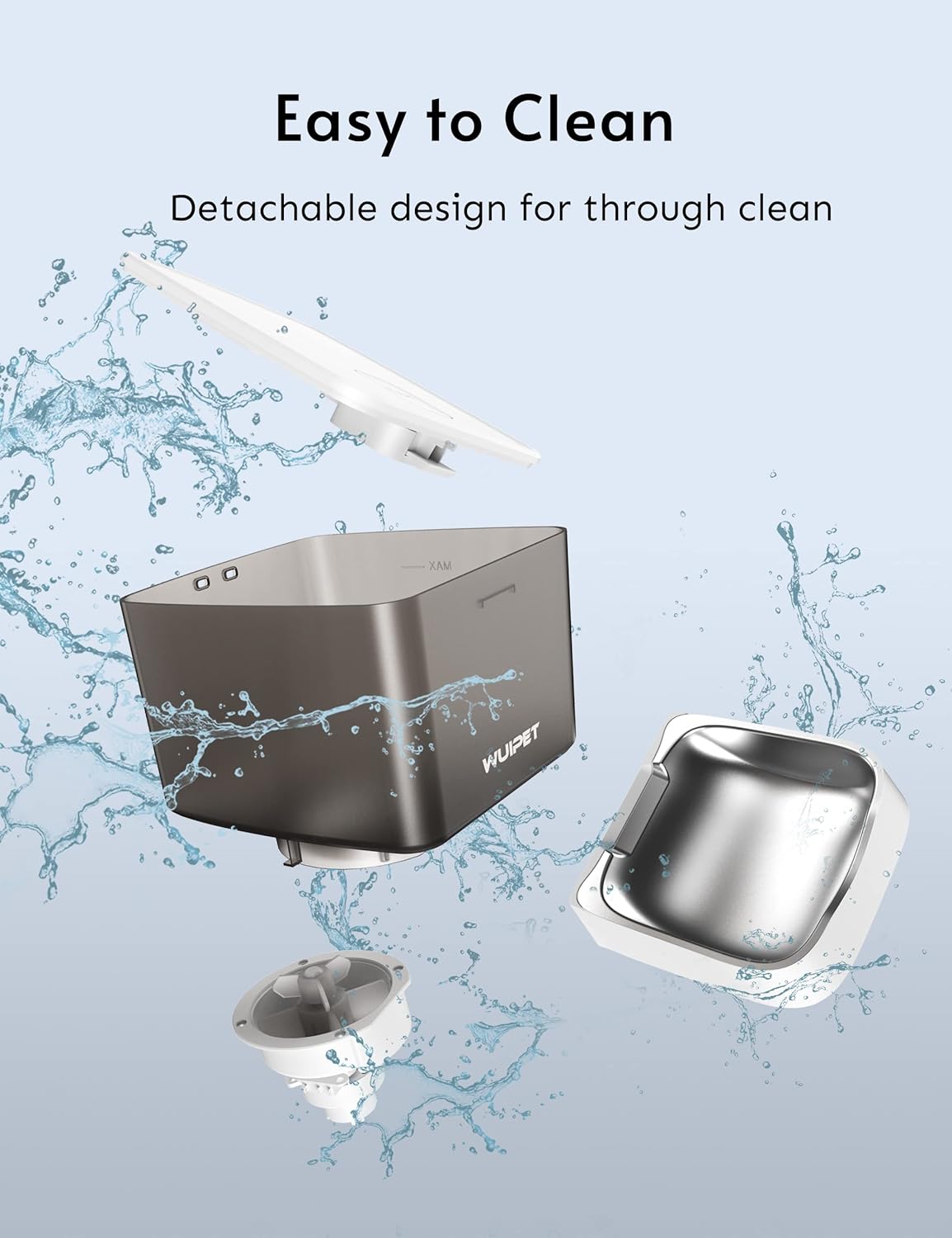
Image: The feeder features a detachable design for easy and thorough cleaning of food-contact parts.
2. Refilling Food
Monitor the food level in the container. When low, open the lid and refill with dry pet food. Ensure the lid is securely closed to maintain food freshness.
3. බැටරි ප්රතිස්ථාපනය
If using D-cell batteries for backup, replace them when the low battery indicator appears (if applicable) or approximately every 6-12 months, depending on usage.

Image: The feeder supports dual power supply with a USB-C adapter and D-cell batteries (not included) for continuous operation.
දෝෂගවේෂණය
පෝෂක ආහාර බෙදා නොහරිමින්:
- Check if the feeder is powered on and connected to a power source.
- Ensure the food container is not empty.
- Verify that the food chute is not blocked by kibble.
- Check the app for any error messages or if the schedule is correctly set.
- Ensure the food size is appropriate for the feeder (typically 5-15mm dry kibble).
WiFi සම්බන්ධතා ගැටළු:
- ඔබගේ රවුටරය 2.4GHz WiFi සංඥාවක් විකාශනය කරන බව තහවුරු කරන්න.
- Ensure the feeder is within range of your WiFi router.
- Reset the feeder's WiFi by pressing the reset button until the indicator flashes rapidly, then re-pair via the app.
- ඔබගේ රවුටරය නැවත ආරම්භ කර නැවත සම්බන්ධ වීමට උත්සාහ කරන්න.
Voice recording not playing:
- Ensure the voice message was successfully recorded and saved in the app.
- Check the volume settings in the app.
- Verify that scheduled meals are active.
Feeder is offline in the app:
- Check the feeder's power supply.
- Verify your home WiFi network is active and stable.
- If the feeder was moved, it might be out of WiFi range.
- Try restarting the feeder and your router.
පිරිවිතර
| විශේෂාංගය | පිරිවිතර |
|---|---|
| ආදර්ශ අංකය | DU4L-WC-01 |
| ධාරිතාව | ලීටර් 4 (කෝප්ප 17ක් පමණ) |
| මානයන් (L x W x H) | 19.05 x 17.53 x 28.7 සෙ.මී |
| බර | කිලෝ ග්රෑම් 2.18 කි |
| ද්රව්ය | ABS Plastic (main unit), Stainless Steel (food bowl) |
| බල සැපයුම | USB-C Adapter (included), 3 x D-cell batteries (not included) |
| සම්බන්ධතාවය | 2.4GHz වයිෆයි |
| Max Meals per Day | 10 |
| ආහාර වේලකට කොටස් | 1-12 (1/12 cup per portion) |
| හඬ පටිගත කිරීම | තත්පර 10 දක්වා |
| ඉලක්කගත විශේෂ | බළලුන්, බල්ලන් |
වගකීම් සහ සහාය
For warranty information and technical support, please refer to the contact details provided on the WUIPET official webවෙබ් අඩවියට පිවිසෙන්න හෝ ඔබේ සිල්ලර වෙළෙන්දා අමතන්න. මිලදී ගත් බවට සාක්ෂියක් ලෙස ඔබේ මිලදී ගැනීමේ රිසිට්පත තබා ගන්න.
බැහැර කිරීම
This product should not be disposed of with household waste. Please recycle it at an appropriate collection point for electrical and electronic equipment.