
1. හැඳින්වීම
Thank you for choosing the Goshyda Portable Multimedia 1080P Projector. This compact and versatile device is designed to provide a personal cinema experience, supporting various multimedia inputs for entertainment, presentations, and more. Please read this manual carefully before using the projector to ensure proper operation and to maximize its lifespan.

Image 1.1: The Goshyda YG300 Mini Portable Projector in a home entertainment setting.
2 ආරක්ෂිත තොරතුරු
- බල සැපයුම: Use only the specified 5V 2A power adapter or a compatible power bank. Incorrect voltage උපාංගයට හානි විය හැක.
- වාතාශ්රය: වාතාශ්රය විවරයන් අවහිර නොකරන්න. අධික උනුසුම් වීම වැළැක්වීම සඳහා ප්රොජෙක්ටරය වටා ප්රමාණවත් වායු ප්රවාහයක් සහතික කරන්න.
- පරිසරය: Avoid exposing the projector to water, moisture, dust, or extreme temperatures. Operate in a clean, dry environment.
- පිරිසිදු කිරීම: පිරිසිදු කිරීමට පෙර විදුලිය විසන්ධි කරන්න. මෘදු, වියළි රෙද්දක් භාවිතා කරන්න. දියර හෝ එයරෙසෝල් පිරිසිදු කරන්නන් භාවිතා නොකරන්න.
- විසුරුවා හැරීම: ප්රොජෙක්ටරය ඔබම විසුරුවා හැරීමට හෝ අලුත්වැඩියා කිරීමට උත්සාහ නොකරන්න. සියලුම සේවා සුදුසුකම් ලත් පුද්ගලයින් වෙත යොමු කරන්න.
- අක්ෂි ආරක්ෂාව: l ක්රියාත්මක වන විට ප්රොජෙක්ටර් කාචය දෙස කෙලින්ම නොබලන්න.amp මත වේ.
3. පැකේජ අන්තර්ගතය
කරුණාකර පෙට්ටියෙන් ඉවත් කිරීමේදී පැකේජයේ අන්තර්ගතය පරීක්ෂා කරන්න. කිසියම් අයිතමයක් අස්ථානගත වී හෝ හානි වී ඇත්නම්, ඔබේ සිල්ලර වෙළෙන්දා අමතන්න.
- Goshyda Portable Projector
- දුරස්ථ පාලකය
- ඒවී කේබල්
- බල ඇඩැප්ටරය
- පරිශීලක අත්පොත (මෙම ලේඛනය)

Image 3.1: Included accessories with the Goshyda Portable Projector.
4. නිෂ්පාදන අවසන්view
4.1. ප්රක්ෂේපක විශේෂාංග
- 1080P Resolution Support: Delivers clear and detailed images.
- සංයුක්ත සහ අතේ ගෙන යා හැකි නිර්මාණය: Weighing approximately 290g, it is easy to carry.
- Multi-Port Connectivity: Includes USB, HDMI, AV, memory card slot, and audio output.
- බිල්ට් ස්පීකර්: පහසුව සඳහා ඒකාබද්ධ ශ්රව්ය සපයයි.
- නම්යශීලී බලය: Can be powered by a 5V 2A wall charger or power bank.

Image 4.1: Visual representation of the projector's main features.
4.2. Projector Ports and Controls
Familiarize yourself with the various ports and controls on your projector.
- කාච: Front-facing projection lens.
- නාද නාභිගත කිරීම: රූපයේ පැහැදිලි බව සීරුමාරු කරයි.
- බල ආදානය (DC IN): Connects to the 5V 2A power adapter.
- HDMI වරාය: For connecting devices via HDMI cable.
- USB Port: USB ගබඩා උපාංග සම්බන්ධ කිරීම සඳහා.
- AV තොට: For connecting devices via AV cable.
- MicroSD කාඩ් පත: මතක කාඩ්පතක් ඇතුළු කිරීම සඳහා.
- ශ්රව්ය ප්රතිදානය: බාහිර කථිකයන් හෝ හෙඩ්ෆෝන් සම්බන්ධ කිරීම සඳහා.
- පාලන බොත්තම්: On the top panel for basic navigation and selection.

රූපය 4.2: පැත්ත view of the projector highlighting its connectivity ports.

Image 4.3: Close-up of the projector lens.
5. පිහිටුවීම
5.1. බල සම්බන්ධතාවය
- සපයා ඇති බල ඇඩැප්ටරය ප්රොජෙක්ටරයේ DC IN තොටට සම්බන්ධ කරන්න.
- බල ඇඩැප්ටරය සම්මත විදුලි අලෙවිසැලකට සම්බන්ධ කරන්න.
- Alternatively, for portable use, connect a 5V 2A power bank to the DC IN port.

Image 5.1: Powering the projector via wall adapter or power bank.
5.2. Placement and Projection
Place the projector on a stable, flat surface. The optimal projection distance is between 1 to 2.5 meters, allowing for a screen size of up to 60 inches.
- For a 24-inch screen, place the projector approximately 0.8 meters away.
- For a 47-inch screen, place the projector approximately 1.2 meters away.
- For a 60-inch screen, place the projector approximately 1.6 meters away.
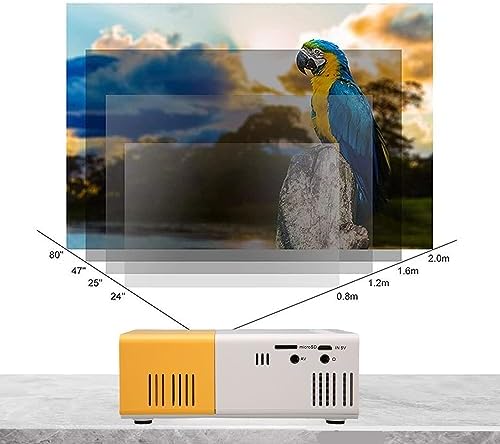
Image 5.2: Projection distance guidelines for various screen sizes. Note: Maximum recommended projection size is 60 inches.
5.3. අවධානය යොමු කිරීම
After placing the projector and powering it on, rotate the focus ring located around the lens until the projected image appears clear and sharp.
6. මෙහෙයුම් උපදෙස්
6.1. බලය සක්රිය / අක්රිය කරන්න
- බල ගැන්වීම: ප්රොජෙක්ටරයේ හෝ දුරස්ථ පාලකයේ බල බොත්තම ඔබන්න.
- විදුලිය විසන්ධි කිරීම: Press the power button again. The projector will shut down.
6.2. ආදාන මූලාශ්ර තේරීම
Use the 'Source' button on the remote control or the projector's control panel to cycle through available input sources (HDMI, USB, AV, MicroSD).
6.3 මෙනු සංචාලනය
Use the arrow buttons on the remote control or projector to navigate through menus. Press 'OK' or 'Enter' to confirm selections. Use the 'Return' or 'Back' button to go back to the previous menu.
7. සම්බන්ධතාවය
ප්රොජෙක්ටරය විවිධ උපාංග සඳහා බහු සම්බන්ධතා විකල්ප ලබා දෙයි.

Image 7.1: Connectivity options for the Goshyda projector.
7.1 HDMI සම්බන්ධතාවය
Connect devices such as laptops, TV Sticks, game consoles (e.g., for Xbox One), or Blu-ray players using an HDMI cable. Select 'HDMI' as the input source.
7.2. USB සම්බන්ධතාවය
මාධ්ය වාදනය කිරීම සඳහා USB ෆ්ලෑෂ් ධාවකයක් USB පෝට් එකට ඇතුළු කරන්න. files directly. Select 'USB' as the input source and navigate through your files.
7.3. AV Connection
Use the provided AV cable to connect older devices like DVD players. Select 'AV' as the input source.
7.4. Smartphone/Tablet Connection
To connect directly to your smartphone or tablet, you will need an appropriate adapter (e.g., Micro USB to HDMI, Type-C to HDMI, or a dedicated HD multimedia interface device), depending on your device's operating system (OS X or Android) and available ports. These adapters are sold separately.
7.5. ශ්රව්ය ප්රතිදානය
Connect external speakers or headphones to the audio output port for enhanced sound.
8. නඩත්තු කිරීම
- කාච පිරිසිදු කිරීම: Use a soft, lint-free cloth specifically designed for optical lenses to gently wipe the projector lens. Do not use abrasive materials or harsh chemicals.
- බාහිර පිරිසිදු කිරීම: ප්රොජෙක්ටරයේ බාහිර පෙනුම මෘදු, වියළි රෙද්දකින් පිස දමන්න.
- ගබඩා: When not in use for extended periods, store the projector in a cool, dry place, away from direct sunlight and dust.
9. දෝශ නිරාකරණය
| ගැටලුව | විය හැකි හේතුව | විසඳුම |
|---|---|---|
| බලය නැත | Power adapter not connected or faulty; insufficient power supply. | Ensure the 5V 2A power adapter is securely connected and plugged into a working outlet. Try a different power source or power bank. |
| රූපයක් නැත | Incorrect input source selected; cable not connected properly; device not outputting signal. | Select the correct input source (HDMI, USB, AV). Check all cable connections. Ensure the connected device is powered on and outputting a signal. |
| රූපය බොඳ වී ඇත | අවධානය සකස් කර නැත; ප්රොජෙක්ටරය තිරයට ඉතා ආසන්නයි/දුරින්. | Rotate the focus ring to sharpen the image. Adjust the projection distance within the recommended range (1-2.5m). |
| ශබ්දයක් නැත | Volume too low or muted; external speakers not connected; audio format not supported. | Increase the volume on the projector and the source device. Check if external speakers are properly connected. Ensure the audio format is supported. |
10. පිරිවිතර
| විශේෂාංගය | විස්තර |
|---|---|
| වෙළඳ නාමය | Goshyda |
| ආදර්ශ අංකය | Goshyda89pkbg17g0 |
| සංදර්ශක විභේදනය | 1920 x 1080 (1080P Support) |
| දීප්තිය | 200 Lumens |
| දර්ශන අනුපාතය | 4:3 |
| ප්රක්ෂේපණ දුර | මීටර් 1 - 2.5 |
| ප්රක්ෂේපණ ප්රමාණය | අඟල් 60 දක්වා |
| සම්බන්ධතා තාක්ෂණය | HDMI, USB, AV, MicroSD, Audio Out |
| බල ආදානය | 5V 2A |
| සංදර්ශක වර්ගය | LCD |
| නිෂ්පාදන මානයන් | 12L x 8.5W x 4.6H cm (Approx. 4.7 x 3.3 x 1.8 inches) |
| ආකෘති සාධකය | අතේ ගෙන යා හැකි |
| සවිකිරීමේ වර්ගය | මේස සවි කිරීම |
11. වගකීම් සහ සහාය
For warranty information and customer support, please refer to the documentation provided with your purchase or contact your retailer directly. Keep your proof of purchase for warranty claims.