1. හැඳින්වීම
This instruction manual provides essential information for the proper use and maintenance of your new Generic replacement remote control. This remote is designed to be compatible with various Philips LCD HD Display Monitor models. Please read this manual thoroughly before using the remote control to ensure optimal performance and longevity.
2 ආරක්ෂිත තොරතුරු
- බැටරි හැසිරවීම: Always insert batteries with the correct polarity (+/-) as indicated in the battery compartment.
- බැටරි වර්ගය: Use only the specified battery type (2 AAA batteries). Do not mix old and new batteries, or different types of batteries.
- බැහැර කිරීම: දේශීය රෙගුලාසි වලට අනුව භාවිතා කළ බැටරි බැහැර කරන්න. බැටරි පුළුස්සා නොගන්න.
- දියර නිරාවරණය: Do not expose the remote control to water or other liquids.
- තාප නිරාවරණය: Keep the remote control away from direct sunlight, heat sources, or extreme temperatures.
- පිරිසිදු කිරීම: Clean the remote with a soft, dry cloth. Do not use abrasive cleaners or solvents.
3. නිෂ්පාදන අවසන්view
This remote control is an infrared (IR) replacement unit designed to operate a range of Philips LCD HD Display Monitors. It provides essential functions for controlling your display.
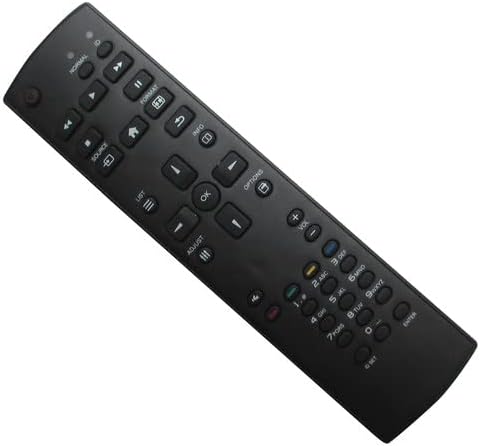
රූපය 3.1: ඉදිරිපස view of the remote control. This image shows the full layout of buttons on the remote, including power, navigation, volume, channel, and numeric keys.

රූපය 3.2: ආපසු view of the remote control. This image displays the ergonomic design of the remote's rear casing.
4. පිහිටුවීම
4.1 බැටරි ස්ථාපනය
To begin using your remote control, you must install two AAA batteries.
- දුරස්ථ පාලකයේ පිටුපස බැටරි මැදිරි කවරය සොයා ගන්න.
- Press down on the tab and slide the cover off in the direction of the arrow.
- Insert two new AAA batteries, ensuring that the positive (+) and negative (-) terminals align correctly with the markings inside the compartment.
- බැටරි මැදිරි කවරය ආරක්ෂිතව ක්ලික් කරන තුරු එය නැවත එම ස්ථානයට තල්ලු කරන්න.

Figure 4.1: Battery compartment with cover open, showing where to insert AAA batteries.
The remote control is now ready for use. No programming is typically required for this replacement unit; it should function directly with compatible Philips LCD HD Display Monitors.
5. මෙහෙයුම් උපදෙස්
Point the remote control directly at the infrared receiver on your Philips LCD HD Display Monitor. Ensure there are no obstructions between the remote and the display.
5.1 මූලික කාර්යයන්
- බල බොත්තම (⏻ ⏻ ශ්රේණිය): Turns the display On or Off.
- ශබ්දය වැඩි/පහළ (වෙළුම +/-): ශ්රව්ය පරිමාව සීරුමාරු කරයි.
- නාලිකාව ඉහළ/පහළ (Ch +/-): Changes the display channel (if applicable).
- Source/Input (මූලාශ්රය): Cycles through available input sources (HDMI, VGA, etc.).
- සංචලන බොත්තම් (▲ ▼ ◀ ▶): මෙනු සැරිසැරීමට සහ විකල්ප තේරීමට භාවිතා කරයි.
- හරි/ඇතුළු කරන්න බොත්තම: මෙනු වල තේරීම් තහවුරු කරයි.
- මෙනු බොත්තම: Opens the display's main menu.
- සංඛ්යාත්මක යතුරු පුවරුව (0-9): For direct channel input or other numeric entries.
සටහන: The functionality of certain buttons may vary slightly depending on your specific Philips LCD HD Display Monitor model. Refer to your display's original manual for detailed function descriptions.
6. නඩත්තු කිරීම
6.1 පිරිසිදු කිරීම
To clean the remote control, use a soft, dry, lint-free cloth. Do not use liquid cleaners, sprays, or abrasive materials, as these can damage the remote's surface or internal components.
6.2 බැටරි ප්රතිස්ථාපනය
If the remote control's range decreases or it becomes unresponsive, the batteries may need to be replaced. Follow the battery installation steps in Section 4.1 to replace the batteries.
7. දෝශ නිරාකරණය
| ගැටලුව | විය හැකි හේතුව | විසඳුම |
|---|---|---|
| දුරස්ථ පාලකය ක්රියා නොකරයි | මිය ගිය හෝ වැරදි ලෙස ඇතුළත් කළ බැටරි. | නිවැරදි ධ්රැවීයතාව සහතික කරමින් බැටරි නව AAA බැටරි සමඟ ප්රතිස්ථාපනය කරන්න. |
| Remote has short range | Weak batteries. Obstruction between remote and display. | Replace batteries. Ensure a clear line of sight to the display's IR receiver. |
| ඇතැම් කාර්යයන් ක්රියා නොකරයි | Compatibility variation with specific display model. | This is a replacement remote; some advanced or specific functions of your original remote may not be supported. Refer to your display's original manual. |
| Display does not respond | Remote is not compatible with your specific display model. | Verify your display model number against the compatible models listed in this manual. If your model is not listed, this remote may not be suitable. |
8. පිරිවිතර
- වෙළඳ නාමය: සාමාන්ය
- ගැළපෙන උපාංග: Philips LCD HD Display Monitors (Models: 65BDL3110Q, 32BDL4050D, 43BDL4050D, 49BDL4050D, 65BDL4050D, 86BDL4150D, 50BDL3010Q, 55BDL3010Q, 65BDL3010Q)
- සම්බන්ධතා තාක්ෂණය: අධෝරක්ත කිරණ (IR)
- බලශක්ති ප්රභවය: 2 x AAA බැටරි (ඇතුළත් කර නැත)
- වර්ණය: කළු
9. වගකීම් සහ සහාය
As a generic replacement remote control, specific warranty details may vary. This product is intended as a direct replacement for the listed Philips LCD HD Display Monitor models. Please note the following:
- This replacement item may not work with all functions as the original remote control.
- No additional instruction manual is included with the product itself; this document serves as the primary guide.
- දුරස්ථ පාලකය සමඟ බැටරි ඇතුළත් නොවේ.
For issues not covered in this manual, or if you are unsure about compatibility, please refer to the original instruction manual for your Philips LCD HD Display Monitor or contact the seller for further assistance.


