
1. හැඳින්වීම
The SUNOL F06 Smart Glasses are designed to provide an integrated audio and visual experience. Featuring an open-ear listening design, these sunglasses allow you to enjoy audio while remaining aware of your surroundings. Equipped with TWS 5.3 Bluetooth technology, they offer a stable and high-fidelity sound connection for music, calls, and navigation. The glasses include touch-sensitive controls for easy operation and come with interchangeable UV-filtered lenses for eye protection. Their waterproof design ensures durability in various environments.

Image: The SUNOL F06 Smart Glasses, showcasing their modern design.
වීඩියෝ: ඉවරයිview of the SUNOL F06 Smart Glasses, highlighting their open-ear audio capabilities and design.
2. පෙට්ටියේ ඇති දේ
Upon opening your SUNOL F06 Smart Glasses package, you should find the following items:
- Smart Glasses (main unit)
- Glasses Case (for storage and protection)
- Two Pairs of Lenses (one pre-installed, one alternative)
- ආරෝපණ කේබලය
- පරිශීලක අත්පොත (මෙම ලේඛනය)

Image: All components included in the SUNOL F06 Smart Glasses package.
3. නිෂ්පාදන අවසන්view
The F06 Smart Glasses integrate audio technology into a stylish eyewear design. Key features include:
- Open Ear Listening: Allows you to hear audio while remaining aware of your surroundings.
- බ්ලූටූත් 5.3: Provides a fast and stable wireless connection for high-fidelity sound.
- ස්පර්ශ පාලන: Intuitive controls on the temple for managing music playback and calls.
- හුවමාරු කළ හැකි කාච: Comes with brown and black UV-filtered lenses to protect your eyes.
- ජල ආරක්ෂිත නිර්මාණය: Built to withstand rain and splashes, suitable for outdoor activities.

Image: Visual representation of the smart glasses' key features.

Image: Demonstrating the open-ear audio and wireless capabilities.

Image: Close-up of the touch control area on the glasses' temple.

Image: Illustrating the UV400 protection provided by the lenses.
4. පිහිටුවීම
4.1 කණ්නාඩි ආරෝපණය කිරීම
Before first use, fully charge your SUNOL F06 Smart Glasses. Connect the provided charging cable to the charging port on the glasses and plug the other end into a compatible USB power source (e.g., computer USB port, wall adapter). The indicator light will show charging status.
4.2 Powering On/Off and Bluetooth Pairing
To power on the glasses, press and hold the touch button area on the right temple for 3 seconds. You will hear a voice prompt "Power on". The glasses will then enter pairing mode.
On your mobile device, enable Bluetooth and search for available devices. Select 'TWS-F' from the list to connect. Once connected, you will hear a confirmation sound.
To power off the glasses, press and hold the right mirror leg touch area for 5 seconds. You will hear a voice prompt "Power off". Alternatively, plugging the glasses into the charger will automatically shut them down.
5. මෙහෙයුම් උපදෙස්
The SUNOL F06 Smart Glasses feature intuitive touch controls located on the temples. Refer to the diagram below for specific functions:
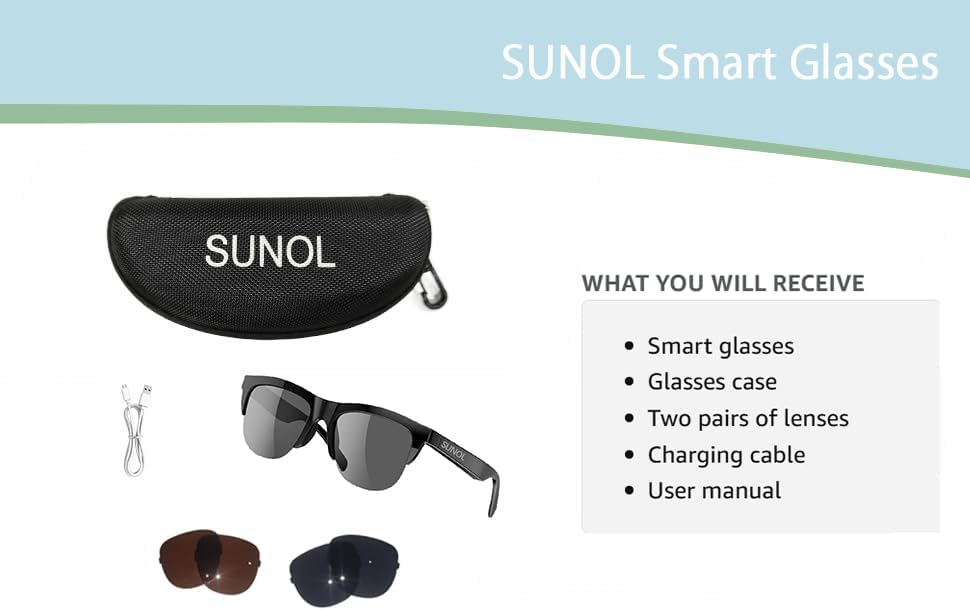
Image: Detailed diagram of touch control functions.
5.1 සංගීත නැවත ධාවනය පාලන
- වාදනය/විරාමය: In standby state or during playback, double-click the multi-function touch area to play or pause the audio.
- Next Song/Content: Triple-click the multi-function touch area.
- Previous Song/Content: Long press the multi-function touch area for 1.5 seconds.
5.2 ඇමතුම් කළමනාකරණය
- පිළිතුරු / ඇමතුම විසන්ධි කරන්න: When an incoming call is received, double-click the multi-function touch area to answer. Double-click again to hang up.
- ඇමතුම ප්රතික්ෂේප කරන්න: Long press the multi-function touch area for 1.5 seconds to reject an incoming call.
6 කාච ආදේශනය
The SUNOL F06 Smart Glasses come with interchangeable lenses, allowing you to switch between different colors or types as needed. Follow the instructions in the video below to safely replace the lenses.
Video: Demonstrating the process of replacing the lenses on the SUNOL F06 Smart Glasses.
සටහන: Handle lenses carefully to avoid scratches. Ensure they are securely seated in the frame after replacement.
7. නඩත්තු කිරීම
Proper maintenance will extend the lifespan of your smart glasses:
- කාච පිරිසිදු කිරීම: Use the provided lens cloth or a soft, clean microfiber cloth to wipe the lenses. Avoid using abrasive materials or harsh chemicals.
- පිරිසිදු කිරීමේ රාමුව: රාමුව මෘදු, d රෙදි කඩකින් පිස දමන්න.amp cloth. Do not submerge the glasses in water, despite their waterproof rating, to prevent damage to electronic components.
- ගබඩා: When not in use, store the glasses in the provided storage case to protect them from dust, scratches, and impacts.
- බැටරි සත්කාර: Avoid extreme temperatures. If storing for a long period, charge the battery to about 50% to maintain battery health.
8. දෝශ නිරාකරණය
If you encounter issues with your SUNOL F06 Smart Glasses, refer to the following common solutions:
| ගැටලුව | විය හැකි හේතුව | විසඳුම |
|---|---|---|
| Glasses do not power on. | බැටරිය අඩුයි; බල බොත්තම නිවැරදිව ඔබා නැත. | Charge the glasses fully. Press and hold the touch area for 3 seconds until "Power on" is heard. |
| උපාංගය සමඟ යුගල කළ නොහැක. | Bluetooth not enabled; glasses not in pairing mode; interference. | Ensure Bluetooth is enabled on your device. Power off and on the glasses to re-enter pairing mode. Move closer to your device. Forget previous pairings on your device. |
| ශබ්දයක් නැත හෝ අඩු පරිමාවක් නැත. | ශබ්දය ඉතා අඩුයි; සම්බන්ධ වී නැත; ශ්රව්ය මූලාශ්ර ගැටලුවකි. | Increase volume on both glasses and connected device. Ensure glasses are properly paired. Check audio source on your device. |
| ඇමතුම් ගුණාත්මකභාවය දුර්වලයි. | දුර්වල බ්ලූටූත් සංඥාව; පාරිසරික ශබ්දය. | Move closer to your connected device. Reduce background noise if possible. |
| ස්පර්ශ පාලන ප්රතිචාර නොදක්වයි. | Temporary software glitch; dirty touch area. | Restart the glasses. Clean the touch control area with a soft, dry cloth. |
9. පිරිවිතර
| විශේෂාංගය | විස්තර |
|---|---|
| ආදර්ශ අංකය | F06 |
| වෙළඳ නාමය | SUNOL |
| බ්ලූටූත් අනුවාදය | 5.3 |
| බැටරි වර්ගය | ලිතියම් පොලිමර් (1ක් අවශ්යයි, ඇතුළත්) |
| ජල ආරක්ෂිත ශ්රේණිගත කිරීම | XP4 Life Waterproof |
| කාච වර්ගය | UV Filtered, Interchangeable (Brown and Black) |
| පාලන ක්රමය | ස්පර්ශ පාලනය |
| ශ්රව්ය ප්රතිදානය | Open Ear HIFI Audio, Dual Speaker Design |
| මානයන් | 7.4 x 2.91 x 2.56 අඟල් (පැකේජ මානයන්) |
| බර | අවුන්ස 1.06 (පැකේජ බර) |
| නිෂ්පාදකයා | SUNOL |
| මුල් රට | චීනය |

Image: Physical dimensions of the smart glasses.
10. වගකීම් සහ සහාය
For warranty information and customer support, please refer to the documentation included with your purchase or contact the manufacturer directly. Keep your proof of purchase for any warranty claims.
Manufacturer: SUNOL
For further assistance, please visit the official SUNOL webවෙබ් අඩවිය හෝ ඔවුන්ගේ පාරිභෝගික සේවා දෙපාර්තමේන්තුව අමතන්න.