හැඳින්වීම
Thank you for choosing the AIR 7 Mini Wireless Bluetooth Earbuds. These earbuds are designed to provide a superior audio experience with advanced features such as Bluetooth 5.3 connectivity, active noise cancellation, and a comfortable, secure fit. This manual will guide you through the setup, operation, and maintenance of your new earbuds to ensure optimal performance and longevity.
The AIR 7 Mini earbuds offer crisp tones, deep bass, and clear sound, making them ideal for music, podcasts, and calls. With their IPX4 waterproof rating, they are suitable for various activities, including workouts and outdoor use. Enjoy wireless freedom and intuitive touch controls for a seamless audio experience.
පෙට්ටියේ ඇති දේ
- AIR 7 Mini L side earbud
- AIR 7 Mini R side earbud
- Charging station (charging case)
- Reinforced charging cable
- පරිශීලක අත්පොත

Image: Unboxing the AIR 7 Mini Earbuds, displaying all included components.
සැලසුම
ඉයර්බඩ් සහ කේස් ආරෝපණය කිරීම
Before first use, fully charge the AIR 7 Mini earbuds and their charging case. Place the earbuds into the charging case, ensuring they are properly seated. Connect the provided charging cable to the charging port on the case and plug the other end into a USB power source. The indicator light on the case will show charging status.
A full charge provides 3-4 hours of playback, and the 200mAh charging case extends this significantly, offering up to 90 hours of standby time. The case can reach 50% charge in approximately 30 minutes.
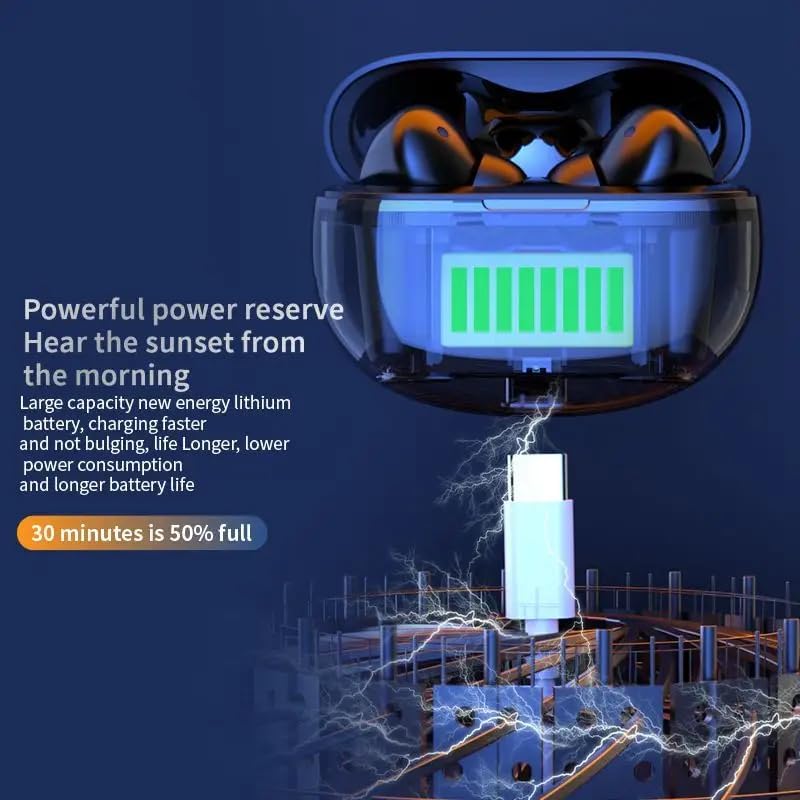
Image: The AIR 7 Mini charging case being charged via its USB-C port.
ඔබේ උපාංගය සමඟ යුගල කිරීම
- ඉයර්බඩ් ආරෝපණය වී ඇති බවත් ආරෝපණ පෙට්ටිය තුළ ඇති බවත් සහතික කර ගන්න.
- ආරෝපණ පෙට්ටිය විවෘත කරන්න. ඉයර්බඩ් ස්වයංක්රීයව යුගල කිරීමේ ප්රකාරයට ඇතුළු වනු ඇත, එය ඉයර්බඩ් මත දැල්වෙන ආලෝකයක් මඟින් දැක්වේ.
- ඔබගේ උපාංගයේ (ස්මාර්ට්ෆෝන්, ටැබ්ලටය, ලැප්ටොප්), බ්ලූටූත් සැකසුම් වෙත ගොස් බ්ලූටූත් ක්රියාත්මක කරන්න.
- ඒ සඳහා සොයන්න available devices. Select "AIR 7 Mini" from the list.
- Once connected, a voice prompt will confirm successful pairing, and the earbud lights will stop flashing.
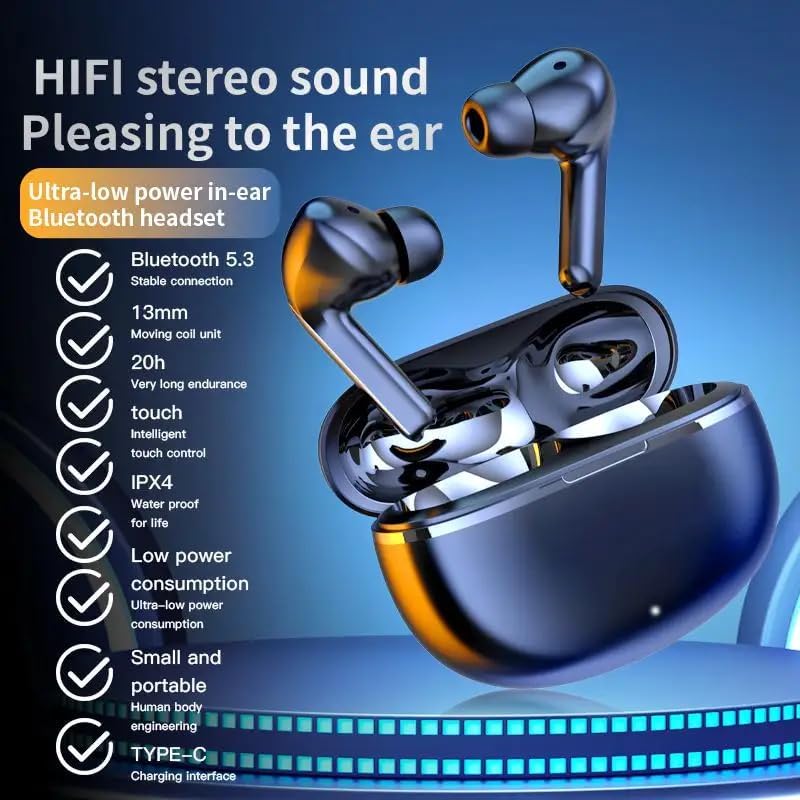
Image: Visual representation of the AIR 7 Mini earbuds' features, including Bluetooth 5.3 connectivity.
මෙහෙයුම් උපදෙස්
ස්පර්ශ පාලන
The AIR 7 Mini earbuds feature intuitive touch controls for easy management of music playback and calls. The touch-sensitive area is located on the outer surface of each earbud.
| ක්රියාව | කාර්යය |
|---|---|
| තනි තට්ටු කිරීම (වම/දකුණ) | සංගීතය වාදනය කරන්න/විරාම කරන්න, පිළිතුරු දෙන්න/ඇමතුම අවසන් කරන්න |
| දෙවරක් තට්ටු කරන්න (දකුණ) | ඊළඟ ධාවන පථය |
| දෙවරක් තට්ටු කරන්න (වම) | පෙර ධාවන පථය |
| ත්රිත්ව තට්ටු කිරීම (වම/දකුණ) | හඬ සහායක සක්රිය කරන්න |
| දිගු ඔබන්න (වම/දකුණ) | Toggle Active Noise Cancellation (ANC) / Transparency Mode |
| එන ඇමතුම (දිගු ඔබන්න) | ඇමතුම ප්රතික්ෂේප කරන්න |

Image: The AIR 7 Mini earbuds providing low sound delay for synchronized audio and visuals, ideal for gaming.
ඉයර්බඩ් පැළඳීම
For optimal sound quality and comfort, ensure the earbuds are properly seated in your ears. Gently insert each earbud into the ear canal and twist slightly until it feels secure and comfortable. The ergonomic design of the AIR 7 Mini ensures a snug fit for prolonged listening sessions and active use.

Image: The AIR 7 Mini earbuds in their charging case, demonstrating their compact and ergonomic design.
ශබ්දය අවලංගු කිරීම
The AIR 7 Mini earbuds feature Dual ENC (Environmental Noise Cancellation) technology to reduce ambient noise, allowing you to focus on your audio. This feature is particularly useful in noisy environments, such as commutes or busy offices. To activate or deactivate noise cancellation, use the designated touch control as described in the "Touch Controls" table.

Image: The AIR 7 Mini earbuds illustrating their intelligent noise reduction capabilities.
නඩත්තු කිරීම
පිරිසිදු කිරීම
Regular cleaning helps maintain the performance and hygiene of your earbuds. Use a soft, dry, lint-free cloth to wipe the earbuds and charging case. For stubborn dirt, slightly dampen the cloth with water. Do not use abrasive cleaners or submerge the earbuds or case in liquid.
The earbuds are IPX4 waterproof, meaning they are resistant to splashes and sweat, but they are not designed for submersion.

Image: The AIR 7 Mini earbuds showcasing their life-grade waterproof and sweat-resistant design.
ගබඩා කිරීම
භාවිතයේ නොමැති විට, දූවිලි, හානිවලින් ආරක්ෂා වීමට සහ ආරෝපණය කර තබා ගැනීමට ඉයර්බඩ් ඒවායේ ආරෝපණ පෙට්ටියේ ගබඩා කරන්න. සෘජු හිරු එළියෙන් සහ අධික උෂ්ණත්වයන්ගෙන් ඈත්ව සිසිල් වියළි ස්ථානයක නඩුව ගබඩා කරන්න.

Image: The small and mini design of the AIR 7 Mini charging case, highlighting its portability.
දෝෂගවේෂණය
If you encounter any issues with your AIR 7 Mini earbuds, please refer to the following common solutions:
- ඉයර්බඩ් යුගල නොවේ:
- ඉයර්බඩ් දෙකම ආරෝපණය කර ඇති බව සහතික කර ගන්න.
- Place earbuds back in the case, close the lid, wait a few seconds, then open the lid again to re-enter pairing mode.
- ඔබගේ උපාංගයේ බ්ලූටූත් අක්රිය කර ක්රියාත්මක කරන්න.
- Forget "AIR 7 Mini" from your device's Bluetooth list and try pairing again.
- එක ඉයර්බඩ් එකකින් ශබ්දයක් නැත:
- ඉයර්බඩ් දෙකම ආරෝපණය වී ඇත්දැයි පරීක්ෂා කරන්න.
- ඉයර්බඩ් දෙකම නැවත කේස් එකට දමා නැවත පිටතට ගැනීමට උත්සාහ කරන්න.
- Perform a factory reset if available (refer to specific product instructions if provided, otherwise assume long press or similar).
- ආරෝපණ ගැටළු:
- ආරෝපණ කේබලය නඩුවට සහ බල ප්රභවයට ආරක්ෂිතව සම්බන්ධ කර ඇති බවට වග බලා ගන්න.
- වෙනත් USB පෝට් එකක් හෝ බල ඇඩැප්ටරයක් උත්සාහ කරන්න.
- වියළි කපු පුළුන් කැබැල්ලකින් ඉයර්බඩ්වල සහ කේස් එකේ ඇතුළත ආරෝපණ සම්බන්ධතා පිරිසිදු කරන්න.
- Poor sound quality or connection drops:
- Ensure your device is within the effective Bluetooth range (typically 10 meters/33 feet) without significant obstacles.
- ප්රබල විද්යුත් චුම්භක මැදිහත්වීම් වලින් වළකින්න.
- ඉයර්බඩ් පිරිසිදුව හා සුන්බුන් වලින් තොර බවට වග බලා ගන්න.
පිරිවිතර
| විශේෂාංගය | විස්තර |
|---|---|
| වෙළඳ නාමය | සාමාන්ය |
| ආකෘතිය | AIR 7 Mini |
| වර්ණය | කළු |
| කන් ස්ථානගත කිරීම | කනේ |
| ආකෘති සාධකය | කනේ |
| ශබ්ද පාලනය | Active Noise Cancellation (Dual ENC) |
| බ්ලූටූත් අනුවාදය | 5.3 |
| පසුධාවන කාලය | පැය 3-4 (තනි ආරෝපණයකින්) |
| ආරෝපණ කේස් බැටරිය | 200mAh |
| පොරොත්තු කාලය | පැය 90 දක්වා |
| ජල ආරක්ෂිත ශ්රේණිගත කිරීම | IPX4 |
| පාලන වර්ගය | ස්පර්ශ පාලන |
වැදගත් ආරක්ෂක තොරතුරු
- ඉයර්බඩ් හෝ ආරෝපණ පෙට්ටිය විසුරුවා හැරීම හෝ වෙනස් කිරීම නොකරන්න.
- අධික උෂ්ණත්වයන්, සෘජු හිරු එළිය සහ විවෘත ගිනිදැල් වලින් ඈත්ව සිටින්න.
- Avoid exposing to excessive moisture or liquids beyond the IPX4 rating.
- හානියට පත් කේබල් හෝ චාජර් භාවිතා නොකරන්න.
- දිගු වේලාවක් ඉහළ ශබ්ද මට්ටම්වලට නිරාවරණය වීමෙන් ශ්රවණාබාධ ඇති විය හැක. ශබ්දය ආරක්ෂිත මට්ටමකට සකසන්න.
- ළමයින්ට සහ සුරතල් සතුන්ට ළඟාවිය නොහැකි ලෙස තබා ගන්න.
නිෂ්පාදන වීඩියෝව
Video: An official product video titled "Air7 Earbuds: Premium Sound" from the seller, showcasing the features and design of the AIR 7 Mini True Wireless Headset, including its sound quality, low latency, long endurance, and touch controls.


