
Hoco WE-1005004459784466-002
Hoco Smart Ear Wireless Bluetooth 5.3 Earbuds User Manual
Model: WE-1005004459784466-002
නිෂ්පාදනය අවසන්view
The Hoco Smart Ear Wireless Bluetooth 5.3 Earbuds offer a seamless audio experience with advanced features. These smart touch stereo earbuds come with a digital LED display charging case, providing convenience and clear battery status at a glance. Designed for comfort and high-quality sound, they are ideal for daily use with mobile phones and other compatible devices.
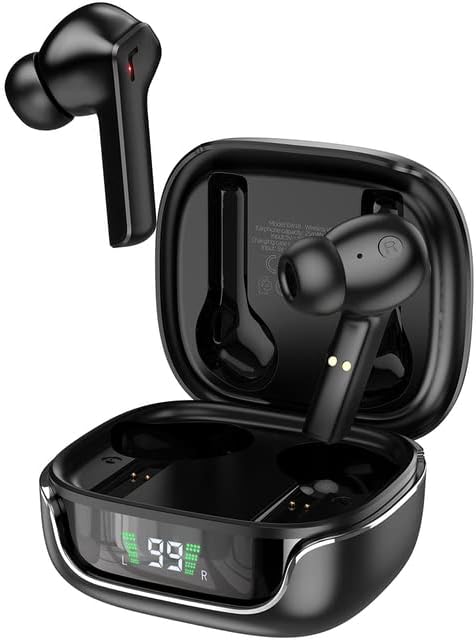
Image: The Hoco Smart Ear Wireless Bluetooth 5.3 Earbuds, showcasing both earbuds and their sleek charging case with a digital LED display.
පැකේජයේ අන්තර්ගතය
- Hoco Smart Ear Wireless Bluetooth 5.3 Earbuds
- අයකිරීමේ නඩුව
- පරිශීලක අත්පොත
- ආරෝපණ කේබලය
සැලසුම
ආරම්භක යුගල කිරීම
To pair your Hoco Smart Ear Earbuds for the first time, ensure they are fully charged. Open the charging case; the earbuds will automatically enter pairing mode. On your device (e.g., smartphone), navigate to Bluetooth settings and select 'Hoco EW18' or a similar name from the list of available devices. Once connected, the earbuds are ready for use.

Image: A visual representation of the Hoco earbuds establishing a wireless connection using Bluetooth 5.3 technology, highlighting stable and low-power consumption.

Image: The earbuds and charging case next to a smartphone, illustrating the automatic pairing feature and the ability to switch between devices seamlessly.
නැවත සම්බන්ධ වෙමින්
After initial pairing, the earbuds will automatically reconnect to the last paired device when taken out of the charging case and Bluetooth is enabled on the device.
මෙහෙයුම් උපදෙස්
The Hoco Smart Ear Earbuds feature intuitive touch controls for various functions:

Image: A detailed diagram illustrating the touch control functions of the Hoco earbuds, including playback, track navigation, call management, power, and voice assistant activation.
- වාදනය/විරාමය: Click the touch area once.
- ඊළඟ ධාවන පථය: Double click the touch area.
- පෙර ධාවන පථය: Triple click the touch area.
- පිළිතුරු ඇමතුම: Click the touch area once.
- ඇමතුම විසන්ධි කරන්න: Double click the touch area.
- ඇමතුම ප්රතික්ෂේප කරන්න: තත්පර 2ක් සඳහා ස්පර්ශ ප්රදේශය දිගු කාලයක් ඔබන්න.
- ක්රියාත්මක කරන්න: Open the cover of the charging case (automatic boot).
- අවදි Siri/Voice Assistant: තත්පර 2ක් සඳහා ස්පර්ශ ප්රදේශය දිගු කාලයක් ඔබන්න.
නඩත්තු කිරීම
ඔබේ ඉයර්බඩ් වල ආයු කාලය සහ ප්රශස්ත ක්රියාකාරිත්වය සහතික කිරීම සඳහා, මෙම නඩත්තු මාර්ගෝපදේශ අනුගමනය කරන්න:
- පිරිසිදු කිරීම: මෘදු, වියලි, ලින්ට් රහිත රෙද්දකින් ඉයර්බඩ් සහ ආරෝපණ පෙට්ටිය නිතිපතා පිරිසිදු කරන්න. රළු රසායනික ද්රව්ය හෝ උල්ෙල්ඛ ද්රව්ය භාවිතා නොකරන්න.
- ආරෝපණ සම්බන්ධතා: Periodically clean the charging contacts on both the earbuds and inside the case to ensure a proper connection.
- ගබඩා: භාවිතයේ නොමැති විට, දූවිලි හා හානිවලින් ආරක්ෂා වීමට ඉයර්බඩ් ඒවායේ ආරෝපණ පෙට්ටියේ ගබඩා කරන්න.
- තෙතමනය වළක්වා ගන්න: Keep the earbuds and case away from water and excessive moisture.
- උෂ්ණත්වය: නිෂ්පාදිතය අධික උෂ්ණත්වයට නිරාවරණය කිරීමෙන් වළකින්න.
දෝෂගවේෂණය
If you encounter issues with your Hoco Smart Ear Earbuds, refer to the following common solutions:
- ශබ්දයක් නැත:
- ඉයර්බඩ් ආරෝපණය කර ඇති බව සහතික කර ගන්න.
- උපාංගයේ ශබ්දය සහ ඉයර්බඩ් ශබ්දය පරීක්ෂා කරන්න.
- Verify Bluetooth connection. Try disconnecting and reconnecting.
- ඉයර්බඩ් යුගල නොවේ:
- ඉයර්බඩ් යුගල කිරීමේ මාදිලියේ ඇති බව සහතික කර ගන්න (විවෘත කවරය).
- ඔබගේ උපාංගයේ බ්ලූටූත් අක්රිය කර ක්රියාත්මක කරන්න.
- ඔබගේ දුරකථනයේ බ්ලූටූත් සැකසුම් තුළ උපාංගය අමතක කර නැවත යුගල කරන්න.
- ඉයර්බඩ් වලට වෙනත් උපාංග සම්බන්ධ වී නොමැති බවට වග බලා ගන්න.
- අයකිරීමේ ගැටළු:
- Check if the charging cable is securely connected.
- ඉයර්බඩ් සහ කේස් දෙකෙහිම ආරෝපණ සම්බන්ධතා පිරිසිදු බව සහතික කර ගන්න.
- වෙනස් ආරෝපණ කේබලයක් හෝ බල ඇඩැප්ටරයක් උත්සාහ කරන්න.
- අතරමැදි සම්බන්ධතාවය:
- Ensure you are within the effective Bluetooth range.
- අනෙකුත් රැහැන් රහිත උපාංග වලින් ඇතිවන බාධා අවම කරන්න.
පිරිවිතර
Detailed technical specifications for the Hoco Smart Ear Wireless Bluetooth 5.3 Earbuds:
| විශේෂාංගය | පිරිවිතර |
|---|---|
| ආකෘතිය | WE-1005004459784466-002 |
| බ්ලූටූත් අනුවාදය | 5.3 |
| රියදුරන් සංඛ්යාව | 2 |
| රියදුරු විෂ්කම්භය | 13 මි.මී |
| සම්පූර්ණ හාර්මොනික් විකෘති කිරීම | 15% |
| සම්බාධනය | 32 ඕම් |
| හෙඩ්ෆෝන් ආකෘති සාධකය | In-ear |
| සම්බන්ධතා තාක්ෂණය | බ්ලූටූත් |
| රැහැන් රහිත සන්නිවේදන තාක්ෂණය | බ්ලූටූත් |
| ගැළපෙන උපාංග | ජංගම දුරකථන |
| කේබල් විශේෂාංගය | Cable-free (Wireless) |
| වර්ණය | කළු |
| පළමු ලබා ගත හැකි දිනය | 6 ජූලි 2023 |

රූපය: පුපුරා ගිය එකක් view illustrating the 13mm moving coil driver and bio-carbon fiber composite diaphragm, designed for immersive sound quality.

Image: A person wearing the Hoco earbuds, highlighting the soft silicone ear caps and in-ear ergonomic design for comfortable wear and pure sound enjoyment.
වගකීම් සහ සහාය
Hoco is committed to customer satisfaction and product quality. We offer the following:
- මාස 12 වගකීම: All products come with a 12-month warranty.
- පාරිභෝගික සේවාව: If you experience any issues with defective or incorrect products, please contact us through the Amazon platform. We are dedicated to providing the best solution, including full refunds or product replacements, to ensure 100% customer satisfaction.
- බෙදාහැරීමේ සහතිකය: We ensure product delivery within the specified timeframe on our sales page.
Ask a question about this manual
Ask about setup, troubleshooting, compatibility, parts, safety, or missing instructions. Manuals+ will review the question and use this page’s manual context to help answer it.