
හැඳින්වීම
This manual provides comprehensive instructions for the HOCO Y1 Pro Smart Sports Watch. Please read this manual carefully before using the device to ensure proper operation and to maximize its features. Keep this manual for future reference.
පැකේජයේ අන්තර්ගතය
පැකේජය විවෘත කිරීමෙන් පසු, සියලුම අයිතම එහි ඇති බව තහවුරු කරගන්න:
- HOCO Y1 Pro Smart Sports Watch
- ආරෝපණ කේබලය
- පරිශීලක අත්පොත
නිෂ්පාදනය අවසන්view
The HOCO Y1 Pro Smart Sports Watch features a 1.91-inch TFT display and a durable design suitable for sports and daily wear.

රූපය 1: ඉදිරිපස view of the HOCO Y1 Pro Smart Watch, showing the main watch face with time, date, battery level, and activity data.

රූපය 2: පැත්ත view illustrating the digital crown and the side button for navigation and control.
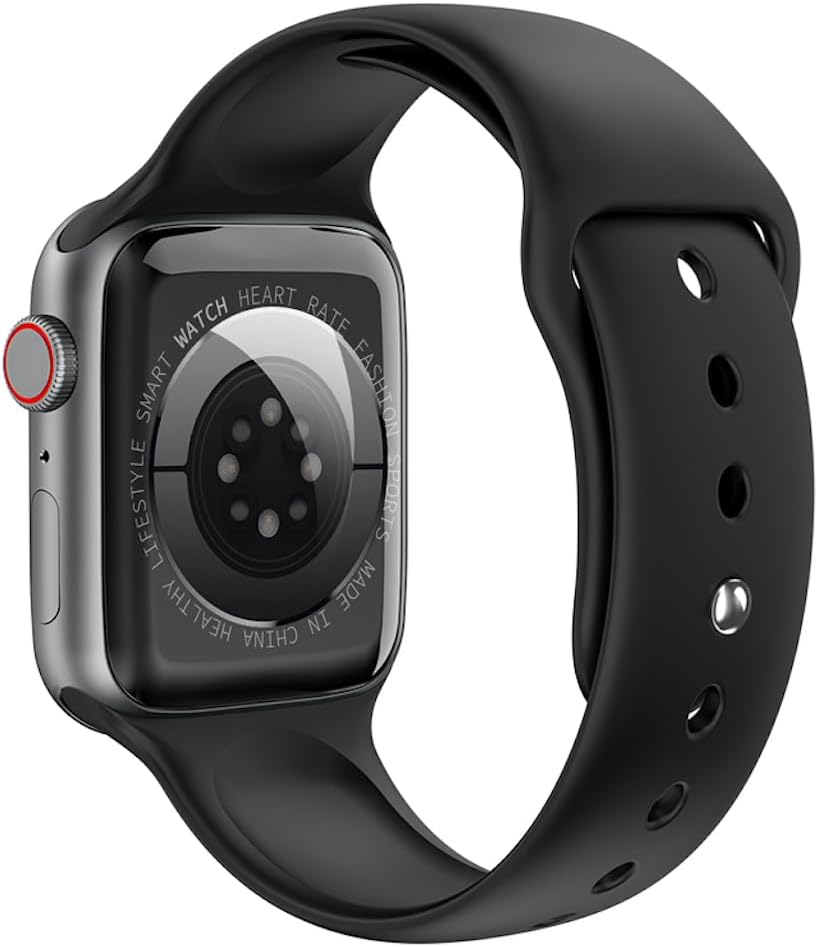
රූපය 3: පසුපස view of the watch, highlighting the optical heart rate sensors and charging contacts.
සංරචක:
- සංදර්ශකය: 1.91-inch TFT color touchscreen.
- ඩිජිටල් ඔටුන්න: මෙනු සංචාලනය කිරීමට සහ සැකසුම් සකස් කිරීමට භාවිතා කරයි.
- පැති බොත්තම: Typically used for power on/off, returning to the home screen, or accessing specific functions.
- හෘද ස්පන්දන සංවේදකය: Located on the back for continuous heart rate monitoring.
- ආරෝපණ සම්බන්ධතා: Magnetic contacts on the back for connecting the charging cable.
සැලසුම
1. උපාංගය ආරෝපණය කිරීම
Before initial use, fully charge your HOCO Y1 Pro Smart Watch. Connect the magnetic charging cable to the charging contacts on the back of the watch and plug the USB end into a power adapter (not included) or a computer's USB port.
- සම්පූර්ණ ආරෝපණයක් සාමාන්යයෙන් පැය 2ක් පමණ ගතවේ.
- බැටරි ධාරිතාව 280mAh වේ.
- Expected battery life: 3 days with dual Bluetooth enabled, 5-7 days with calls turned off.
2. බලය සක්රිය / අක්රිය කරන්න
- බල ගැන්වීම: Press and hold the side button until the HOCO logo appears.
- විදුලිය විසන්ධි කිරීම: පැති බොත්තම ඔබා අල්ලාගෙන සිටින්න, ඉන්පසු තිරය මත "පවර් ඕෆ්" තෝරන්න.
3. යෙදුම් ස්ථාපනය සහ යුගල කිරීම
To unlock the full functionality of your HOCO Y1 Pro, download and install the companion application on your smartphone. ඒ සඳහා සොයන්න the official HOCO smartwatch app in your device's app store (e.g., Google Play Store or Apple App Store).
- Ensure your watch is powered on and fully charged.
- ඔබගේ ස්මාර්ට් ජංගම දුරකතනයේ බ්ලූටූත් සක්රිය කරන්න.
- Open the HOCO companion app and follow the on-screen instructions to create an account or log in.
- Within the app, select "Add Device" or "Pair New Device" and choose "HOCO Y1 Pro" from the list of available devices.
- ඔබගේ ස්මාර්ට් ජංගම දුරකථනයේ සහ ඔරලෝසුවේ යුගල කිරීමේ ඉල්ලීම තහවුරු කරන්න.
- The watch supports dual Bluetooth for calls and data synchronization.
මෙහෙයුම් උපදෙස්
මූලික සංචාලනය
- ඉහළට/පහළට ස්වයිප් කරන්න: මෙනු හෝ දැනුම්දීම් හරහා අනුචලනය කරන්න.
- වමට/දකුණට ස්වයිප් කරන්න: Access quick functions or different watch faces.
- තට්ටු කරන්න: අයිතමයක් තෝරන්න හෝ ක්රියාවක් තහවුරු කරන්න.
- ඩිජිටල් ඔටුන්න: Rotate to scroll, press to return to the home screen or open the app list.
- පැති බොත්තම: Short press to return to the previous screen or home screen. Long press for power options.
ඇමතුම් කාර්යය
With dual Bluetooth enabled and paired to your smartphone, the HOCO Y1 Pro supports making and receiving calls directly from your wrist.
- ඇමතුම් ලබා ගැනීම: Access the dialer or contacts list on the watch to initiate a call.
- ඇමතුම් ලැබීම: When a call comes in, you can answer or reject it from the watch screen.
සෞඛ්ය නිරීක්ෂණ
- හෘද ස්පන්දන වේගය හඳුනාගැනීම: ඔරලෝසුව ඔබේ හෘද ස්පන්දන වේගය අඛණ්ඩව නිරීක්ෂණය කරයි. View ඔරලෝසුවේ තත්ය කාලීන දත්ත හෝ යෙදුමේ සවිස්තරාත්මක ප්රවණතා.
- නින්ද නිරීක්ෂණය: ගැඹුරු නින්ද, සැහැල්ලු නින්ද සහ අවදි වන වේලාවන් ඇතුළුව ඔබේ නින්දේ රටා නිරීක්ෂණය කිරීමට නින්දට යන විට ඔරලෝසුව පළඳින්න.
- Exercise Pedometer: ඔබගේ දෛනික පියවර, දුර සහ දහනය වූ කැලරි නිරීක්ෂණය කරයි.
Sports Modes and GPS Track
The watch offers various sports modes to track your workouts. When connected to your phone's GPS, it can record your outdoor activity routes.
- Select a sports mode (e.g., running, walking) from the watch menu.
- Ensure GPS tracking is enabled in the app for outdoor activities.
දැනුම්දීම්
Receive notifications for calls, messages, and app alerts directly on your watch. Configure notification settings within the companion app.
අතිරේක කාර්යයන්
- Remote Music: ඔරලෝසුවෙන් ඔබගේ ස්මාර්ට් ජංගම දුරකතනයේ සංගීත වාදනය පාලනය කරන්න.
- තත්ය කාලීන කාලගුණය: View current weather conditions and forecasts (requires app connection).
- Mobile Phone Search: ඔබගේ යුගල කළ ස්මාර්ට් ජංගම දුරකථනය නාද කිරීමට සැලැස්වීමෙන් එය සොයා ගැනීමට ඔරලෝසුව භාවිතා කරන්න.
නඩත්තු කිරීම
පිරිසිදු කිරීම
ප්රශස්ත ක්රියාකාරිත්වය සහ සනීපාරක්ෂාව සහතික කිරීම සඳහා ඔබේ ඔරලෝසුව නිතිපතා පිරිසිදු කරන්න.
- මෘදු, d රෙදි කඩකින් තිරය සහ පටිය පිස දමන්න.amp රෙදි.
- දරුණු රසායනික ද්රව්ය හෝ උල්ෙල්ඛ ද්රව්ය භාවිතා කිරීමෙන් වළකින්න.
- ආරෝපණය කිරීමට පෙර ආරෝපණ සම්බන්ධතා පිරිසිදු හා වියලි බව සහතික කර ගන්න.
ජල ප්රතිරෝධය (IP68)
The HOCO Y1 Pro is IP68 waterproof, meaning it is resistant to dust and can withstand immersion in water up to 1.5 meters for up to 30 minutes. While it is suitable for daily use and light water activities, it is not recommended for diving, hot showers, or prolonged submersion.
- දිය යට බොත්තම් ක්රියා නොකරන්න.
- වතුරට නිරාවරණය වීමෙන් පසු ඔරලෝසුව හොඳින් වියළන්න.
දෝෂගවේෂණය
| කලාපය | හැකි විසඳුම |
|---|---|
| ඔරලෝසුව ක්රියාත්මක නොවේ. | ඔරලෝසුව සම්පූර්ණයෙන්ම ආරෝපණය කර ඇති බවට වග බලා ගන්න. අවම වශයෙන් විනාඩි 30ක්වත් එය චාජරයට සම්බන්ධ කරන්න. |
| ස්මාර්ට් ජංගම දුරකථනය සමඟ යුගල කළ නොහැක. |
|
| Inaccurate heart rate or activity data. |
|
| දැනුම්දීම් ලැබී නැත. |
|
| තිරය ප්රතිචාර නොදක්වයි. | Try restarting the watch by long-pressing the side button. If unresponsive, allow the battery to drain completely and then recharge. |
පිරිවිතර
| විශේෂාංගය | විස්තර |
|---|---|
| මාදිලියේ නම | Y1 ප්රෝ |
| ප්රධාන තිරය | TFT 1.91 inches; Resolution: 240*285 pixel |
| CPU | Realtek 8762CW |
| මතකය | RAM 192KB + ROM 64MB |
| සම්බන්ධතාවය | Dual Bluetooth (supports calls) |
| ජල ප්රතිරෝධය | IP68 ජල ආරක්ෂිත |
| බැටරි ධාරිතාව | 280mAh ලිතියම් අයන |
| බැටරි ආයු කාලය | 3 days (dual Bluetooth on), 5-7 days (calls off) |
| විශේෂ කාර්යයන් | GPS track support, Information push, Heart rate detection, Sleep monitoring, Exercise pedometer, Remote music, Real-time weather, Mobile phone search |
| සහාය දක්වන භාෂා | 22 language packs including Chinese, English, Russian, Arabic, Vietnamese, Danish, Thai, Polish, Persian, Spanish, Malay, Greek, French, Italian, German, Portuguese, Turkish, Latin, Romanian, Hebrew, Burmese, Ukrainian. |
| පැකේජ මානයන් | 21.9 x 6.9 x 3.2 සෙ.මී |
| අයිතමයේ බර | 176 ග්රෑම් |
ආරක්ෂිත තොරතුරු
- උපාංගය විසුරුවා හැරීමට හෝ වෙනස් කිරීමට උත්සාහ නොකරන්න.
- උපාංගය අධික උෂ්ණත්වයන්, සෘජු හිරු එළිය සහ විවෘත ගිනිදැල් වලින් ඈත් කර තබන්න.
- උපාංගය ශක්තිමත් චුම්බක ක්ෂේත්රවලට නිරාවරණය කිරීමෙන් වළකින්න.
- ලබා දී ඇති ආරෝපණ කේබලය පමණක් භාවිතා කරන්න.
- Consult a medical professional before starting any new exercise regimen, especially if you have pre-existing health conditions. The heart rate data is for reference only and should not be used for medical diagnosis.
- දේශීය රෙගුලාසි වලට අනුව උපාංගය සහ එහි බැටරිය වගකීමෙන් යුතුව බැහැර කරන්න.
වගකීම් සහ සහාය
For warranty information and technical support, please refer to the documentation included with your purchase or visit the official HOCO webවෙබ් අඩවිය. වගකීම් හිමිකම් සඳහා ඔබේ මිලදී ගැනීමේ සාක්ෂි තබා ගන්න.
නිෂ්පාදකයා: Hoco
ASIN: B0CBVTSX1V
UPC/EAN: 6931474766106