
HOCO W25
HOCO Bluetooth Headphones W25 User Manual
Model: W25 | Brand: HOCO
හැඳින්වීම
The HOCO W25 Bluetooth Headphones are designed to provide a high-quality audio experience with deep bass and crisp sound. Featuring touch controls, a water-resistant and sweat-proof design, and extended battery life, these headphones are suitable for various activities, from daily commutes to workouts. They offer broad compatibility with Bluetooth-enabled devices, ensuring seamless connectivity and reliable performance.
පෙට්ටියේ ඇති දේ
- HOCO W25 Bluetooth Headphones
- ආරෝපණ කේබලය
නිෂ්පාදනය අවසන්view

රූපය 1: කෝණික view of the HOCO W25 Bluetooth Headphones in Black.
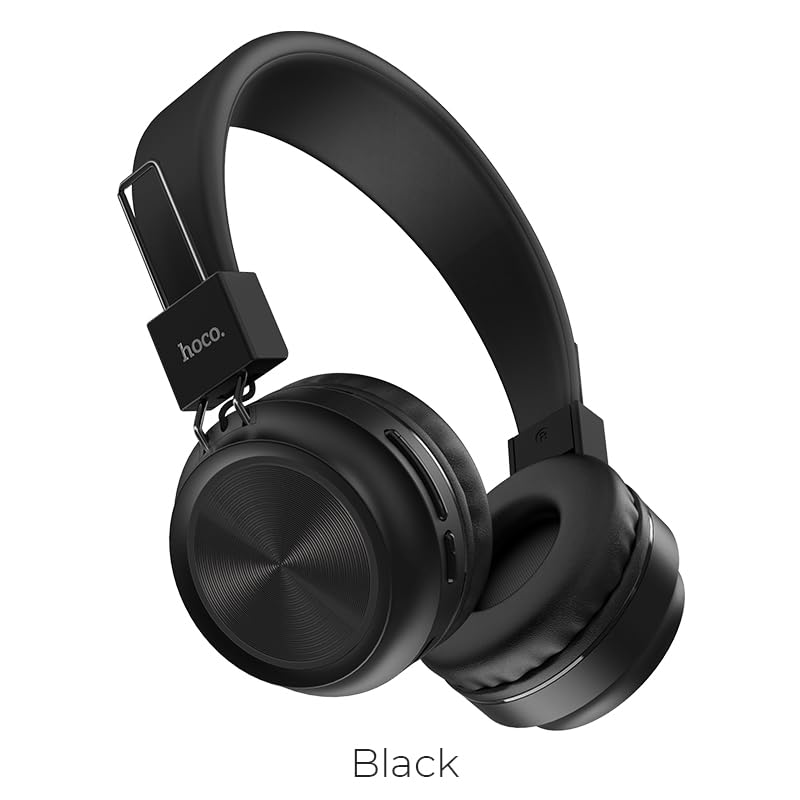
රූපය 2: ඉදිරිපස view of the HOCO W25 Bluetooth Headphones, highlighting the black color option.
ප්රධාන ලක්ෂණ:
- උසස් ශබ්ද තත්ත්වය: Rich, deep bass and crystal-clear highs for an immersive audio experience.
- Water-Resistant and Sweat-Proof: Designed to withstand water and sweat, making them ideal for workouts and outdoor use.
- ස්පර්ශ පාලන: Convenient and intuitive control over music playback and calls.
- බ්ලූටූත් 5.3 තාක්ෂණය: Ensures seamless pairing, stable connectivity, and reliable wireless performance.
- සූදු ප්රකාරය: Low latency performance for an enhanced gaming experience.
- සිනිඳු සහ හැඩකාර නිර්මාණය: Lightweight and comfortable over-ear design.
සැලසුම
1. හෙඩ්ෆෝන් ආරෝපණය කිරීම
Before first use, fully charge your HOCO W25 headphones. Connect the provided charging cable to the charging port on the headphones and the other end to a USB power source (e.g., computer USB port, wall adapter). The charging indicator light will show the charging status and turn off when fully charged. A full charge takes approximately 1 hour.
2. බ්ලූටූත් උපාංගයක් සමඟ යුගල කිරීම
- හෙඩ්ෆෝන් ක්රියා විරහිත කර ඇති බවට සහතික වන්න.
- යුගල කිරීමේ මාදිලිය දක්වමින්, දර්ශක ආලෝකය නිල් සහ රතු මාරුවෙන් මාරුවට දැල්වෙන තුරු හෙඩ්ෆෝන්වල බල බොත්තම ඔබාගෙන සිටින්න.
- ඔබගේ උපාංගයේ (ස්මාර්ට්ෆෝන්, ටැබ්ලටය, ලැප්ටොප්), බ්ලූටූත් සක්රීය කර පවතින උපාංග සොයන්න.
- Select "HOCO W25" from the list of found devices.
- Once connected, the indicator light on the headphones will turn solid blue or flash slowly.
සටහන: හෙඩ්ෆෝන් ක්රියාත්මක වූ විට අවසන් වරට යුගල කළ උපාංගයට ස්වයංක්රීයව නැවත සම්බන්ධ වීමට උත්සාහ කරයි.
මෙහෙයුම් උපදෙස්
බලය සක්රිය / අක්රිය:
- බල ගැන්වීම: තත්පර 3 ක් සඳහා බල බොත්තම ඔබාගෙන සිටින්න.
- විදුලිය විසන්ධි කිරීම: තත්පර 5 ක් සඳහා බල බොත්තම ඔබාගෙන සිටින්න.
සංගීත වාදනය:
- වාදනය/විරාමය: Single tap the multi-function button.
- ඊළඟ ධාවන පථය: Double tap the multi-function button.
- පෙර ධාවන පථය: Triple tap the multi-function button.
- පරිමාව: වෙළුම + බොත්තම ඔබන්න.
- ශබ්දය පහළට: වෙළුම් බොත්තම ඔබන්න.
ඇමතුම් කළමනාකරණය:
- පිළිතුර/අවසන් ඇමතුම: Single tap the multi-function button.
- ඇමතුම ප්රතික්ෂේප කරන්න: බහුකාර්ය බොත්තම තත්පර 2 ක් ඔබාගෙන සිටින්න.
- අවසාන අංකය නැවත අමතන්න: Double tap the multi-function button when not on a call.
හ oice සහකාර:
- හ oice සහකාර සක්රිය කරන්න: Press and hold the multi-function button for 1 second.
උපාංග අනුකූලතාව
The HOCO W25 Bluetooth Headphones are designed for wide compatibility and can connect with virtually all Bluetooth-enabled devices, including:
- ස්මාර්ට්ෆෝන් (iOS සහ Android)
- ටැබ්ලට්
- ලැප්ටොප්
- ස්මාර්ට් රූපවාහිනී
- Other Bluetooth audio devices
බැටරි ආයු කාලය සහ ආරෝපණය
- පසුධාවන කාලය: Up to 12 hours of continuous music playback or talk time on a single charge.
- පොරොත්තු කාලය: පැය 200 දක්වා.
- ආරෝපණ කාලය: සම්පූර්ණ ආරෝපණය සඳහා ආසන්න වශයෙන් පැය 1 ක්.
- ආරෝපණ දර්ශකය: LED දර්ශකය ආරෝපණ තත්ත්වය පෙන්වන අතර සම්පූර්ණයෙන්ම ආරෝපණය වූ විට නිවා දමයි.
Actual battery life may vary based on volume level, audio content, and usage conditions.
නඩත්තු කිරීම
- පිරිසිදු කිරීම: මෘදු වියළි රෙද්දකින් හෙඩ්ෆෝන් පිස දමන්න. උල්ෙල්ඛ පිරිසිදු කරන්නන් හෝ ද්රාවක භාවිතා නොකරන්න.
- ගබඩා: හෙඩ්ෆෝන් සෘජු හිරු එළියෙන් සහ අධික උෂ්ණත්වයන්ගෙන් ඈත්ව සිසිල් වියළි ස්ථානයක ගබඩා කරන්න.
- ජල නිරාවරණය: While water-resistant and sweat-proof, avoid submerging the headphones in water. Dry thoroughly if exposed to moisture.
- බැටරි සත්කාර: To prolong battery life, avoid fully discharging the headphones frequently. Charge regularly, even if not in use for extended periods.
දෝෂගවේෂණය
බලය නැත:
- හෙඩ්ෆෝන් සම්පූර්ණයෙන්ම ආරෝපණය වී ඇති බවට වග බලා ගන්න.
- Check the charging cable and power source.
යුගල කළ නොහැක:
- Make sure the headphones are in pairing mode (flashing blue and red light).
- ඔබගේ උපාංගයේ බ්ලූටූත් සබල කර ඇති බව සහතික කර ගන්න.
- හෙඩ්ෆෝන් ඔබේ උපාංගයට සමීප කරන්න.
- Forget "HOCO W25" from your device's Bluetooth settings and try pairing again.
- හෙඩ්ෆෝන් සහ ඔබගේ උපාංගය දෙකම නැවත ආරම්භ කරන්න.
ශබ්දයක් හෝ අඩු හඬක් නැත:
- හෙඩ්ෆෝන් සහ ඔබේ සම්බන්ධිත උපාංගය යන දෙකෙහිම ශබ්දය වැඩි කරන්න.
- හෙඩ්ෆෝන් ඔබේ උපාංගයට නිසි ලෙස සම්බන්ධ වී ඇති බවට වග බලා ගන්න.
- Check if another device is connected to the headphones.
දුර්වල ශබ්ද තත්ත්වය:
- බාධා වළක්වා ගැනීමට ඔබගේ උපාංගයට සමීප වන්න.
- Ensure there are no obstacles between the headphones and your device.
- විවිධ ශ්රව්ය ප්රභවයන් වාදනය කිරීමට උත්සාහ කරන්න.
පිරිවිතර
| විශේෂාංගය | විස්තර |
|---|---|
| මාදිලියේ නම | W25 |
| සම්බන්ධතා තාක්ෂණය | රැහැන් රහිත (බ්ලූටූත්) |
| බ්ලූටූත් අනුවාදය | 5.3 |
| ශබ්ද පාලනය | ශබ්ද හුදකලා කිරීම |
| ජල ප්රතිරෝධක මට්ටම | වතුර කාන්දු නොවන |
| පාලන වර්ගය | ස්පර්ශය, ශබ්ද පාලනය |
| බැටරි ආයු කාලය | 12 Hours (Playback) |
| ආරෝපණ කාලය | පැය 1 යි |
| පොරොත්තු කාලය | පැය 200 යි |
| ආකෘති සාධකය | Over Ear, On Ear |
| මයික්රෆෝන ආකෘතිය | බිල්ට්-ඉන් |
| ද්රව්ය | ප්ලාස්ටික් |
| අයිතමයේ බර | 161 ග්රෑම් |
| නිෂ්පාදකයා | හොකෝ |
නිල නිෂ්පාදන වීඩියෝව
මෙම වීඩියෝව අවසන් කිරීමක් සපයයිview of the HOCO W25 Bluetooth Headphones, highlighting key features such as deep bass, touch controls, water resistance, and battery life. It also showcases the product's compatibility and design.
වගකීම් සහ සහාය
The HOCO W25 Bluetooth Headphones come with a standard brand warranty. For specific warranty terms and conditions, please refer to the warranty card included with your product or visit the official HOCO webඅඩවිය.
For further assistance, technical support, or troubleshooting beyond this manual, please contact HOCO customer service or visit the product detail page on the retailer's website where you purchased the item.
- වගකීම්: වසර 1ක වගකීමක්
You can find more information and support resources by visiting the product page on Amazon.in.
Ask a question about this manual
Ask about setup, troubleshooting, compatibility, parts, safety, or missing instructions. Manuals+ will review the question and use this page’s manual context to help answer it.