1. හැඳින්වීම
This manual provides essential instructions for the proper use and maintenance of your new Generic replacement infrared (IR) remote control. This remote is designed to function as a direct replacement for specific sound bar models, including Britz BZ-T3820, Monoprice SB-200, Toshiba TS205, Schneider SC300SND, and Schneider SC600SND. Please read this manual thoroughly before use to ensure optimal performance and compatibility.
වැදගත් සටහන: This remote control is an IR replacement and does not require any programming or setup. It is designed to work immediately with compatible models once batteries are installed. Ensure your original remote control matches the appearance of this replacement for guaranteed compatibility.
2. නිෂ්පාදන අවසන්view
The replacement remote control features a standard button layout for controlling various functions of your compatible sound bar. Familiarize yourself with the buttons and their corresponding functions.
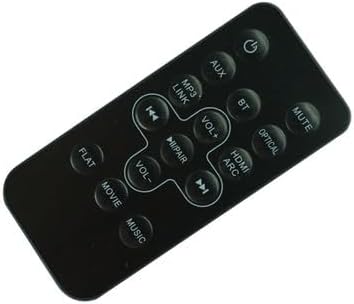
රූපය 1: ඉදිරිපස view of the Generic Replacement IR Remote Control, displaying all function buttons including Power, Volume, Mute, Input Selectors (AUX, BT, MP3 LINK, OPTICAL, HDMI ARC), Playback Controls, and Sound Modes (FLAT, MOVIE, MUSIC).
The back of the remote control houses the battery compartment and may include an optional mounting clip.

රූපය 2: ආපසු view of the Generic Replacement IR Remote Control, showing the closed battery compartment cover and an included detachable mounting clip.
3. බැටරි ස්ථාපනය
The remote control requires two (2) CR2 batteries (not included). Follow these steps to install the batteries:
- දුරස්ථ පාලකයේ පිටුපස බැටරි මැදිරිය සොයා ගන්න.
- එය විවෘත කිරීම සඳහා බැටරි මැදිරි කවරය පහළට හෝ ඊතලයකින් දක්වා ඇති දිශාවට තල්ලු කරන්න.
- Insert two (2) CR2 batteries, ensuring the positive (+) and negative (-) terminals align correctly with the markings inside the compartment. Incorrect installation can prevent the remote from functioning.
- බැටරි මැදිරි කවරය ආරක්ෂිතව ක්ලික් කරන තුරු එය නැවත එම ස්ථානයට තල්ලු කරන්න.

රූපය 3: ආපසු view of the remote control with the battery compartment cover removed, revealing the battery slots.
අවවාදයයි: Do not mix old and new batteries. Do not mix alkaline, standard (carbon-zinc), or rechargeable (nickel-cadmium) batteries. Remove batteries if the remote control will not be used for an extended period.
4. මූලික මෙහෙයුම
Once batteries are installed, the remote control is ready for use with your compatible sound bar. Point the remote control directly at the IR receiver on your sound bar and press the desired function button.
පොදු කාර්යයන්:
- බල බොත්තම (⏻ ⏻ ශ්රේණිය): Turns the sound bar ON or OFF.
- ශබ්දය වැඩි කිරීම (VOL+): Increases the sound bar's volume.
- ශබ්දය අඩු කිරීම (වෙළුම-): Decreases the sound bar's volume.
- නිශ්ශබ්ද බොත්තම: ශබ්දය නිශ්ශබ්ද කරයි හෝ නිශ්ශබ්ද කරයි.
- Input Selection (AUX, BT, MP3 LINK, OPTICAL, HDMI ARC): Selects the audio input source for the sound bar. Press the corresponding button for the desired input.
- පසුධාවන පාලන (⏮ ⏮ ශ්රේණිය පෙර, ⏸ ⏸ დარ ක්රීඩා/විරාම, ⏭ ⏭ ශ්රව්ය Next): Controls media playback when applicable (e.g., Bluetooth or MP3 LINK modes).
- Sound Modes (FLAT, MOVIE, MUSIC): Switches between different audio equalization presets.
5. දෝශ නිරාකරණය
If the remote control does not operate your sound bar, consider the following:
- බැටරි ස්ථාපනය පරීක්ෂා කරන්න: Ensure batteries are inserted correctly with the proper polarity (+/-).
- බැටරි ප්රතිස්ථාපනය කරන්න: If the batteries are old or depleted, replace them with fresh CR2 batteries.
- දර්ශන රේඛාව: Ensure there is a clear line of sight between the remote control and the IR receiver on your sound bar. Obstructions can block the signal.
- දුරස්ථ අනුකූලතාව: Verify that your sound bar model is listed as compatible with this remote control. This remote is a direct replacement and does not require programming. If your original remote looked different, this replacement may not be compatible.
- Sound Bar Power: Ensure your sound bar is powered on and functioning correctly.
If issues persist after performing these checks, the remote control may not be compatible with your specific sound bar unit, or there may be an issue with the sound bar's IR receiver.
6. පිරිවිතර
| නිෂ්පාදන වර්ගය | ප්රතිස්ථාපන අධෝරක්ත (IR) දුරස්ථ පාලකය |
| සම්බන්ධතා තාක්ෂණය | අධෝරක්ත කිරණ |
| පාලක වර්ගය | බොත්තම් පාලනය |
| බලශක්ති ප්රභවය | 2 x CR2 Batteries (not included) |
| විශේෂ ලක්ෂණය | Ergonomic design, no programming required |
7. ගැළපුම
This replacement remote control is specifically designed to be compatible with the following sound bar models:
- Britz BZ-T3820
- Monoprice SB-200
- Toshiba TS205
- Schneider SC300SND
- Schneider SC600SND
සටහන: Compatibility is based on the original remote control having an identical appearance and button layout to this replacement. If your original remote differs, this replacement may not function correctly.
8. වගකීම් සහ සහාය
As a generic replacement product, specific warranty details may vary depending on the retailer or seller. Please refer to your purchase documentation or contact your point of purchase for information regarding warranty coverage and customer support.
For general troubleshooting not covered in this manual, please consult the original user manual for your specific sound bar model or contact the manufacturer of your sound bar.


