
SUNOL K8
GM20 True Wireless Earbuds User Manual
මාදිලිය: K8
හැඳින්වීම
Thank you for choosing the SUNOL GM20 True Wireless Earbuds. This manual provides detailed instructions on how to set up, operate, and maintain your earbuds to ensure optimal performance and longevity. Please read this manual thoroughly before using the product.
නිෂ්පාදනය අවසන්view

Image: The GM20 True Wireless Earbuds in orange, shown with their matching charging case. The charging case features an LED display indicating battery percentage.
The GM20 True Wireless Earbuds are designed for a superior audio experience with advanced features:
- බ්ලූටූත් 5.3 තාක්ෂණය: Ensures faster pairing, more stable connection, and lower power consumption with an effective range of up to 10 meters.
- ඒකාබද්ධ මයික්රෆෝනය: High-quality microphone with environmental noise reduction for clear hands-free calls.
- විස්තීරණ පසුධාවනය: Up to 48 hours of total playback time with the 600mAh charging case, which can recharge the earbuds four times.
- නායකත්වය විදහා: The charging case features an LED display to show the power levels of both the earbuds and the charging case.
- ජල ආරක්ෂිත නිර්මාණය: IPX8 waterproof nano-coating makes the earbuds suitable for various activities, including sports.
- සුවපහසු ගැලපීම: Ergonomic in-ear design with multiple ear tip sizes for prolonged comfortable wear.
පෙට්ටියේ ඇති දේ
Upon opening your GM20 True Wireless Earbuds package, you should find the following items:
- GM20 True Wireless Earbuds (Left and Right)
- අයකිරීමේ නඩුව
- ආරෝපණ කේබලය
- Multiple sizes of Ear Tips
- පරිශීලක අත්පොත (මෙම ලේඛනය)
සැලසුම
1. ඉයර්බඩ් සහ කේස් ආරෝපණය කිරීම
පළමු භාවිතයට පෙර, ඉයර්බඩ් සහ ආරෝපණ පෙට්ටිය දෙකම සම්පූර්ණයෙන්ම ආරෝපණය වී ඇති බවට වග බලා ගන්න.
- Place the earbuds into the charging case. Ensure they are correctly seated; the LED display on the case will show charging status.
- Connect the charging cable to the charging port on the case and to a USB power source. The LED display will indicate the charging progress of the case.
- A full charge for the case typically takes a few hours. The earbuds will charge automatically when placed inside the powered case.

Image: The GM20 charging case displaying "100" on its LED screen, indicating a full charge. An earbud is shown next to it, ready for use.
2. ඔබගේ උපාංගය සමඟ යුගල කිරීම (එක්-පියවර යුගල කිරීම)
The GM20 earbuds feature automatic pairing for convenience.
- මූලික යුගලනය:
- ආරෝපණ පෙට්ටිය විවෘත කර ඉයර්බඩ් දෙකම එළියට ගන්න. ඒවා ස්වයංක්රීයව ක්රියාත්මක වී යුගල කිරීමේ ප්රකාරයට ඇතුළු වේ.
- ඔබගේ උපාංගයේ (ස්මාර්ට්ෆෝන්, ටැබ්ලටය, ආදිය), බ්ලූටූත් සක්රීය කරන්න.
- ඒ සඳහා සොයන්න Bluetooth devices and select "GM20 TWS" from the list.
- සම්බන්ධ වූ පසු, ඔබට තහවුරු කිරීමේ ස්වරයක් ඇසෙනු ඇති අතර, ඉයර්බඩ් භාවිතයට සූදානම් වනු ඇත.
- නැවත යුගල කිරීම: The earbuds will automatically connect to the last paired device when taken out of the charging case.
- If the earbuds do not connect automatically, ensure Bluetooth is enabled on your device and select "GM20 TWS" from your Bluetooth settings.
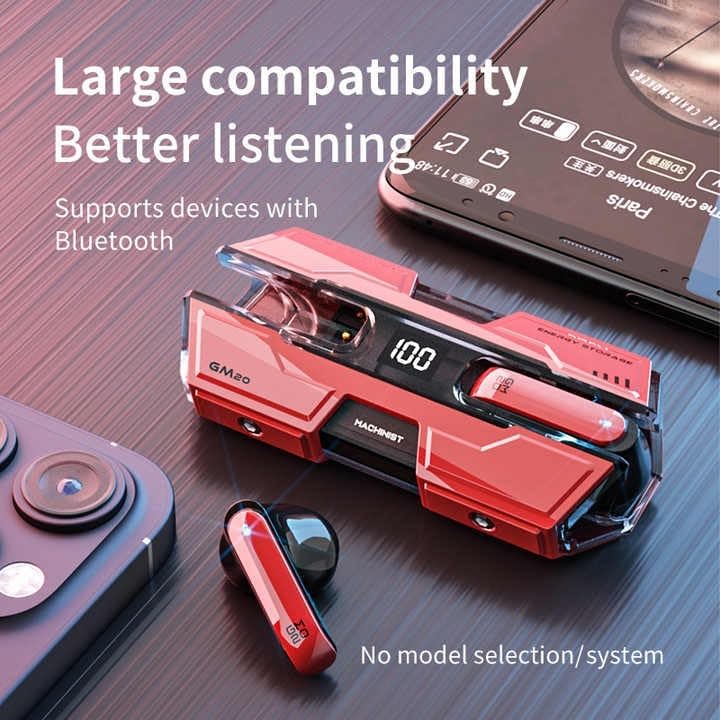
Image: The GM20 earbuds and charging case positioned near a smartphone, emphasizing their broad compatibility with Bluetooth-enabled devices.
මෙහෙයුම් උපදෙස්
ඉයර්බඩ් පාලන
The GM20 earbuds feature a multifunction button on each earbud for easy control of audio playback and calls.
| ක්රියාව | කාර්යය |
|---|---|
| තනි ඔබන්න (වම්/දකුණු ඉයර්බඩ්) | සංගීතය වාදනය කරන්න/විරාම කරන්න, ඇමතුමට පිළිතුරු දෙන්න/අවසන් කරන්න |
| ද්විත්ව ඔබන්න (වම් ඉයර්බඩ්) | පෙර ගීතය |
| ද්විත්ව ඔබන්න (දකුණු ඉයර්බඩ්) | ඊළඟ ගීතය |
| දිගු පීඩනය (තත්පර 2) | ඇමතුම ප්රතික්ෂේප කරන්න, හඬ සහායක සක්රිය කරන්න |
| දිගු පීඩනය (තත්පර 5) | බලය සක්රිය / අක්රිය |
ඉයර්බඩ් පැළඳීම
For optimal sound quality and comfort, ensure the earbuds are properly seated in your ears. Experiment with the different sizes of ear tips provided to find the best fit for your ears.

රූපය: පුපුරා ගිය එකක් view diagram of an earbud, illustrating its internal components such as the 13mm moving coil and composite diaphragm, which contribute to high-resolution sound.
නඩත්තු කිරීම
Proper maintenance will extend the life of your GM20 earbuds.
- පිරිසිදු කිරීම: මෘදු, වියලි, ලින්ට් රහිත රෙද්දකින් ඉයර්බඩ් සහ ආරෝපණ පෙට්ටිය නිතිපතා පිරිසිදු කරන්න. උල්ෙල්ඛ පිරිසිදු කරන්නන් හෝ ද්රාවක භාවිතා නොකරන්න.
- ජල ප්රතිරෝධය: The earbuds are IPX8 waterproof, meaning they are protected against prolonged immersion in water. However, the charging case is not waterproof. Avoid exposing the charging case to liquids. Always ensure earbuds are dry before placing them back in the charging case.
- ගබඩා: භාවිතයේ නොමැති විට, ඉයර්බඩ් ආරක්ෂා කර ගැනීමට සහ ආරෝපණය කර තබා ගැනීමට ඒවායේ ආරෝපණ පෙට්ටියේ ගබඩා කරන්න. අධික උෂ්ණත්වයන්ගෙන් ඈත්ව සිසිල් වියළි ස්ථානයක ගබඩා කරන්න.
- බැටරි සත්කාර: බැටරි ආයු කාලය ආරක්ෂා කර ගැනීම සඳහා, ඉයර්බඩ් සම්පූර්ණයෙන්ම විසර්ජනය කිරීමෙන් සහ කේස් නිතර ආරෝපණය කිරීමෙන් වළකින්න. නිරන්තරයෙන් භාවිතයේ නොමැති වුවද, ඒවා නිතිපතා ආරෝපණය කරන්න.
දෝෂගවේෂණය
If you encounter issues with your GM20 earbuds, try the following solutions:
- ඉයර්බඩ් යුගල නොවේ:
- ඉයර්බඩ් දෙකම සම්පූර්ණයෙන්ම ආරෝපණය කර ඇති බව සහතික කර ගන්න.
- ඔබගේ උපාංගයේ බ්ලූටූත් ක්රියාවිරහිත කරන්න, ඉන්පසු එය නැවත ක්රියාත්මක කරන්න.
- Forget "GM20 TWS" from your device's Bluetooth settings and attempt to re-pair.
- ඉයර්බඩ් නැවත කේස් එකට දමා, පියන වසා, තත්පර කිහිපයක් රැඳී සිට, පසුව විවෘත කර නැවත උත්සාහ කරන්න.
- ශබ්දයක් නැත හෝ අඩු පරිමාවක්:
- ඔබගේ උපාංගයේ සහ ඉයර්බඩ් දෙකෙහිම ශබ්ද මට්ටම පරීක්ෂා කරන්න.
- ඉයර්බඩ් ඔබේ උපාංගයට නිසි ලෙස සම්බන්ධ වී ඇති බවට වග බලා ගන්න.
- ඉයර්බඩ් ස්පීකර් දැලෙන් ඕනෑම සුන්බුන් පිරිසිදු කරන්න.
- Sound distortion or crackling:
- Ensure the earbuds are within the 10-meter Bluetooth range of your device.
- වෙනත් රැහැන් රහිත උපාංගවලින් හෝ ප්රබල විද්යුත් චුම්භක ක්ෂේත්රවලින් ඉවතට යාමෙන් ඇඟිලි ගැසීම් අඩු කරන්න.
- ඉයර්බඩ් නැවත යුගල කිරීමට උත්සාහ කරන්න.
- ඉයර්බඩ් ආරෝපණය නොවේ:
- ආරෝපණ කේබලය නඩුවට සහ බල ප්රභවයට ආරක්ෂිතව සම්බන්ධ කර ඇති බවට වග බලා ගන්න.
- නඩුවේ ආරෝපණ වරාය පිරිසිදුද සහ සුන්බුන් වලින් තොරද යන්න පරීක්ෂා කරන්න.
- වෙනස් ආරෝපණ කේබලයක් හෝ බල ඇඩැප්ටරයක් උත්සාහ කරන්න.
පිරිවිතර
| විශේෂාංගය | විස්තර |
|---|---|
| මාදිලියේ නම | K8 |
| බ්ලූටූත් අනුවාදය | 5.3 |
| බ්ලූටූත් පරාසය | මීටර් 10 |
| බැටරි ආයු කාලය (ඉයර්බඩ්) | Approx. 8-10 hours (single charge) |
| බැටරි ආයු කාලය (ආරෝපණ ආවරණයක් සහිතව) | පැය 48 දක්වා |
| ආරෝපණ කේස් බැටරි ධාරිතාව | 600mAh |
| ජල ප්රතිරෝධක මට්ටම | IPX8 (Earbuds පමණි) |
| සංඛ්යාත ප්රතිචාරය | 20 හර්ට්ස් - 20 කිලෝහර්ට්ස් |
| සම්බාධනය | 32 ඕම් |
| පාලන ක්රමය | ස්පර්ශය/බොත්තම |
| ද්රව්ය | ඇක්රිලෝනයිට්රයිල් බියුඩඩීන් ස්ටයිරීන් (ABS) |
| අයිතමයේ බර | අවුන්ස 14.4 (මුළු පැකේජය) |
වගකීම් සහ සහාය
For warranty information and customer support, please refer to the documentation included with your purchase or visit the official SUNOL website. If you experience any issues not covered in this manual, please contact SUNOL customer service for assistance.
වගකීම් හිමිකම් සඳහා කරුණාකර ඔබගේ මිලදී ගැනීමේ සාක්ෂි තබා ගන්න.
Ask a question about this manual
Ask about setup, troubleshooting, compatibility, parts, safety, or missing instructions. Manuals+ will review the question and use this page’s manual context to help answer it.