
හැඳින්වීම
This manual provides detailed instructions for the SUNOL GM20 True Wireless Earbuds. Please read this manual carefully before using the product to ensure proper operation and to maximize your listening experience. These earbuds feature Bluetooth 5.3 connectivity, a waterproof design, and a charging case with an LED display.
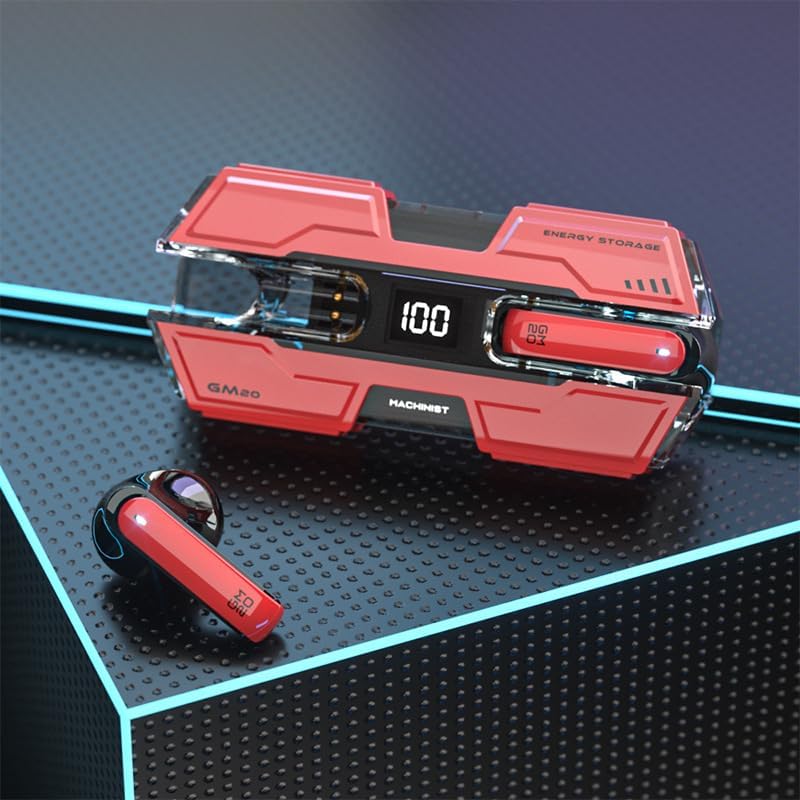
Image: The SUNOL GM20 True Wireless Earbuds with their charging case, showcasing the design and LED display.
පැකේජයේ අන්තර්ගතය
සියලුම අයිතම පැකේජයේ ඇති බවට වග බලා ගන්න:
- GM20 True Wireless Earbuds (Left and Right)
- අයකිරීමේ නඩුව
- ආරෝපණ කේබලය
- පරිශීලක අත්පොත
- බහු ප්රමාණයේ කන් ඉඟි
නිෂ්පාදන විශේෂාංග
- බ්ලූටූත් 5.3 තාක්ෂණය: Offers faster pairing, stable connection, and lower power consumption with an effective range of up to 10 meters.
- 48-Hour Playback: The charging case provides multiple charges, extending total listening time.
- IPX8 ජල ආරක්ෂිත: Designed to withstand water exposure, suitable for sports and outdoor activities.
- නායකත්වය විදහා: The charging case features an LED display to show battery life.
- Deep Bass Audio: Equipped with a 14mm dynamic bass unit for enhanced sound quality.
- බිල්ට් මයික්රෆෝනය: Supports hands-free calls with environmental noise reduction.
- Ergonomic Design: Lightweight and comfortable for extended wear.

Image: The GM20 earbuds and charging case, emphasizing Bluetooth 5.3 and high-definition sound quality.

රූපය: පුපුරා ගිය එකක් view diagram illustrating the internal components of the earbud, highlighting the 13mm moving coil and composite diaphragm for high-fidelity sound.
සැලසුම
1. ඉයර්බඩ් සහ ආරෝපණ නඩුව ආරෝපණය කිරීම
Before first use, fully charge the earbuds and the charging case. Connect the provided charging cable to the charging case and a USB power source. The LED display on the charging case will indicate the charging status and battery level. When charging the earbuds inside the case, the display will show their individual battery life.
2. බල ගැන්වීම / අක්රිය කිරීම
- බල ගැන්වීම: ආරෝපණ පෙට්ටියෙන් ඉවත් කළ විට ඉයර්බඩ් ස්වයංක්රීයව ක්රියාත්මක වේ.
- විදුලිය විසන්ධි කිරීම: Place the earbuds back into the charging case to automatically power them off and begin charging.
3. උපාංගයක් සමඟ යුගල කිරීම
The earbuds support one-step pairing for convenience.
- ඉයර්බඩ් ආරෝපණය කර ඇති බව සහතික කර ගන්න.
- Open the charging case and remove both earbuds. They will automatically power on and attempt to connect to each other.
- After approximately 10 seconds, the earbuds will enter pairing mode.
- ඔබගේ උපාංගයේ (ස්මාර්ට්ෆෝන්, ටැබ්ලටය, ආදිය), බ්ලූටූත් සක්රීය කර පවතින උපාංග සොයන්න.
- Select "GM20 TWS" from the list of found devices to complete the pairing process.
- යුගල කළ පසු, ආරෝපණ පෙට්ටියෙන් ඉවත් කළ විට ඉයර්බඩ් ස්වයංක්රීයව අවසන් වරට යුගල කළ උපාංගයට සම්බන්ධ වේ.

Image: The GM20 earbuds and charging case, illustrating the quick connect and pairing process with a smartphone.
මෙහෙයුම් උපදෙස්
1. ඉයර්බඩ් පැළඳීම
Select the ear tips that provide the most comfortable and secure fit. Insert the earbuds gently into your ear canal and rotate slightly until they feel snug. A proper fit ensures optimal sound quality and noise isolation.
2. මූලික පාලනයන්
ඉයර්බඩ් වල විවිධ පාලනයන් සඳහා බහුකාර්ය බොත්තමක් ඇත:
- සංගීතය වාදනය/විරාම කරන්න: Single press the multifunction button on either earbud.
- ඊළඟ ගීතය: Double press the multifunction button on the right earbud.
- පෙර ගීතය: Double press the multifunction button on the left earbud.
- පිළිතුර/අවසන් ඇමතුම: Single press the multifunction button on either earbud during an incoming call or active call.
- ඇමතුම ප්රතික්ෂේප කරන්න: Press and hold the multifunction button on either earbud during an incoming call.
- ශබ්ද පාලනය: (Note: Specific volume control via earbuds is not detailed in product information. Adjust volume via your connected device.)
3. Waterproof Functionality
The GM20 earbuds are designed with an IPX8 waterproof nano-coating, making them resistant to water. This feature makes them suitable for activities such as running, cycling, and other sports where exposure to sweat or light rain may occur. Avoid prolonged submersion in water.

Image: The GM20 earbuds and charging case in a gaming context, highlighting fast transmission and no delay for an enhanced experience.
නඩත්තු කිරීම
1 පිරිසිදු කිරීම
Regularly clean your earbuds and charging case to maintain optimal performance and hygiene. Use a soft, dry, lint-free cloth. For stubborn dirt, a slightly damp cloth can be used, but ensure no moisture enters the earbud openings or charging ports. Do not use harsh chemicals or abrasive materials.
2. ගබඩා කිරීම
භාවිතයේ නොමැති විට, දූවිලි, හානිවලින් ආරක්ෂා වීමට සහ ආරෝපණය කර තබා ගැනීමට ඉයර්බඩ් ඒවායේ ආරෝපණ පෙට්ටියේ ගබඩා කරන්න. සෘජු හිරු එළියෙන් සහ අධික උෂ්ණත්වයන්ගෙන් ඈත්ව සිසිල් වියළි ස්ථානයක නඩුව ගබඩා කරන්න.
3. බැටරි රැකවරණය
To prolong battery life, avoid fully discharging the earbuds and charging case frequently. Charge them regularly, even if not in constant use. Do not expose batteries to excessive heat.
දෝෂගවේෂණය
- ඉයර්බඩ් එකිනෙක සමඟ යුගල නොවීම: Place both earbuds back into the charging case, close the lid, wait a few seconds, then remove them again. They should automatically connect.
- ඉයර්බඩ් උපාංගයට සම්බන්ධ නොවේ: Ensure Bluetooth is enabled on your device and the earbuds are in pairing mode. Forget "GM20 TWS" from your device's Bluetooth list and try pairing again.
- එක ඉයර්බඩ් එකකින් ශබ්දයක් නැත: Check if both earbuds are charged. Try resetting them by placing them in the case and then removing them.
- ආරෝපණ ගැටළු: Ensure the charging cable is securely connected and the power source is functional. Clean the charging contacts on both the earbuds and the case.
- දුර්වල ශබ්ද ගුණාත්මකභාවය: Ensure the earbuds are properly seated in your ears. Try different sized ear tips for a better seal. Check the audio source device for any issues.
තාක්ෂණික පිරිවිතර
| මාදිලියේ නම | GM20 (K8) |
| බ්ලූටූත් අනුවාදය | 5.3 |
| බ්ලූටූත් පරාසය | මීටර් 10 දක්වා |
| බැටරි ආයු කාලය (ඉයර්බඩ්) | Approximately 48 hours with charging case |
| ආරෝපණ කේස් බැටරිය | 600mAh |
| ජල ප්රතිරෝධක මට්ටම | IPX8 |
| ශ්රව්ය ධාවක වර්ගය | 14mm ගතික ධාවකය |
| සංඛ්යාත පරාසය | 20 හර්ට්ස් - 20 කිලෝහර්ට්ස් |
| පාලන ක්රමය | ස්පර්ශය/බොත්තම |
| ද්රව්ය | ඇක්රිලෝනයිට්රයිල් බියුඩඩීන් ස්ටයිරීන් (ABS) |
වගකීම් තොරතුරු
The SUNOL GM20 True Wireless Earbuds come with a standard manufacturer's warranty. Please refer to the warranty card included in your package or contact customer support for specific details regarding warranty coverage and duration. Keep your proof of purchase for warranty claims.
පාරිභෝගික සහාය
If you encounter any issues not covered in this manual or require further assistance, please contact SUNOL customer support. Contact information can typically be found on the product packaging or the official SUNOL webඅඩවිය.