
හැඳින්වීම
Thank you for choosing CLEYVER Earbuds Pro. This user manual provides essential information for the proper setup, operation, maintenance, and troubleshooting of your new wireless headphones. Please read this manual thoroughly before using the product to ensure optimal performance and longevity.
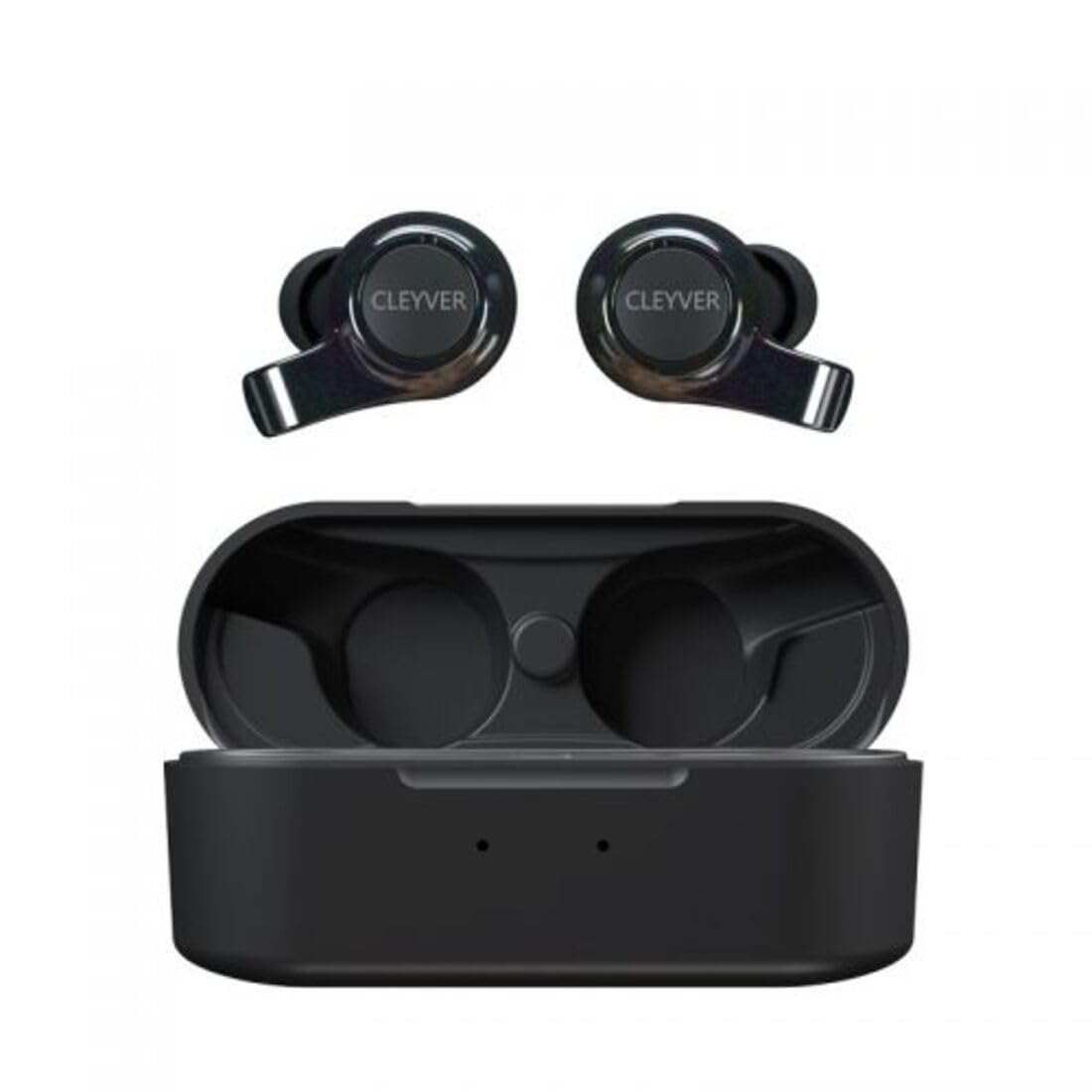
Image: The CLEYVER Earbuds Pro displayed with the CLEYVER brand logo.
පැකේජයේ අන්තර්ගතය
ඔබගේ පැකේජයේ සියලුම අයිතම ඇති බවට වග බලා ගන්න:
- CLEYVER Earbuds Pro (Left and Right)
- රැහැන් රහිත ආරෝපණ නඩුව
- USB-C ආරෝපණ කේබලය
- Eartips (Small, Medium, Large sizes)
- පරිශීලක අත්පොත (මෙම ලේඛනය)

Image: The CLEYVER Earbuds Pro and their accompanying charging case.
නිෂ්පාදනය අවසන්view
The CLEYVER Earbuds Pro are designed for a superior audio experience with advanced features. Each earbud is equipped with a dual microphone system for clear calls and Environmental Noise Cancellation (ENC) technology. The earbuds feature a hybrid Touch & Push-button control system for easy management of calls and media playback.
The compact charging case provides extended battery life and supports both wired (USB-C) and wireless charging.

Image: The CLEYVER Earbuds Pro securely placed within their charging case.
සැලසුම
1. ඉයර්බඩ් සහ කේස් ආරෝපණය කිරීම
පළමු භාවිතයට පෙර, ඉයර්බඩ් සහ ආරෝපණ පෙට්ටිය සම්පූර්ණයෙන්ම ආරෝපණය කරන්න.
- වයර් ආරෝපණය: සපයා ඇති USB-C කේබලය නඩුවේ ආරෝපණ වරායට සහ බල ප්රභවයකට සම්බන්ධ කරන්න.
- රැහැන් රහිත ආරෝපණය: ආරෝපණ පෙට්ටිය අනුකූල රැහැන් රහිත ආරෝපණ පෑඩයක් මත තබන්න.
The charging case has a 500 mAh battery, providing up to 40 hours of listening time or 7 hours of talk time. A quick 10-minute charge can provide up to 2 hours of autonomy.

Image: Visual representation highlighting the 40 hours of playtime for the CLEYVER Earbuds Pro.
2. ඔබගේ උපාංගය සමඟ යුගල කිරීම
- ආරෝපණ පෙට්ටියේ පියන විවෘත කරන්න. ඉයර්බඩ් ස්වයංක්රීයව යුගල කිරීමේ ප්රකාරයට ඇතුළු වනු ඇත.
- ඔබගේ උපාංගයේ (ස්මාර්ට්ෆෝන්, ටැබ්ලටය, ආදිය), බ්ලූටූත් සක්රීය කරන්න.
- ඒ සඳහා සොයන්න available Bluetooth devices and select "CLEYVER Earbuds Pro" from the list.
- සම්බන්ධ වූ පසු, තහවුරු කිරීමේ ශබ්දයක් වාදනය වන අතර, ඉයර්බඩ් භාවිතයට සූදානම් වනු ඇත.
The earbuds feature instant pairing when the case lid is opened, simplifying the connection process.

Image: A smartphone screen displaying the CLEYVER Earbuds Pro as a connected Bluetooth device, illustrating the simple setup process.
3. ඉයර්බඩ් පැළඳීම
Choose the eartip size (S, M, L) that provides the most comfortable and secure fit for optimal sound quality and noise isolation. Gently insert the earbuds into your ears and twist slightly to secure them.

Image: A person demonstrating how to properly insert a CLEYVER Earbud Pro into their ear.
ඉයර්බඩ් ක්රියාත්මක කිරීම
Touch & Push-Button Controls
The CLEYVER Earbuds Pro feature a hybrid control system combining touch gestures with a physical push-button for precise command execution. Specific functions for playback, call management, and mode switching are detailed in the quick start guide included in the package.
ශබ්ද මාදිලි
- පාරිසරික ශබ්ද අවලංගු කිරීම (ENC): This technology actively reduces ambient noise, providing clearer audio during calls and an immersive listening experience.
- විනිවිදභාවය ප්රකාරය: Allows you to hear your surroundings without removing the earbuds. You can choose between full or partial noise isolation to stay aware of your environment.

Image: A person wearing CLEYVER Earbuds Pro, with an overlay indicating 'Transparency Mode' and a phone screen showing options for different sound modes.
ක්රීඩා මාදිලිය
Activate Gaming Mode for reduced audio latency, ensuring synchronized sound with on-screen action during gaming sessions.

Image: The CLEYVER Earbuds Pro positioned beside a smartphone screen showing a dynamic racing game, illustrating the 'Gaming Mode' feature.
ඇමතුම් කාර්යයන්
Benefit from HD audio and a dual microphone system per earbud, designed to deliver crystal-clear voice quality during calls while minimizing background noise.
Mono or Stereo Use
The earbuds can be used individually (mono mode) or together (stereo mode) according to your preference and situation.
නඩත්තු කිරීම
පිරිසිදු කිරීම
ප්රශස්ත ක්රියාකාරිත්වය සහ සනීපාරක්ෂාව පවත්වා ගැනීම සඳහා ඔබේ ඉයර්බඩ් සහ ආරෝපණ පෙට්ටිය නිතිපතා පිරිසිදු කරන්න.
- ඉයර්බඩ් සහ කේස් එක පිස දැමීමට මෘදු, වියලි, ලින්ට් රහිත රෙද්දක් භාවිතා කරන්න.
- For eartips, remove them from the earbuds and clean with a damp නැවත සවි කිරීමට පෙර රෙදි කැබැල්ලකින් හොඳින් වියළා ගන්න.
- උල්ෙල්ඛ ද්රව්ය, ද්රාවක හෝ සැර රසායනික ද්රව්ය භාවිතා කිරීමෙන් වළකින්න.
ගබඩා කිරීම
භාවිතයේ නොමැති විට, දූවිලි, හානිවලින් ආරක්ෂා වීමට සහ ආරෝපණය කර තබා ගැනීමට ඉයර්බඩ් ඒවායේ ආරෝපණ පෙට්ටියේ ගබඩා කරන්න.
ජල ප්රතිරෝධය
The CLEYVER Earbuds Pro are IPX5 certified, meaning they are protected against low-pressure water jets from any direction. This makes them suitable for workouts and light rain, but they are not designed for submersion in water.
දෝෂගවේෂණය
If you encounter issues with your CLEYVER Earbuds Pro, refer to the following common solutions:
| ගැටලුව | හැකි විසඳුම |
|---|---|
| ඉයර්බඩ් යුගල නොවේ | ඉයර්බඩ් ආරෝපණය වී ඇති බව සහතික කර ගන්න. ඔබගේ උපාංගයේ බ්ලූටූත් ක්රියා විරහිත කර ක්රියාත්මක කරන්න. ඉයර්බඩ් නැවත කේස් එකක තබා, වසා, පසුව යුගල කිරීමේ ප්රකාරයට නැවත ඇතුළු වීමට නැවත විවෘත කරන්න. |
| එක් ඉයර්බඩ් එකකින් ශබ්දයක් නැත | Check battery level of both earbuds. Re-pair the earbuds with your device. Ensure both earbuds are properly seated in the charging case for connection. |
| ආරෝපණ නඩුව ආරෝපණය නොවේ | Verify the USB-C cable is securely connected to both the case and power source. If using wireless charging, ensure the case is correctly positioned on the charging pad. |
| දුර්වල ශබ්ද ගුණාත්මකභාවය | Ensure earbuds are clean and eartips are correctly sized and sealed in your ear. Move closer to your connected device to avoid interference. |
පිරිවිතර
| විශේෂාංගය | විස්තර |
|---|---|
| වෙළඳ නාමය | Cleyver |
| මාදිලියේ නම | ODEWPRO |
| වර්ණය | කළු |
| ආකෘති සාධකය | කන් ඇතුලේ |
| සම්බන්ධතා තාක්ෂණය | රැහැන් රහිත (බ්ලූටූත් 5.2) |
| බ්ලූටූත් පරාසය | මීටර් 30 දක්වා |
| මයික්රොෆෝන | 2 per earbud (with ENC Technology) |
| ශබ්ද පාලනය | Environmental Noise Cancellation (ENC), Transparency Mode |
| ජල ප්රතිරෝධය | IPX5 Standard (splash resistant) |
| Earbud Playtime | පැය 40 දක්වා (ආරෝපණ පෙට්ටිය සමඟ) |
| Earbud Talk Time | පැය 7 දක්වා |
| පොරොත්තු කාලය | පැය 200 දක්වා |
| ආරෝපණ කේස් බැටරිය | 500 mAh |
| ආරෝපණ වර්ගය | USB-C (wired) or Wireless Charging |
| ඇතුළත් සංරචක | User Manual, USB-C Cable, Wireless Charging Case, Eartips |
වගකීම් සහ සහාය
වගකීම් තොරතුරු
The CLEYVER Earbuds Pro come with a වසර 2ක වගකීමක් from the date of purchase. This warranty covers manufacturing defects and ensures your product functions as intended under normal use. Please retain your proof of purchase for warranty claims.
පාරිභෝගික සහාය
For further assistance, technical support, or warranty inquiries, please visit the official Cleyver website or contact their customer service through the details provided on your purchase receipt or packaging.