1. හැඳින්වීම
ස්තූතියි, උදව් කළාටasing the Generic SW-XJ-398 Electronic Digital Multifunction Stopwatch. This device is designed for various timing needs, offering stopwatch, alarm, and time display functions. It is ideal for sports, training, and daily use. This manual will guide you through the setup, operation, and maintenance of your new stopwatch.
2. නිෂ්පාදන ලක්ෂණ
- බහුකාර්ය සංදර්ශකය: Shows hour, minute, second, AM/PM indicator, month, date, and day of the week.
- Stopwatch Chronograph: Precise timing with start, stop, and reset functions.
- අනතුරු ඇඟවීමේ කාර්යය: Includes an alarm and an hourly chime feature.
- Time Format Selection: Choose between 12-hour or 24-hour display formats.
- ජල ප්රතිරෝධය: Designed to be water-resistant for various environments.
- කල් පවතින ද්රව්ය: Constructed from plastic for lightweight and robust performance.
- සංයුක්ත සහ අතේ ගෙන යා හැකි: ඕනෑම තැනක රැගෙන යාමට සහ භාවිතා කිරීමට පහසුය.
- ඒකාබද්ධ මාලිමා යන්ත්රය: For added convenience (note: accuracy may vary).
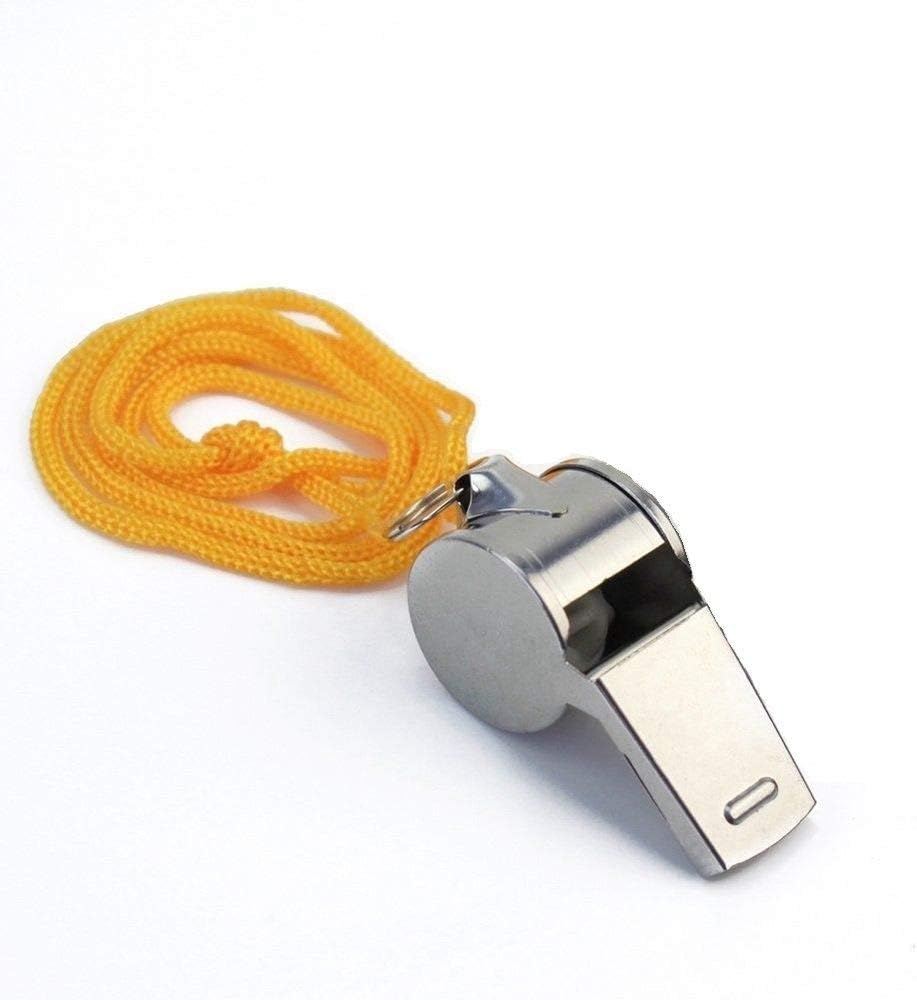
- Included Whistle: A complementary whistle is provided for various uses.
3. පිහිටුවීම
The Generic SW-XJ-398 Stopwatch comes with a pre-installed button battery. No initial battery installation is typically required. Simply power on the device if it is not already active.
3.1 ආරම්භක බලය සක්රීය කිරීම
The stopwatch should display the time upon arrival. If the screen is blank, ensure the battery is properly seated. There is no specific power on/off button; the device is always ready for use when the battery is active.
රූපය 1: ඉදිරිපස view of the Generic SW-XJ-398 Electronic Digital Multifunction Stopwatch. It features a digital display and three control buttons: SPLIT/RESET (left), MODE (top), and START/STOP (right).
4. මෙහෙයුම් උපදෙස්
Your stopwatch has three main buttons: මාදිලිය (top), START/STOP (right), and බෙදීම/නැවත සකසන්න (වමේ).
4.1 නැවතුම් ඔරලෝසු ක්රියාකාරිත්වය
- සාමාන්ය කාල සංදර්ශකයෙන්, ඔබන්න මාදිලිය button once to enter stopwatch mode. The display will show "0:0000" or a similar stopwatch indication.
- ඔබන්න START/STOP (right) button to begin timing.
- ඔබන්න START/STOP වේලාව විරාම කිරීමට නැවත බොත්තම ඔබන්න.
- ඔබන්න START/STOP button once more to resume timing from where it was paused.
- When the stopwatch is paused, press the බෙදීම/නැවත සකසන්න (left) button to reset the stopwatch to zero.
4.2 අනතුරු ඇඟවීමේ ස්විචය
To activate or deactivate the alarm, press and hold the යළි පිහිටුවන්න (වමේ) සහ START/STOP (right) buttons simultaneously from the normal time display. The alarm icon will appear or disappear to indicate its status.
4.3 Setting Alarm Time
- සාමාන්ය කාල සංදර්ශකයෙන්, ඔබන්න මාදිලිය button twice to enter the alarm time setting mode. The alarm hour digits will start flashing.
- ඔබන්න START/STOP (right) button to adjust the flashing hour digit.
- ඔබන්න බෙදීම/නැවත සකසන්න (left) button to switch to the minute digits.
- ඔබන්න START/STOP (right) button to adjust the flashing minute digit.
- ඔබන්න මාදිලිය button to exit the alarm setting mode and save your changes.
4.4 වත්මන් වේලාව සැකසීම
- සාමාන්ය කාල සංදර්ශකයෙන්, ඔබන්න මාදිලිය button three times. The seconds digits will start flashing.
- ඔබන්න START/STOP (right) button to reset the seconds to zero.
- ඔබන්න බෙදීම/නැවත සකසන්න (left) button to move to the minute digits. The minute digits will flash.
- ඔබන්න START/STOP (right) button to adjust the flashing minute digit.
- ඔබන්න බෙදීම/නැවත සකසන්න (left) button to move to the hour digits. The hour digits will flash.
- ඔබන්න START/STOP (right) button to adjust the flashing hour digit (includes AM/PM adjustment for 12-hour format).
- දිගටම ඔබන්න බෙදීම/නැවත සකසන්න to cycle through and set the month, date, and day of the week, adjusting each with the START/STOP බොත්තම.
- ඔබන්න මාදිලිය button to exit the time setting mode and save your changes.

රූපය 2: The Generic SW-XJ-398 Stopwatch is available in multiple colors, such as black and yellow, both featuring the same button layout and digital display for consistent operation.
5. නඩත්තු කිරීම
5.1 පිරිසිදු කිරීම
Wipe the stopwatch with a soft, dry cloth. For stubborn dirt, a slightly damp cloth can be used. Avoid using harsh chemicals or abrasive cleaners, as these can damage the plastic casing සහ සංදර්ශකය.
5.2 බැටරි ප්රතිස්ථාපනය
The stopwatch is powered by a button battery. When the display becomes dim or unresponsive, it's time to replace the battery. Carefully open the battery compartment on the back of the device (usually secured by small screws) and replace the old battery with a new one of the same type (e.g., AG13 or LR44). Ensure proper polarity (+/-) when inserting the new battery. Dispose of old batteries responsibly.
5.3 ගබඩා කිරීම
Store the stopwatch in a cool, dry place away from direct sunlight and extreme temperatures. Avoid dropping the device or exposing it to strong impacts.
6. දෝශ නිරාකරණය
- සංදර්ශකය හිස් හෝ අඳුරු ය: The battery may be low or depleted. Replace the button battery. Ensure the battery is inserted with correct polarity.
- බොත්තම් ප්රතිචාර නොදක්වයි: Try removing and reinserting the battery to perform a soft reset. Ensure no dirt or debris is obstructing the buttons.
- වේලාව වැරදියි: Follow the "Setting Current Time" instructions in Section 4.4 to reset the time.
- අනතුරු ඇඟවීමේ ශබ්දය ඇසෙන්නේ නැත: Ensure the alarm function is activated (refer to Section 4.2). Check if the alarm time is set correctly (refer to Section 4.3).
7. පිරිවිතර
| ආදර්ශ අංකය | SW-XJ-398 |
| වෙළඳ නාමය | සාමාන්ය |
| ද්රව්ය | ප්ලාස්ටික් |
| මානයන් (L x W x H) | 9 cm x 6.5 cm x 2 cm |
| බර | 60 ග්රෑම් |
| බලශක්ති ප්රභවය | Button Battery (included) |
| විශේෂාංග | Stopwatch, Alarm, Hourly Chime, 12/24 Hour Format, Water-Resistant, Compass |

රූපය 3: Dimensions of the SW-XJ-398 Stopwatch, showing its compact and ergonomic design for easy handling.

රූපය 4: The complementary whistle included with the stopwatch, featuring a durable metal construction and a yellow lanyard.
8. වගකීම් තොරතුරු
Specific warranty details for Generic products may vary by retailer and region. Please refer to your purchase receipt or contact the retailer from whom you purchased this product for information regarding warranty coverage and terms. Generally, electronic devices come with a limited warranty against manufacturing defects.
9. පාරිභෝගික සහාය
For technical assistance, troubleshooting, or inquiries about your Generic SW-XJ-398 Stopwatch, please contact the customer support service of the retailer where you made your purchase. They will be able to provide the most accurate and timely support.


