
1. හැඳින්වීම
This manual provides detailed instructions for the installation, operation, and maintenance of your EVTSCAN Digital Thermoregulator. This device is designed to precisely control heating equipment, such as wall-mounted boilers and gas boilers, ensuring a stable and energy-efficient temperature environment. Please read this manual thoroughly before installation and use to ensure proper function and safety.
2 ආරක්ෂිත තොරතුරු
උපාංගයට හානි වීම හෝ පුද්ගලික තුවාල වළක්වා ගැනීම සඳහා පහත සඳහන් ආරක්ෂක පියවරයන් සැමවිටම නිරීක්ෂණය කරන්න:
- ස්ථාපනය කිරීමට හෝ නඩත්තු කිරීමට පෙර බල සැපයුම විසන්ධි කර ඇති බවට සහතික වන්න.
- විදුලි රැහැන් ඇදීම පිළිබඳව ඔබට විශ්වාස නැත්නම්, සුදුසුකම් ලත් වෘත්තිකයෙකු විසින් ස්ථාපනය සිදු කළ යුතුය.
- උපාංගය ජලයට හෝ අධික ආර්ද්රතාවයට නිරාවරණය නොකරන්න.
- Use only the specified battery type (2 AA batteries) and ensure correct polarity.
- උපාංගය ගිනි ගන්නා ද්රව්ය වලින් ඈත් කරන්න.
3. නිෂ්පාදන අවසන්view
The EVTSCAN Digital Thermoregulator features a clear LCD display for easy monitoring and a simple interface for temperature control. Its compact design allows for discreet integration into your living space.

රූපය 3.1: ඉදිරිපස view of the Digital Thermoregulator. The LCD screen displays current settings and room temperature, with a rotary knob below for adjustments.
ප්රධාන සංරචක:
- LCD සංදර්ශකය: Shows set temperature, room temperature, time, and operational icons.
- Control Knob/Button: මෙනු සංචාලනය කිරීමට සහ සැකසුම් සකස් කිරීමට භාවිතා කරයි.
- බැටරි මැදිරිය: Located on the rear or side for 2 AA batteries.
- රැහැන් පර්යන්ත: For connection to the heating system.
4. පිරිවිතර
| විශේෂාංගය | පිරිවිතර |
|---|---|
| ආකෘතිය | EVTSCANok0g9ct2zq |
| බල ප්රකාරය | 2 AA බැටරි (ඇතුළත් කර නැත) |
| Screen Accuracy | 0.5 ℃ |
| පරීක්ෂණ සංවේදකය | NTC (10k) 1% |
| සම්බන්ධතා ධාරිතාව | Greater than 30-230 V DC working voltage, lower current. Reference: 5 A 30 V (HF relay) or 2 A 30 V (NEC relay) |
| උෂ්ණත්ව සංදර්ශක පරාසය | 1 සිට 40 ℃ දක්වා |
| Default Temperature Adjustment Range | 5 සිට 35 ℃ දක්වා |
| මෙහෙයුම් උෂ්ණත්ව පරාසය | 0 සිට 50 ℃ දක්වා |
| ධාවන වැඩසටහන | Set once a week |
| ප්රතිදානය | රිලේ මාරු කිරීම |
| ද්රව්ය | ගිනි වැළැක්වීමේ පොලිකාබනේට් |
| බර | 170 ග්රෑම් |
5. පිහිටුවීම සහ ස්ථාපනය
The EVTSCAN Digital Thermoregulator is designed for simple installation. Follow these steps carefully:
5.1. ඇසිරීම සහ පරීක්ෂා කිරීම
Carefully remove all components from the packaging. Verify that all items listed in the package contents are present and undamaged.
- 1 Digital Temperature Controller
- 2 ඉස්කුරුප්පු
5.2. බැටරි ස්ථාපනය
The device requires 2 AA batteries for operation. These are not included in the package.
- Locate the battery compartment on the back of the thermoregulator.
- බැටරි මැදිරි කවරය විවෘත කරන්න.
- නිවැරදි ධ්රැවීයතාව සහතික කරමින් (+/-) AA බැටරි 2 ක් ඇතුළු කරන්න.
- බැටරි මැදිරි කවරය ආරක්ෂිතව වසා දමන්න.

රූපය 5.1: කෝණික view of the thermoregulator, illustrating its compact size and potential location for battery access or mounting points.
5.3. සවි කිරීම සහ රැහැන්වීම
The thermoregulator is designed for wall mounting. Ensure the power to your heating system is turned off before proceeding with wiring.
- Choose a suitable location on an interior wall, away from direct sunlight, drafts, or heat sources that could affect temperature readings.
- Mount the backplate (if detachable) to the wall using the provided screws.
- Connect the thermoregulator to your boiler or heating system according to the wiring diagram provided with your boiler and the thermoregulator's terminal markings. This typically involves connecting the switching relay output to the boiler's control input.
- Secure the thermoregulator onto the mounted backplate.
සටහන: For wiring, consult a qualified electrician if you are unfamiliar with electrical installations.
6. මෙහෙයුම් උපදෙස්
The EVTSCAN Digital Thermoregulator uses a microcomputer control technology to maintain your desired temperature efficiently.
6.1. Powering On and Initial Display
Once batteries are installed, the LCD display will illuminate, showing the current room temperature, set temperature, and time.
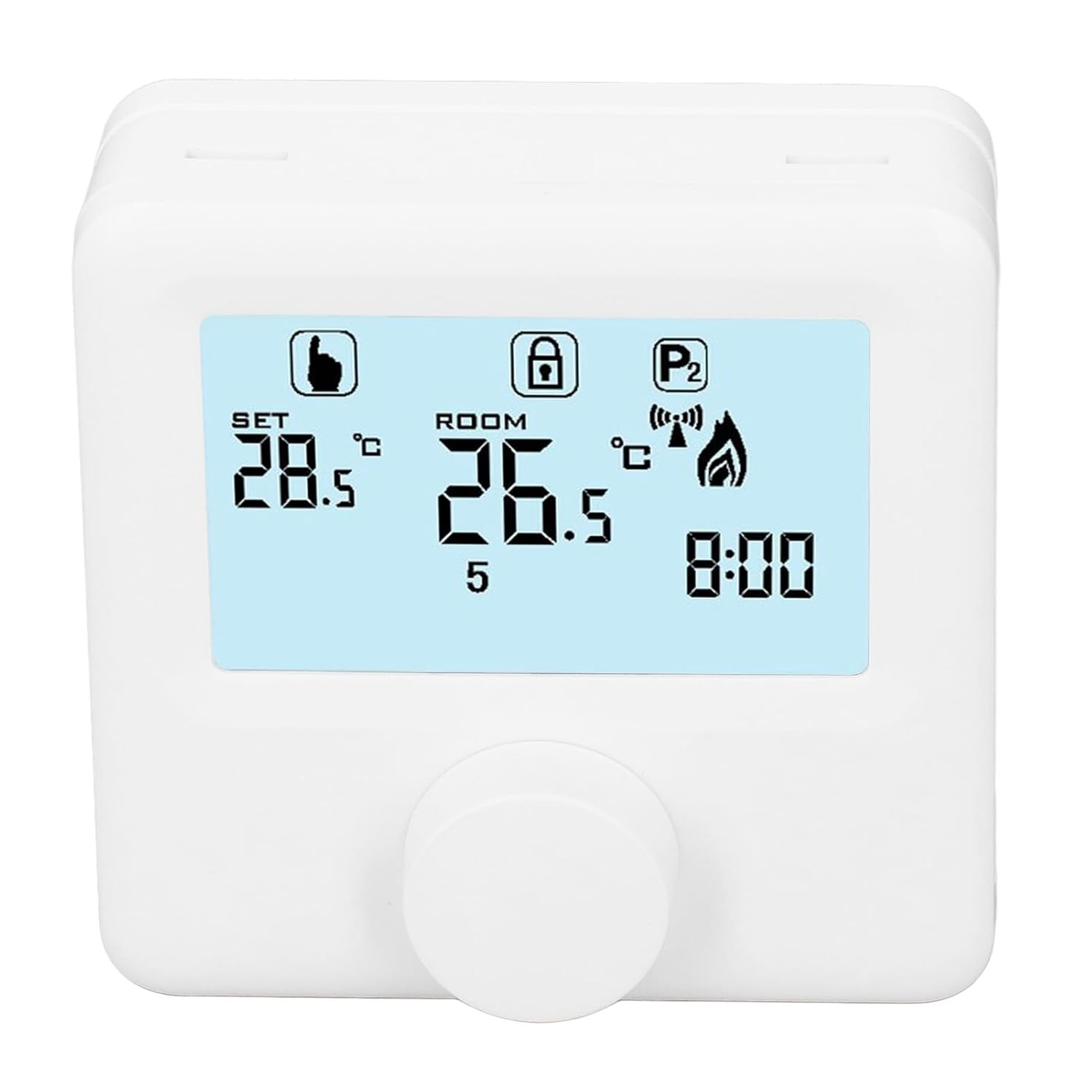
රූපය 6.1: සවිස්තරාත්මක view of the LCD display. It shows the set temperature (SET), room temperature (ROOM), a lock icon, a program icon (P2), a signal icon, a flame icon indicating heating, and the current time.
6.2 උෂ්ණත්වය සැකසීම
අපේක්ෂිත උෂ්ණත්වය සකස් කිරීම සඳහා:
- Rotate the control knob to increase or decrease the set temperature. The "SET" value on the display will change accordingly.
- The device will automatically activate or deactivate the heating system to maintain the set temperature within the range of 1 to 40 ℃. The default adjustment range is 5 to 35 ℃.
6.3. සතිපතා කාලසටහන ක්රමලේඛනය කිරීම
The thermoregulator supports a weekly programming schedule. This allows you to set different temperatures for various times of the day across the week.
- Press and hold the control knob (or a designated button, if available) to enter programming mode.
- Use the control knob to navigate through days of the week and time slots.
- Adjust the desired temperature for each programmed period.
- Confirm your settings to save the weekly program. The device will then operate according to this schedule.
6.4. Understanding Display Icons
- සැකසුම: Indicates the target temperature you have set.
- කාමරය: Displays the current ambient room temperature.
- ගිනිදැල් නිරූපකය: තාපන පද්ධතිය ක්රියාත්මක වන විට ආලෝකමත් වේ.
- අගුළු නිරූපකය: May indicate a keypad lock feature to prevent accidental changes.
- P1/P2 Icon: Indicates the current program mode (e.g., P1 for comfort, P2 for economy, or specific weekly program segments).
- සංඥා නිරූපකය: May indicate wireless communication status if applicable.
7. නඩත්තු කිරීම
Regular maintenance ensures the longevity and optimal performance of your thermoregulator.
- පිරිසිදු කිරීම: මෘදු වියළි රෙද්දකින් උපාංගය පිස දමන්න. උල්ෙල්ඛ පිරිසිදු කරන්නන් හෝ ද්රාවක භාවිතා නොකරන්න.
- බැටරි ආදේශනය: Replace batteries when the low battery indicator appears on the display. Always replace both batteries simultaneously with new AA batteries.
- Sensor Area: Ensure the temperature sensor area (usually a small vent on the device) is free from dust and obstructions for accurate readings.
8. දෝශ නිරාකරණය
If you encounter issues with your EVTSCAN Digital Thermoregulator, refer to the following common problems and solutions:
- සංදර්ශකය හිස් ය:
- බැටරි නිවැරදිව ස්ථාපනය කර ඇත්දැයි පරීක්ෂා කරන්න.
- පැරණි බැටරි නව ඒවා සමඟ ප්රතිස්ථාපනය කරන්න.
- තාපන පද්ධතිය ප්රතිචාර නොදක්වයි:
- Ensure the thermoregulator is powered on and the flame icon is displayed when heating is expected.
- Verify wiring connections to the boiler are secure and correct.
- Check the boiler's power supply and status.
- Ensure the set temperature is higher than the current room temperature.
- වැරදි උෂ්ණත්ව කියවීම්:
- Ensure the device is not exposed to direct sunlight, drafts, or heat sources.
- Clean any dust or debris from the sensor area.
- Cannot change settings:
- Check if the lock icon is displayed. If so, refer to the operating instructions to unlock the keypad.
ගැටලුව දිගටම පවතින්නේ නම්, පාරිභෝගික සහාය අමතන්න.
9. වගකීම් සහ සහාය
Specific warranty information for this product is not provided in the available data. Please refer to the product packaging or the retailer's webවගකීම් විස්තර සඳහා අඩවිය.
For technical support or further assistance, please contact EVTSCAN customer service through their official channels or the retailer from whom you purchased the product.
You can visit the EVTSCAN store on Amazon for more information: EVTSCAN Store