
හැඳින්වීම
This manual provides detailed instructions for the installation, operation, and maintenance of your GREATHTEK HDMI KVM Switch. This device allows you to control up to four computers using a single monitor, keyboard, and mouse, enhancing workspace efficiency and reducing cable clutter. Please read this manual thoroughly before use to ensure proper functionality and to maximize your product experience.
පැකේජයේ අන්තර්ගතය
පහත ලැයිස්තුගත කර ඇති සියලුම අයිතම ඔබේ පැකේජයට ඇතුළත් කර ඇති බව තහවුරු කරගන්න. කිසියම් අයිතමයක් අස්ථානගත වී හෝ හානි වී ඇත්නම්, කරුණාකර පාරිභෝගික සහාය අමතන්න.
- KVM Switch Unit x1
- HDMI 2.0 කේබල් x1
- USB 3.0 කේබල් x4
- USB C Power Cable x1
- Desktop Controller x1
- උපදෙස් අත්පොත x1
- ෆුට් පෑඩ් x4

නිෂ්පාදන විශේෂාංග
- 4-Port KVM Functionality: Control up to four computers (PCs) with a single set of keyboard, mouse, and monitor.
- අධි විභේදන සහාය: Supports resolutions up to 4K@60Hz (3840x2160@60Hz), and is backward compatible with 2K and 1080P. Ensure your source devices, monitor, and HDMI cables all support 4K@60Hz for optimal performance.
- High-Speed USB 3.0 Ports: Equipped with 3 USB 3.0 ports and 1 USB C port, offering data transfer speeds up to 5 Gbit/s, which is ten times faster than USB 2.0. These ports can connect keyboards, mice, USB drives, printers, scanners, and other USB devices.
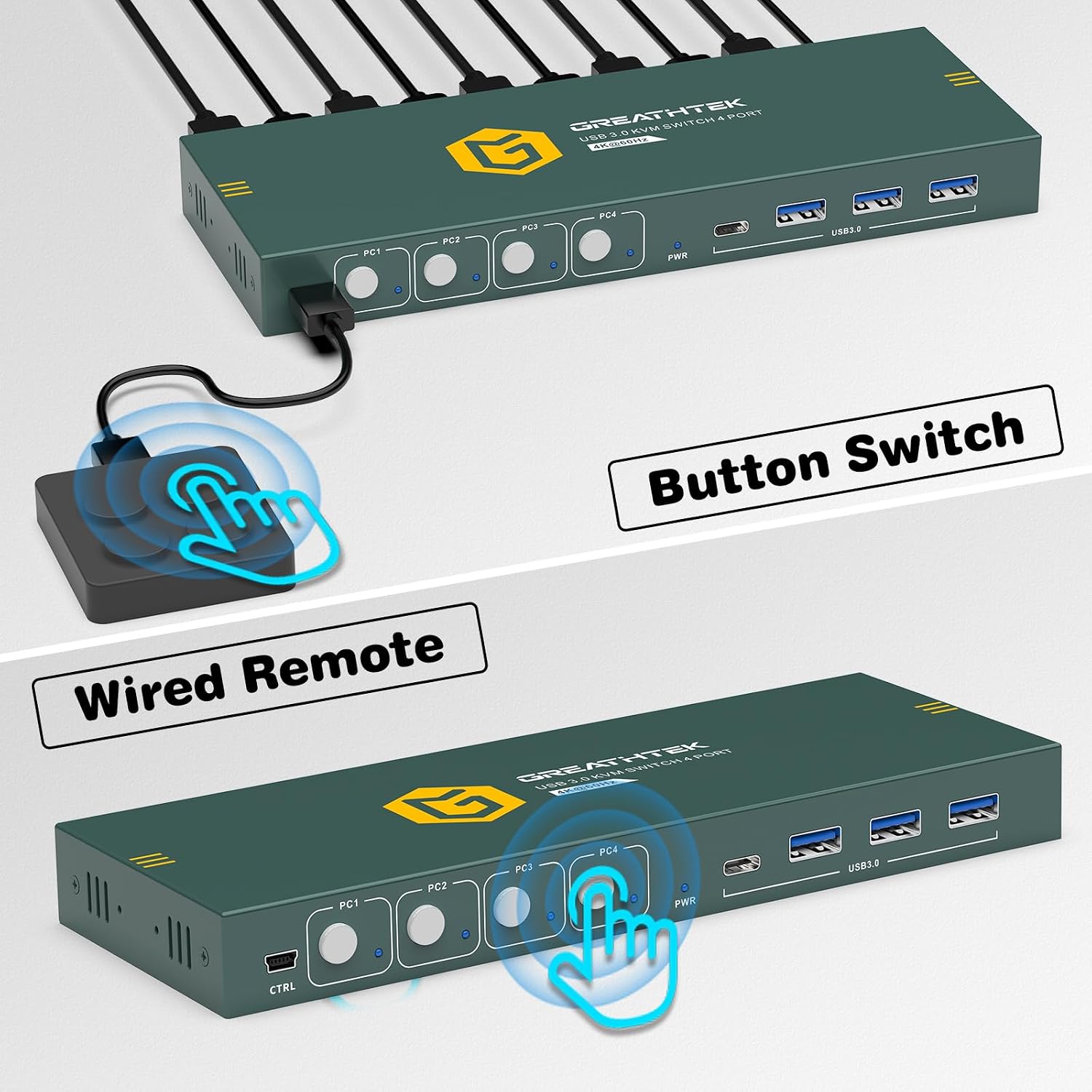
- Dual Switching Methods: Easily switch between connected computers using either the physical button on the KVM switch or the included 1.5m wired desktop controller.
- EDID Adaptation: Features EDID adaptation to maintain consistent window and resolution settings when switching between computers, preventing display disruption.
- පුළුල් අනුකූලතාව: Compatible with various operating systems including Windows, Linux, Unix, and Mac.


සැකසුම් උපදෙස්
Follow these steps to properly set up your GREATHTEK HDMI KVM Switch:
- සියලුම උපාංග ක්රියා විරහිත කරන්න: Before starting, ensure all computers and your monitor are powered off and unplugged from their power sources.
- මොනිටරය සම්බන්ධ කරන්න: Connect your monitor to the "HD OUT" port on the KVM switch using an HDMI cable.
- Connect Computers (HDMI): For each computer, connect an HDMI cable from the computer's HDMI output to an available "HD IN" port (PC1, PC2, PC3, PC4) on the KVM switch.
- පරිගණක සම්බන්ධ කරන්න (USB): For each computer, connect a USB 3.0 cable from the computer's USB port to the corresponding "USB 3.0" input port (PC1, PC2, PC3, PC4) on the KVM switch. These connections enable keyboard, mouse, and other USB device sharing.
- යතුරුපුවරුව සහ මූසිකය සම්බන්ධ කරන්න: Connect your keyboard and mouse to the dedicated USB 3.0 ports on the KVM switch. You can also connect other USB peripherals like a USB drive or printer to the remaining USB 3.0 ports.
- සම්බන්ධක බලය: Connect the USB C power cable to the KVM switch's power input and then to a suitable USB power adapter (not included) or a powered USB port.
- බල ගැන්වීම: Power on the KVM switch, then your monitor, and finally your computers.

මෙහෙයුම් උපදෙස්
Once the KVM switch is set up, you can easily switch between your connected computers.
පරිගණක අතර මාරුවීම
The GREATHTEK HDMI KVM Switch offers two methods for switching:
- ඉදිරිපස පුවරු බොත්තම: Press the corresponding button (PC1, PC2, PC3, or PC4) on the front panel of the KVM switch to select the desired computer. The LED indicator next to the button will illuminate to show the active computer.
- Wired Desktop Controller: Use the included wired desktop controller. Press the button on the controller to cycle through the connected computers. This allows for convenient switching without reaching for the KVM unit itself.

නඩත්තු කිරීම
To ensure the longevity and optimal performance of your KVM switch, follow these maintenance guidelines:
- පිරිසිදු කිරීම: උපාංගයේ බාහිර පෙනුම පිරිසිදු කිරීම සඳහා මෘදු වියළි රෙද්දක් භාවිතා කරන්න. ඒකකයට හානි කළ හැකි දියර පිරිසිදු කරන්නන් හෝ එයරොසෝල් භාවිතා කිරීමෙන් වළකින්න.
- වාතාශ්රය: අධික උනුසුම් වීම වැළැක්වීම සඳහා KVM ස්විචය හොඳින් වාතාශ්රය ඇති ප්රදේශයක තබා ඇති බවට වග බලා ගන්න. කිසිදු වාතාශ්රය විවරයක් අවහිර නොකරන්න.
- කේබල් කළමනාකරණය: Keep cables organized and free from kinks or excessive bending to prevent damage and ensure stable connections.
- පාරිසරික තත්ත්වයන්: උපාංගය අධික උෂ්ණත්වයට, ආර්ද්රතාවයට හෝ සෘජු හිරු එළියට නිරාවරණය කිරීමෙන් වළකින්න.
දෝෂගවේෂණය
ඔබේ KVM ස්විචය සමඟ ගැටළු ඇති වුවහොත්, පහත දැක්වෙන පොදු ගැටළු සහ විසඳුම් වෙත යොමු වන්න:
- සංදර්ශක ප්රතිදානයක් නැත:
- Ensure all HDMI cables are securely connected to both the KVM switch and the computers/monitor.
- Verify that the KVM switch is powered on.
- ඔබගේ මොනිටරයේ නිවැරදි ආදාන ප්රභවය තෝරාගෙන ඇත්දැයි පරීක්ෂා කරන්න.
- KVM ස්විචය සහ සම්බන්ධිත පරිගණක නැවත ආරම්භ කිරීමට උත්සාහ කරන්න.
- Confirm that your HDMI cables support the desired resolution (e.g., 4K@60Hz).
- යතුරුපුවරුව/මූසිකය ප්රතිචාර නොදක්වයි:
- Ensure the USB 3.0 cables from the computers to the KVM switch are properly connected.
- Verify that the keyboard and mouse are connected to the dedicated USB 3.0 ports on the KVM switch.
- Try connecting the keyboard and mouse directly to the computer to confirm they are functional.
- Some specialized gaming keyboards/mice may require direct connection or specific drivers; try a standard keyboard/mouse first.
- Display Resolution/Refresh Rate Issues:
- Ensure all connected devices (computers, monitor, HDMI cables) support the desired resolution and refresh rate (e.g., 4K@60Hz).
- Adjust display settings on your computer to match the capabilities of your monitor and KVM switch.
- මාරු වීමේ ප්රමාදය:
- A slight delay during switching is normal as the system re-establishes connections. Excessive delays might indicate a cable issue; try replacing HDMI or USB cables.
If these steps do not resolve your issue, please contact GREATHTEK customer support for further assistance.
පිරිවිතර
| විශේෂාංගය | පිරිවිතර |
|---|---|
| ආදර්ශ අංකය | GHT-S7415H-01 |
| වෙළඳ නාමය | GREATHTEK |
| KVM වරාය | 4 Computers, 1 Monitor |
| වීඩියෝ විභේදනය | Up to 4K@60Hz (3840x2160@60Hz) |
| USB Ports | 3 x USB 3.0, 1 x USB C |
| USB Transfer Speed | 5 Gbit/s දක්වා |
| මාරු කිරීමේ ක්රම | Button Switch, Desktop Controller |
| Desktop Controller Cable Length | මීටර් 1.5 |
| ගැළපුම | Windows, Linux, Unix, Mac |
| සම්බන්ධක වර්ගය | HDMI, USB-A, USB-C |
| ද්රව්ය | තඹ (සම්බන්ධතා ද්රව්ය) |
| වර්ණය | කළු |
| මානයන් (පාර්සලය) | 25.2 x 18.3 x 6.9 සෙ.මී |
| බර (පාර්සලය) | 810 ග්රෑම් |
වගකීම් සහ සහාය
GREATHTEK products are designed for reliability and performance. This product comes with a standard manufacturer's warranty. For specific warranty details, please refer to the warranty card included in your package or contact GREATHTEK customer support.
If you encounter any issues or have questions regarding your KVM switch, please do not hesitate to contact our customer support team. We are committed to providing prompt and helpful assistance.