
1. හැඳින්වීම
Welcome to the user manual for your ZOMBIES CAT Transformers TF-T06 Wireless Earbuds. This guide provides detailed instructions on how to set up, operate, maintain, and troubleshoot your new earbuds. Please read this manual carefully to ensure optimal performance and longevity of your device.
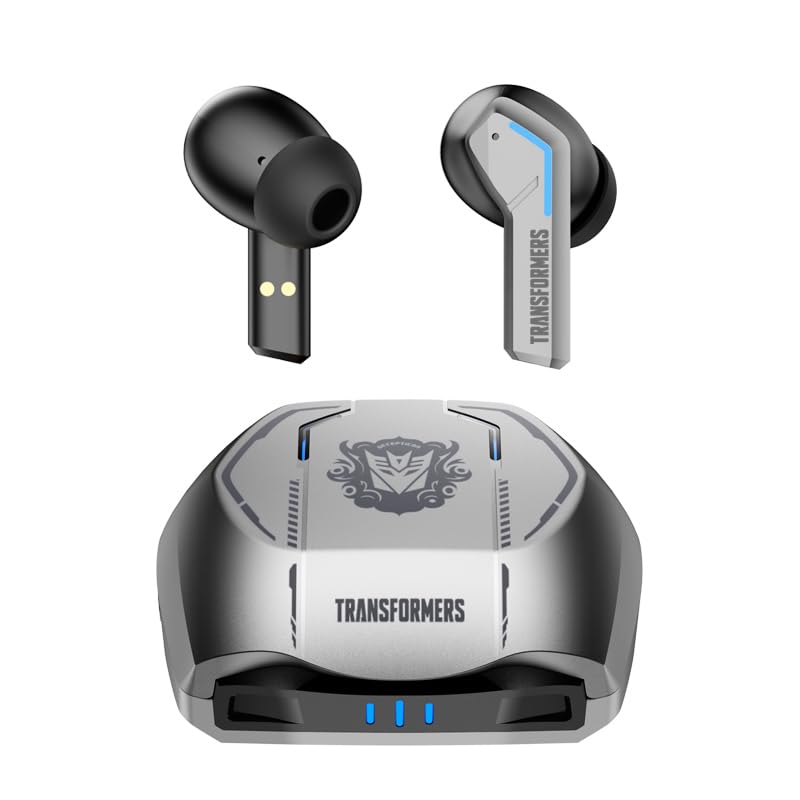
Image 1.1: The Transformers TF-T06 Wireless Earbuds and their charging case.
2. පැකේජ අන්තර්ගතය
ඔබගේ පැකේජයේ සියලුම අයිතම ඇති බව තහවුරු කරගන්න:
- Transformers In-Ear Headphones (2 units)
- Earbuds Charging Case (1 unit)
- Type-C Charging Cable (1 unit)
- පරිශීලක අත්පොත (මෙම ලේඛනය)

Image 2.1: The TF-T06 Earbuds, charging case, and packaging.
3. නිෂ්පාදන අවසන්view
3.1 Earbud Design and Ergonomics
The TF-T06 earbuds are designed for a comfortable and secure fit within the ear, ensuring stability during various activities. Their lightweight and skin-friendly construction allows for extended wear without discomfort.

Image 3.1: An earbud shown in an ear, highlighting its ergonomic design for comfortable wear.
3.2 ස්මාර්ට් ස්පර්ශ පාලන
Each earbud features a touch-sensitive area for controlling various functions without needing to access your connected device. The controls are intuitive and responsive.

Image 3.2: Visual representation of the smart touch control functions on the earbuds.
- වාදනය/විරාමය: ඉයර්බඩ් දෙකෙන් එකක් මත එක තට්ටු කරන්න.
- ඊළඟ ධාවන පථය: දකුණු ඉයර්බඩ් එක දෙවරක් තට්ටු කරන්න.
- පෙර ධාවන පථය: වම් ඉයර්බඩ් එක දෙවරක් තට්ටු කරන්න.
- පරිමාව: දකුණු ඉයර්බඩ් එක තුන් වරක් තට්ටු කරන්න.
- ශබ්දය පහළට: වම් ඉයර්බඩ් එක තුන් වරක් තට්ටු කරන්න.
- පිළිතුර/අවසන් ඇමතුම: එන ඇමතුමක් හෝ සක්රිය ඇමතුමක් අතරතුර ඉයර්බඩ් දෙකෙන් එකක් මත තනි තට්ටු කරන්න.
- ඇමතුම ප්රතික්ෂේප කරන්න: ලැබෙන ඇමතුමක් අතරතුර ඉයර්බඩ් දෙකෙන් එකක් තත්පර 2ක් ඔබාගෙන සිටින්න.
- හ oice සහකාර සක්රිය කරන්න: (ඇමතුමක නොමැති විට) ඉයර්බඩ් දෙකෙන් එකක් තත්පර 2ක් ඔබාගෙන සිටින්න.
4. පිහිටුවීම
4.1 ඉයර්බඩ් සහ කේස් ආරෝපණය කිරීම
පළමු භාවිතයට පෙර, ඉයර්බඩ් සහ ආරෝපණ පෙට්ටිය සම්පූර්ණයෙන්ම ආරෝපණය කරන්න.
- ඉයර්බඩ් ආරෝපණ පෙට්ටියට දමන්න. ඒවා නිවැරදිව සවි කර ඇති බවට වග බලා ගන්න; චුම්බක සම්බන්ධතා ඒවා නිසි තැන තබා ගනී.
- Connect the Type-C charging cable to the charging port on the case and the other end to a USB power adapter (not included).
- The indicator lights on the charging case will illuminate to show charging status. A full charge typically takes approximately 3 hours for the case.
- Once fully charged, disconnect the charging cable. The earbuds will charge automatically when placed in the powered case.
4.2 Initial Pairing with a Device
The TF-T06 earbuds feature one-step pairing for convenience.
- ආරෝපණ පෙට්ටිය විවෘත කරන්න. ඉයර්බඩ් ස්වයංක්රීයව ක්රියාත්මක වී යුගල කිරීමේ ප්රකාරයට ඇතුළු වේ.
- ඔබගේ ස්මාර්ට් ජංගම දුරකථනය, ටැබ්ලටය හෝ වෙනත් බ්ලූටූත් සක්රීය උපාංගයක, බ්ලූටූත් සැකසුම් වෙත සංචාලනය කරන්න.
- ඒ සඳහා සොයන්න available devices and select "TF-T06" from the list.
- සම්බන්ධ වූ පසු, ඔබට ඇසෙන තහවුරු කිරීමක් ඇසෙනු ඇති අතර, ඉයර්බඩ් භාවිතයට සූදානම් වනු ඇත.

Image 4.1: The earbuds in their open charging case, indicating they are ready for Bluetooth pairing.
සටහන: After the initial pairing, the earbuds will automatically connect to the last paired device when removed from the charging case, provided Bluetooth is enabled on the device and it is within range.
5. මෙහෙයුම් උපදෙස්
5.1 බලය සක්රිය / අක්රිය
- බල ගැන්වීම: ආරෝපණ පෙට්ටිය විවෘත කරන්න, නැතහොත් ඉයර්බඩ් දෙකෙහිම ස්පර්ශ ප්රදේශය තත්පර 3ක් ඔබාගෙන සිටින්න.
- විදුලිය විසන්ධි කිරීම: ඉයර්බඩ් නැවත ආරෝපණ පෙට්ටියට දමා පියන වසා දමන්න, නැතහොත් ඉයර්බඩ් දෙකෙහිම ස්පර්ශ ප්රදේශය තත්පර 5ක් ඔබාගෙන සිටින්න.
5.2 සංගීත වාදනය
Use the smart touch controls as described in Section 3.2 to manage your music.
5.3 ඇමතුම් කළමනාකරණය
Handle incoming and active calls using the smart touch controls as described in Section 3.2. The built-in ENC noise-cancelling microphone ensures clear communication.
5.4 හ oice සහකාර
Activate your device's voice assistant (e.g., Siri, Google Assistant) by pressing and holding the touch area on either earbud for 2 seconds (when not on a call).
5.5 ශබ්ද ගුණාත්මකභාවය
The TF-T06 earbuds feature 10mm double-layer diaphragm drivers, delivering powerful bass, clear midrange, and bright treble for a high-fidelity audio experience.

Image 5.1: An illustration of the 10mm dynamic driver, responsible for the earbud's sound quality.
6. නඩත්තු කිරීම
- පිරිසිදු කිරීම: මෘදු, වියලි, ලින්ට් රහිත රෙද්දකින් ඉයර්බඩ් සහ ආරෝපණ පෙට්ටිය නිතිපතා පිරිසිදු කරන්න. උල්ෙල්ඛ පිරිසිදු කරන්නන් හෝ ද්රාවක භාවිතා නොකරන්න.
- ජල ප්රතිරෝධය: The earbuds have an IPX4 waterproof rating, meaning they are resistant to splashing water and sweat. Do not submerge them in water or expose them to heavy rain. Ensure they are dry before placing them back in the charging case.
- ගබඩා: භාවිතයේ නොමැති විට, ඉයර්බඩ් ආරක්ෂා කර ගැනීමට සහ ආරෝපණය කර තබා ගැනීමට ඒවායේ ආරෝපණ පෙට්ටියේ ගබඩා කරන්න. අධික උෂ්ණත්වයන්ගෙන් ඈත්ව සිසිල් වියළි ස්ථානයක ගබඩා කරන්න.
- බැටරි සත්කාර: බැටරි ආයු කාලය දීර්ඝ කිරීම සඳහා, ඉයර්බඩ් සම්පූර්ණයෙන්ම විසර්ජනය කිරීමෙන් සහ කේස් නිතර ආරෝපණය කිරීමෙන් වළකින්න. නිරන්තරයෙන් භාවිතයේ නොමැති වුවද, ඒවා නිතිපතා ආරෝපණය කරන්න.
7. දෝශ නිරාකරණය
If you encounter issues with your TF-T06 earbuds, refer to the following common solutions:
- ඉයර්බඩ් යුගල නොවේ:
- ඉයර්බඩ් දෙකම ආරෝපණය කර ඇති බව සහතික කර ගන්න.
- ඔබගේ උපාංගයේ බ්ලූටූත් අක්රිය කර නැවත ක්රියාත්මක කරන්න.
- Forget "TF-T06" in your device's Bluetooth settings and attempt to pair again.
- ඔබගේ උපාංගය නැවත ආරම්භ කරන්න.
- එක් ඉයර්බඩ් එකක් පමණක් ක්රියා කරයි:
- ඉයර්බඩ් දෙකම ආරෝපණය කර ඇති බව සහතික කර ගන්න.
- ඉයර්බඩ් දෙකම නැවත ආරෝපණ පෙට්ටියට දමා, පියන වසා, තත්පර කිහිපයක් රැඳී සිටින්න, ඉන්පසු පියන විවෘත කර ඒවා ඉවත් කරන්න.
- Try resetting the earbuds (refer to specific reset instructions if available in a separate quick start guide, or try forgetting the device and re-pairing).
- ශබ්දයක් නැත හෝ අඩු පරිමාවක්:
- ඔබේ ඉයර්බඩ් සහ සම්බන්ධිත උපාංගය යන දෙකෙහිම ශබ්ද මට්ටම පරීක්ෂා කරන්න.
- ඉයර්බඩ් ඔබේ උපාංගයට නිසි ලෙස සම්බන්ධ වී ඇති බවට වග බලා ගන්න.
- ඉයර්බඩ් ස්පීකර් දැලෙන් ඕනෑම සුන්බුන් පිරිසිදු කරන්න.
- ආරෝපණ ගැටළු:
- ආරෝපණ කේබලය නඩුවට සහ බල ප්රභවයට ආරක්ෂිතව සම්බන්ධ කර ඇති බවට වග බලා ගන්න.
- වෙනස් ආරෝපණ කේබලයක් හෝ බල ඇඩැප්ටරයක් උත්සාහ කරන්න.
- ඉයර්බඩ්වල සහ කේස් එක ඇතුළත ආරෝපණ සම්බන්ධතා පිරිසිදු කරන්න.
8. පිරිවිතර
| මාදිලියේ නම | TF-T0602 |
| වෙළඳ නාමය | ZOMBIES CAT |
| සම්බන්ධතා තාක්ෂණය | රැහැන් රහිත (බ්ලූටූත් 5.3) |
| බ්ලූටූත් අනුවාදය | 5.3 |
| ශ්රව්ය ධාවක වර්ගය | ගතික ධාවකය (මි.මී. 10) |
| බැටරි ආයු කාලය (ආවරණය සමඟ මුළු) | පැය 30 දක්වා |
| ඉයර්බඩ් ක්රීඩා කාලය (තනි ආරෝපණය) | 3-4 පැය |
| ආරෝපණ කාලය | Approx. 3 Hours (Case) |
| පාලන ක්රමය | ස්පර්ශ කරන්න |
| ජල ප්රතිරෝධක මට්ටම | IPX4 (ජල ආරක්ෂිත) |
| ශබ්දය අවලංගු කිරීම | ENC (Environmental Noise Cancellation) Mic |
| ගැළපෙන උපාංග | Most Bluetooth-enabled devices (smartphones, tablets, laptops, smartwatches) |
| උපරිම මෙහෙයුම් දුර | මීටර් 10 |
| අයිතමයේ බර | 132 ග්රෑම් |
| නිෂ්පාදන මානයන් | 3.3 x 2.18 x 1.83 සෙ.මී |
9. වගකීම් සහ සහාය
For warranty information and customer support, please refer to the documentation provided at the point of purchase or contact your retailer. Keep your proof of purchase for any warranty claims.