
හැඳින්වීම
This manual provides essential information for the safe and efficient use of your HP 15 Professional Slim High-Performance Laptop. Please read these instructions carefully before using your device. Keep this manual for future reference.
1. මූලික සැකසුම
1.1 පෙට්ටි ඉවත් කිරීම සහ බලය සම්බන්ධ කිරීම
Carefully remove the laptop and all accessories from the packaging. Connect the provided AC adapter to the laptop's power port and then to a power outlet. It is recommended to fully charge the battery before first use.

Image: The HP 15 laptop shown from the front, with the power adapter connected to the side. This illustrates the initial connection for charging.
1.2 පළමු ඇරඹුම සහ මෙහෙයුම් පද්ධති සැකසුම
Press the power button to turn on the laptop. Follow the on-screen instructions to complete the Windows 11 Home operating system setup. This includes selecting your region, connecting to a Wi-Fi network, and creating a user account.

Image: The HP 15 laptop open, displaying the Windows 11 desktop interface, indicating successful operating system initialization.
2. ඔබේ ලැප්ටොප් පරිගණකය ක්රියාත්මක කිරීම
2.1 බලය සක්රිය/අක්රිය සහ නිද්රා ප්රකාරය
- බල ගැන්වීම: යතුරුපුවරු තට්ටුවේ ඇති බල බොත්තම ඔබන්න.
- විදුලිය විසන්ධි කිරීම: ආරම්භක බොත්තම ක්ලික් කර, පසුව බලය ක්ලික් කර, "වසා දමන්න" තෝරන්න.
- නින්ද ප්රකාරය: Close the lid or click the Start button, then Power, and select "Sleep."
2.2 යතුරු පුවරුව සහ ස්පර්ශක පෑඩ්
The laptop features a full-size island-style QWERTY keyboard and a multi-touch touchpad. Use the touchpad for navigation and gestures. Refer to Windows 11 settings for touchpad customization.
2.3 සම්බන්ධතාවය
Your HP 15 laptop offers various connectivity options:
- Wifi: Supports Realtek Killer Wi-Fi 6 (802.11ax) for high-speed wireless internet access.
- බ්ලූටූත්: Integrated Bluetooth 5.3 for connecting wireless peripherals like headphones and mice.
- USB Ports:
- Two (2) USB 3.2 Gen 1.0 Type-A ports (5 Gbps signaling rate).
- One (1) USB 3.2 Gen 1.0 Type-C port (5 Gbps signaling rate, data transfer only; charging or external monitors not supported).
- HDMI: One (1) HDMI v1.4b output port for connecting to external displays.
- ශ්රව්ය ජැක්: One (1) headphone/microphone combo port.
රූපය: පැත්තක් view of the HP 15 laptop, highlighting the various input/output ports for external device connectivity.
2.4 ශ්රව්ය සහ කැමරාව
- ශ්රව්ය: Equipped with dual speakers for audio output and HD Audio support.
- කැමරාව: Features an HP True Vision 720p HD camera with integrated dual array digital microphones, suitable for video calls and online meetings.

Image: The HP 15 laptop displaying a video conference call, demonstrating the use of the integrated camera and microphone.
3. නඩත්තුව සහ රැකවරණය
3.1 ඔබේ ලැප්ටොප් පරිගණකය පිරිසිදු කිරීම
- තිරය: මෘදු, ලින්ට් රහිත රෙද්දක් සැහැල්ලුවෙන් භාවිතා කරන්නampජලය හෝ තිර පිරිසිදු කරන්නෙකු සමඟ ආලේප කර ඇත. තිරය මත කෙලින්ම දියර ඉසින්න එපා.
- යතුරුපුවරුව සහ චැසිය: මෘදු, වියළි රෙද්දක් භාවිතා කරන්න. මුරණ්ඩු අපිරිසිදුකම සඳහා, තරමක් damp cloth can be used, ensuring no moisture enters openings.
- කුටි: Periodically check and gently clean the ventilation openings to prevent dust buildup, which can affect cooling.
3.2 බැටරි සත්කාර
To maximize battery lifespan, avoid extreme temperatures and prolonged full discharge or full charge states. For long-term storage, charge the battery to approximately 50%.
3.3 මෘදුකාංග යාවත්කාලීන
Regularly check for and install Windows updates and HP driver updates to ensure optimal performance, security, and compatibility. Access Windows Update via Settings > Windows Update.
3.4 පාරිසරික සලකා බැලීම්
This laptop is built with recycled materials, including ocean-bound plastic. Please dispose of the device and its components responsibly at the end of its life cycle, following local regulations for electronic waste.
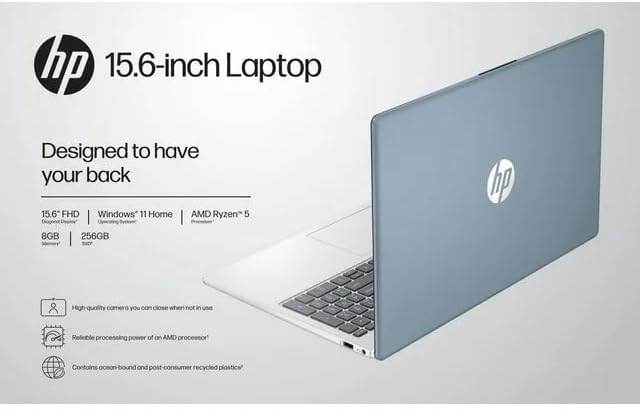
Image: The HP 15 laptop shown from the rear, illustrating its design and potential ventilation areas for maintenance.
4. පොදු ගැටළු දෝශ නිරාකරණය
This section addresses common problems you might encounter. For more complex issues, refer to the HP support webඅඩවිය.
4.1 විදුලිය නොමැති වීම හෝ ලැප්ටොප් පරිගණකය ක්රියාත්මක නොවීම
- AC ඇඩැප්ටරය ලැප්ටොප් පරිගණකයට සහ ක්රියාකාරී බල අලෙවිසැලකට ආරක්ෂිතව සම්බන්ධ කර ඇති බවට වග බලා ගන්න.
- වෙනත් උපාංගයක් සම්බන්ධ කිරීමෙන් බල සැපයුම ක්රියාකාරී බව තහවුරු කර ගන්න.
- වෙනස් බල සැපයුමක් උත්සාහ කරන්න.
- බැටරිය සම්පූර්ණයෙන්ම බැස ගොස් ඇත්නම්, එය ක්රියාත්මක කිරීමට පෙර අවම වශයෙන් විනාඩි 30ක් ආරෝපණය කිරීමට ඉඩ දෙන්න.
4.2 සංදර්ශක ගැටළු
- හිස් තිරය: ගැටළුව ලැප්ටොප් පරිගණකයේ සංදර්ශකයේද නැතහොත් ග්රැෆික් ප්රතිදානයේද යන්න පරීක්ෂා කිරීමට HDMI හරහා බාහිර මොනිටරයක් සම්බන්ධ කරන්න.
- අඳුරු සංදර්ශකය: Adjust screen brightness using the function keys (usually F2/F3 or similar icons) or through Windows display settings.
- වැරදි විභේදනය: Adjust the display resolution in Windows Settings > System > Display.
4.3 Wi-Fi or Bluetooth Connectivity Problems
- Ensure Wi-Fi and Bluetooth are enabled in Windows Settings > Network & internet or Devices > Bluetooth & devices.
- Wi-Fi ගැටළු සඳහා ඔබේ රවුටරය/මොඩමය නැවත ආරම්භ කරන්න.
- Update wireless drivers through HP Support Assistant or Device Manager.
- Forget and reconnect to the Wi-Fi network or re-pair the Bluetooth device.
4.4 ශ්රව්ය ක්රියා නොකරයි
- Check volume levels in Windows and ensure speakers are not muted.
- Verify that the correct audio output device is selected in Windows Sound settings.
- Update audio drivers.
- Test with headphones to determine if the issue is with the internal speakers or the audio output.
5. නිෂ්පාදන පිරිවිතර
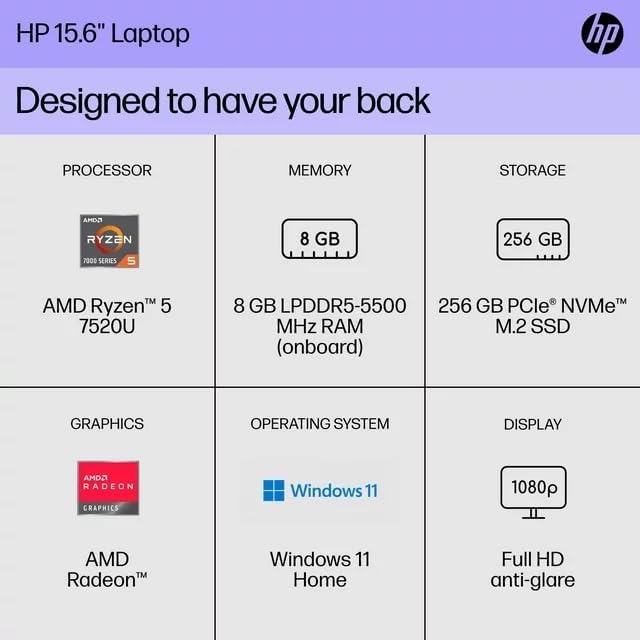
The following are the technical specifications for the HP 15 Professional Slim High-Performance Laptop (Model 15):
| විශේෂාංගය | විස්තර |
|---|---|
| මාදිලියේ නම | HP 15 |
| ප්රොසෙසරය | AMD Ryzen 5 7520U (up to 4.3 GHz max boost, 4 cores, 8 threads) |
| ග්රැෆික්ස් | AMD Radeon ග්රැෆික්ස් (ඒකාබද්ධ) |
| මතකය (RAM) | 8GB DDR4 SDRAM |
| ගබඩා කිරීම | 256GB PCIe NVMe M.2 SSD |
| ප්රදර්ශනය කරන්න | 15.6-inch diagonal, Full HD (1920 x 1080), micro-edge, anti-glare, 250 nits, 45% NTSC |
| මෙහෙයුම් පද්ධතිය | Windows 11 Home |
| රැහැන් රහිත සම්බන්ධතාව | Realtek Killer Wi-Fi 6 (2x2), Bluetooth 5.3 |
| වරායන් |
|
| කැමරාව | ඒකාබද්ධ ද්විත්ව අරා ඩිජිටල් මයික්රොෆෝන සහිත HP True Vision 720p HD කැමරාව |
| ශ්රව්ය උපකරණ | Dual speakers, HD Audio |
| යතුරු පුවරුව | Full-size island-style QWERTY keyboard |
| බල උපාංගය | AC ඇඩැප්ටරය |
| UPC | 196337455771 |
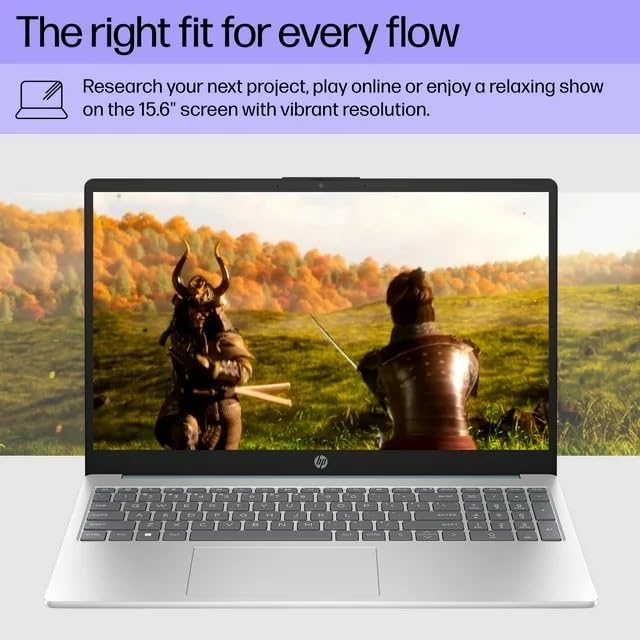
Image: A visual representation of the HP 15 laptop, complementing the detailed specifications listed.
6. වගකීම් තොරතුරු
This HP 15 laptop is a renewed product and comes with a දින 90ක සීමිත වගකීමක්. This warranty covers defects in materials and workmanship under normal use. For specific terms and conditions, please refer to the warranty documentation included with your product or contact HP support.
7. පාරිභෝගික සහාය
For further assistance, technical support, or to download updated drivers and software, please visit the official HP support website. You can typically find support resources by searching for "HP Support" and your specific model number (HP 15) on their webඅඩවිය.
සබැඳි සම්පත්: https://support.hp.com