
1. හැඳින්වීම
ස්තූතියි, උදව් කළාටasing the RCA 50-inch UHD 4K LCD TV. This manual provides essential information for setting up, operating, and maintaining your television. Please read this manual thoroughly before using the product to ensure safe and optimal performance. Keep this manual for future reference.
2. වැදගත් ආරක්ෂක තොරතුරු
ඔබේ රූපවාහිනිය භාවිතා කරන විට සෑම විටම මෙම මූලික ආරක්ෂක පියවරයන් අනුගමනය කරන්න:
- ගින්න හෝ විදුලි කම්පනය වැළැක්වීම සඳහා රූපවාහිනිය වැස්සට හෝ තෙතමනයට නිරාවරණය නොකරන්න.
- වාතාශ්රය විවරයන් අවහිර නොකරන්න. නිසි වායු ප්රවාහය සඳහා රූපවාහිනිය වටා ප්රමාණවත් ඉඩක් ඇති බවට වග බලා ගන්න.
- රූපවාහිනිය වැටීම වැළැක්වීම සඳහා ස්ථාවර, සමතලා මතුපිටක් මත තබන්න.
- රූපවාහිනිය සමඟ සපයා ඇති විදුලි රැහැන පමණක් භාවිතා කරන්න. විදුලි අලෙවිසැල් අධික ලෙස පටවන්න එපා.
- අකුණු කුණාටු ඇති විට හෝ දිගු කාලයක් භාවිතා නොකළ විට රූපවාහිනිය විසන්ධි කරන්න.
- රූපවාහිනී කැබිනට්ටුව විවෘත නොකරන්න. සියලුම සේවා සුදුසුකම් ලත් සේවා නිලධාරීන් වෙත යොමු කරන්න.
- කුඩා කොටස් සහ බැටරි දරුවන්ට ළඟාවිය නොහැකි ලෙස තබා ගන්න.
3. පැකේජ අන්තර්ගතය
Carefully unpack your television and check that all items are included. If any items are missing or damaged, please contact your retailer.

රූපය 3.1: ඇතුළත් උපාංග
- RCA 50-inch UHD 4K LCD TV
- දුරස්ථ පාලකය (AAA බැටරි 2ක් අවශ්යයි, ඇතුළත්)
- බල කේබලය
- TV Stand Bases (x2)
- Screws for Stand Installation (x4)
- Anti-tip Screw (x1) and Clips (x3)
- Instruction Manual (Japanese)
4. පිහිටුවීම
4.1. Physical Setup (Stand / Wall Mount)
You can install your TV on the included stand or mount it on a wall using a VESA-compatible bracket (sold separately).

Figure 4.1: TV Dimensions and Stand Installation
ස්ථාවර ස්ථාපනය:
- හානි වැළැක්වීම සඳහා රූපවාහිනී තිරය මෘදු, පැතලි මතුපිටක් මත තබන්න.
- රූපවාහිනියේ පතුලේ ඇති ඉස්කුරුප්පු සිදුරු සමඟ ස්ථාවර පාදම පෙළගස්වන්න.
- සපයා ඇති ඉස්කුරුප්පු භාවිතයෙන් ස්ථාවර පාදම සුරක්ෂිත කරන්න.
බිත්ති සවි කිරීම:
This TV supports VESA mount standard 400x300mm. Use a compatible wall mount bracket and follow the instructions provided with the bracket. Ensure the wall can support the TV's weight (approximately 9 kg).

Figure 4.2: Wall Mounting Options
4.2. බාහිර උපාංග සම්බන්ධ කිරීම
Connect your external devices to the appropriate ports on the TV's rear and side panels.

රූපය 4.3: රූපවාහිනී සම්බන්ධතා තොට

Figure 4.4: Rear Panel and Connection Terminals
| වරාය වර්ගය | විස්තරය |
|---|---|
| HDMI (x3) | Connect to Blu-ray players, game consoles, set-top boxes, etc. HDMI 2 supports ARC. |
| USB (x2) | Connect external USB HDD for recording (FAT32 format compatible). |
| AV ආදානය | සංයුක්ත වීඩියෝ සහ ස්ටීරියෝ ශ්රව්ය කේබල් භාවිතයෙන් පැරණි උපාංග සම්බන්ධ කරන්න. |
| Optical Digital Audio Out | ඩිජිටල් ශ්රව්ය සඳහා ශබ්ද තීරුවකට හෝ ගෘහ සිනමා පද්ධතියකට සම්බන්ධ කරන්න. |
| LAN | For service or firmware updates. This TV does not support internet streaming services. |
| mini B-CAS Slot | Insert your mini B-CAS card for digital broadcast reception. |
| BS/CS Antenna Input | Connect to a BS/CS satellite antenna. |
| Terrestrial Digital Antenna Input | Connect to a terrestrial digital antenna. |
| 3.5mm ශ්රව්ය ආදානය | Connect external audio sources. |
4.3. Initial Power On and Channel Setup
- After connecting all necessary cables, plug the power cord into an electrical outlet.
- දුරස්ථ පාලකයේ හෝ රූපවාහිනියේ බල බොත්තම ඔබන්න.
- Follow the on-screen instructions to perform initial setup, including language selection and channel scanning.
5. මෙහෙයුම් උපදෙස්
5.1. දුරස්ථ පාලන කාර්යයන්
The remote control allows you to access all TV functions. Insert two AAA batteries (included) into the remote control before use.

Figure 5.1: Remote Control Layout and Key Functions
- බලය: රූපවාහිනිය ක්රියාත්මක හෝ අක්රිය කරයි.
- අංක බොත්තම් (0-12): නාලිකා කෙලින්ම තෝරන්න.
- ආදානය: ආදාන මූලාශ්රය තෝරන්න (HDMI, AV, ආදිය).
- පරිමාව (+/-): පරිමාව මට්ටම සකසන්න.
- නාලිකාව (ඉහළ/පහළ): නාලිකා අනුපිළිවෙලින් වෙනස් කරන්න.
- Directional Buttons (Up/Down/Left/Right) & OK: මෙනු හරහා සංචාලනය කර තේරීම් තහවුරු කරන්න.
- මෙනුව: Access the main settings menu.
- EPG (ඉලෙක්ට්රොනික වැඩසටහන් මාර්ගෝපදේශය): වැඩසටහන් මාර්ගෝපදේශය පෙන්වන්න.
- වාර්තාව: වත්මන් වැඩසටහන පටිගත කිරීම ආරම්භ කරන්න.
- පසුධාවන පාලන: Play, Pause, Stop, Fast Forward, Rewind for recorded content.
5.2. Background Program Recording
Your RCA TV is equipped with dual tuners, allowing you to record one digital broadcast program while watching another. An external USB Hard Disk Drive (HDD) is required for recording (FAT32 format compatible, up to 6TB).

Figure 5.2: Dual Tuner Recording Function

Figure 5.3: External HDD Recording
පටිගත කිරීමේ පියවර:
- Connect a FAT32-formatted external USB HDD to one of the TV's USB ports.
- Access the program guide (EPG) to select a program for recording.
- Use the remote control to set a recording timer or initiate instant recording.
- The TV supports series recording and automatically adjusts for broadcast time changes or extended final episodes.
5.3. පින්තූර සහ ශබ්ද සැකසුම්
ඔබගේ ප්රශස්ත කරන්න viewපින්තූර සහ ශබ්ද සැකසුම් සකස් කිරීමෙන් අත්දැකීම් ලබා ගැනීම.
පින්තූරයේ ගුණාත්මකභාවය:
This TV features a high-performance image processing engine that reproduces fine details and natural colors. It supports UHD 4K resolution and HDR content for enhanced contrast and vibrant colors.
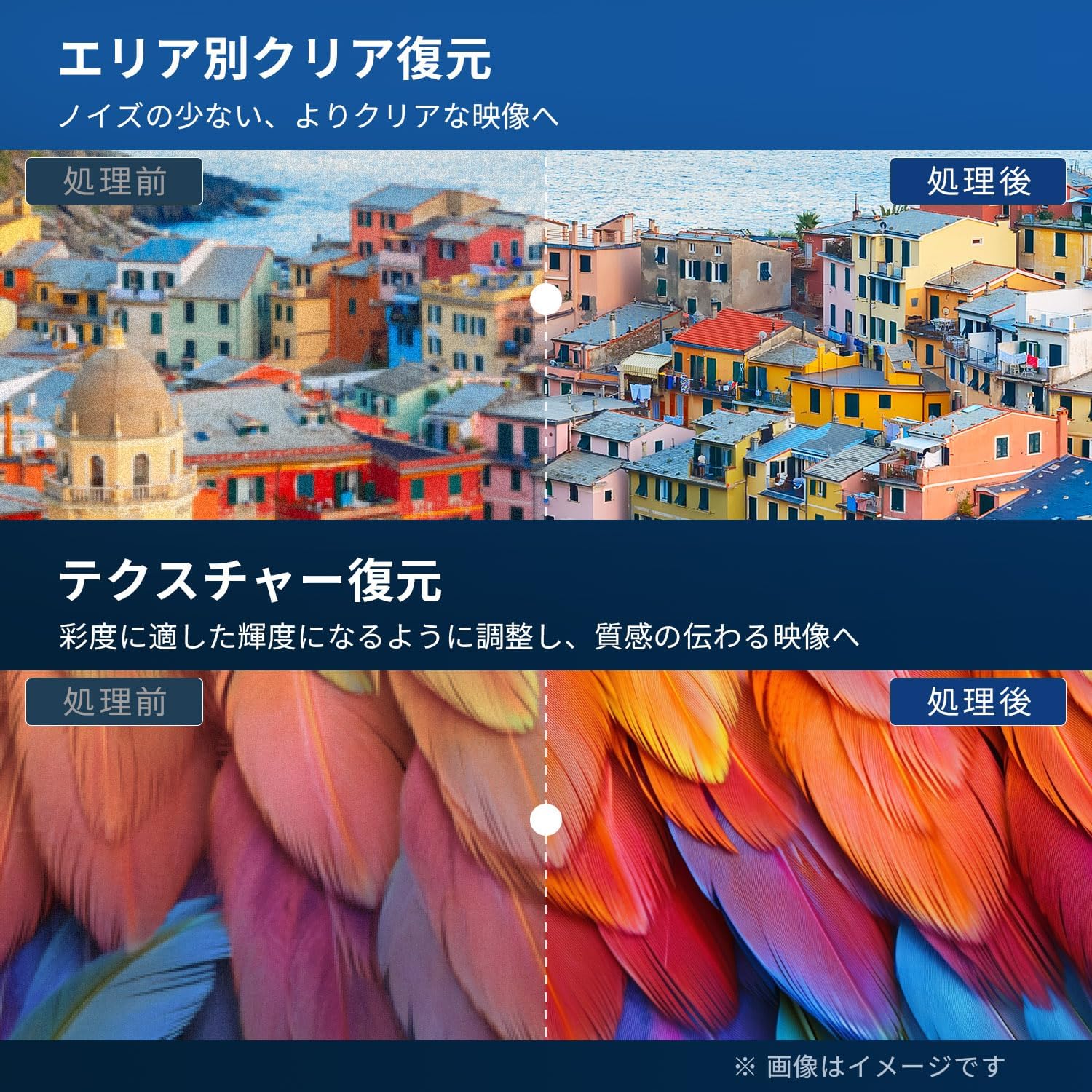
Figure 5.4: Image Processing for Clarity and Texture

Figure 5.5: High-Performance Multi-Speed Processing for Motion Clarity
ක්රීඩා ප්රකාරය:
Activate Game Mode to reduce input lag and image processing delay, providing a smoother and more responsive gaming experience, especially for fast-paced games like FPS and fighting games.
ඩොල්බි ඕඩියෝ:
Experience immersive, high-quality sound with built-in Dolby Audio technology. Adjust sound modes in the audio settings menu to suit your preferences.

Figure 5.6: Dolby Audio for Immersive Sound
6. නඩත්තු කිරීම
නිසි නඩත්තුව ඔබේ රූපවාහිනියේ ආයු කාලය සහ ක්රියාකාරිත්වය සහතික කරයි.
- තිරය පිරිසිදු කිරීම: Gently wipe the screen with a soft, lint-free cloth. For stubborn marks, use a screen cleaner specifically designed for LCD/LED displays. Do not spray cleaner directly onto the screen.
- කැබිනට් මණ්ඩලය පිරිසිදු කිරීම: රූපවාහිනී කැබිනට්ටුව පිස දැමීමට මෘදු වියළි රෙද්දක් භාවිතා කරන්න. උල්ෙල්ඛ පිරිසිදු කරන්නන්, ඉටි හෝ ද්රාවක භාවිතා නොකරන්න.
- වාතාශ්රය: රූපවාහිනියේ පිටුපස ඇති වාතාශ්රය විවරයන් අවහිර නොවන බවට වග බලා ගන්න.
- විදුලි රැහැන්: කිසියම් හානියක් සඳහා විදුලි රැහැන නිතිපතා පරීක්ෂා කරන්න. හානි වී ඇත්නම්, ප්රතිස්ථාපනය සඳහා පාරිභෝගික සහාය අමතන්න.
7. දෝශ නිරාකරණය
පාරිභෝගික සහාය සම්බන්ධ කර ගැනීමට පෙර, පොදු ගැටළු සඳහා පහත විසඳුම් උත්සාහ කරන්න:
| ගැටලුව | හැකි විසඳුම |
|---|---|
| බලය නැත | Check if the power cord is securely plugged into the TV and the outlet. Press the power button on the remote or TV. |
| පින්තූරයක් නැත, නමුත් ශබ්දය පවතී | ආදාන මූලාශ්රය පරීක්ෂා කරන්න. බාහිර උපාංග බලගන්වා නිවැරදිව සම්බන්ධ කර ඇති බව සහතික කර ගන්න. |
| ශබ්දයක් නැත, නමුත් පින්තූරය තිබේ | ශබ්ද මට්ටම පරීක්ෂා කරන්න. නිශ්ශබ්ද කිරීම සක්රිය කර නොමැති බව සහතික කර ගන්න. බාහිර උපාංග සඳහා ශ්රව්ය කේබල් පරීක්ෂා කරන්න. |
| දුරස්ථ පාලකය ක්රියා නොකරයි | බැටරි මාරු කරන්න. දුරස්ථ පාලකය සහ රූපවාහිනියේ IR සංවේදකය අතර කිසිදු බාධාවක් නොමැති බවට වග බලා ගන්න. |
| දුර්වල පින්තූර ගුණාත්මකභාවය / විකෘති රූපය | Check antenna connection. Adjust picture settings in the menu. Try a different input source. |
| Cannot record programs | Ensure an external USB HDD is connected and formatted to FAT32. Check available storage space. Verify tuner reception. |
| රූපවාහිනිය කැටි වීම හෝ ප්රතිචාර නොදක්වයි | Unplug the TV from the power outlet, wait for 1 minute, then plug it back in and power on. |
8. පිරිවිතර
| විශේෂාංගය | විස්තර |
|---|---|
| ආදර්ශ අංකය | RCA-NS-50Q1 හඳුන්වා දීම |
| තිර ප්රමාණය | අඟල් 50 |
| සංදර්ශක තාක්ෂණය | LED මොඩියුලය |
| විභේදනය | 4K UHD (3840 x 2160) |
| Refresh Rate | 60 Hz |
| දර්ශන අනුපාතය | 16:9 |
| Viewing කෝණය | අංශක 178 යි |
| ප්රතිචාර කාලය | 2 ms |
| පරස්පර අනුපාතය | 200:1 |
| උපරිම දීප්තිය | 220 cd/m² |
| HDR සහාය | HDR |
| සුසර කරන්නන් | Dual Terrestrial/BS/110-degree CS Digital Tuners (ISDB-T) |
| පටිගත කිරීම | External USB HDD Recording (FAT32 compatible, up to 6TB) |
| ශ්රව්ය උපකරණ | Dolby Audio, Built-in Speakers (Max Output: 10W) |
| සම්බන්ධතාවය | HDMI (x3), USB (x2), AV Input, Optical Digital Audio Out, LAN, 3.5mm Audio Input |
| VESA සවිකිරීමේ ප්රමිතිය | 400 x 300 මි.මී |
| බල සැපයුම | AC 100-240V, 50/60Hz |
| බලශක්ති පරිභෝජනය | 120 ඩබ්ලිව් |
| මානයන් (නැවතුම් සහිත) | 111.8 cm (W) x 69.6 cm (H) x 21.5 cm (D) |
| බර (නැවතුම් සහිත) | ආසන්න වශයෙන්. කිලෝ ග්රෑම් 9 කි |
| Smart TV විශේෂාංග | None. This TV does not support internet connection or streaming services. |
9. වගකීම් සහ සහාය
9.1. නිෂ්පාදන වගකීම්
This RCA television comes with a තුන් අවුරුදු වගකීමක් from the date of purchase, covering manufacturing defects. Please retain your proof of purchase for warranty claims. Note that some specific components may have a 12-month quality guarantee.

රූපය 9.1: වගකීම් තොරතුරු
9.2. පාරිභෝගික සහාය
For any inquiries, technical assistance, or warranty claims, please contact our customer support team. Our offices are located in Tokyo, and our customer service team provides nationwide support.

Figure 9.2: RCA Customer Support Network
සම්බන්ධතා ක්රම:
- LINE සහාය: Scan the QR code below to add our after-sales service account on LINE for quick assistance.
- ඊමේල් සහාය: Send your inquiries to our dedicated email address. We aim to respond within 24 hours.

Scan for LINE Support: https://lin.ee/AOq4pQs

විද්යුත් තැපෑල: ටුටු@ටුටුලෙක්.කොම්