
හැඳින්වීම
Thank you for choosing the SUNJOM Inspire Over-Ear Bluetooth Headphones. These headphones are designed to provide an immersive audio experience with the latest Bluetooth 5.3 technology, Hi-Fi stereo sound, and versatile connectivity options including wired mode and FM radio. This manual will guide you through the setup, operation, and maintenance of your new headphones.
ආරක්ෂිත තොරතුරු
ආරක්ෂිත ක්රියාකාරිත්වය සහතික කිරීම සහ හානි වැළැක්වීම සඳහා මෙම නිෂ්පාදනය භාවිතා කිරීමට පෙර කරුණාකර සියලුම ආරක්ෂක අනතුරු ඇඟවීම් සහ උපදෙස් ප්රවේශමෙන් කියවන්න. අනාගත යොමුව සඳහා මෙම අත්පොත තබා ගන්න.
- හෙඩ්ෆෝන් අධික උෂ්ණත්වයන්ට, ආර්ද්රතාවයට හෝ විඛාදන ද්රව්යවලට නිරාවරණය නොකරන්න.
- හෙඩ්ෆෝන් බිම හෙළීමෙන් හෝ දැඩි බලපෑම්වලට ලක් කිරීමෙන් වළකින්න.
- හෙඩ්ෆෝන් ඔබම විසුරුවා හැරීම හෝ අලුත්වැඩියා කිරීමට උත්සාහ නොකරන්න. මෙය වගකීම් අවලංගු කරයි.
- මෘදු වියළි රෙද්දකින් හෙඩ්ෆෝන් පිරිසිදු කරන්න. රළු රසායනික ද්රව්ය හෝ උල්ෙල්ඛ ද්රව්ය භාවිතා නොකරන්න.
- ඉහළ ශබ්ද මට්ටම්වල දීර්ඝ කාලයක් සවන් දීමෙන් ශ්රවණ හානි සිදුවිය හැකිය. ශබ්දය ආරක්ෂිත මට්ටමකට සකසන්න.
පැකේජයේ අන්තර්ගතය
විවෘත කිරීමෙන් පසු කරුණාකර පැකේජයේ අන්තර්ගතය පරීක්ෂා කරන්න. කිසියම් අයිතමයක් අස්ථානගත වී හෝ හානි වී ඇත්නම්, පාරිභෝගික සහාය අමතන්න.
- SUNJOM Inspire Over-Ear Bluetooth Headphones
- USB-C ආරෝපණ කේබලය
- 3.5mm ශ්රව්ය කේබල්
- පරිශීලක අත්පොත
නිෂ්පාදනය අවසන්view

Figure 1: Headphone Controls and Ports.
This diagram illustrates the various buttons, ports, and indicators on your SUNJOM Inspire headphones for easy identification and operation.
- බල සක්රිය/අක්රිය බොත්තම: Used to power the headphones on or off.
- Next Track / Volume Up / Voice Assistant Button: Short press for next track, long press for volume up, double press for voice assistant.
- Play/Pause / Call / Mode Switch Button: Short press to play/pause music or answer/end calls. Long press to switch between Bluetooth, FM Radio, and TF/SD Card modes.
- පෙර ඛණ්ඩය / ශබ්දය අඩු කිරීමේ බොත්තම: පෙර ධාවන පථය සඳහා කෙටි ඔබන්න, ශබ්දය අඩු කිරීමට දිගු ඔබන්න.
- TF කාඩ් පත: Insert a TF/Micro SD card for direct music playback.
- දර්ශක ආලෝකය: Displays power, charging, and Bluetooth pairing status.
- USB-C ආරෝපණ වරාය: ආරෝපණය කිරීම සඳහා USB-C කේබලය සම්බන්ධ කරන්න.
- මයික්රෆෝනය: හෑන්ඩ්ස්-ෆ්රී ඇමතුම් සඳහා බිල්ට් මයික්රෆෝනය.
- AUX ආදානය (3.5mm): Connect the 3.5mm audio cable for wired listening.
සැලසුම
1. හෙඩ්ෆෝන් ආරෝපණය කිරීම
Before first use, fully charge your headphones. A full charge provides approximately 28 hours of playtime.
- USB-C ආරෝපණ කේබලය හෙඩ්ෆෝන්වල USB-C ආරෝපණ තොටට සම්බන්ධ කරන්න.
- කේබලයේ අනෙක් කෙළවර USB බල ඇඩැප්ටරයකට (ඇතුළත් කර නැත) හෝ පරිගණකයේ USB පෝට් එකකට සම්බන්ධ කරන්න.
- The indicator light will show charging status (e.g., red while charging, off or blue when fully charged).

Figure 2: Charging the SUNJOM Inspire Headphones.
The headphones are equipped with a USB-C port for convenient charging. Ensure the cable is securely connected to both the headphones and a power source.
2. බ්ලූටූත් යුගලනය
The Inspire headphones utilize Bluetooth 5.3 for a stable and seamless wireless connection.
- හෙඩ්ෆෝන් සම්පූර්ණයෙන්ම ආරෝපණය වී ඇති බවට වග බලා ගන්න.
- Press and hold the Power On/Off button until the indicator light flashes (e.g., blue and red alternately), indicating pairing mode.
- ඔබගේ උපාංගයේ (ස්මාර්ට්ෆෝන්, ටැබ්ලටය, පරිගණකය), බ්ලූටූත් සක්රීය කර පවතින උපාංග සොයන්න.
- Select "SUNJOM INSPIRE" from the list of found devices.
- Once paired, the indicator light will stop flashing and remain solid blue.

Figure 3: Bluetooth Pairing Process.
The headphones offer a reliable Bluetooth connection up to 33 feet, allowing freedom of movement while enjoying your audio.
3. රැහැන්ගත සම්බන්ධතාවය (AUX මාදිලිය)
බැටරිය අවසන් වුවද, ඔබට හෙඩ්ෆෝන් රැහැන්ගත ආකාරයෙන් භාවිතා කළ හැකිය.
- Connect one end of the 3.5mm audio cable to the AUX input port on the headphones.
- අනෙක් කෙළවර ඔබගේ උපාංගයේ 3.5mm ශ්රව්ය ජැක් එකට සම්බන්ධ කරන්න.
- හෙඩ්ෆෝන් ස්වයංක්රීයව රැහැන්ගත ප්රකාරයට මාරු වේ.

Figure 4: Wired Connection via 3.5mm AUX.
The 3.5mm audio cable provides a reliable wired connection, ensuring uninterrupted listening regardless of battery life.
4. FM Radio Setup
The headphones feature a built-in FM radio with high reception sensitivity.
- හෙඩ්ෆෝන් ක්රියාත්මක කරන්න.
- Press and hold the Play/Pause/Mode Switch button to cycle through modes until you hear the FM radio.
- Short press the Play/Pause/Mode Switch button to auto-scan and save available FM stations.
- සුරකින ලද ස්ථාන අතර මාරු වීමට ඊළඟ/පෙර ධාවන පථ බොත්තම් භාවිතා කරන්න.
මෙහෙයුම් උපදෙස්
බලය සක්රිය / අක්රිය
- බල ගැන්වීම: Press and hold the Power On/Off button for approximately 3 seconds until the indicator light turns on.
- විදුලිය විසන්ධි කිරීම: Press and hold the Power On/Off button for approximately 3 seconds until the indicator light turns off.
Music Playback (Bluetooth/TF Card)
- වාදනය/විරාමය: Short press the Play/Pause/Mode Switch button.
- ඊළඟ ධාවන පථය: Short press the Next Track button.
- පෙර ධාවන පථය: Short press the Previous Track button.
- පරිමාව: ශබ්දය වැඩි කිරීමේ බොත්තම දිගු වේලාවක් ඔබන්න.
- ශබ්දය පහළට: ශබ්දය අඩු කිරීමේ බොත්තම දිගු වේලාවක් ඔබන්න.
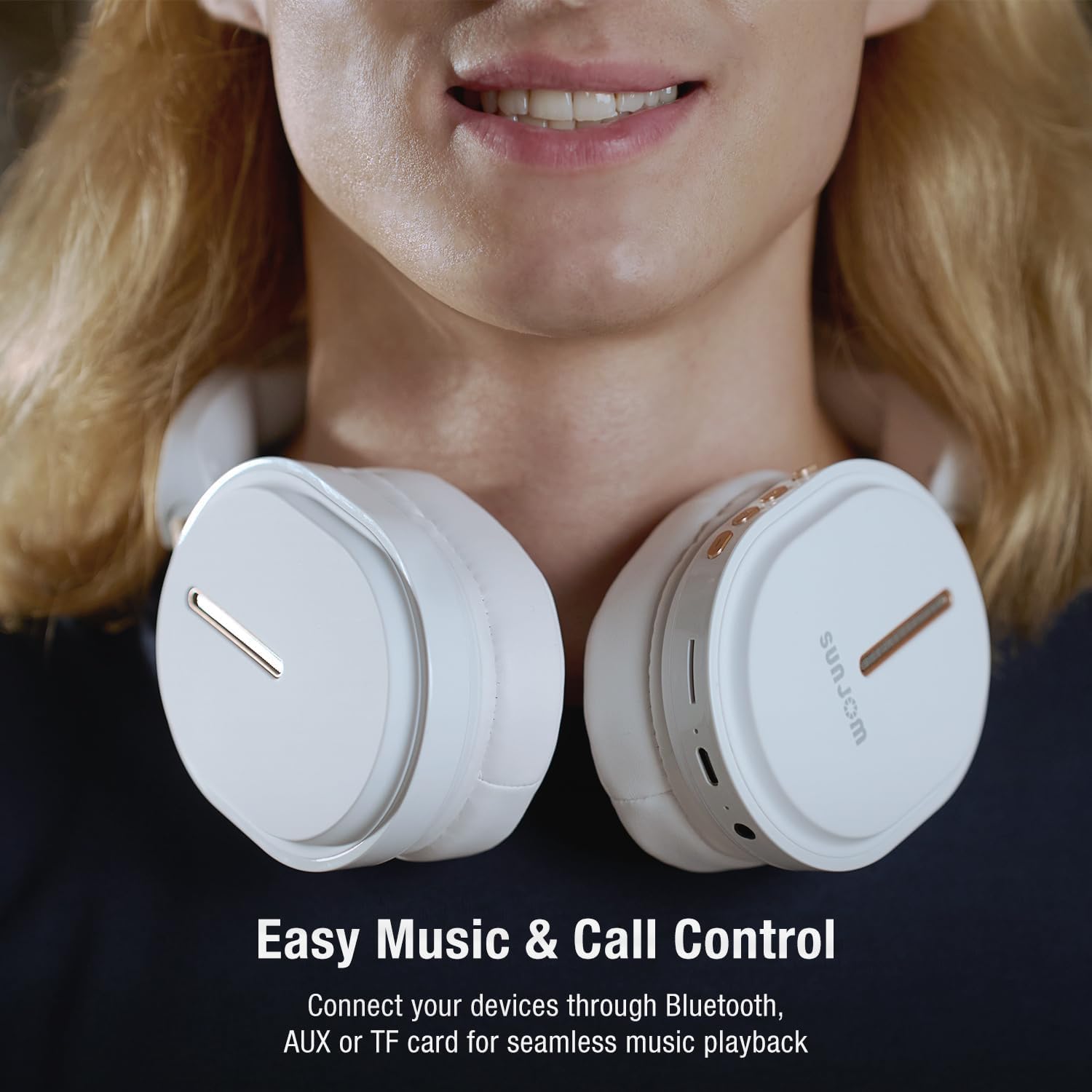
Figure 5: Easy Music and Call Control.
The intuitive controls on the headphones allow for seamless management of your music and calls.
ඇමතුම් කළමනාකරණය
- පිළිතුර/අවසන් ඇමතුම: Short press the Play/Pause/Mode Switch button when a call comes in.
- ඇමතුම ප්රතික්ෂේප කරන්න: Long press the Play/Pause/Mode Switch button when a call comes in.
- අවසාන අංකය නැවත අමතන්න: Double press the Play/Pause/Mode Switch button.

Figure 6: Built-in Microphone for Clear Calls.
The integrated microphone ensures clear voice transmission during phone calls and video conferences.
හඬ සහායක
- හ oice සහකාර සක්රිය කරන්න: Double press the "Next Track / Volume Up" button to activate your device's voice assistant (e.g., Siri, Google Assistant).
මාදිලිය මාරු කිරීම
- ස්විච් මාදිලි: Long press the Play/Pause/Mode Switch button to cycle between Bluetooth, FM Radio, and TF/SD Card playback modes.
නඩත්තු කිරීම
- පිරිසිදු කිරීම: Use a soft, lint-free cloth to wipe the headphones. Do not use liquids or aerosol cleaners directly on the headphones.
- ගබඩා: Store the headphones in a cool, dry place away from direct sunlight and extreme temperatures. When not in use for extended periods, it is recommended to fully charge them every few months to preserve battery life.
- නැමීම: The headphones are foldable for easy storage and portability. Fold them carefully to avoid damaging the hinges.

Figure 7: Lightweight and Comfortable Design.
The foldable design enhances portability, making them easy to store and carry.
දෝෂගවේෂණය
| ගැටලුව | විය හැකි හේතුව | විසඳුම |
|---|---|---|
| හෙඩ්ෆෝන් ක්රියාත්මක නොවේ. | අඩු බැටරි. | හෙඩ්ෆෝන් සම්පූර්ණයෙන්ම ආරෝපණය කරන්න. |
| බ්ලූටූත් හරහා යුගල කළ නොහැක. | හෙඩ්ෆෝන් යුගල කිරීමේ මාදිලියේ නැත; උපාංගය බ්ලූටූත් ක්රියා විරහිතයි; උපාංගයෙන් බොහෝ දුරයි. | Ensure headphones are in pairing mode (flashing indicator). Turn device Bluetooth off and on. Move headphones closer to device (within 33 feet). |
| බ්ලූටූත් මාදිලියේ ශබ්දයක් නැත. | Volume too low; headphones not connected; incorrect audio output on device. | Increase headphone and device volume. Re-pair headphones. Check device's audio output settings. |
| FM රේඩියෝ පිළිගැනීම දුර්වලයි. | දුර්වල සංඥාව; බාධාව. | විවෘත ප්රදේශයකට යන්න. ස්ථාන සඳහා නැවත ස්කෑන් කරන්න. |
| මයික්රෆෝනය ක්රියා නොකරයි. | Microphone muted on device; software issue. | Check device's microphone settings. Restart device. |
පිරිවිතර
| විශේෂාංගය | විස්තර |
|---|---|
| මාදිලියේ නම | ආශ්වාදයක් |
| වෙළඳ නාමය | සන්ජෝම් |
| සම්බන්ධතා තාක්ෂණය | රැහැන් රහිත (බ්ලූටූත් 5.3), රැහැන්ගත (3.5mm AUX) |
| රැහැන් රහිත පරාසය | අඩි 33 දක්වා |
| රියදුරු ප්රමාණය | 40mm ගතික ධාවක |
| සංඛ්යාත පරාසය | හර්ට්ස් 20 - හර්ට්ස් 20,000 |
| සම්බාධනය | 32 ඕම් |
| බැටරි ආයු කාලය | Approx. 28 hours playtime |
| ආරෝපණ වරාය | USB-C |
| බිල්ට් මයික්රෆෝනය | ඔව් |
| එෆ්එම් රේඩියෝව | Yes (RF range: FM87.5-108MHz) |
| TF/SD Card Support | ඔව් |
| පාලන වර්ගය | Button, Touch (Voice Assistant) |
| නිෂ්පාදන මානයන් | අඟල් 7.48 x 3.35 x 8.07 |
| අයිතමයේ බර | අවුන්ස 14.1 (ග්රෑම් 399) |

Figure 8: 40mm Dynamic Drivers for Immersive Sound.
The 40mm dynamic drivers are engineered to deliver premium Hi-Fi stereo sound with balanced deep bass.
නිල නිෂ්පාදන වීඩියෝව
Video 1: SUNJOM Inspire Bluetooth Headphones Overview.
මෙම වීඩියෝව දෘශ්යමය විස්තරයක් සපයයිview of the SUNJOM Inspire Bluetooth Headphones, showcasing their design, features, and usage scenarios. It highlights key aspects such as comfort, portability, and sound quality.
වගකීම් සහ සහාය
SUNJOM products are designed and manufactured to the highest quality standards. For warranty information, technical support, or customer service inquiries, please refer to the contact information provided on the product packaging or visit the official SUNJOM webවෙබ් අඩවිය. මිලදී ගැනීම පිළිබඳ සාක්ෂියක් ලෙස ඔබේ මිලදී ගැනීමේ රිසිට්පත තබා ගන්න.
නිෂ්පාදකයා: සන්ජෝම්