
Acoyer SRP9232D
Acoyer Universal TV Remote Control User Manual
Model: SRP9232D
හැඳින්වීම
This manual provides detailed instructions for setting up and operating your new Acoyer Universal TV Remote Control. This remote is designed to simplify your home entertainment experience by controlling multiple devices with a single unit. Please read this manual carefully before use to ensure proper functionality and to maximize your remote's capabilities.

රූපය: ඉදිරිපස සහ පසුපස view of the Acoyer Universal TV Remote Control.
ගැළපෙන උපාංග
Your Acoyer Universal Remote Control is compatible with a wide range of audio and video devices, including:
- TV brands: Samsung, LG, Vizio, Sony, Hisense, Onn, Sharp, RCA, Element, Westinghouse, Sanyo, Emerson, Philips, JVC, Sceptre, Sansui, Panasonic, Magnavox, Skyworth, and more.
- DVD/Blu-ray players
- Media Streaming Players
- ශබ්ද තීරු
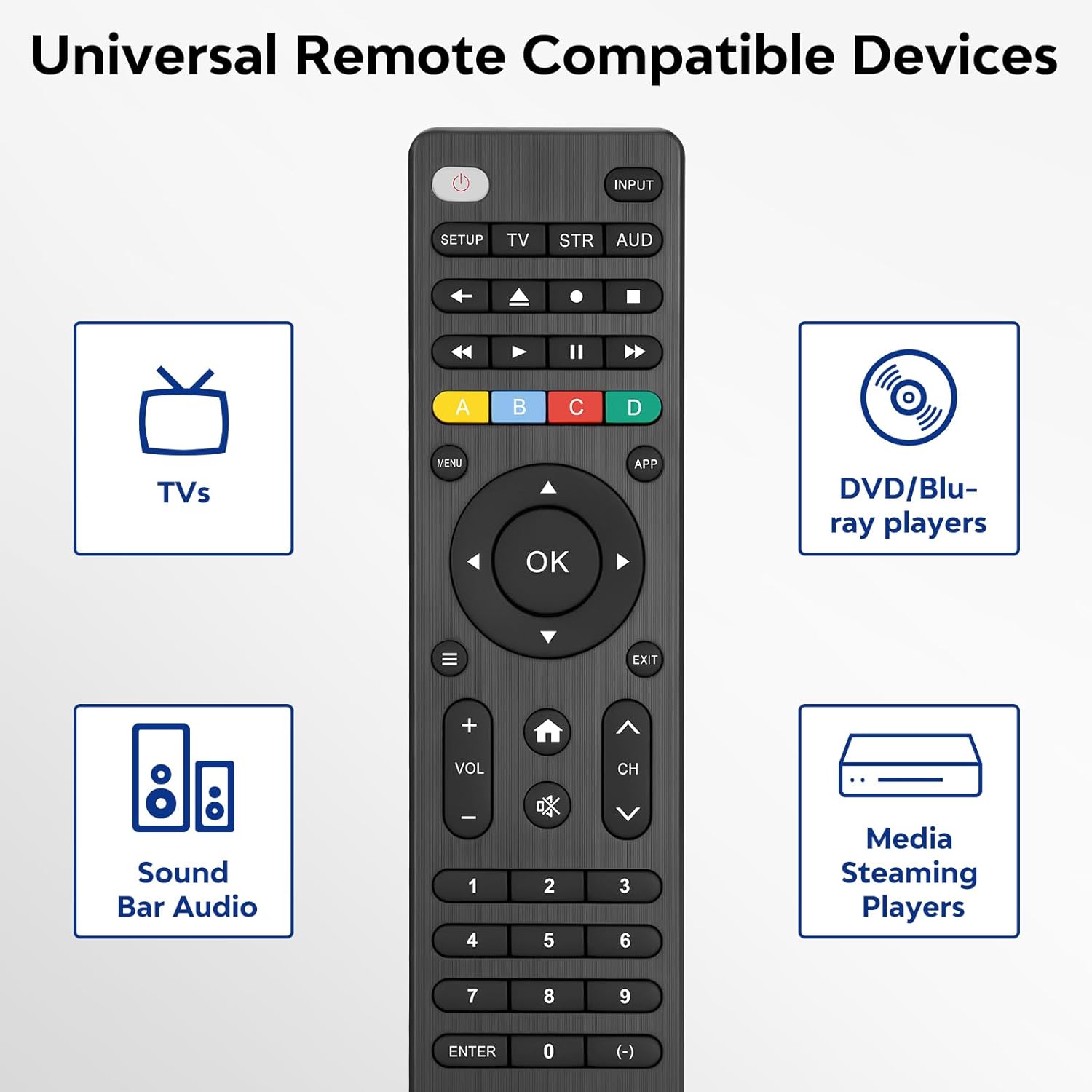
Image: Visual representation of compatible device types.

Image: List of compatible brands including Samsung, LG, Vizio, Sony, Hisense, Philips, and more.
නොගැලපෙන උපාංග
Please note that this universal remote is නැත compatible with the following devices:
- Roku Streaming Sticks
- Roku Sound Bar
- Amazon Sound Bar
- TCL ශබ්ද තීරුව
- Hisense Sound Bar
- Anker Sound Bar
- Klipsch Sound Bar
- Fire TV Sticks
- TCL Fire TV
- ගිනි රූපවාහිනී ලාංඡනය
- ටොෂිබා ෆයර් ටීවී
- Amazon Fire Stick
- ගිනි රූපවාහිනී කියුබ්
This product connects and pairs via infrared only. If you are unsure about compatibility, please refer to the product's code list or contact customer support.

Image: Visual representation of devices not compatible with the remote.
සැලසුම
Direct Code Entry Pairing
Follow these steps to program your universal remote using direct code entry:
- පියවර 1: Find the device type you need in the provided code list (included in the package). Then, locate and circle all the codes for your specific brand.
- පියවර 2: යතුර ඔබාගෙන සිටින්න සැලසුම button for 3 seconds until the red light on the remote turns on.
- පියවර 3: ඔබා නිදහස් කරන්න TV/STR/AUD button on the remote. The red light will blink once and then remain on.
- පියවර 4: Enter the first 4-digit code from your code list.
- පියවර 5: Point the remote at your TV (or other device) and test the buttons to see if the device responds as expected. If the buttons do not control the device, repeat steps 2-4 and enter a different code from your list to test.
Note: If all codes in the program fail, please refer to the instructions on page 7 of your physical user manual for "Automatic Code Search" (including code table and usage instructions).

Image: Visual guide for the direct code entry pairing process.
මෙහෙයුම් උපදෙස්
බොත්තම් කාර්යයන්
Familiarize yourself with the functions of each button on your universal remote control:

Image: Detailed layout of remote buttons and their corresponding functions.
| බොත්තම | කාර්යය |
|---|---|
| බලය | Turns devices ON / OFF |
| සැලසුම | දුරස්ථ පාලකය වැඩසටහන් කිරීමට භාවිතා කරයි |
| ආදානය | වීඩියෝ ආදාන තෝරනවා |
| TV / STR / AUD | Selects the device to control (TV, Streaming Device, Audio Device) |
| අවසාන නාලිකාව | කලින් තෝරාගත් නාලිකාව වෙත ආපසු පැමිණේ |
| Record / Stop / Fast Forward / Pause / Rewind | Controls media playback |
| ABCD Buttons | DVR, කේබල්, සහ චන්ද්රිකා ග්රාහක සඳහා අමතර විශේෂාංග වෙත ප්රවේශ වන්න |
| මෙනුව | තිරයේ මෙනුව පෙන්වයි |
| App Hotkey | Netflix, Amazon Prime, Hulu, සහ තවත් ඉහළම යෙදුම් වෙත ප්රවේශ වන්න |
| OK | පාලිත උපාංගය සඳහා මෙනු අයිතම තෝරන්න |
| Up / Down / Left / Right Navigation | මෙනු සහ විකල්ප හරහා ගමන් කරයි |
| Info / Options | තිරයේ සංදර්ශන/අන්තර්ගත තොරතුරු පෙන්වයි |
| පිටවෙන්න | Exits on-screen menus |
| Home / Guide | Easily access features on today's streaming devices, or Guide on cable/satellite receivers |
| ශබ්දය ඉහළට / පහළට | පරිමාව සීරුමාරු කරයි |
| නාලිකාව ඉහළට / පහළට | නාලිකා වෙනස් කරයි |
| නිහඬ කරන්න | ශබ්දය නිශ්ශබ්ද කරයි |
| අංක (0-9) | සෘජු නාලිකා තේරීම සඳහා අංක ඇතුළත් කරන්න |
| යතුර ඇතුලත් කරන්න | Confirms selection (some devices require Enter to be pressed after channel selection) |
| (-) Dash | Used to select digital channels (e.g., 4.1) |
The universal remote control utilizes infrared technology, providing a rapid response time of 0.2 seconds and an effective range of up to 30 feet.

Image: Features of the remote's infrared technology.
නඩත්තු කිරීම
බැටරි ස්ථාපනය
The universal remote control requires two (2) AAA alkaline batteries for operation. Batteries are not included in the package.
- දුරස්ථ පාලකයේ පිටුපස ඇති බැටරි මැදිරි කවරය විවෘත කරන්න.
- Insert the two AAA batteries, ensuring correct polarity (+ and -) as indicated inside the compartment.
- බැටරි මැදිරි කවරය ආරක්ෂිතව වසා දමන්න.
Warning: Do not mix old and new batteries, or mix different types of batteries together. This can lead to battery leakage or damage to the remote.

Image: Battery compartment and remote dimensions.
දෝෂගවේෂණය
If you encounter issues with your universal remote, try the following troubleshooting steps:
- දුරස්ථ පාලකය ප්රතිචාර නොදක්වයි: Ensure fresh AAA batteries are correctly installed. Check if the red light on the remote illuminates when a button is pressed.
- උපාංගය ප්රතිචාර නොදක්වයි: Verify that the remote is pointed directly at the device's infrared sensor. Ensure there are no obstructions between the remote and the device.
- Incorrect device control: Re-attempt the programming steps (Direct Code Entry) using a different code from the provided code list for your device brand.
- සීමිත ක්රියාකාරිත්වය: Some advanced functions may not be supported by all universal remotes or specific device models. Refer to your device's original manual for specific feature compatibility.
- Red light blinks continuously: This may indicate a programming error or low battery. Re-program the remote or replace the batteries.
පිරිවිතර
| විශේෂාංගය | විස්තර |
|---|---|
| ආදර්ශ අංකය | SRP9232D |
| පැකේජ මානයන් | අඟල් 6.89 x 3.27 x 0.75 |
| අයිතමයේ බර | අවුන්ස 2.05 කි |
| බලශක්ති ප්රභවය | 2 * AAA alkaline batteries (not included) |
| වර්ණය | කළු |
| විශේෂ ලක්ෂණය | විශ්වීය |
| උපරිම සහාය දක්වන උපාංග ගණන | 3 |
| ගැළපෙන උපාංග | Sound Bar, Television, VCR, Streaming Device, DVD/Blu-ray Player |
| නිෂ්පාදකයා | Acoyer |
| මුල් රට | චීනය |
වගකීම් සහ සහාය
Acoyer is committed to providing safe, durable, and user-friendly remote control products. We value your experience with our products.
For any questions regarding your order or product, please do not hesitate to contact us. Our customer service team aims to respond to inquiries within 24 hours on working days.
Please refer to your purchase documentation for specific warranty details and terms.
අදාළ ලියකියවිලි - SRP9232D
 |
Philips SRP9232D 3-in-1 විශ්ව දුරස්ථ පාලකය - පිරිවිතර සහ විශේෂාංග Philips SRP9232D 3-in-1 විශ්ව දුරස්ථ පාලකය ගවේෂණය කරන්න. මෙම ලේඛනය එහි විශේෂාංග, පිරිවිතර සහ රූපවාහිනිය, Blu-ray සහ ශ්රව්ය ඇතුළු උපාංග 3ක් දක්වා පාලනය කිරීම සඳහා ergonomic නිර්මාණය විස්තර කරයි. |
 |
Philips SRP9232D/27 විශ්ව දුරස්ථ පාලක පරිශීලක අත්පොත මෙම පරිශීලක අත්පොත විවිධ ශ්රව්ය/දෘශ්ය උපාංග ක්රියාත්මක කිරීම සඳහා Philips SRP9232D/27 විශ්ව දුරස්ථ පාලකය සැකසීම, ක්රමලේඛනය කිරීම සහ භාවිතා කිරීම සඳහා සවිස්තරාත්මක උපදෙස් සපයයි. |
 |
Philips Universal Remote Control SRP9232D/27 පරිශීලක අත්පොත Philips SRP9232D/27 විශ්ව දුරස්ථ පාලකය සඳහා පරිශීලක අත්පොත, සැකසුම, බොත්තම් ක්රියාකාරකම්, ක්රමලේඛනය, දුරස්ථ පාලකය භාවිතා කිරීම, දෝශ නිරාකරණය, වගකීම් සහ FCC ප්රකාශය ආවරණය කරයි. |
 |
Philips SRP9232D/27 විශ්ව දුරස්ථ පාලක පරිශීලක අත්පොත This user manual provides instructions for setting up, programming, and using the Philips SRP9232D/27 Universal Remote Control to operate various audio/video devices. |
 |
Tuovar Universal Remote Control SRP9232D Compatibility Guide A comprehensive compatibility list for the Tuovar Universal Remote Control SRP9232D, detailing supported brands and device types including TVs, DVD players, Blu-ray players, sound bars, and cable/satellite boxes. |
 |
Philips SRP9232D/27 විශ්ව දුරස්ථ පාලක පරිශීලක අත්පොත This user manual provides comprehensive instructions for the Philips SRP9232D/27 Audio/Video Universal Remote Control. It covers setup, battery installation, button functions, programming methods (Direct Code Entry, Auto Code Search), using the remote, primary audio control, code identification, factory reset, troubleshooting, warranty information, and FCC compliance. |
Ask a question about this manual
Ask about setup, troubleshooting, compatibility, parts, safety, or missing instructions. Manuals+ will review the question and use this page’s manual context to help answer it.