හැඳින්වීම
Thank you for choosing this generic replacement remote control. This manual provides essential information for setting up, operating, and maintaining your new remote control. This remote is designed to be compatible with various Qilive TV models, including Q24HS231, Q32H231, Q43US231, Q40FS232, and Q50US231.
Please read this manual carefully before use to ensure proper functionality and to maximize your viewඅත්දැකීමෙන්.
සැලසුම
This remote control is designed for immediate use with compatible Qilive TV models without requiring complex programming. Simply insert the batteries, and it should function directly.
1. බැටරි ස්ථාපනය
- දුරස්ථ පාලකයේ පිටුපස බැටරි මැදිරිය සොයා ගන්න.
- ස්ලයිඩයෙන් බැටරි මැදිරියේ කවරය විවෘත කරන්න.
- Insert two AAA batteries (not included), ensuring the positive (+) and negative (-) terminals align correctly with the indicators inside the compartment.
- බැටරි මැදිරි කවරය ආරක්ෂිතව වසා දමන්න.
Once batteries are installed, the remote control is ready for use with your compatible Qilive TV.
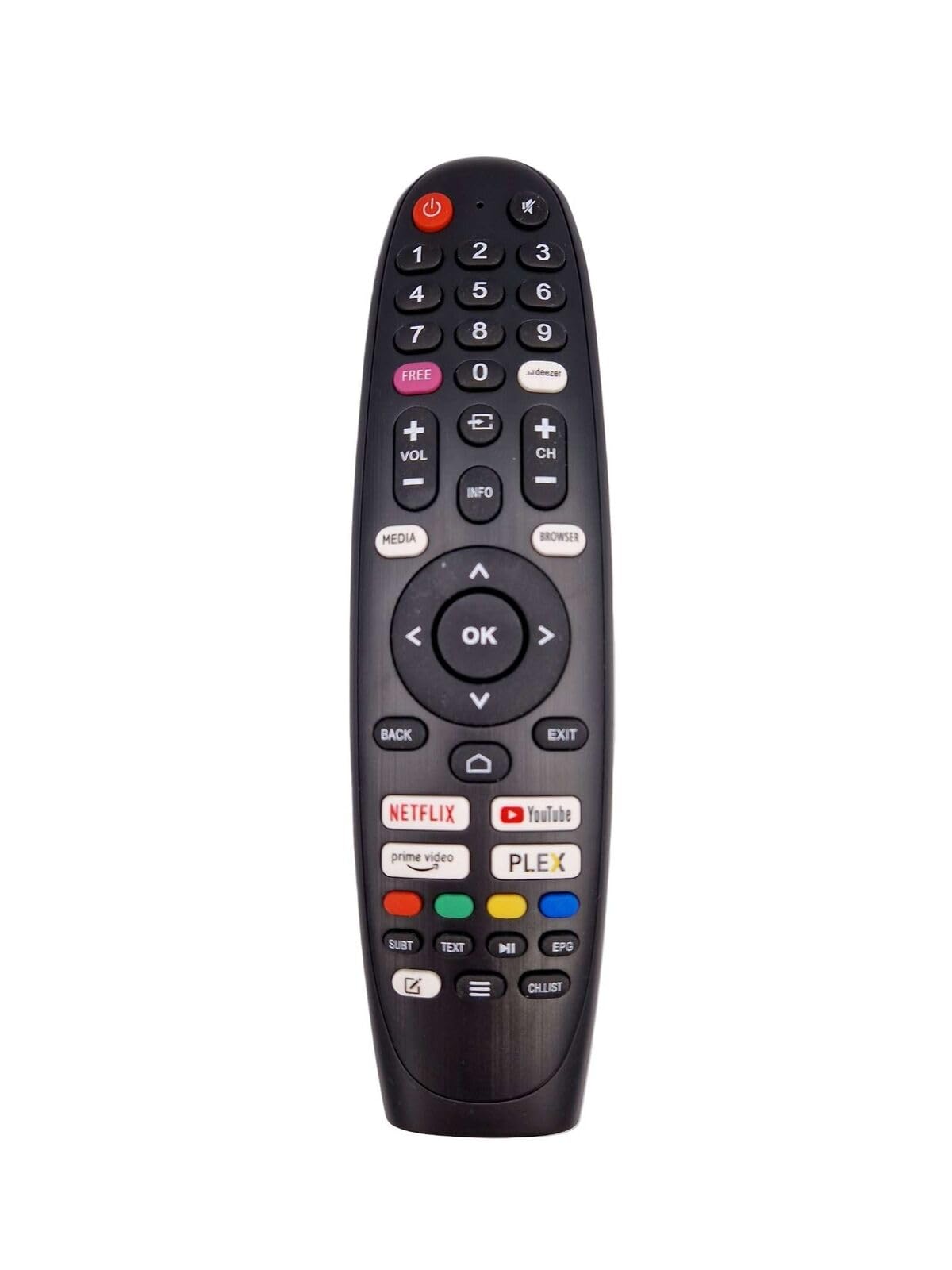
මෙම රූපය ඉදිරිපස පෙන්වයි view of the remote control, showing its layout of buttons.
මෙහෙයුම් උපදෙස්
The remote control features standard buttons for navigating your Qilive TV. Point the remote directly at your TV's infrared receiver for optimal performance.
ප්රධාන කාර්යයන්:
- බල බොත්තම: රූපවාහිනිය ක්රියාත්මක හෝ අක්රිය කරයි.
- අංක බොත්තම් (0-9): නාලිකා කෙලින්ම තෝරන්න.
- ශබ්දය වැඩි/පහළ: ශබ්ද මට්ටම සකසයි.
- නාලිකාව ඉහළ/පහළ: රූපවාහිනී නාලිකාව වෙනස් කරයි.
- නිශ්ශබ්ද බොත්තම: රූපවාහිනී ශ්රව්ය නිහඬ කරයි.
- Menu/Settings Button: රූපවාහිනියේ ප්රධාන මෙනුව හෝ සැකසුම් වෙත ප්රවේශ වේ.
- සංචාලන බොත්තම් (ඉහළ, පහළ, වම, දකුණ): මෙනු සහ විකල්ප හරහා යන්න.
- හරි/ඇතුළු කරන්න බොත්තම: තේරීම් තහවුරු කරයි.
- Back/Exit Button: පෙර තිරයට නැවත පැමිණේ හෝ මෙනුවකින් පිටවෙයි.
- මූලාශ්ර/ආදාන බොත්තම: ආදාන මූලාශ්ර (HDMI, AV, ආදිය) තෝරයි.
- හඬ විධාන හඳුනාගැනීම: This remote may support voice commands. Refer to your TV's manual for specific instructions on activating and using voice control features.
නඩත්තු කිරීම
නිසි සැලකිල්ල ඔබේ දුරස්ථ පාලකයේ ආයු කාලය දීර්ඝ කරයි.
- පිරිසිදු කිරීම: දුරස්ථ පාලකය පිරිසිදු කිරීම සඳහා මෘදු වියළි රෙද්දක් භාවිතා කරන්න. දියර පිරිසිදු කරන්නන් හෝ උල්ෙල්ඛ ද්රව්ය භාවිතා නොකරන්න.
- බැටරි ආදේශනය: Replace batteries when the remote's range decreases or it stops responding. Always replace both batteries at the same time with new ones of the same type.
- ගබඩා: දුරස්ථ පාලකය දිගු කාලයක් භාවිතා නොකරන්නේ නම්, කාන්දු වීම හා හානි වීම වැළැක්වීම සඳහා බැටරි ඉවත් කරන්න. සිසිල් වියළි ස්ථානයක ගබඩා කරන්න.
- හානි වළක්වන්න: Do not drop the remote control, expose it to extreme temperatures, or immerse it in water.
දෝෂගවේෂණය
ඔබගේ දුරස්ථ පාලකය සමඟ ගැටළු ඇති වුවහොත්, පහත විසඳුම් උත්සාහ කරන්න:
- දුරස්ථ පාලකය ප්රතිචාර නොදක්වයි:
- නිවැරදි ධ්රැවීයතාවයෙන් බැටරි නිවැරදිව ඇතුළු කර ඇත්දැයි පරීක්ෂා කරන්න.
- පැරණි බැටරි නව ඒවා සමඟ ප්රතිස්ථාපනය කරන්න.
- දුරස්ථ පාලකය සහ රූපවාහිනියේ අධෝරක්ත ග්රාහකය අතර පැහැදිලි දෘෂ්ටි රේඛාවක් ඇති බවට වග බලා ගන්න. ඕනෑම බාධාවක් ඉවත් කරන්න.
- ඔබ ඵලදායී මෙහෙයුම් පරාසය තුළ සිටින බවට වග බලා ගන්න (සාමාන්යයෙන් මීටර් 10 දක්වා).
- නිශ්චිත බොත්තම් ක්රියා නොකරයි:
- Clean the remote control, especially around the unresponsive buttons, to remove any dirt or debris that might be interfering.
- If only certain advanced functions are not working, verify that your specific Qilive TV model supports those functions with a generic remote.
- බාධා කිරීම්:
- Other electronic devices or strong light sources can sometimes interfere with the infrared signal. Try moving away from such sources.
පිරිවිතර
| වෙළඳ නාමය | සාමාන්ය |
| වර්ණය | කළු |
| සම්බන්ධතා තාක්ෂණය | අධෝරක්ත කිරණ |
| විශේෂ ලක්ෂණ | Voice Command Recognition, Universal Device Compatibility |
| ගැළපෙන උපාංග | Television (Qilive models: Q24HS231, Q32H231, Q43US231, Q40FS232, Q50US231) |
| උපරිම පරාසය | මීටර් 10 |
| බොත්තම් ගණන | 32 |
| පාලක වර්ගය | බොත්තම් පාලනය |
වගකීම් තොරතුරු
This product typically comes with a 1-year limited manufacturer's warranty. Please retain your proof of purchase for any warranty claims. For specific details regarding warranty coverage and procedures, refer to the seller's policy or contact the point of purchase.
සහාය
If you require further assistance or have questions not covered in this manual, please contact the seller or retailer from whom you purchased this remote control. They can provide product-specific support and troubleshooting advice.


