1. හැඳින්වීම
The Ultrapods Pro Wireless Earphones (model ultra buds gg) are designed to provide a high-fidelity audio experience with the convenience of wireless connectivity. Featuring Bluetooth 5.3 for stable connections, IPX4 sweat and water resistance, and intuitive touch controls, these in-ear earbuds are suitable for various activities, including sports and daily use. The charging case includes a digital display for battery status and a unique cool light feature.
2. පැකේජ අන්තර්ගතය
- Ultrapods Pro Wireless Earbuds (Left and Right)
- රැහැන් රහිත ආරෝපණ නඩුව
- ආරෝපණ කේබලය (USB-C)
- පරිශීලක අත්පොත
3. නිෂ්පාදන අවසන්view
The Ultrapods Pro feature an ergonomic in-ear design for comfort and a secure fit. The transparent charging case not only protects and charges your earbuds but also displays the battery level digitally. Each earbud is equipped with touch-sensitive controls for managing audio playback and calls.
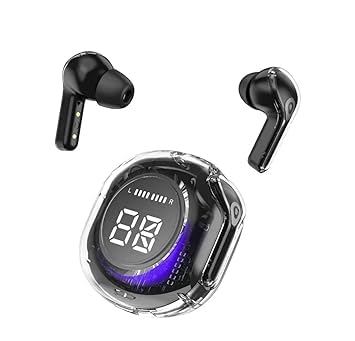
Image: Ultrapods Pro Wireless Earphones with their transparent charging case, showing the earbuds inside.
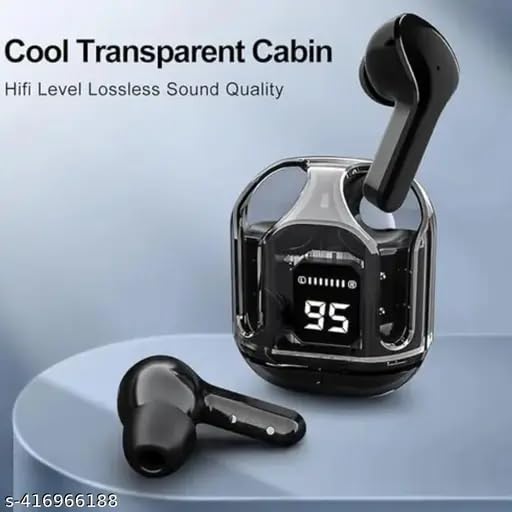
රූපය: සමීප රූපය view of the Ultrapods Pro transparent charging case with one earbud inserted and another lying beside it, highlighting the digital battery display.
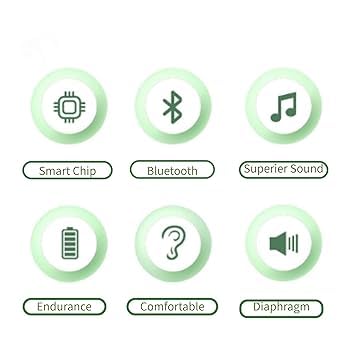
Image: Icons representing key features: Smart Chip, Bluetooth, Superior Sound, Endurance, Comfortable, and Diaphragm.
4. පිහිටුවීම
4.1 ඉයර්ෆෝන් සහ කේස් ආරෝපණය කිරීම
- නඩුව අයකිරීම: Connect the provided USB-C charging cable to the charging port on the case and a USB power source. The digital display on the case will show the charging progress. The case features a cool light during charging.
- ඉයර්බඩ් ආරෝපණය කිරීම: Place the earbuds into their respective slots in the charging case. Ensure they are properly seated. The earbuds will automatically begin charging. The case's display will indicate the charging status of the earbuds.
Note: Fully charge the earphones and case before first use for optimal battery life.
4.2 බ්ලූටූත් යුගල කිරීම
- බල ගැන්වීම: Open the charging case. The earbuds will automatically power on and enter pairing mode. You may hear an audible prompt.
- බ්ලූටූත් සක්රිය කරන්න: On your mobile device (smartphone, tablet, etc.), go to the Bluetooth settings and ensure Bluetooth is enabled.
- උපාංගය තෝරන්න: In the list of available Bluetooth devices, look for "Ultrapods Pro" or a similar name and select it to connect.
- තහවුරු කිරීම: Once connected, you will hear a confirmation tone or voice prompt from the earbuds, and your device will show them as connected.
සටහන: උපාංගයේ බ්ලූටූත් සක්රීය කර ඇත්නම්, ඉයර්බඩ් නඩුවෙන් පිටතට ගත් විට අවසන් වරට යුගල කළ උපාංගයට ස්වයංක්රීයව නැවත සම්බන්ධ වේ.
5. මෙහෙයුම් උපදෙස්
5.1 බලය සක්රිය / අක්රිය
- බල ගැන්වීම: ආරෝපණ පෙට්ටිය විවෘත කරන්න, එවිට ඉයර්බඩ් ස්වයංක්රීයව ක්රියාත්මක වේ.
- විදුලිය විසන්ධි කිරීම: ඉයර්බඩ් නැවත ආරෝපණ පෙට්ටියට දමා පියන වසා දමන්න. ඒවා ස්වයංක්රීයව ක්රියා විරහිත වේ.
5.2 සංගීත වාදනය
- වාදනය/විරාමය: ඉයර්බඩ් එකක් වරක් තට්ටු කරන්න.
- ඊළඟ ධාවන පථය: දකුණු ඉයර්බඩය දෙවරක් තට්ටු කරන්න.
- පෙර ධාවන පථය: වම් ඉයර්බඩය දෙවරක් තට්ටු කරන්න.
5.3 ඇමතුම් කළමනාකරණය
- පිළිතුර/අවසන් ඇමතුම: ඉයර්බඩ් එකක් වරක් තට්ටු කරන්න.
- ඇමතුම ප්රතික්ෂේප කරන්න: ඉයර්බඩ් එකක් තත්පර 2ක් ඔබාගෙන සිටින්න.
5.4 වෙළුම් පාලනය
The Ultrapods Pro include a built-in remote function that allows you to adjust the volume directly from the earbuds. Refer to your device's specific settings or the earbud's touch control guide for detailed volume adjustment gestures, as these can vary.
6. නඩත්තු කිරීම
6.1 පිරිසිදු කිරීම
- ඉයර්බඩ් සහ ආරෝපණ පෙට්ටිය පිරිසිදු කිරීමට මෘදු, වියලි, ලින්ට් රහිත රෙද්දක් භාවිතා කරන්න.
- දරුණු රසායනික ද්රව්ය, පිරිසිදු කිරීමේ ද්රාවණ හෝ ශක්තිමත් ඩිටර්ජන්ට් භාවිතා නොකරන්න.
- නිසි ආරෝපණය සහතික කිරීම සඳහා ඉයර්බඩ් සහ කේස් දෙකෙහිම ආරෝපණ සම්බන්ධතා මෘදු ලෙස පිරිසිදු කරන්න.
6.2 ගබඩා කිරීම
- ඉයර්බඩ් ආරක්ෂා කර ගැනීමට සහ ආරෝපණය කර තබා ගැනීමට, භාවිතයේ නොමැති විට සෑම විටම ඒවායේ ආරෝපණ පෙට්ටියේ ගබඩා කරන්න.
- අධික උෂ්ණත්වයන්ගෙන් සහ සෘජු හිරු එළියෙන් ඈත්ව සිසිල් වියළි ස්ථානයක ගබඩා කරන්න.
6.3 ජල ප්රතිරෝධය (IPX4)
The Ultrapods Pro are rated IPX4, meaning they are resistant to splashing water from any direction. This makes them suitable for workouts and light rain. They are not designed for swimming, showering, or submersion in water. Ensure the earbuds are dry before placing them back into the charging case to prevent damage.
7. දෝශ නිරාකරණය
- ඉයර්බඩ් යුගල නොවේ:
Ensure both earbuds are charged. Place them back in the case, close the lid, then open it again. On your device, forget the "Ultrapods Pro" from your Bluetooth list and try pairing again. - එක ඉයර්බඩ් එකකින් ශබ්දයක් නැත:
Check if both earbuds are charged. Try resetting the earbuds by placing them in the case and then taking them out. Re-pair with your device. - ආරෝපණ ගැටළු:
ආරෝපණ කේබලය නඩුවට සහ බල ප්රභවයට ආරක්ෂිතව සම්බන්ධ වී ඇති බව තහවුරු කර ගන්න. ඉයර්බඩ්වල සහ නඩුව ඇතුළත ආරෝපණ සම්බන්ධතා පිරිසිදු හා සුන්බුන් වලින් තොර බව සහතික කර ගන්න. - ස්පර්ශ පාලක ප්රතිචාර නොදක්වයි:
ඔබේ ඇඟිලි පිරිසිදුව හා වියලිව තබා ගන්න. සමහර විට සරල නැවත ආරම්භ කිරීමකින් (ඉයර්බඩ් නඩුවේ තබා ඒවා පිටතට ගැනීම) සුළු දෝෂ විසඳා ගත හැකිය.
8. පිරිවිතර
| විශේෂාංගය | පිරිවිතර |
|---|---|
| මාදිලියේ නම | ultra buds gg |
| සම්බන්ධතා තාක්ෂණය | රැහැන් රහිත |
| රැහැන් රහිත සන්නිවේදන තාක්ෂණය | Bluetooth v5.3 (Enhanced Data Rate) |
| පාලන ක්රමය | ස්පර්ශ කරන්න |
| විශේෂ ලක්ෂණ | Fast Charging, Microphone Included, Sweatproof (IPX4) |
| මයික්රෆෝන ආකෘතිය | බිල්ට්-ඉන් |
| ද්රව්ය | ප්ලාස්ටික් |
| කන් ස්ථානගත කිරීම | කනේ |
| ආකෘති සාධකය | කනේ |
| ශබ්ද පාලනය | ක්රියාකාරී ශබ්ද අවලංගු කිරීම |
| Audio Codecs Support | SBC, ACC |
| රියදුරු ප්රමාණය | 10mm + 6mm vibrating diaphragm |
9. වගකීම් සහ සහාය
වගකීම් තොරතුරු හෝ තාක්ෂණික සහාය සඳහා, කරුණාකර මිලදී ගැනීමේදී සපයන ලද ලියකියවිලි වෙත යොමු වන්න හෝ සිල්ලර වෙළෙන්දා/නිෂ්පාදකයා කෙලින්ම අමතන්න. ඕනෑම වගකීම් හිමිකම් පෑමක් සඳහා ඔබේ මිලදී ගැනීම පිළිබඳ සාක්ෂි තබා ගන්න.


