
1. හැඳින්වීම
This manual provides detailed instructions for the installation, operation, and maintenance of your Junsun 11.5-inch Touch Screen Car Radio Stereo. This unit is designed to enhance your in-car entertainment and navigation experience with features such as wireless CarPlay, Android Auto, GPS, and Bluetooth connectivity. Please read this manual thoroughly before installation and use to ensure proper function and safety.
Applicable Car Models:
- Jeep Wrangler: 2007-2018
- Jeep Compass: 2009-2016
- Jeep Patriot: 2009-2016
- ජීප් ග්රෑන්ඩ් චෙරෝකී: 2005-2011
- Jeep Liberty: 2008-2011
- Jeep Commander: 2008-2011
- Chrysler Sebring: 2007-2010
- Chrysler Town&Country: 2007-2010
- Dodge Grand Caravan: 2011-2014
- Dodge Charger: 2008-2010
- Dodge Ram Pickup 1500/2500/3500: 2009-2012

Image 1.1: The Junsun 11.5-inch Touch Screen Car Radio Stereo installed in a vehicle dashboard.
2 ආරක්ෂිත තොරතුරු
- Always operate the device responsibly. Distracted driving can lead to accidents.
- විදුලි රැහැන් ඇදීම හෝ හානි වැළැක්වීම සඳහා සියලුම රැහැන් නිවැරදිව සම්බන්ධ කර ඇති බවට වග බලා ගන්න.
- ඒකකය විසුරුවා හැරීමට හෝ වෙනස් කිරීමට උත්සාහ නොකරන්න. මෙය වගකීම් සහතිකය අවලංගු කර හානි සිදු කළ හැකිය.
- පැහැදිලි දෘශ්යතාව පවත්වා ගැනීම සඳහා තිරය පිරිසිදුව හා බාධාවකින් තොරව තබා ගන්න.
- ඔබට කිසියම් පියවරක් ගැන විශ්වාස නැත්නම්, ස්ථාපනය සඳහා වෘත්තිකයෙකුගෙන් විමසන්න.
3. පැකේජ අන්තර්ගතය
ස්ථාපනය ආරම්භ කිරීමට පෙර සියලුම සංරචක පැකේජයේ ඇති බව තහවුරු කර ගන්න:
- 11.5-inch Car Radio Stereo Unit
- මයික්රෆෝනය
- GPS මොඩියුලය
- USB කේබල් (x2)
- 4G Antenna (for 4G-Model, if applicable)
- Can Bus Box
- Power Cable (Plug and Play harness)
- RCA Cable Set
- Reversing Line (for optional backup camera)
- ඉස්කුරුප්පු නියනක්
- Crowbar (for trim removal)
- ඇන්ටෙනා ඇඩැප්ටර කේබලය
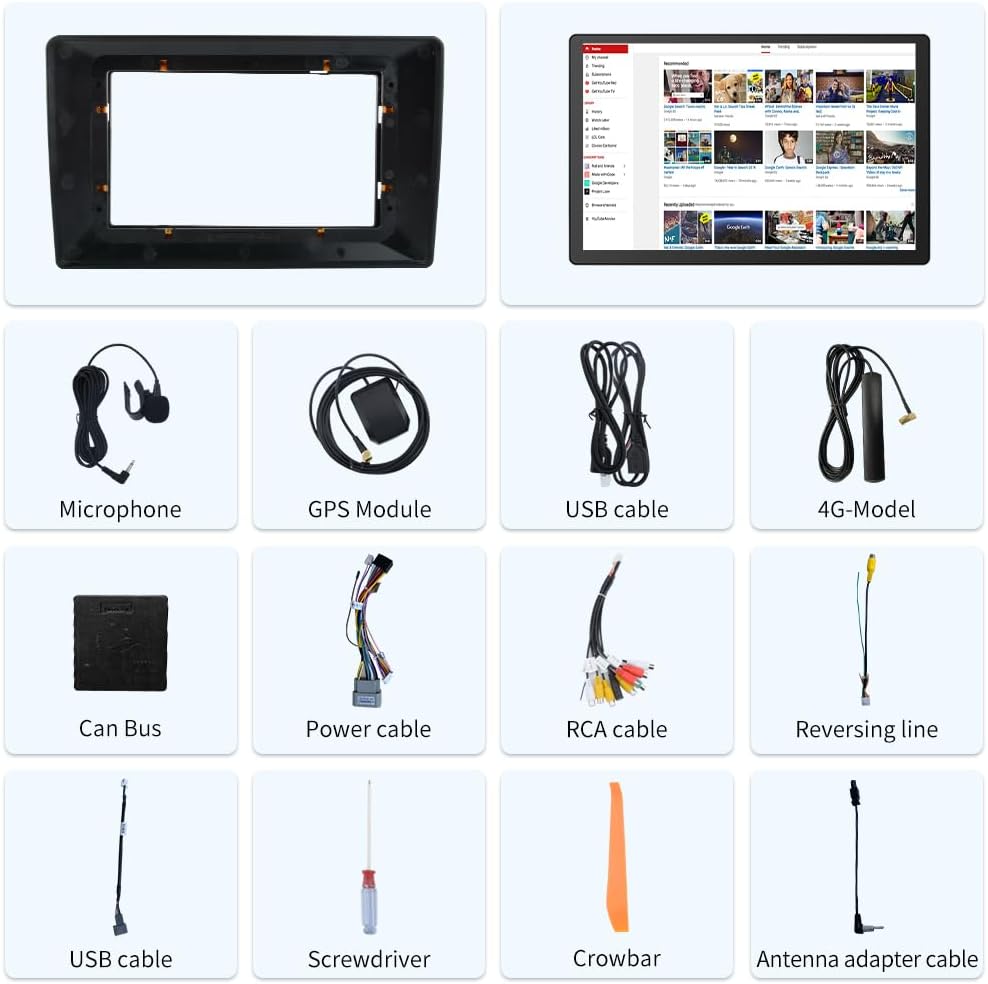
Image 3.1: Included components of the Junsun 11.5-inch Car Radio Stereo package.
4. පිහිටුවීම සහ ස්ථාපනය
The Junsun car radio stereo is designed for dashboard mounting and features a plug-and-play power harness for simplified installation. It supports existing steering wheel controls and factory backup cameras in compatible vehicles.
4.1 රැහැන් සම්බන්ධතා
Refer to the wiring diagram below for proper connection of all cables. Ensure all connections are secure before powering on the unit.
- බල පටි: Connect the plug-and-play power harness to your vehicle's wiring.
- GPS මොඩියුලය: Connect the GPS module and position it in a location with a clear view ප්රශස්ත සංඥා පිළිගැනීම සඳහා අහසේ.
- USB කේබල්: Connect the provided USB cables for external device connectivity.
- RCA කේබල්: Use the RCA cable set for audio/video input/output connections, including front camera input, video output, auxiliary input, and subwoofer output.
- මයික්රෆෝනය: Connect the external microphone for improved call quality and voice commands.
- ඇන්ටෙනා ඇඩැප්ටරය: Connect your vehicle's radio antenna using the provided adapter.
- Can Bus Box: Connect the Can Bus box to enable integration with vehicle features like steering wheel controls.

Image 4.1: Wiring diagram for the Junsun 11.5-inch Car Radio Stereo.
4.2 මූලික බල සක්රිය කිරීම සහ වින්යාසය
After installation, turn on your vehicle's ignition. The unit should power on automatically. Follow the on-screen prompts for initial setup, including language selection and time zone settings.
5. මෙහෙයුම් උපදෙස්
5.1 සංදර්ශකය සහ අතුරුමුහුණත
The unit features an 11.5-inch touch screen with a resolution of 2000*1200 pixels, providing a clear and responsive interface.

Image 5.1: Display resolution comparison for the 11.5-inch screen.
5.2 රැහැන් රහිත CarPlay සහ Android Auto
Connect your smartphone wirelessly via Bluetooth to access CarPlay or Android Auto. This allows for voice control and integration of phone functions such as music, navigation, calls, and messages directly on the car stereo display.
- යුගල කිරීම: Enable Bluetooth on your smartphone and the car stereo. Select your phone from the stereo's Bluetooth menu to pair.
- සක්රිය කිරීම: Once paired, CarPlay or Android Auto should automatically launch or be selectable from the main menu.

Image 5.2: CarPlay and Android Auto interfaces.
5.3 GPS Navigation
The unit includes a built-in GPS module that supports both online and offline navigation applications from the Google Play app market. Ensure the GPS antenna is properly installed for accurate positioning.
- මාර්ගගත සංචාලනය: Requires a Wi-Fi connection or mobile hotspot for real-time traffic data and map updates.
- Offline Navigation: Download maps for offline use to navigate without an internet connection.

Image 5.3: GPS Navigation interface.
5.4 බ්ලූටූත් සම්බන්ධතාවය
Utilize Bluetooth for hands-free calling and audio streaming. The built-in microphone allows for clear communication during calls.
- හෑන්ඩ්ස්-ෆ්රී ඇමතීම: Pair your phone to make and receive calls directly from the stereo.
- බ්ලූටූත් සංගීතය: Stream audio from your paired device to the car stereo.

Image 5.4: Bluetooth phone and music interface.
5.5 සුක්කානම් රෝද පාලනය
The unit supports integration with your vehicle's existing steering wheel controls, allowing you to manage audio and calls without taking your hands off the wheel. Configuration may be required in the settings menu.

Image 5.5: Steering wheel control functionality.
5.6 FM රේඩියෝව
Access local radio stations with the built-in FM tuner. Scan for stations and save your favorites for quick access.

Image 5.6: FM Radio interface.
5.7 ස්ප්ලිට් ස්ක්රීන් ක්රියාකාරීත්වය
The split-screen feature allows you to run two applications simultaneously on the display, such as navigation and music playback.

Image 5.7: Split Screen mode.
5.8 Audio Equalizer (DSP)
Adjust audio settings using the built-in Digital Sound Processor (DSP) and equalizer to customize your sound experience.

Image 5.8: Built-in DSP and Equalizer interface.
6. නඩත්තු කිරීම
- තිර පිරිසිදු කිරීම: ස්පර්ශ තිරය පිරිසිදු කිරීම සඳහා මෘදු, ලින්ට් රහිත රෙද්දක් භාවිතා කරන්න. මුරණ්ඩු පැල්ලම් සඳහා, සැහැල්ලුවෙන් dampරෙදි කැබැල්ල වතුරෙන් හෝ තිර ආරක්ෂිත පිරිසිදුකාරකයකින් සෝදන්න. උල්ෙල්ඛ ද්රව්ය හෝ රළු රසායනික ද්රව්ය වලින් වළකින්න.
- සාමාන්ය පිරිසිදු කිරීම: Keep the unit and surrounding dashboard area free from dust and debris.
- මෘදුකාංග යාවත්කාලීන: Periodically check for available software updates to ensure optimal performance and access to new features. Updates can typically be found through the unit's settings menu or the manufacturer's webඅඩවිය.
7. දෝශ නිරාකරණය
If you encounter issues with your Junsun car radio stereo, refer to the following common troubleshooting steps:
| ගැටලුව | විය හැකි හේතුව | විසඳුම |
|---|---|---|
| ඒකකය බලය සක්රිය නොවේ. | වැරදි රැහැන් ඇදීම, පිපිරුණු ෆියුස්, වාහන ජ්වලනය අක්රිය වීම. | Check power cable connections. Verify vehicle ignition is on. Inspect vehicle fuses. |
| ශබ්දයක් නැත. | ශබ්දය ඉතා අඩුයි, නිහඬ කිරීම සක්රියයි, වැරදි ස්පීකර් රැහැන් ඇදීම. | ශබ්දය වැඩි කරන්න. නිහඬ කිරීම සක්රිය දැයි පරීක්ෂා කරන්න. ස්පීකර් සම්බන්ධතා සත්යාපනය කරන්න. |
| GPS සංඥාව නැති වී හෝ සාවද්යයි. | GPS ඇන්ටනාව නුසුදුසු ලෙස තබා හෝ විසන්ධි කර ඇත. | GPS ඇන්ටෙනාව පැහැදිලි බව සහතික කර ගන්න view අහසේ සහ ආරක්ෂිතව සම්බන්ධ කර ඇත. |
| බ්ලූටූත් සම්බන්ධතාවය අස්ථායි. | Interference, phone too far, software glitch. | Ensure phone is close to the unit. Re-pair the Bluetooth device. Restart both devices. |
| සුක්කානම් රෝද පාලන ක්රියා නොකරයි. | Can Bus box not connected, incorrect configuration. | Verify Can Bus box connection. Check steering wheel control settings in the unit's menu. Some vehicles may require specific configuration. |
| CarPlay/Android Auto සම්බන්ධ නොවේ. | Bluetooth issue, phone compatibility, software glitch. | Ensure Bluetooth is active and paired. Restart phone and stereo. Check phone compatibility with CarPlay/Android Auto. |
8. පිරිවිතර
| විශේෂාංගය | විස්තර |
|---|---|
| සංදර්ශක ප්රමාණය | අඟල් 11.5 |
| තිර විභේදනය | 2000*1200 |
| මෙහෙයුම් පද්ධතිය | ඇන්ඩ්රොයිඩ් |
| සම්බන්ධතා තාක්ෂණය | බ්ලූටූත් |
| විශේෂ ලක්ෂණය | ස්පර්ශ තිරය |
| සවිකිරීමේ වර්ගය | උපකරණ පුවරුව සවිකිරීම |
| ශ්රව්ය ප්රතිදාන ප්රකාරය | ස්ටීරියෝ |
| හඬ විධානය | මයික්රෆෝනය, ස්පර්ශ තිරය |
| සිතියම් වර්ගය | උතුරු ඇමෙරිකාව |
| අයිතමයේ බර | රාත්තල් 4.69 කි |
| පැකේජ මානයන් | අඟල් 13.58 x 11.42 x 6.57 |
9. වගකීම් සහ සහාය
9.1 වගකීම් තොරතුරු
This Junsun car radio stereo comes with a වසර 1ක වගකීමක් from the date of purchase. Please retain your proof of purchase for warranty claims. The warranty covers manufacturing defects but does not cover damage caused by improper installation, misuse, accidents, or unauthorized modifications.
9.2 තාක්ෂණික සහාය
For technical assistance, installation questions, or troubleshooting beyond what is covered in this manual, please contact Junsun Car Electronics directly. You can typically find contact information on the seller's page where you purchased the product or through the official Junsun webඅඩවිය.

Image 9.1: How to contact Junsun Car Electronics for support.